
Where Flight Simulation Enthusiasts Gather from Around the World!
AVSIM Library - Search Results

| Category: Flight Simulator 2004 - Aircraft Repaints, Textures and Modifications | |
| Sunfire Airlines Cessna Citation II |

|
File Description:
This is a repaint of the Veneaviones Citation II (requires veneaviones_cii_d-cysv.zip) in Sunfire Airlines Regional colors. Excellent model including animated control surfaces, flaps, landing gear, and passanger exit. Visit us at www.geocities.com/sunfireairlines. Happy Flying!
| Filename: | Sunfire_Airlines_Cessna_Citation_II.zip |
| License: | Freeware |
| Added: | 2nd May 2005, 02:06:21 |
| Downloads: | 443 |
| Author: | Veneaviones Simulations Group / Textures: Thomas Weber |
| Size: | 871.83 KB |
| Category: Flight Simulator 2004 - Utilities | |
| GaugeGlow v2.0 |
|
File Description:
GaugeGlow is an easy to use tool that allows you to quickly set or adjust an aircraft's 2D panel lighting and the luminous glow of your MS Flight Simulator aircraft's lumious instruments. The virtual cockpit (VC) lighting is controlled by gauge designer and aircraft modeller, and cannot be modified by GaugeGlow.
GaugeGlow gives you a WYSIWYG (what you see is what you get) view of a sample aircraft panel & instrument with easy to use but sophisticated tools to discover the RGB lighting values to create the right lighting effect for your panel. Before GaugeGlow, a panel designer would have to "estimate" desired RGB values for lighting settings, modify configuration files, and then run Flight Simulator to see if they got it right. With GaugeGlow, you can select colors easily with slider controls, and imediately see the effects on panel and gauge lighting just as it will appear in FS under any lighting conditions.
The licensed registered user will be able to easily open any aircraft's panel, to load existing settings, make changes, then save them. Unregistered you'll have to take the data you see and using your knowledge of the SDK, edit the aircraft's config files to make the actual change in that aircraft's night lighting.
| Filename: | GaugeGlow_v20.zip |
| License: | Shareware, limited functionality |
| Added: | 24th August 2006, 14:24:13 |
| Downloads: | 1,758 |
| Author: | Patrick Waugh (Benchmark Avionics) |
| Size: | 692.17 KB |
| Category: Flight Simulator 2002 - Utilities | |
| Royal Europe Airlines v1.1 Virtual Airlines Business Edition |
|
File Description:
A must have for all viritual commercial Pilots:
Royal Europe Airlines v1.1 Business Edition
Works with all flightsimulators!
Get a flight assignment at REA and see how many passengers you'll get this flight.
After gate arrival report at REA and log your flight.
Check out how much money you can make in a week by flying for Royal Europe Airlines.
Then look at the total profit of REA and see if you can improve it next week!(all data can be checked whenever you want)
New in v 1.1:
* Bugfixes
* Memmoryfix
* Clear documentation
* Multiple players
* A random number of passengers will fly with you each flight
* Each flight will now have ticketprices!
* REA finances including profit for this flight, fuelcosts, landingfee, etc..
* You can now enter a comment on your flight
* All data, wages, finances, flight, comments will be saved
* more.. (check it out)
Destination Airports:
Munich
Brussels
London Gatwick
Copenhagen
Berlin
London Heathrow
Paris
Maastricht Aachen Airport
Frankfurt
Zurich
Madrid
Dusseldorf
Salzburg
John F Kennedy New-York
Rome
(see documentation if you would like your personal airports in this game!).
* Viritual ticket prices (made from REAL ticket prices)
* Viritual passengers (more passengers more $$, less passengers, no good!!)
* Viritual money
* All saved, every time you fly. Total overview always availible...
tested on
WinXP home edition
1700MHz
256 mb memmory
64 MB 3dfx video
Min syst. requirements:
Win 98, 233 Mhz, 128 MB memmory, 16mb video
REA version 1.0 required
(to download you need REA version 1.0)
| Filename: | Royal_Europe_Airlines_v11_Virtual_Airlines_Busines.zip |
| License: | Freeware |
| Added: | 17th December 2002, 17:16:19 |
| Downloads: | 841 |
| Author: | M.Heuts |
| Size: | 341.76 KB |
| Category: Flight Simulator 2004 - AFCAD Files | |
| Orofino (S68) |
|
File Description:
Just that.I have done a little more research and have made the file more "realistic", but it is not perfect. I have added parking, messed with some taxiways and have mead them the proper surface.
| Filename: | Orofino_S68.zip |
| License: | Freeware |
| Added: | 10th July 2005, 14:45:15 |
| Downloads: | 132 |
| Author: | Keith Hoffmann |
| Size: | 2.85 KB |
| Category: X-Plane - Utilities | |
| X-Camera 2.2.1 |
|
Images related to this file:
File Description:
The X-Camera 2.1.1 plugin for X-Plane 9 and 10 is a replacement camera system that lets you define multiple view categories and multiple views within those categories that are associated with specific aircraft. X-Camera is similar to EzDok for FSX only for X-Plane. Watch this short X-Camera demo on YouTube: https://www.youtube.com/watch?v=PgOxG8ejq9A
Each view can have options:
- TrackIR:
Each view can enable or disable the TrackIR input. If the view is out the cockpit window having TrackIR enabled is desirable. However, if the view is a close-up of an instrument panel then having TrackIR disabled is probably the better choice since the view will be stable making it easy to click on cockpit controls with the mouse. We also support LinuxTrack on Linux and Mac systems.
- HeadShake:
If the HeadShake plugin from SimCoders is installed then the view can accept input from HeadShake. Similar to the TrackIR feature you will likely want this enabled for certain views but disabled for views on instrument panel close-ups where a stable camera makes it easier to use a mouse to control cockpit knobs and switches. The HeadShake plugin must be at version 1.3 or higher for the integration to work.
- Scenic Flyer:
If the Scenic Flyer plugin from Digital Avionics is installed then the view can choose to display either the Scenic Flyer Glass panel or GA panel.
- Smooth Transition:
When this option is enabled the camera with smoothly transition from one view to another over approximately half a second. When the option is off the view will transition immediately.
- Views can be controlled in a number of ways:
> Each view can be positioned by using keyboard keys or a control panel
> The camera'™s X, Y, Z, Heading, and Pitch can all be adjusted for each view
> Views can be assigned to a HotKey or JoyStick button for easy selection
> HotKey or JoyStick button can be used to navigate to next or previous views
> The views for a specific aircraft can be saved to a CSV file for easy editing
- Walk Mode:
Any view'™s camera can be placed in Walk Mode. While in this mode the camera can be walked or floated around using keyboard input. If you ever played the video game asteroid that is what walk mode is like. The mode is particularly useful for pre-flight inspections of your aircraft. You can create a external view and after selecting that view you can "Walk" the camera around checking out your landing gear, props, etc.
- Linear Transitions and Auto Advance:
Linear transitions allows you to define a transition between two adjacent cameras in category. This capability, in conjunction with the auto advance feature, allows you define fairly sophisticated animations that can be used for automated Pre-flight inspections, scenery viewing, and cool transitions affects that can be used when creating flight videos. All the transitions in our YouTube video were done with X-Camera.
- Bezier Curve Transitions:
Bezier curve transitions allows you to define a transition between three or more adjacent cameras in a category. This capability, in conjunction with the auto advance feature, allows you define fairly sophisticated animations that have an ultra smooth movement between the curve control points.
- Many Unique Camera Attributes:
Tracking Cameras - Camera Leveling - Smooth Camera Joining - Auto Advance to the Next Camera - Individual Zoom and Field of View Setting - External Cameras - Free Cameras - Target Following Cameras - Cineflex Cameras - Automatically Generate Unique Orbit and Fly-By Animations
X-Camera can create unique orbit and fly-by camera sequences by providing a few key parameters
- Airport Cameras:
You can define a set of free cameras associated with an airport. You can create up to 2,000 cameras per airport. X-Camera can also automatically populate airport cameras by reading the airport scenery files and creating cameras at runways, starting locations, taxiway signs, and airport viewpoints. You can map a joystick button to quickly switch between your aircraft camera set and the nearest camera at the nearest airport.
- Target Following Cameras:
Targets are locations defined by a latitude, longitude, and elevation in meters. Target following cameras are a special type of external camera that is attached to your plane and it has the ability to track a selected target. You can also view the target reciprocal which as a view from the target back to you plane.
X-Camera Tutorial Videos: There is also a four part series of tutorial videos that will help you get started with X-Camera. You can access them from the X-Camera Tutorial Page: https://www.stickandrudderstudios.com/x-camera-tutorial-videos/
The full manual is included in the zip file you can also view it here: https://www.stickandrudderstudios.com/downloads/User_Guide.pdf
| Filename: | XCamera_221.zip |
| License: | Shareware, limited functionality |
| Added: | 27th January 2017, 15:14:21 |
| Downloads: | 478 |
| Author: | Mark Ellis |
| Size: | 4.61 MB |
| Category: Flight Simulator 2004 - Aircraft Repaints, Textures and Modifications | |
| International Airlines "1962" Douglas DC-6 |
|
Images related to this file:
File Description:
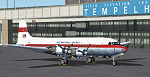
Textures only for the Greg Pepper DC-6 available at www.calclassic.com. International Airlines was a non scheduled carrier based at Burbank, California and West Berlin. It operated from 1962 to 1967. You should have the most current version of the DC-6 as this uses the international model with navigators position.
| Filename: | International_Airlines_1962_Douglas_DC6.zip |
| License: | Freeware, limited distribution |
| Added: | 10th September 2014, 01:16:38 |
| Downloads: | 122 |
| Author: | Mike Stevens |
| Size: | 6.74 MB |
| Category: Flight Simulator X - Aircraft Repaints, Textures and Modifications | |
| "MD-022 Osprey Composite Squadron" Cessna C172 |
|
File Description:
These Textures represent the aircraft of the MD-022 Osprey Composite Squadron, Civil Air Patrol, Dundaulk, Maryland. You must have a paid for copy of A2A C172 Trainer for these to work. This pack includes four paints, 3 Real Liveries and 1 fictional for the cadets of the Osprey Squadron.
| Filename: | MD022_Osprey_Composite_Squadron_Cessna_C172.zip |
| License: | Freeware |
| Added: | 18th September 2014, 17:13:12 |
| Downloads: | 352 |
| Author: | Kenneth S. Headley |
| Size: | 79.45 MB |
| Category: Flight Simulator X - Aircraft Repaints, Textures and Modifications | |
| Grumman G164A AgCat RP-R5838 |
|
Images related to this file:
File Description:
Features two liveries: 2007 and current. For Marcel du Plessis's Grumman G164A Ag-Cat, and its FSX native conversion by Eagle Rotorcraft Simulations/George Arana. Texture only. You must either have Marcel du Plessis' original model or George Arana's FSX native conversion with PBR (mdpersg164.zip). Repaint by Marco Revilla.
| Filename: | Grumman_G164A_AgCat_RPR5838.zip |
| License: | Freeware |
| Added: | 16th April 2024, 19:26:53 |
| Downloads: | 23 |
| Author: | Marco Alejandro I. Revilla |
| Size: | 28.82 MB |
| Category: Flight Simulator X - Missions | |
| BreedonHillChurchVisit.zip |
|
File Description:
Helicopter mission. A company helicopter at EGBD airport provides services. Take passengers for a walk in tour of the church of Saint Mary and Hardulph on Breedon Hill in the UK. This mission requires you have Orbx FTX EU England installed on your system. The church is in that scenery.
| Filename: | BreedonHillChurchVisitzip.zip |
| License: | Freeware |
| Added: | 7th April 2023, 14:44:58 |
| Downloads: | 27 |
| Author: | helomissionman |
| Size: | 2.05 MB |
| Category: Flight Simulator X - Missions | |
| MallorcaSightseeingTour.zip |
|
File Description:
Helicopter mission. A helicopter located at LEPA airport provides services. Take tourists out to see some of the interesting sites in Mallorca, Spain. This mission works best if you have Orbx base scenery installed on your system. Also, it will not work in any version of P3D due to scenery incompatibility.
| Filename: | MallorcaSightseeingTourzip.zip |
| License: | Freeware |
| Added: | 2nd December 2022, 17:46:40 |
| Downloads: | 46 |
| Author: | helomissionman |
| Size: | 20.27 MB |


© 2001-2026 AVSIM Online
All Rights Reserved
Privacy Policy |