
Where Flight Simulation Enthusiasts Gather from Around the World!
AVSIM Library - Search Results

| Category: Flight Simulator 2004 - Aircraft Repaints, Textures and Modifications | |
| Northwest Airlines Airbus A330-200 Version II |

|
File Description:
Northwest A330-200 delivered summer 2004. Texture fix using the POSKY`s A330-200 model. Texture files only for POSKY`s 330-200 with PW 4000 power plants Simply replace texture folder with this one. Hope you enjoy it and happy landings.
| Filename: | Northwest_Airlines_Airbus_A330200_Version_II.zip |
| License: | Freeware |
| Added: | 12th June 2005, 13:17:57 |
| Downloads: | 1,329 |
| Author: | Ramón Ortiz |
| Size: | 1.44 MB |
| Category: Flight Simulator 2004 - Aircraft Repaints, Textures and Modifications | |
| Posky Boeing 777 Virtual Cockpit Refresh 2017 |
|
Images related to this file:
File Description:
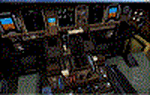
Remake of the beautiful texture merge Posky 777.
It also works with the PSS merge.
I not, however, answer the possible objections malfunctions.
Installation: Copy the texture of this folder in the texture , after you back up the same folder-
Fafo a greeting.
| Filename: | Posky_Boeing_777__Virtual_Cockpit_Refresh__2017.zip |
| License: | Freeware, limited distribution |
| Added: | 20th February 2017, 19:44:49 |
| Downloads: | 1,518 |
| Author: | Fabio Ferrari |
| Size: | 14.16 MB |
| Category: Miscellaneous Files - Demos from Commercial Vendors | |
| Eurofighter - Saudi Arabia Air Force |
|
File Description:
Saudi Arabia Eurofighter texture update for FS2004 Please download my last Saudi Arabia Eurofightermodel and install this texture-update. Textures by www.afs-design.de
| Filename: | Eurofighter__Saudi_Arabia_Air_Force.zip |
| License: | Commercial demo |
| Added: | 8th February 2006, 01:04:48 |
| Downloads: | 282 |
| Author: | Andreas Meyer |
| Size: | 1.02 MB |
| Category: Flight Simulator 2004 - Aircraft Repaints, Textures and Modifications | |
| Brazil Air Eurocopter AS-350 Esquilo |
|
Images related to this file:
File Description:

Brazil Air New texture 2010 This is one of the texture of Brazil Air http://www.grupobrazilair.com / Model by Tamas Nemeth and Peter Nemeth.
| Filename: | Brazil_Air_Eurocopter_AS350_Esquilo.zip |
| License: | Freeware |
| Added: | 15th September 2010, 19:22:00 |
| Downloads: | 64 |
| Author: | Marcelo Queiroz / Diego Costa |
| Size: | 16.98 MB |
| Category: Flight Simulator 2004 - AI Aircraft | |
| RAF BAE Systems Hawk T1 (XX154) |
|
Images related to this file:
File Description:
Updated texture 2015 colour scheme for the Nick Black BAe Hawk T1 XX154. The file maiw_uk_hawks_pt2.zip is required to use the texture.
| Filename: | RAF_BAE_Systems_Hawk_T1_XX154.zip |
| License: | Freeware |
| Added: | 19th March 2015, 22:39:09 |
| Downloads: | 147 |
| Author: | Stephen Phillips |
| Size: | 183.48 KB |
| Category: Flight Simulator 2004 - Aircraft Repaints, Textures and Modifications | |
| CRJ-200 |
|
File Description:
Repaint of Project OpenSky's CRJ-200. Credit to Project OpenSky for model and repaint texture, and Andy Hoffman (BloodAngel) for Angel Air texture.
| Filename: | CRJ200.zip |
| License: | Freeware |
| Added: | 8th March 2005, 03:27:10 |
| Downloads: | 177 |
| Author: | Andy Hoffman |
| Size: | 1.74 MB |
| Category: Flight Simulator X - AFCAD Files | |
| Vliet Airport (6NJ1), NJ |
|
File Description:
Located 02 miles SE of Washington, New Jersey, Vliet Airport is a private turf field. Trees border the runway on three sides, and a dirt mound and semi-truck are also obstacles to watch out for at the end of Runway 06 if you land long. At 1300' feet, it is a very short runway so make sure you check the capabilities of your aircraft before attempting to either land or take off here! Don't forget that in order to clear trees, usable runway space is closer to only 1000'. This airport has no lighting so daytime VFR operations only are recommended. Take note that there is also no wind sock, so be sure you are aware of the weather conditions prior to arriving/departing. There is also no hard-surfaced runway and you will be landing on terrain so it's suggested you have your mesh resolution slider as high as possible.
Scenery constructed with use of satellite images/streetview/aerial photos - the author has not been there in person.
This scenery is meant to be used in conjunction with MegaScenery Earth New York 007. It is not required, but apron use is minimized to allow satellite scenery to show through as much as possible, and objects are placed based on the MSE textures - lack of it may make scenery look out of place.
| Filename: | Vliet_Airport_6NJ1_NJ.zip |
| License: | Freeware |
| Added: | 8th February 2011, 23:20:47 |
| Downloads: | 182 |
| Author: | Drew Sikora |
| Size: | 375.28 KB |
| Category: Flight Simulator 2004 - Miscellaneous Files | |
| Active ILS - KMIA (Miami International Airport) |
|
File Description:
By design KMIA is now the most advanced ATC controlled airport in the FS9 database. This is the 4th Airport and the most complex in a series of new ILS runways. As most know initiating the ILS at certain airports for AI Traffic is not a function at this time when using AFCAD2. If you add a new ILS runway to an airport such as KMIA (Miami International Airport 8L/26R) only the user aircraft can use this runway when visibility falls below 3 miles. ATC will no longer use this runway for AI Traffic because FS9 sees it as a visual runway. This will cause ATC to vector your AI Traffic back to 9L/27R (old numbers) 8R/26L (new numbers) which is also a Terminal departure runway. All 4 runways for KMIA are now simultaneously active for both departure and arrival. In the past only the runways closest to the Terminal were for departure, and arrivals used the outer parallel runways. This no longer applies with KMIA. The many options written in the XML are to numerous to list for KMIA so follow the instructions in the README and just sit back (or fly) and plane spot either VMC or IMC for a very active airport.
*** FlyTampa-Miami Scenery AFCAD2 and special ILS bgl also included ***
| Filename: | Active_ILS__KMIA_Miami_International_Airport.zip |
| License: | Freeware, limited distribution |
| Added: | 4th July 2004, 03:33:01 |
| Downloads: | 2,217 |
| Author: | Jim Vile |
| Size: | 128.67 KB |
| Category: Prepar3D V5 - AFCAD Files | |
| KMEM (Memphis Intl.) bgl/afcad for Prepar3D v5 |
|
File Description:
This is a modification of the stock Memphis afcad/bgl in Prepar3d v5 and models the airport in its state prior to the new construction occurring presently at the main terminal area. For ease of use and simplicity, gates are numbered "Gate A1, Gate A2", etc...
I tried to match as closely as possible the FedEx Terminal as close to what was shown on current Navigraph charts but it is NOT exact.
Airport Breakdown:
Passenger Terminal w/ airline codes have been added to gates.
- Concourse A: Gates 1-8
- Concourse B: Gates 1-24
- Concourse C: Gates 1-8
- FedEx Terminal - Dock numbering is based loosely on the dock numbers found on the Navigraph charts for KMEM. Not all docks are represented but there 120 spaces for parking there.
- FedEx Maintenance - Is on the East side of the airport below runway 27. It has 16 static parking areas.
- Northwest FBO - Located West of runway 18C. It has 18 parking spots.
- Northeast FBO - Located East of Runway 18C to the left of the FedEx Maint. area. It has 14 parking spots.
- South Cargo - Located next to Runway 36R. It has 5 parking spots (I am assuming UPS and other carriers).
- Military Ramp - Located next to South Cargo next to Runway 36R. It has 5 parking spots.
I hope you enjoy this enhancement of KMEM
| Filename: | KMEM_Memphis_Intl_bglafcad_for_Prepar3D_v5.zip |
| License: | Freeware |
| Added: | 28th November 2023, 01:47:55 |
| Downloads: | 67 |
| Author: | Michael Johnson |
| Size: | 47.2 KB |
| Category: Flight Simulator 2004 - Miscellaneous Files | |
| GoTo any Airport Version 4 |
|
File Description:
Go To Any Airport.- Now 4 Airports Included.
Always wanted to return to your favourite local Airport from anywhere in the world? simply - with no fuss? Look no Further.
Start at your Designated Airport, [in this case London Gatwick,Innsbruck,Dublin or Edinburgh in a 737], then Goto any Airport! - via the FS9 World menu and return to the Original Designated Airport - every time! - By Just turning the GPS/nav switch to GPS and Flight Director and autothrottle on whilst still on the ground.Click on the Autopilot and Nav Hold switch once above 1000ft - thats it !! . Set Weather as required and dont forget Altitude and Speed in autopilot and away you go. Use the FS9 ATC as You Travel, call into designated Airport when close and receive the curent ATIS and Runway approach in use.
HAVE FUN.
(This is different to the great circle direct routes that you can programme into the very good FS9 GPS - each and every time you start from a new airport).
As A bonus you can also use the designated flight files provided to take of and circle your Airport,using autopilot again with GPS/nav switch on gps setting and nav hold switch on. This is a good way to observe the airfield and your aircraft especially from tower view - set tower position using map window and pointing and dragging tower icon also set the tower altitude.Some Example flights worded "AJT Circuit of......." are also enclosed.- these particular flights can make good moving screen savers!
| Filename: | GoTo_any_Airport_Version_4.zip |
| License: | Freeware |
| Added: | 7th March 2004, 18:21:48 |
| Downloads: | 1,001 |
| Author: | Alan Trussell |
| Size: | 54.91 KB |


© 2001-2026 AVSIM Online
All Rights Reserved
Privacy Policy |