
Where Flight Simulation Enthusiasts Gather from Around the World!
AVSIM Library - Search Results

| Category: Flight Simulator 2002 - Original Aircraft | |
| Jodel D140R 'Abeille' |

|
File Description:
On a French Airforce demand's, the Jodel D140 "Mouquetaire" was modified to launch sailplanes. She was name D140R "Abeille" and keep the same fly caracteristics of the "Mousquetaire", except for climbrates which was better.
Between 1965 and 1966, only 22 models were build by SAN near Bernay (France).
The D140R 'Abeille" (larger flaps, new tail and monobloc elevator, wider rear canopy) made her first fly in 1964.
Here, the D140R is the "Abeille" of the Dauphiné's aeroclub, at Grenoble-Le Versoud Airfield (France).
She was Henri Giraud personal plane's, famous pilot who develops technics of fly over mountains in France.
This model has full surface animation, Complete panel, virtual cockpit, open canopy and cargo-door. Two versions : skis and wheels. Design and panel by Christian DAVI, gauges by Zeteam and Dominique Noulette. 5.11 mb.
| Filename: | Jodel_D140R_Abeille.zip |
| License: | Freeware, limited distribution |
| Added: | 2nd June 2003, 13:17:57 |
| Downloads: | 2,233 |
| Author: | Christian Davi |
| Size: | 4.89 MB |
| Category: Flight Simulator X - Miscellaneous Files | |
| P3D replacement effects for AI ships and AI Ship Traffic |
|
Images related to this file:
File Description:
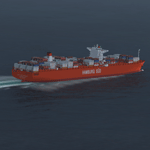
This package contains replacement effects to be used with my packages "63 AI Ships and AI Ship Traffic for Europe and South America", "75 AI Ships and AI Ship Traffic" and "Patch for 75 AI Ships and AI Ship Traffic".
The new wake files resolve the problem descried by some as "heavenly" wakes. Some obscure difference makes ship wakes including certain parameters turn towards the heaven in P3D while they work as intended in FSX.
In order to get full benefit of this package you must first download and install "63 AI Ships and AI Ship Traffic for Europe and South America" and "75 AI Ships and AI Ship Traffic" and "Patch for 75 AI Ships and AI Ship Traffic" in the mentioned order.
These replacement files are only for P3D.
| Filename: | P3D_replacement_effects_for_AI_ships_and_AI_Ship_T.zip |
| License: | Freeware |
| Added: | 7th September 2013, 22:46:16 |
| Downloads: | 5,476 |
| Author: | Henrik Nielsen |
| Size: | 74.93 KB |
| Category: Flight Simulator 2004 - Aircraft Repaints, Textures and Modifications | |
| Flydubai Boeing 737-9 MAX (A6-FNA) |
|
Images related to this file:
File Description:

This is a repaint of the excellent TDS (Tenkuu Developers Studio) Boeing 737-9 MAX model, in Flydubai livery, A6-FNA. Texture only. The textures are saved in 32bit format for quality graphics. Model developed by Tenkuu Developers Studio, features high resolution textures, dynamic flexing wings, nose gear steering, rudder lock, ground spoilers, low speed aileron locks at high speed, fully animated control surfaces, fully independent suspension, trim animation, opening passenger doors, rolling wheels, animated thrust reverse with reverser block doors, detailed textures, full night lighting, ground service vehicles and more. Model design by Hiroshi Igami. Flight dynamics design by Nick Wilkinson and David Biggar. Master textures by Kyle Schurb, Carlos Eduardo Salas, and Stian Svensen. For support visit Tenkuu Developers Studio's Facebook page: https://www.facebook.com/groups/TDS.SkySpirit.B737NG/ . Works in FS9 and FSX.
| Filename: | Flydubai_Boeing_7379_MAX_A6FNA.zip |
| License: | Freeware |
| Added: | 29th December 2018, 22:26:26 |
| Downloads: | 649 |
| Author: | Stefan Bree, Tenkuu Developers Studio |
| Size: | 10.64 MB |
| Category: Flight Simulator 2004 - Aircraft Repaints, Textures and Modifications | |
| FedEx opb. ASL Airlines Belgium Boeing 737-8AS BCF (OE-IXA) |
|
Images related to this file:
File Description:

This is a repaint of the excellent TDS (Tenkuu Developers Studio) Boeing 737-800SF model, in FedEx opb.ASL Airlines Belgium livery, OE-IXA. Texture only. The textures are saved in 32bit format for quality graphics. Model developed by Tenkuu Developers Studio, features high resolution textures, dynamic flexing wings, nose gear steering, rudder lock, ground spoilers, low speed aileron locks at high speed, fully animated control surfaces, fully independent suspension, trim animation, opening passenger doors, rolling wheels, animated thrust reverse with reverser block doors, detailed textures, full night lighting, ground service vehicles and more. Model design by Hiroshi Igami. Flight dynamics design by Nick Wilkinson, with assistance from David Biggar. Master textures and paint kit by Kyle Schurb. For support visit Tenkuu Developers Studio's Facebook page: https://www.facebook.com/groups/TDS.SkySpirit.B737NG/. Works in FS9 and FSX.
| Filename: | FedEx_opb_ASL_Airlines_Belgium_Boeing_7378AS_BCF_O.zip |
| License: | Freeware |
| Added: | 26th January 2024, 17:23:12 |
| Downloads: | 169 |
| Author: | Stefan Bree, Tenkuu Developers Studio |
| Size: | 10.94 MB |
| Category: Flight Simulator X - Scenery | |
| Bahamas Airfield Package (BAP) |
|
Images related to this file:
File Description:
Get the "full Bahamas"... The "Bahamas Airfield Package" contains ALL 64 airfields and airports in the Bahamas - a complete country especially (re-) designed for VFR pilots!
All required objects libraries are included in the download. Nassau Intl (MYNN) comes as a "free loan" of Menno C. Robert. Big thank you for that, Menno :-)
Look forward to an improved version of ALL Bahamian airfields with a lot of atmosphere, many details and some landclass enhancements.
Since the original FSX didn't contain all existing airfields in the Bahamas, I've added the missing 5 airports. Two of them comes along with a complete new designed island as well. A comprehensive manual is also provided. Requirements: FSX with Acceleration pack and Ultimate Terrain X - The Tropical Americas & Caribbean (= UTX-TAC)!
| Filename: | Bahamas_Airfield_Package_BAP.zip |
| License: | Freeware |
| Added: | 21st June 2013, 07:25:51 |
| Downloads: | 4,946 |
| Author: | Dirk Cremer |
| Size: | 129.09 MB |
| Category: Flight Simulator 2004 - Aircraft Repaints, Textures and Modifications | |
| China Southern Airbus A350-941 (B-308T) |
|
Images related to this file:
File Description:

This is a repaint of the excellent TDS (Tenkuu Developers Studio) Airbus A350-900 model, in China Southern Airlines, B-308T. Texture only. The textures are saved in 32bit format for quality graphics. Model developed by Tenkuu Developers Studio, features high resolution textures, dynamic flexing wings, nose gear steering, rudder lock, ground spoilers, low speed aileron locks at high speed, fully animated control surfaces, fully independent suspension, trim animation, opening passenger doors, rolling wheels, animated thrust reverse with reverser block doors, detailed textures, full night lighting, ground service vehicles and more. Model design by Hiroshi Igami. Flight dynamics design by Nate Rosenstrauch. Master textures by Carlos Eduardo Salas Franco and Stian Svensen. PBR texture by Ken Webber. For support visit Tenkuu Developers Studio's Facebook page: https://www.facebook.com/groups/tds350 . Works in FS9 and P3D.
| Filename: | China_Southern_Airbus_A350941_B308T.zip |
| License: | Freeware |
| Added: | 26th January 2022, 01:07:14 |
| Downloads: | 416 |
| Author: | Stefan Bree, Tenkuu Developers Studio |
| Size: | 15.43 MB |
| Category: Flight Simulator 2004 - Aircraft Repaints, Textures and Modifications | |
| China Southern Airlines Boeing 777-21B/ER "B-2057" |
|
Images related to this file:
File Description:
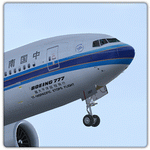
China Southern Airlines Boeing 777-21B/ER "B-2057". China Southern Airlines livery painted on SkySpirit2012 Boeing 777-200/ER aircraft. The textures are saved in 32bit format for quality graphics. Its features are opening doors & cargo doors, detailed textures, accurate paint, dynamic shine & effects, dynamic flexing wings that respond to turbulence, fully independent suspension, trim animation, gear steering, accurate flight dynamics, spoiler animation, reflective cockpit windows, crash effects, animated tilting bogies, full night lighting, ground service vehicles when cargo door open, transparent navigation light lenses and many more. For support visit SkySpirit2012 Boeing 777 group:
https://www.facebook.com/groups/407992835888461/. Visit my Facebook page "Abdullah's Aerographix" for updates on my ongoing and future repaint projects: https://www.facebook.com/pages/Abdullahs-Aerographix/281295935336274?ref=hl.
Thanks for downloading and happy flying.
| Filename: | China_Southern_Airlines_Boeing_77721BER_B2057.zip |
| License: | Freeware |
| Added: | 12th January 2014, 19:17:07 |
| Downloads: | 918 |
| Author: | Abdullah Rahman, SkySpirit2012 |
| Size: | 15.9 MB |
| Category: Flight Simulator 2004 - AFCAD Files | |
| FlyTampa Dubai (OMDB) v2.1 |
|
Images related to this file:
File Description:
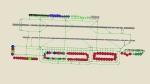
This high quality file is for the FS2004 Dubai scenery by FlyTampa. Features all gates in use, all coded for airlines that serve the airport. A total of 154 parking spots (T1, T2, T3, T4, Cargo, Overflow, VIP, EK Engineering) can be found at this airport and all will be used during busy periods, such as late at night! A full cargo area is also included, featuring correctly coded stands. North of the runways can be found Terminal 2, Fedex Cargo, DHL Cargo, UPS Cargo and GA ramps, plus an overflow area for the south cargo ramp. An extensive GA area (including Dubai Royal wing / VIP) can be found to the east of the airport, near Emirates engineering. This file replaces the one I released in 2005 (5687 downloads). Enjoy!!
| Filename: | FlyTampa_Dubai_OMDB_v21.zip |
| License: | Freeware |
| Added: | 28th December 2010, 03:35:28 |
| Downloads: | 5,577 |
| Author: | Lee Brompton |
| Size: | 2.18 MB |
| Category: Flight Simulator X - Original Aircraft | |
| Boeing 737-200ADV, Version 1.30 (FSX) |
|
Images related to this file:
File Description:
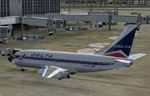
V1.30 of the TinMouse II Boeing 737-200, complete archive. This is the first release of the TinMouse II for FSX.
Complete 737-200 add-on, with panel simulation of most aircraft systems in detail, with five custom models, flight dynamics, and soundset.
Includes new Sperry SP-177 autopilot and autothrottle system, and can be cross-installed into FS9. Full integration of optional CIVA INS and ISG FMS units (available separately). Requires FS2Audio (included) and a registered installation of FSUIPC V3.70(FS9)/V4.60(FSX) or later (not included). 2D panels only. Visit the TinMouse forum here on AVSIM for support and information. Separate FS9 version is available (tinmouse_ii_v1.30_fs9.zip).
| Filename: | Boeing_737200ADV_Version_130_FSX.zip |
| License: | Freeware, limited distribution |
| Added: | 21st December 2010, 02:28:58 |
| Downloads: | 24,040 |
| Author: | Bob Scott, Richard Probst, Terry Gaff, Gustavo Rodrigues, Christoffer Petersen |
| Size: | 63.66 MB |
| Category: Flight Simulator X - Scenery | |
| Ireland VFR Small Airports Part 3 |
|
Images related to this file:
File Description:
Ireland VFR Small Airports Part 3. This scenery consists of 1. EIKY Kerry International Airport, 2. EIBN Bantry Airfield, 3. EIBR Birr Airfield, and 4. Clonbullogue Airfield.
Kerry is situated in the South West of Ireland and serves as a gateway to the world famous Lakes of Killarney, The Ring of Kerry and the Dingle Peninsula. Bantry is ideal for visiting the rugged beauty of West Cork. Clonbullogue is home to the Irish Parachute Club and is situated approximately 30 miles southwest of EIDW Dublin. Birr is almost in the centre of Ireland and is home to a very active group of GA aviators.
The scenery has been created almost entirely from real photographs and all objects have been placed accurately using ordinance survey data and satellite imagery. It also includes animated marshallers, aircrew and passengers together with animated animals and vehicles. Appropriate sound effects have been added to each file together with smoke and strobe lighting. Full night lighting is included, with flood and wash lighting of the aprons and carparks. Each airport has been sub-divided into seperate elements, which can be switched on or off according to the users preference and hardware setup. It caters for GA enthuasiasts and for those who prefer to fly the heavies.
This scenery has not been designed as a standalone, it calls on many objects from my Ireland VFR Small Airports parts 1 and 2. It has also been designed to complement photographic scenery but will also work with the default terrain and I have inlcuded a set of landclass and photoreal textures. It also includes an extended set of photoscenery treescapes. Full installation instructions, settings, credits and tips can be found in the README file.
Please enjoy and I hope you like my airports as much as I enjoyed making them.
| Filename: | Ireland_VFR_Small_Airports_Part_3.zip |
| License: | Freeware, limited distribution |
| Added: | 8th April 2012, 22:40:52 |
| Downloads: | 3,760 |
| Author: | George Keogh |
| Size: | 81.33 MB |


© 2001-2026 AVSIM Online
All Rights Reserved
Privacy Policy |