
Where Flight Simulation Enthusiasts Gather from Around the World!
AVSIM Library - Search Results

| Category: Flight Simulator 2004 - Original Aircraft | |
| Luftwaffe, D.F.S.-230 , Assault Glider, v.01 |

|
Images related to this file:
File Description:
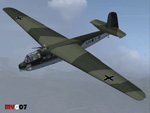
At 4:30 A.M. on May 10, 1940, three Junkers Ju 52's took off from the Cologne airfields of Ostheim and Butzweilerhof, towing behind them three other aircraft that lacked motors. The first front service of a new weapon, the freight glider, developed by the DFS (Deutsche Forschungsanstalt fur Segelflug / German Research Institute for Sailplane Flight), had begun. A total of 41 DFS-230 freight gliders with 400 paratroopers were launched for this mission. It was their task to take the Belgian Fort Eben Emael near Maastrich. With this successful operation the crossing of the Albert Canal was secured and the cornerstone of Belgian defense fell in German hands.
These assault gliders were also used during the Krete invasion (1941). The DFS 230's last significant use was during the 'Eichen' operation: 10 assault gliders were used to deliver the group of hand picked commandos led by Otto Skorzeny against the Gran Sasso mountain-top hotel that was used to hold Mussolini. The Royal Italian Air Force (Regia Aeronautica) received from Luftwaffe, during 1941, almost 20 DFS-230 and 4 Gotha Go-242 assault gliders. These aircrafts were used only for pilot training until 09/1943.
Complete aircraft. Original GMAX hi-res model, features the usual moving parts, such as all flight controls, canopy, doors and so on (5 different versions); Five different liveries (4 'Luftwaffe' +1 "Regia Aeronautica'); multiview 2D panel (NO VC). Created by Manuele Villa.
| Filename: | Luftwaffe_DFS230__Assault_Glider_v01.zip |
| License: | Freeware |
| Added: | 7th June 2010, 11:07:00 |
| Downloads: | 2,141 |
| Author: | Manuele Villa |
| Size: | 17.37 MB |
| Category: Flight Simulator 2004 - Helicopters | |
| Bell 429 Base Pack |
|
Images related to this file:
File Description:
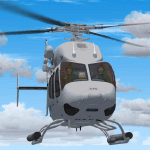
A large number of different models based on the real rotorcraft and with at least one different livery per model (32 in total) / A great variety of animations: All doors (including the clamshell in the rear of the ship). Main rotor, which is fully articulated. Show/hide flight controls feature by a single mouse click. Show/hide passengers feature by a single mouse click. Show/hide pilots feature. Depending if the helicopter is on the ground, with both engines off and the battery switch off, some other objects will show or hide. And much more, find it out yourself! / Clickable Virtual Cockpit; the most important switches and knobs do its job! Engine starter, fuel valves, etc., you name it! / Integration between 2d panel gauges and virtual cockpit gauges, switches and clickspots. Caution and warning messages, depending on helicopter’s conditions and limits. / Instrument backlighting effects at sunset, night and dawn! / Your flight experience will be enhanced by a sophisticated sound system which resembles the Pratt&Whiney PW207D1 Turboshaft Engines. You will be able to enjoy the start up and shuting down sequences for both engines from interior and exterior perspectives; audible transitions between idling, on ground at 100% rpm and also in flight conditions. I have included -as a bonus- a set of two audio files meant to be used beside the BladeSlapSND (Helicopter Blade Slap Sound Gauge) by Stephan Siebertz. / Author: Sergio Kauffman.
| Filename: | Bell_429_Base_Pack.zip |
| License: | Freeware, limited distribution |
| Added: | 15th September 2016, 12:34:23 |
| Downloads: | 2,017 |
| Author: | Sergio Kauffman |
| Size: | 150.11 MB |
| Category: Flight Simulator X - Aircraft Repaints, Textures and Modifications | |
| Nord Noratlas Israeli Air Force (4X-FAP) |
|
Images related to this file:
File Description:

This folder contains a repaint for the Nord 2501 Noratlas by Projet Noratlas in the colors of N2501IS 4X-FAP, the first of the Noratlas aircraft used by the Israeli Air Force. In the immediate post-war era France produced a plethora of prototype aircraft, nearly all of which vanished without trace. One of those that made good was the Nord 2500, a cargo transport with the same twin-boom configuration as the American C-119, with the cockpit in the nose of a capacious nacelle. Like the US type, the rear doors were of the left/right clamshell type, so for air-dropping heavy loads they had to be removed before takeoff, causing turbulence and high drag. Despite this, the more powerful 2501 proved an excellent aircraft, produced in large numbers in France and Germany in a programme that led directly to the Transall, produced by the same partners, designed in 1959 and flown in 1962.
Israel bought eight N.2501 IS direct from Nord in 1955-59, a further 12 from Germany in 1962, and four more later. The first, 4X-FAP, was delivered before the end of 1955, and immediately proved extremely popular and capable.
Eight Nords had been purchased and these were used extensively to re-supply IDF columns in Sinai. To assist with these re-supply efforts other Nords were made available from the French Air Force and were requisitioned from Israeli Airline EL-AL which used them as freight transports. Repaint by Jan Kees Blom, based on the paintkit by Projet Noratlas.
| Filename: | Nord_Noratlas_Israeli_Air_Force_4XFAP.zip |
| License: | Freeware |
| Added: | 23rd July 2020, 17:39:27 |
| Downloads: | 145 |
| Author: | Jan Kees Blom |
| Size: | 11.6 MB |
| Category: Flight Simulator X - Utilities | |
| FS Remote version 1.0 |
|
File Description:
Email: [email protected]
Name: Hans Elzer
Current version 1.0
Version 1.0 contains various little bug fixes plus Fuel management in the Engines dialog
FS-Remote a utility for remotely controlling FSX
The Zip file contains:
* Readme text file
* .NET 2.0 FS-Remote executable
* Configuration file for FS-Remote
* Document file in MSWord format
What you need to run FS-Remote:
* .NET 2.0 or 3.0 installed on the computer where you want to run FS-Remote
* FSUIPC4 (registered) on the computer where you run FSX
* WideClient (FSUIPC4 FSWide remote) if you want to run FS-Remote on a remote computer
It does what the title says FS-Remote controls FSX remotely through FSUIPC.
Just take a look at the (word) document that is contained in the zip file and look at some screen shots.
It can view and control the following items in FSX through FSUIPC:
* Aircraft - Control aircraft switches like Lights, Doors, Pushback, De-Ice and Jetway plus call fuel truck
* Auto Pilot - Control auto pilot switches plus reset altimeter and heading indicator instruments
* Radio - Control radio stack switches and push buttons plus view navigation status information
* Attitude - View attitude information and warnings plus convert and view various items in feet, meter, knots, mph and km/p
* Engines - Control engines auto start and stop plus fuel management
* Weather - not implemented jet (next version)
* Environment - View the local date, time and position environment information
* Date Time - Control and view the flight simulator date and time
* Message - View and send messages to flight simulator message bar
* FPS - View real-time flight simulator frames per second FPS rate
* About - View version information about FS-Remote, FSUIPC4 and FSX
Hope that you like it.
| Filename: | FS_Remote_version_10.zip |
| License: | Freeware |
| Added: | 9th September 2007, 15:26:14 |
| Downloads: | 1,439 |
| Author: | Hans Elzer |
| Size: | 353.2 KB |
| Category: Flight Simulator X - Utilities | |
| FSRemote 2.0 |
|
File Description:
Current version 2.0
Version 2.0 contains a new more graphical interface
Version 1.0 contains various little bug fixes plus Fuel management in the Engines dialog
FS-Remote a utility for remotely controlling FSX
The Zip file contains:
* Readme text file
* .NET 2.0 FS-Remote executable
* Configuration file for FS-Remote
* Document file in MSWord format
What you need to run FS-Remote:
* .NET 2.0 or 3.0 installed on the computer where you want to run FS-Remote
* FSUIPC4 (registered) on the computer where you run FSX
* WideClient (FSUIPC4 FSWide remote) if you want to run FS-Remote on a remote computer
It does what the title says FS-Remote controls FSX remotely through FSUIPC.
Just take a look at the (word) document that is contained in the zip file and look at some screen shots.
It can view and control the following items in FSX through FSUIPC:
* Aircraft - Control aircraft switches like Lights, Doors, Pushback, De-Ice and Jetway plus call fuel truck
* Auto Pilot - Control auto pilot switches plus reset altimeter and heading indicator instruments
* Radio - Control radio stack switches and push buttons plus view navigation status information
* Attitude - View attitude information and warnings plus convert and view various items in feet, meter, knots, mph and km/p
* Engines - Control engines auto start and stop plus fuel management
* Weather - not implemented jet (next version)
* Environment - View the local date, time and position environment information
* Date Time - Control and view the flight simulator date and time
* Message - View and send messages to flight simulator message bar
* FPS - View real-time flight simulator frames per second FPS rate
* About - View version information about FS-Remote, FSUIPC4 and FSX
Hope that you like it.
| Filename: | FSRemote_20.zip |
| License: | Freeware |
| Added: | 9th November 2007, 22:24:52 |
| Downloads: | 1,674 |
| Author: | Hans Elzer |
| Size: | 620.8 KB |
| Category: Flight Simulator X - Aircraft Repaints, Textures and Modifications | |
| FSX/P3D Thomas Ruth Air Leisure Egypt SU-GBM Airbus A340-212 |
|
Images related to this file:
File Description:
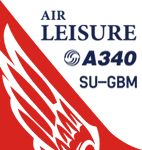
(TEXTURES ONLY)
(ONLY TESTED IN FSX: STEAM EDITION)
This was requested by Ahmed Fouad on the Facebook as well as in Flightsim. This has been requested by him for a while so I decided to do it.
Happy New Years guys! This is my first livery for the year. Sadly, as of writing this, Flightsim just went offline for renovation and may stay like that for who knows how long. Could be days, weeks, or even months.
I used the placards from Joey_C's Dragonair A330-300 Livery for the Bulk Cargo Doors as well as the Cargo Door Levers. He is the same user I asked permission from to use his decals and door placards for my Dragonair Cargo 747-300SF Livery, so thanks to him again for letting me borrow his textures with his permission! You should also check out his page if you like flying with X-Plane!
I spent a few hours on this livery just by doing the logo alone. Since I needed a high quality photo of the tail logo, I used OpenAI's ChatGPT to upscale the logo and it did, though the edges still look very pixelated. So I spent a few hours trying to re-draw every line so it could be the highest quality as possible.
I further spent the entire day trying to find photos of the cargo door placards, specifically the "CARGO DOOR OPERATIONS" Instructions text. In real life, it included both in English and Arabic. I tried looking for a photo of the instructions for hours until I found it on a YouTube Shorts video. Then I used that as a reference which also took me a few hours trying to make lines, outlines, and text for it. I didn't want to spend more time doing the same thing for the Arabic text, so I used ChatGPT to translate all of the text and I just remove the background using DXTBMP.
Instructions and more information are included in the readme file.
| Filename: | FSXP3D_Thomas_Ruth_Air_Leisure_Egypt_SUGBM_Airbus_.zip |
| License: | Freeware |
| Added: | 3rd January 2026, 14:44:37 |
| Downloads: | 37 |
| Author: | Ryubunao |
| Size: | 79.81 MB |
| Category: Flight Simulator X - AFCAD Files | |
| Somerset Airport (KSMQ), NJ |
|
File Description:
Located 03 miles N of Somerville, New Jersey on 210 acres of land, Somerset is a public airport with one asphalt and two grass runways, the longest of which is 2733' in length. The turf runways have no hard surfaces and you will be landing on terrain so have your mesh set as high as possible - both runways are still selectable in the ATC window for landing/takeoff announcements. AI aircraft will not use them. The helipad is a start location in front of the main terminal if a parking location is not wanted to begin helicopter flights. Parking is divvied up into three categories - GA_SMALL spots will accommodate aircraft with wingspans no greater than 40 feet. GA_MEDIUM spots will accommodate aircraft with wingspans no greater than 60 feet. GA_LARGE spots are named to identify locations suitable for starting in a glider if you wish to do so. They can also accommodate aircraft with wingspans no greater than 60 feet. In addition to tie downs, there are 13 hangars open for parking in various locations - they can be identified by GA_DOCK. Only the N Parking hangar can accommodate aircraft with wingspans no greater than 60 feet - all other hangers are suitable only for aircraft with wingspans no greater than 40 feet. Several of the hangars have attendants - look beside the doors for the NAV2 frequency to set for opening them. AI aircraft will only spawn on the north tarmac/hangars (largely to prevent AI traffic crossing the runway on taxi). All objects and static aircraft in the immediate vicinity of parking and taxiways have collision disabled. If your aircraft has a wingspan greater than 40 feet it is NOT recommended that you taxi down the middle taxiway leading to the main tarmac from N Parking as you will not clear the hangars - go either via the NW taxiway past the grass tie downs (NW Parking) or around East to the next taxi way on the other side of the east hangars (E Parking) which has more wing clearance. Fuel is available on both tarmacs north and south of the runway by stopping on the asphalt in front of the tanks/pump.
Scenery constructed with use of satellite images/streetview/aerial photos - the author has not been there in person.
This scenery is meant to be used in conjunction with MegaScenery Earth New York 005. It is not required, but apron use is minimized to allow satellite scenery to show through as much as possible, and objects are placed based on the MSE textures - lack of it may make scenery look out of place.
| Filename: | Somerset_Airport_KSMQ_NJ.zip |
| License: | Freeware |
| Added: | 27th September 2011, 01:15:53 |
| Downloads: | 306 |
| Author: | Drew Sikora |
| Size: | 1.47 MB |


© 2001-2026 AVSIM Online
All Rights Reserved
Privacy Policy |