
Where Flight Simulation Enthusiasts Gather from Around the World!
AVSIM Library - Search Results

| Category: Flight Simulator 2004 - Flight Plans | |
| A CYZT-KPDX-01 |

|
File Description:
An FS2K4 GPS flight and plan by the Ancient Brit and the Team for the FS2K4 default aircraft (B737-400) and scenery. Depart Port Hardy (CYZT) runway 11, British Columbia, Canada and arrive 1 hour 33 minutes later at Portland International (KPDX) runway 10R, Oregon, USA. The plan is fully flight briefed with Word and text briefings and also with a kneeboard in-flight briefing. The Briefings contain climb, cruise, and top of descent and fuel loading details, waypoint timings and destination details. A start-up flight that loads the plan, weather and kneeboard flight briefing is included. A low level departure through valleys and mountains with a spectacular climb to cruise; followed by the close passing of Mount Hood and St. Helens concluding with a sweeping turn into the sunset for alignment for finals are features of this flight.
| Filename: | A_CYZTKPDX01.zip |
| License: | Freeware |
| Added: | 5th September 2003, 23:25:23 |
| Downloads: | 2,807 |
| Author: | Denis Egan |
| Size: | 50.6 KB |
| Category: Flight Simulator 2004 - Aircraft Repaints, Textures and Modifications | |
| US Airways NC, Airbus A321-211 (N196UW) |
|
Images related to this file:
File Description:
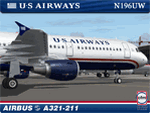
I am very proud to present this Project Airbus (pa321) Airbus A321-211 in the US Airways NC livery. This is the second newest A321-211 in US Airways' fleet of A321-211's. The A321 is the medium-haul workhorse for US Airways and flies into most major US airports serviced by US Airways including; KCLT, KPHL, KLAX, KSFO, KORD, KMCO, KSAN among others. US Airways A321's service Caribbean destinations as well. This is a detailed repaint with custom textures, including some texture improvements over the US Airways A321-231 I recently released. The repainted textures in this package are 32-bit with no mipmaps for best clarity and quality. This is a complete install package. The Project Airbus A321-211 model and air files are included. Uses default 737-400 panel and sounds. Please see Readme.txt for more details.
| Filename: | US_Airways_NC_Airbus_A321211_N196UW.zip |
| License: | Freeware, limited distribution |
| Added: | 21st June 2011, 19:04:16 |
| Downloads: | 904 |
| Author: | Jeffrey S. Bryner, Project Airbus |
| Size: | 10.5 MB |
| Category: Flight Simulator 2004 - Aircraft Repaints, Textures and Modifications | |
| LANICA BAC One-Eleven 422 AN-BBI |
|
File Description:
One of four One-Elevens operated by Lineas Aereas de Nicaragua this was the only one bought new. Possessing the apt C/N of 111 it was delivered in April 1967 replacing a leased Aer Lingus series 208 that had been operated since the previous November. This aircraft had to be hastily replaced in December 1971 by a Court Line series 518 when the interior was burnt out in a hijacking. The aircraft returned to Hurn for repairs in January 1972 and was sold as an executive jet in October of that year. The Court Line machine continued until March 1972 when LANICA leased an ex American Airlines series 401. Exactly a year later that machine was returned for sale to Bahamsair ending LANICA's short, but eventful time with the type. Requires the BAC One-Eleven 400 model by David Maltby.
| Filename: | LANICA_BAC_OneEleven_422_ANBBI.zip |
| License: | Freeware |
| Added: | 1st June 2005, 04:48:27 |
| Downloads: | 226 |
| Author: | Garry Russell |
| Size: | 516.81 KB |
| Category: Flight Simulator 2004 - Aircraft Repaints, Textures and Modifications | |
| Sahara Tahoe BAC One-Eleven 401 N711ST |
|
File Description:
This Aircraft was operated by Jet Travel on behalf of Sahara Tahoe Hotel & Casino for bringing clients into the resort on package deals. Delivered to American Airlines in February 1966 as N5018 it served with them until May 1971 when it was stored. Sold to National Aircraft leasing, it was converted to water injection for lease to Merpati Nusantara. The lease did not take place and instead it became N711ST with Jet Travel/Sierra Tahoe. Wearing the basic livery of Merpati, it continued until damaged beyond repair on hitting a snowbank at Lake Tahoe in February 1975. The reamains were passed on to Tiger Air in February 1979 and reported as stored at Burbank as N128GA. Registered to Gulfstream American Corporation in October 1981 it was transferred to Tabac Inc as N128GA. Requires the BAC One-Eleven 400 model by David Maltby.
| Filename: | Sahara_Tahoe_BAC_OneEleven_401_N711ST.zip |
| License: | Freeware |
| Added: | 8th August 2005, 19:42:45 |
| Downloads: | 283 |
| Author: | Garry Russell |
| Size: | 507.07 KB |
| Category: Prepar3D V1-4 - AI Aircraft | |
| AI Aeronaves TSM FAIB Boeing 737-400SF Fleet Pack |
|
Images related to this file:
File Description:
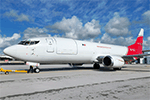
Those are the newest Aeronaves TSM aircrafts, the registrations are: XA-ADQ (with Black Livery), XA-EGD (with Red Livery), XA-EGT (with New Livery), XA-TIF (with Red Livery), XA-VEV (with Mercado Libre Livery), XA-VEW (with Mercado Libre Livery), XA-VFJ (with Red Livery), XA-VFM (with Black Livery), XA-VFT (with Black Livery), XA-VGB (with Red Livery), XA-VGD (Mercado Libre & Mercado Pago Livery). Aeronaves TSM are celebrating his 25th Anniversary, coming soon more Boeing 737-400F missing registrations and textures, that I couldn´t find images with the registrations XA-LIC, XA-UGJ, XA-UNH, XA-VGY. I am doing the complete fleet of this mexican airline cargo. The model is FSX AI Bureau (FAIB) Boeing 737-400 Basepack. This is my website: https://el-mundo-de-los-aviones-ai-traffic.jimdosite.com I hope you enjoy it!.
| Filename: | AI_Aeronaves_TSM_FAIB_Boeing_737400SF_Fleet_Pack.zip |
| License: | Freeware |
| Added: | 6th February 2024, 18:07:50 |
| Downloads: | 57 |
| Author: | Jesús Gibran Soriano Solleiro |
| Size: | 60.23 MB |
| Category: Flight Simulator 2004 - AI Aircraft | |
| Justice Prisoner and Alien Transportation System (JPATS) AI package |
|
File Description:
All attempts were made to make this package as realistic as possible! Please note that the JPATS flight information is not published and information was obtained from a variety of sources to make them as representative as possible.
I highly recommend to tailor your AFCAD2s at the following airports : KOKC, KIWA and KAEX to ensure enough available parking is available using parking codes DOJ and RPN. I recommend you use the aircraft.cfg file that I included for my repaints as well as N501UW which was repainted by George Widener and is available here @ Avsim ---> jpats733.zip
Also, included are repaints for 2x - Boeing 737-400 and 8x - McDonnell Douglas MD-83s (ex-Alaska Airlines which replaced the former 727s).
Included are all JPAT flights operate under Callsign: JUSTICE IATA:DOJ
all ICE flights operate under Callsign: REPATRIATE IATA: RPN
| Filename: | Justice_Prisoner_and_Alien_Transportation_System_J.zip |
| License: | Freeware |
| Added: | 11th December 2008, 23:38:26 |
| Downloads: | 1,090 |
| Author: | Jerel Gregory Hayes & Bob Jarvis |
| Size: | 1.55 MB |
| Category: Flight Simulator X - Utilities | |
| FSTramp v8.84 for MSFS, FSX(-SE), Prepart3D, X-Plane (Win) |
|
Images related to this file:
File Description:
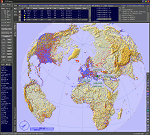
This add-on is an EXE application for Microsoft Flight Simulator and a DLL module for all other simulators. The DLL variant is activated via hotkeys or the simulator menu add-ons or plugins. Window size and layout are configurable for one or more screens. To avoid dazzling, the brightness of the entire application is customizable. Primarily it is a flight management system (FMS) with automatic control from start to landing. This also includes the observance of SID, STAR and Approaches in unmatched quality. The flight plan required for the FMS can be created manually or automatically, interactive changes and additions during the flight are possible. The basis of the flight planner is the 3D world map and the search function for airfields and navigation aids. The FMS by FSTramp relies on the autopilot of the aircraft. In case of incompatibility, the autopilot integrated in FSTramp will be used. This allows FSTramp to control almost all aircraft from airport to airport. The altitude profile of the flight plan, SID, STAR and approach is taken into account. This means that FSTramp extends the often incomplete airport procedures to and from the runway so that they can be flown completely automatically. During the fully automatic flight, the autopilot values ​​for HDG, ALT, VSPEED, SPD and MACH can be manually overridden. This is e.g. useful for being able to react to the instructions of the tower in the final approach without completely stopping the automatic flight. The rotating or north pointing 3D world map with numeric display of the terrain elevation under the mouse arrow is another special feature. It does not need an internet but is synthesized from included height profiles of the globe. The Data of continents, mountains and rivers are included in the setup. Airspaces, Airways, Waypoints and SID, STAR and Approaches are also included in the setup, but can be updated by installing additional AIRAC cycles. Airfields and navigation stations are taken from the simulator. NVIDIA: If the frame rate of the simulator drops sharply about 20 seconds after FSTramp's visibility, the power management of the GPU slows down prematurely. In the NVIDIA Control Panel, change the 'Manage 3D settings - Power management mode' option to 'Adaptive'.
| Filename: | FSTramp_v884_for_MSFS_FSXSE_Prepart3D_XPlane_Win.zip |
| License: | Shareware, time limited |
| Added: | 7th July 2023, 04:35:43 |
| Downloads: | 130 |
| Author: | Helge Schroeder |
| Size: | 358.21 MB |
| Category: Prepar3D V5 - Utilities | |
| FSTramp v8.84 for Prepart3D 2-6, MSFS, FSX(-SE), X-Plane (Win) |
|
Images related to this file:
File Description:
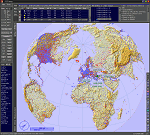
This add-on is an EXE application for Microsoft Flight Simulator and a DLL module for all other simulators. The DLL variant is activated via hotkeys or the simulator menu add-ons or plugins. Window size and layout are configurable for one or more screens. To avoid dazzling, the brightness of the entire application is customizable. Primarily it is a flight management system (FMS) with automatic control from start to landing. This also includes the observance of SID, STAR and Approaches in unmatched quality. The flight plan required for the FMS can be created manually or automatically, interactive changes and additions during the flight are possible. The basis of the flight planner is the 3D world map and the search function for airfields and navigation aids. The FMS by FSTramp relies on the autopilot of the aircraft. In case of incompatibility, the autopilot integrated in FSTramp will be used. This allows FSTramp to control almost all aircraft from airport to airport. The altitude profile of the flight plan, SID, STAR and approach is taken into account. This means that FSTramp extends the often incomplete airport procedures to and from the runway so that they can be flown completely automatically. During the fully automatic flight, the autopilot values ​​for HDG, ALT, VSPEED, SPD and MACH can be manually overridden. This is e.g. useful for being able to react to the instructions of the tower in the final approach without completely stopping the automatic flight. The rotating or north pointing 3D world map with numeric display of the terrain elevation under the mouse arrow is another special feature. It does not need an internet but is synthesized from included height profiles of the globe. The Data of continents, mountains and rivers are included in the setup. Airspaces, Airways, Waypoints and SID, STAR and Approaches are also included in the setup, but can be updated by installing additional AIRAC cycles. Airfields and navigation stations are taken from the simulator. NVIDIA: If the frame rate of the simulator drops sharply about 20 seconds after FSTramp's visibility, the power management of the GPU slows down prematurely. In the NVIDIA Control Panel, change the 'Manage 3D settings - Power management mode' option to 'Adaptive'.
| Filename: | FSTramp_v884_for_Prepart3D_26_MSFS_FSXSE_XPlane_Wi.zip |
| License: | Shareware, time limited |
| Added: | 7th July 2023, 04:35:26 |
| Downloads: | 42 |
| Author: | Helge Schroeder |
| Size: | 358.21 MB |
| Category: Microsoft Flight Simulator (2020) - Utilities | |
| FSTramp v8.84 for MSFS, FSX(-SE), Prepart3D, X-Plane (Win) |
|
Images related to this file:
File Description:

This add-on is an EXE application for Microsoft Flight Simulator and a DLL module for all other simulators. The DLL variant is activated via hotkeys or the simulator menu add-ons or plugins. Window size and layout are configurable for one or more screens. To avoid dazzling, the brightness of the entire application is customizable. Primarily it is a flight management system (FMS) with automatic control from start to landing. This also includes the observance of SID, STAR and Approaches in unmatched quality. The flight plan required for the FMS can be created manually or automatically, interactive changes and additions during the flight are possible. The basis of the flight planner is the 3D world map and the search function for airfields and navigation aids. The FMS by FSTramp relies on the autopilot of the aircraft. In case of incompatibility, the autopilot integrated in FSTramp will be used. This allows FSTramp to control almost all aircraft from airport to airport. The altitude profile of the flight plan, SID, STAR and approach is taken into account. This means that FSTramp extends the often incomplete airport procedures to and from the runway so that they can be flown completely automatically. During the fully automatic flight, the autopilot values ​​for HDG, ALT, VSPEED, SPD and MACH can be manually overridden. This is e.g. useful for being able to react to the instructions of the tower in the final approach without completely stopping the automatic flight. The rotating or north pointing 3D world map with numeric display of the terrain elevation under the mouse arrow is another special feature. It does not need an internet but is synthesized from included height profiles of the globe. The Data of continents, mountains and rivers are included in the setup. Airspaces, Airways, Waypoints and SID, STAR and Approaches are also included in the setup, but can be updated by installing additional AIRAC cycles. Airfields and navigation stations are taken from the simulator. NVIDIA: If the frame rate of the simulator drops sharply about 20 seconds after FSTramp's visibility, the power management of the GPU slows down prematurely. In the NVIDIA Control Panel, change the 'Manage 3D settings - Power management mode' option to 'Adaptive'.
| Filename: | FSTramp_v884_for_MSFS_FSXSE_Prepart3D_XPlane_Win.zip |
| License: | Shareware, time limited |
| Added: | 7th July 2023, 04:35:12 |
| Downloads: | 111 |
| Author: | Helge Schroeder |
| Size: | 358.21 MB |
| Category: Flight Simulator 2002 - Panels | |
| M.J./O.S. Boeing 747 Multi-Wing View Passenger Window and Interior Cockpit Non-Virtual Panel |
|
File Description:
Leading Edge and Trailing Edge wing views with new larger passenger windows and interior cockpit non-virtual views added to the default B747 panel for use with FS2002 add-on B747 aircraft such as ML.jet and Opn.Sk.
versions. Also includes an option to upgrade to the FS2004 GPS gauge for use with FS2004! (NOT for use with default B747!)
| Filename: | MJOS_Boeing_747__MultiWing_View_Passenger_Window_a.zip |
| License: | Freeware |
| Added: | 7th September 2003, 18:56:00 |
| Downloads: | 2,472 |
| Author: | Kenneth Francis |
| Size: | 1.44 MB |


© 2001-2026 AVSIM Online
All Rights Reserved
Privacy Policy |