
Where Flight Simulation Enthusiasts Gather from Around the World!
AVSIM Library - Search Results

| Category: Flight Simulator X - Aircraft Repaints, Textures and Modifications | |
| Supermarine Spitfire P7346 PR-M |

|
Images related to this file:
File Description:

Repaint for the A2A Wings of Power III Spitfire by Jan Kees Blom, based on the paintkit by Martin Catney: Supermarine Spitfire IIa P7346 PR-M was the aircraft flown by Belgian ace Jean Offenberg, while flying with 609 squadron from Biggin Hill. He shot down his first aircraft, a Dornier during the German attack on Belgium, and later managed to escape via Corsica and North Africa to England, where he joined the RAF. While on a lone 'training mission' near Cherbourg, he shoots down three aircraft, which earns him the DFC. He later joins 609 Squadron, where a Belgian flight is being formed. Jean Offenberg is killed during a training accident on 22 january 1942, when a Spitfire from another squadron performs a mock attack and collides with him.
| Filename: | Supermarine_Spitfire_P7346_PRM.zip |
| License: | Freeware |
| Added: | 6th February 2011, 15:11:20 |
| Downloads: | 271 |
| Author: | Jan Kees Blom |
| Size: | 13.85 MB |
| Category: Prepar3D V1-4 - Aircraft Repaints, Textures and Modifications | |
| Hawker Hurricane Mk.I (H-33) Belgian Air Force |
|
Images related to this file:
File Description:
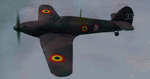
This folder contains a repaint for the Hawker Hurricane by Aeroplane Heaven, in the colors of H-33 of the Belgian Air Force, 1940. The Belgian Air Force received 11 Hurricane before the start of WWII, and received one Hurricane that was built by Avions Fairey under license. All Belgian Hurricanes were operated by Squadron 2/I/2Aé (Chardon), commanded by Capt. Marcel Charlier and were based at Schaffen. This aircraft, H-33, was damaged in a confrontation with a Dornier Do-17 over Durbuy on the 12th of March 1940. Its pilot, Sgt. Pierre van Strijdonck made a succesful belly landing at Pallenge, and was not hurt himself. The other Hurricanes were all destroyed during the first two days of fighting after the German invasion of Belgium. Repaint by Jan Kees Blom, based on the paintkit by Aeroplane Heaven.
| Filename: | Hawker_Hurricane_MkI_H33_Belgian_Air_Force.zip |
| License: | Freeware |
| Added: | 14th March 2020, 21:24:01 |
| Downloads: | 95 |
| Author: | Jan Kees Blom |
| Size: | 100.05 MB |
| Category: Flight Simulator 2004 - Scenery | |
| Reworked Altenstadt Army airfield, ETHA (Bavaria, South-Germany) including AI-Package |
|
File Description:
This airfield, located near Schongau in the Allgaeu (Bavaria, South-Germany),
is the main training center for parachuters of the German Army and used for cargo-drop missions of various users. The airport has been reworked to improve
the overall appearance. Version 2 replaces V1 completely.
The included AI-Package contains: Bell UH-1D SAR, Nord-Aviation Noratlas ND2501,
North-American T-6D and an aircraft.cfg for an AI-Transall C160.
Two Transall and a single T-6D from Landsberg and two Noratlas from Kaufbeuren
are comming over for touch and goes at Altenstadt as scheduled per attached
flightplan. A Dornier Do-28 does local touch and goes and a Bell UH-1D SAR-helicopter hurries to Landsberg. Welcome to a little Xmas party.
Lago's FSE is required in order to see most of the major buildings / objects.
| Filename: | Reworked_Altenstadt_Army_airfield_ETHA_Bavaria_Sou.zip |
| License: | Freeware, limited distribution |
| Added: | 24th December 2005, 17:48:42 |
| Downloads: | 2,423 |
| Author: | Klaus Jone |
| Size: | 3.97 MB |
| Category: Flight Simulator 2004 - Helicopters | |
| Bell UH-1D SAR-71 |
|
File Description:
Texture & Panel
In 1973, the Armed Forces' hospital in Hamburg also got a helicopter for EMS and SAR purposes. Ever since, this has been a Dornier Bell UH-1D aircraft. It's radio callname is ''SAR Hamburg 71'', also known more briefly as ''SAR 71''. For usual EMS purposes, Hamburg's fire brigade and EMS dispatch centre coordinates the helicopter's missions. Whenever an SAR task is to be done, the Air Force's RCC (Rescue Coordination Centre) in Muenster is responsible for ''SAR 71''. SAR missions are quite rare when compared to the number of aeromedical missions in EMS. Yet this is the most important job that ''SAR 71'' is responsible for so SAR missions will always be seen as more important task than medical emergencys."SAR 71" is mostly active in an area that is in no more than 80 kilometers of distance to the helicopter`s homebase. Any place which is located in this area can usually be reached by the aircraft within about 25 minutes of flight.
The SAR 71 has also a own serial on the Second German Televison ( http://www.zdf.de/ZDFde/inhalt/9/0,1872,2061609,00.html )
www.sar71.de
| Filename: | Bell_UH1D_SAR71.zip |
| License: | Freeware |
| Added: | 24th September 2005, 09:58:16 |
| Downloads: | 3,909 |
| Author: | Julian Schuengel |
| Size: | 5.89 MB |
| Category: Miscellaneous Files - Miscellaneous Files | |
| Al Pelletier's Round Robins - Castlegar |
|
File Description:
Hi again Flight Simmers. This adventure takes place in the Interior of British Columbia Canada, which is a very rugged and mountainous area. In fact, one of the toughest areas of the World, for any kind of planes to fly regular routes. I flew this route with 2 different airplanes. One with the Dornier and one with the old DC3 Dakota. With the more modern airplane, you can fly in and out of the route in IFR conditions with no problems. But with an aircraft that has a maximum of 500 to 900 Feet per minute rate of climb, you have to fly in VFR condition out of Castlegar to find an area that will allow you to climb to IMC(Instrument Meteorological Conditions) from VMC (Visual Meteorological Conditions). The DC3 I flew is by Bill Rambow, Roy Chaffin and Jan Visser. This, folks, is simply the BEST airplane that I have ever seen for MS Flight Sim, since 1982! This airplane and all the necessary scenery for this article can be found at http://wings.ark.com in the Full Throttle directory and probably at the Flight Simulator World web site. A list of all the necessary or nice to have files are listed on these pages.
| Filename: | Al_Pelletiers_Round_Robins__Castlegar.zip |
| License: | Freeware, limited distribution |
| Added: | 11th December 2006, 23:34:42 |
| Downloads: | 702 |
| Author: | Al Pelletier |
| Size: | 3.89 MB |
| Category: Flight Simulator 2004 - Scenery | |
| VAOZ Nashik/Ozar, India |
|
File Description:
Googly scenery for Ozar, a small domestic airport located in Nashik (or
Nasik), 111 miles from Mumbai (Bombay). Nashik is a fast-expanding city in
the Maharashtra state in the Western Ghats located on the western edge of the Deccan
peninsula and is known as the Wine Capital of India or Grape City.
Owing to its close proximity to Mumbai, the airport has not proved popular as
the journey by taxi, bus or rail is not much greater after taking into account
check-in times etc. Air Deccan recently withdrew all flights from Ozar and as
far as I can establish the only airline now serving Ozar is Jagson Airlines,
using Dornier 228 turboprops. There is also a military presence at the east
end of the airport.
Flight Simulator 2004 has only provided a runway at this airport and this scenery
seeks to redress the situation so that you and your "AI" traffic can use the
airport.
The scenery does not purport to be ultra-accurate. Based on high quality
satellite imagery from Google Earth, the layout is proportionally correct but the
added airport features, such as buildings, are built from default Microsoft objects
and add-on libraries so will not look exactly like the real thing.
You are not obliged to download and install any additional scenery libraries,
but to enjoy this scenery in its entirety, you may wish to. It will work fine,
with or without.
| Filename: | VAOZ_NashikOzar_India.zip |
| License: | Freeware |
| Added: | 22nd April 2008, 07:55:32 |
| Downloads: | 737 |
| Author: | John Hinson |
| Size: | 118.11 KB |
| Category: Prepar3D V1-4 - Utilities | |
| Flightplan Visualizer 1.16 |
|
Images related to this file:
File Description:
Flightplan Visualizer (FV) version 1.16.0. Copyright 2018-2020 by Pelle F. S. Liljendal ([email protected]), all rights reserved.
FV comes with 765 pre-imported Commercial AI flightplans (+380 BizJet flightplans are available as a separate download). However you are able to import additional (AI) flightplans yourself. Once imported these (AI) flightplans can be visualized on a map-view, and the user will be able to search accross all these. Hence you can use the program as inspiration as to which routes to fly. E.g. you can search across all imported flightplans to find all flights in an A321 flying into/out from LDDU, or simply to look for all flights in a Boeing 747-8F.
Simply run the included installer to install the software. The program will be installed into "C:\Program Files (x86)\Flightplan Visualizer" and all datafiles will be installed into: "C:\Users\[UserName]\AppData\Roaming\FlightplanVisualizer". The program comes with a full manual explaining everything, and a 3 page quick manual to get you started. The first 3 times you run the program the quick manual will automatically open. The forum is hosted here: https://forum.aerosoft.com/index.php?/forum/919-flightplan-visualizer/
Version 1.16 Contains the following changes:
- First of all a big THANK YOU to AIG (Alpha India Group) for allowing me to add features to both download their flight-plans (actually a feature suggested by Kai Kamjunke who is one of the developers of AIG AIM and other AIG tools) and access their list of defunct/renamed flightplans. While giving thanks, I also want to thank all (AI) aircraft-model creators, repainters and those who create all the flightplans ... our virtual sky would not be the same without your hard and dedicated work.
- Added new form to download or install AIG flightplans (downloaded directly from the AIG-servers). The form will identify all flightplans that are newer than those already installed or flightplans that are not currently installed. You can simply double-click a flightplan and it will be directly installed without the need to first download the file, and then choose to import this file.
- Both the new flightplan download- and the enable/disable flightplan- form contains a button which download- and show a list of defunct/renamed flightplans (obtained directly from the AIG forum).
- If you create a user-Airline while importing a flight-plan, when you return to the import-form you will be asked if you want to use that newly created flightplan (saves you from having to open the airline-browser and search-for/select that user-airline).
- Added Flightplan-, Airline- and Aircraft-filter to the top of the leg-search form to filter the items shown in the listviews.
- The "Select All" and "Select None" buttons now only (de)select visible items (if a filter is active there might be more items not displayed). However holding SHIFT while pressing these buttons, ALL items will be (de)selected no matter if they are shown or not.
- Replaced the two airport entry fields (in the leg-search form) with filter combo-boxes (MRU) so you can now enter a filter-text to filter which airports to include (the default filter is usign ICAO-codes so the old functionallity is preserved).
- Added filters to search for legs with specific flight-numbers and/or served by aircraft with specific registrations.
- When setting up a filter, sub-elements of the same type can now be separated by "/" so you only have to enter the type-name once (e.g. "country=dnk/nor/swe"). The pipe-char ("|") can be uses in stead if you prefer (e.g. "country=dnk|nor|swe").
- Now both "?" and "%" can be used as a single char wildcard in the filters ("?" is a DOS wildcard, whereas "%" is a SQL-wildcard).
- Added "#" as a wildcard for a single numeric value (0-9) in filters.
- Added "@" as a wildcard for a single alpha value (A-Z) in filters.
- Improved detection of invalid filter-text, which changes the text-color into red, to indicatet that the filter is invalid.
- The ISO3 country-code is now visible in the country combo-boxes in the leg-search form (these codes can be used in the airline- and airport- filters).
- Likewise 3-char Region- and Sub-region -codes have been added to their respective combo-boxes (these codes can also be used in the airline- and airport- filters).
- Saving the leg-search criteria will no longer require the input to be validated. E.g. you can now save the criteria where no aircraft have been selected. If you want to make sure that the criteria is valid for a search, please perform a search before you save the criteria.
- Flightplan-filter added to the "Re-process flightplans" form.
- Aircraft-filter added to the "Choose favorite aircraft-types" form. Also a few extra columns were added to the aicraft list-view.
- The Decode-METAR/TAF form now allows the user to manually enter METAR/TAF messages, and the form can now be opened directly from the main-menu (in case you optain METAR/TAF from other sources and need to decode it).
- Added a new button to the Randomizer form which lets you pick a random route (there is already a button to pick a random flight). The difference is the statistical chance of the chosen route.
- Added 2 columns to the runways listview in the Airport-info form showing head/cross-wind based on selected wind-direction/speed (automatically updated from the obtained METAR report).
- When accepting the result of a leg-search the previous used criteria (if different) are now archived. So you are able to load the 5 last used search criteria.
- The Result-viewer form now have a "Top-most" check-box. When checked that form will be shown on top of all other windows. This allows you to have this form shown on top of other forms (e.g. if you need to enter data from a metar-message into the FMC in the simulator).
- Many of the result-viewer forms now opens non-modal, meaning it can be displayed next to the window form where it was opened and you can switch between the two (you might need to use the new "Top-most" check-box for the best result). When closing the form from where the result-viewer was opened, the result-viewer will be closed as well.
- Likewise the Unit Conversion form also got the "Top-most" check-box in case you want to display this window on top of another program (e.g. if you have paper-work with weight based on kg and you need to enter the weights into a FMC/MCDU that only accepts lbs (or vice versa).
- The "Copy to clipboard" buttons on the METAR/TAF-decode form, and the Leg-Info form have been replaced by a "Show Report" button in stead. This new button will in stead show the text in the Result-viewer form (if you need to, it can be clipped to the clipboard from there).
- Below the (left/right) list-views in the "Enable/disable flightplans" form you now find a label showing two numbers. The 1st number shows the number of items (flightplans) shown in the list-view, and the 2nd number (in the parentheses) shows the number of selected items.
- When importing a flightplan where the aircraft-type can not be detected, the "lines" assigned to the "DUMMY AIRCRAFT" are now all automatically selected. So it is easy to just hit the "Change Aircraft type" button in case there is just a single, or multiple that should have the same type assigned.
- Hoovering the mouse over the gate-markers in the Airport-info form, the tool-tip now contains the GPS-position of the gate. Likewise editing the gate the caption of the edit window contains the GPS-position.
- Added airport size to "FS Comment" column in the "Nearby Airports" form.
- Added line-breaks to the METAR/TAF tool-tips displayed in the Leg-info form (line-breaks also included in the report).
- Fixed: There was a nasty bug in the "Legs" tab-page of the Airport-Info form where the same time-zone was used for both departure- and destination-airport when showing the departure-/destination-times as local times, even if departure- and destination-airports were in different time-zones.
- Fixed: The value of the "Calculated flighttime" check-box in the leg-search form was not set to the loaded value.
- Fixed: If one of your user-airlines had a blank callsign, it would list all airlines with a blank callsign as alternatives. Now it will only try to match non-blank callsigns.
- Fixed: The METAR/TAF decoder was not able to correctly detect a fraction visibility if following variable wind (e.g. "210V290 3/8SM").
- Fixed: Some of the combo-boxes in the leg-search form were enabled for text-entry, where the user should only be able to pick a value.
- Fixed: If "[None]" was selected and you executed a leg-search the "Edit" button remained disabled when you returned to the main form.
- Data: While testing some of the new filters I saw a few erros in the aircraft data (e.g. a few freight aircraft had a non-zero passenger count and other minor issues like that), which were fixed.
- Data: Thanks to Bruce Nicholson for bringing it to my attention that DC-9-15F was not being detected in version 1.15. Now all the DC-9 sub-variants should be detected correctly (e.g. 9-11/12/13/14...51 both pax and freight). The same better sub-variant detection was added to the DC-8's and DC-10's as well.
- Data: Thanks to Aucery for bringing it to my attension that some of the (BizJet) aircraft were not being detected, or not being detected correctly. The King Air 250/300 should now be detected correctly as are Hawker-700/1000, Mitsubishi MU-300, IAI Astra Jet 1125, Cessna T210/T303, and Dornier 328JET/PROP.
- Flightplans: All new/updated flightplans have been added to the installer, and all obsolete have been removed. A total of 765 active flightplans are bundled with the installer.
Pelle
| Filename: | Flightplan_Visualizer_116.zip |
| License: | Freeware, limited distribution |
| Added: | 2nd May 2020, 23:15:38 |
| Downloads: | 318 |
| Author: | Pelle Liljendal |
| Size: | 29.27 MB |


© 2001-2026 AVSIM Online
All Rights Reserved
Privacy Policy |