
Where Flight Simulation Enthusiasts Gather from Around the World!
AVSIM Library - Search Results

| Category: Flight Simulator 2004 - Original Aircraft | |
| Piaggio P-166 Collection |

|
Images related to this file:
File Description:
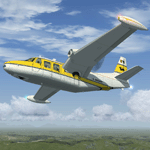
This package contains an updated re-release of all my original Piaggio P-166 models developed for FS-2002/2004. All versions are included in a single package: P-166A, P-166BL-2, P-166CL-2, P-166M, P-166S, P-166DL-3 and P-166DP-1. The 3D models are the same, so these are fairly simple models. Yet they come with a VC (no 2D panel this time!). With respect to the original releases, they come with very much improved panels, in two flavors: Piston and Turboprop. Gauges developed by Milton Shupe & Scott Thomas for the Aero Commander / Turbo Commander Aircraft series, and Edgar Guinart López of Aeroproyecto for the Embraer 110. Other Gauges from my own Piaggio P-180 & PD-808. Also Included is a brand-new flight model redeveloped from scratch. Please refer to the Reference and Checklist pages provided via the FS Kneeboard for flying and operating instructions.
The Piaggio P-166 is a light small twin. An Exotic twin-engine prop that sold all over the world including America, UK, and Australia. Its origin is traced Back to the Piaggio P-136, a light amphibian, which the P-166 keeps the wings, the engines and the tail planes. The first P-166A flew in November 1957. The aircraft was still in production in the early 21st century in an improved turboprop version, the P-166DP-1.
| Filename: | Piaggio_P166_Collection.zip |
| License: | Freeware |
| Added: | 2nd April 2020, 17:50:35 |
| Downloads: | 521 |
| Author: | Mario Noriega |
| Size: | 40.89 MB |
| Category: Flight Simulator 2004 - Aircraft Repaints, Textures and Modifications | |
| C-46 Curtiss Commando - With Buffalo Air type VC and Failure Model |
|
Images related to this file:
File Description:
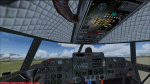
FS2004 Curtiss C46 VC And Failure Model, v2. For the C46 Curtiss Commando aircraft by Libardo Guzman Garcia, Greg Pepper, and Tom Gibson (GAC46V2.ZIP). This is my Version 2 and it supersedes my previous uploads (c46bflvc.zip, c46bflfix.zip, c46bfl_up.zip). It adds a virtual cockpit similar to the Buffalo Airways C46 cockpit as well as pilot induced and random failures/damages through gauges originally developed by Charles Owens for the DC3C (most failures) and by Robert Graf (carburetor icing and oil consumption) for the DC-6. These gentlemen together with Gunter Tesons RealEngine_v14 have really made flying piston aircraft a lot more interesting. The frequency of random failures can be adjusted between "never" and "certain" but you always have to watch the engine limitations, carburetor icing, and oil consumption.
Further gauges by other authors are used or have been modified or have been developed by me. Version 2 increases the number of failures (engine, fire, leaks, systems, equipment, instruments), and introduces an improved upper overhead panel, an abbreviated interactive checklist on the panel, and reduced braking in rain, snow and freezing rain. Version 1 is not required for Version 2. See the C46BFL ReadMe V2.txt for further details and credits. Required files: ga_c46_v2.zip, RealEngine_v14.zip and also recommended: The Project Tupolev TU-154M aircraft for the fully functional KLN90B GPS (PT aircraft available at: http://files.protu-154.net/). By Detlev J. Rohmer.
| Filename: | C46_Curtiss_Commando__With_Buffalo_Air_type_VC_and.zip |
| License: | Freeware |
| Added: | 21st March 2015, 18:00:30 |
| Downloads: | 1,688 |
| Author: | Detlev J. Rohmer |
| Size: | 16.55 MB |
| Category: Flight Simulator X - Original Aircraft | |
| Piaggio P-166 Collection |
|
Images related to this file:
File Description:
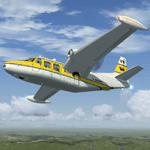
This package contains a FS-X native conversion of all my original Piaggio P-166 models developed for FS-2002/2004. All versions are included: P-166A, P-166BL-2, P-166CL-2, P-166M, P-166S, P-166DL-3 and P-166DP-1. The 3D models are virtually the same, so these are fairly simple models. Yet they come with a VC (no 2D panel this time!). With respect to the FS-2002/2004 releases, they come with very much improved panels, in two flavors: Piston and Turboprop. Gauges developed by Milton Shupe & Scott Thomas for the Aero Commander / Turbo Commander Aircraft series, and Edgar Guinart López of Aeroproyecto for the Embraer 110. Other Gauges from my own Piaggio P-180 & PD-808. Also Included is a brand-new flight model redeveloped from scratch. The 3D models are mildly improved, with a proper pilot figure, main panel backlighting and bump-mapping. Please refer to the Reference and Checklist pages provided via the FS Kneeboard for flying and operating instructions. Models converted with Arno Gerretsen’s Model Converter X.
The Piaggio P-166 is a light small twin. An Exotic twin-engine prop that sold all over the world including America, UK, and Australia. Its origin is traced Back to the Piaggio P-136, a light amphibian, which the P-166 keeps the wings, the engines and the tail planes. The first P-166A flew in November 1957. The aircraft was still in production in the early 21st century in an improved turboprop version, the P-166DP-1.
| Filename: | Piaggio_P166_Collection.zip |
| License: | Freeware |
| Added: | 2nd April 2020, 17:49:58 |
| Downloads: | 704 |
| Author: | Mario Noriega |
| Size: | 56.4 MB |
| Category: Prepar3D V1-4 - Aircraft Repaints, Textures and Modifications | |
| Cessna 421 advanced physics |
|
File Description:
C421C advanced physics
Modification for the Alabeo C421 C Golden Eagle
Version: tested for P3DV4; should work also with P3DV5 (and probably FSX)
1. Why I developed the advanced physics version
I was asked via this forum, via PMs and also by e-mails to provide a modified version of the Alabeo C421C which can be used for serious multi-engine training. It should have accurate type specific performance for both AEO (all engine operative) and OEI (one engine inoperative), the latter for either a windmilling prop at various speeds and for a feathered engine. Feathering should work as realistic as possible.
Thus, I developed an advanced physics version of the Alabeo C421C. It shows realistic physics for negative thrust (prop drives engine). This is necessary for OEI training and more realistic idle power simulation.
2. Modified files
Modification includes “c421.air†and “aircraft.cfg†files. Data is based on real world Cessna 421C, N100L, 421C-0313.
Aircraft data, equipment list, checklist and other documents for N100L,
as well as some images of C421C, registration N100L, can be found here, too.
Unfortunately, due to copyrights, I can’t upload the full files and can’t provide the AFM and other copyright protected documents.
3. How to install
To update “c421.airâ€:
- Copy the original Alabeo C421 to another aircraft folder, e.g. “C421C advanced physicsâ€.
- Use AirEd (freeware) and open the original “c421.airâ€.
Open AirEd a second time and open “modifications advanced physics c421.airâ€.
Copy the modified tables 511 and 512 to the original .air file
(right click in modification file -> copy -> right click on original file -> replace from clipboard)
To update “aircraft.cfgâ€:
Just copy the modifications to the corresponding position in the original file.
4. Legend of modifications
Modifications in aircraft.cfg:
- Basic Empty Mass (actual mass for N100L 5,154 lbs inserted; most C421C are more heavy, ours is on diet)
- correct basic data for engines + props
- engine friction included (necessary for all negative thrust scenarios)
- flaps lift + drag scalar adjusted (split flaps)
- 2 vacuum pumps
- VMO = 151 KIAS; VNE= 240 KIAS
- cabin: max. differential pressure: 5.0 psi
Modifications in c421.air:
- implemented negative thrust scenarios in prop thrust and efficiency curves (tables 511 + 512); adjusted thrust curves for high TAS at high ALT
5. Side effects of modifications:
- more realistic engine starting:
starting the engine needs the throttle to be 2 cm above idle (see checklist) for the first 15 seconds
- if you start the engine and don’t retard the prop to medium RPMs immediately, you will overstress engine and prop. So be careful when doing an air start, you might lose the prop and the aircraft. (In the real aircraft, these effects are less severe, but you have to avoid high RPMs until the engine is warmed up and have to avoid rapid change of RPM.)
6. Additional Notes:
- Basic aircraft data as published by the manufacturer, like range and service ceilings, especially OEI, are based on MTOM.
- The use of high payloads close to MTOM and higher ambient temperatures are making for a more challenging OEI training.
- In the sim, climb power is too low compared to full power (about 65 % instead of 75 %). I have to find a way to adjust that.
- I have buttons for engine failure under the mixture (see images)
- Seat Position is, like in many Aircraft, higher than as per Default by the sim. For the C421C and me being 5 ft 7 in, that's about 7 clicks arrow up.
| Filename: | Cessna_421_advanced_physics.zip |
| License: | Freeware |
| Added: | 20th March 2021, 01:09:34 |
| Downloads: | 191 |
| Author: | Andreas Kunzi |
| Size: | 18.06 KB |
| Category: Flight Simulator 2002 - Aircraft Repaints, Textures and Modifications | |
| Northrop F-5B Freedom Fighter Hellenic Air Force |
|
File Description:
This is a superb aircraft I used to fly as a Hellenic Air Force pilot. This repaint is presenting an F-5B Freedom Fighter as it used to fly with 343rd Squadron of Hellenic Air Force, during the '90ties. The F-5 Freedom Fighter was a very succesfull aircraft during its 30 year carrer in HAF as a fighter, bomber, multy role aircraft until the early months 2001 when finaly released by active duty. The project is fully combatible with both FS2K2 & FS9 versions. It is based on a very realistic FS model, with realistic features, made by FSD International. The package contains realistic sounds made by Mr. Angelos Hatzikatakos. A new, based on real photos and diagrams 2D panel, was made by Nick Karatzides who also modified (for FS purposes) the official checklist by Northrop. A VERY completed flight manual (60 pages) which can be read with Adobe Acrobat is included. The panel (combatible with both FS2K2 & FS9 versions) uses plenty of realistic gauges to simulate the real F-5's cockpit. The HUD gauge is made by Mr. Eric Marciano, afterburner flame effects by Mr. Jan Rosenberg and fuel jettison gauge by Mr. Doug Dawson. This "F5B_HAF1.zip" package is for EXPERIENCED FlightSimers and virtual pilots who have a "good feeling" on the controls and do not "kick" the contol stick while flying...It is for people who want to know how it looks to fly with a modern fighter. The package contains visual effects, night lighting, fine looking mechanical parts movement, contrails, realistic gears extracting / retracting etc. Instructions for both FS2K2 and FS9 versions are included.
| Filename: | Northrop_F5B_Freedom_Fighter_Hellenic_Air_Force.zip |
| License: | Freeware |
| Added: | 27th January 2004, 03:04:05 |
| Downloads: | 1,505 |
| Author: | Nick Karatzides |
| Size: | 15.51 MB |
| Category: Flight Simulator 2002 - Aircraft Repaints, Textures and Modifications | |
| Canadair CL-13 Mk 2 Sabre (F-86E) Royal Hellenic Air Force |
|
File Description:
This is one of the first jet age aircrafts served in Royal Hellenic Air Force, almost 50 years ago (!!!). There are two repaint versions of Royal Hellenic Air Force in the zip package: The first one, represents a Royal Hellenic Air Force Canadair CL-13 Mark 2 Sabre used to fly with 342nd Sqdr. of Royal Hellenic Air Force (RHAF) in Elefsina, Greece with an interception role. The second, represents the aniversary "Alexander the Great" texture, painted in "patriotic" colours, by a gas station owner (!!!) in Thessaloniki - Greece after buying the aircraft (sn. 19294) as scrap and finaly display it as a memorial by his store. This specific aircraft used to fly with 343rd Sqdr. In Nea Anchialos, Greece. The Canadair CL-13 Mark 2 Sabre aircraft (Canadian build F-86E under North American licence) used to be one of the most succesfull aircrafts during the 50'ies and the Korean war. This "CL-13_RHAF_v1.zip" package is full compatible with FS2K2 and FS9 too and contains realistic sound made by Angelos Hatzikatakos, NEW (made by the author) panel, the official checklist and a VERY completed (as always...) flight manual (31 pages) which can be read with Adobe Acrobat. This repaint was based on the original model made by Rey Lopez . The primary panel was made by Ken Mitchell and modified by Nick Karatzides to look more realistic and closer to the Hellenic CL-13 Mk 2 cockpit. A total NEW flight model ("air" file and aircraft.cfg file) have been created by Nick Karatzides and and I test it hard, to ensure that it flies as close as possible like a real fighter! This "CL-13_RHAF_v1.zip" package is for EXPERIENCED FlightSimers and virtual pilots who have a "good feeling" on the stick and do not "kick" the contol stick while flying. The package contains new visual effects, night lighting, fine looking mechanical parts movement, contrails, realistic gears extracting / retracting etc. Repaint and stuff by Nick Karatzides.
| Filename: | Canadair_CL13_Mk_2_Sabre_F86E_Royal_Hellenic_Air_F.zip |
| License: | Freeware |
| Added: | 4th October 2003, 00:15:30 |
| Downloads: | 1,408 |
| Author: | Nick Karatzides |
| Size: | 11.28 MB |
| Category: Flight Simulator 2002 - Aircraft Repaints, Textures and Modifications | |
| Hellenic Air Force Republic Aviation F-84F Thunderstreak |
|
File Description:
This is one of the first jet age aircrafts served in Hellenic Air Force, almost 50 years ago (!!!). There are three (3) repaint versions of Royal Hellenic Air Force in the zip package: The first one, represents an F-84F, as placed in front of 113rd Wing's main entrance as a "gate guard monument". The aircraft was placed there during early '90ies and the idea was captured by Brigadier General Vlachandonis who used to be the 113rd Wing's commander at that time. The second, shows an F-84F, as it was painted from 1957 to 1967. The specific aircraft used to belong to 339th Sqdr.with a white-blue-white stripe painted close to the nose as a squadron's ID mark. Additionaly, the "Mighty Mouse" official Sqdr's badge was placed on the left part of fuselage, just behind the cockpit. The thrird repaint is representing an F-84F, as it was painted from 1971, until the "retirement" on 1984. The aircraft which is presented into this "VietNam typed" repaint version used to belong to 338th Sqdr. operating from Larisa AB. This "F84F_HAF.zip" package is full compatible with FS2K2 and FS9 too and contains realistic sound made by Angelos Hatzikatakos, new panel made by Nick Karatzides, helpfull checklist and a VERY completed (as always...) flight manual (46 pages) which can be read with Adobe Acrobat. This repaint was based on the original model made by Kazunori Ito. A total NEW flight model ("air" file and aircraft.cfg file) have been created by Nick Karatzides and have been tested hard, to ensure that the aircraft flies as close as possible like a real fighter! This "F84F_HAF.zip" package is for EXPERIENCED FlightSimers and virtual pilots who have a "good feeling" on the stick and do not "kick" the contol stick while flying. The package contains new visual effects, night lighting, fine looking mechanical parts movement, contrails, realistic gears extracting / retracting etc.
| Filename: | Hellenic_Air_Force_Republic_Aviation_F84F_Thunders.zip |
| License: | Freeware |
| Added: | 10th March 2004, 03:59:45 |
| Downloads: | 725 |
| Author: | Nick Karatzides, Angelos Hatzikatakos |
| Size: | 12.35 MB |
| Category: Flight Simulator 2004 - Original Aircraft | |
| Caproni-Vizzola C-22J Ventura |
|
Images related to this file:
File Description:
The Machine:
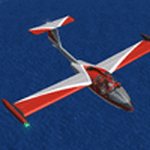
A fully aerobatic, very-light Jet that compares to the Bede BD-5J, but heavier and sporting two instead of one TRS-18 turbojets. Up to Mach 0.47 and 650 NM of range, with a service ceiling of 25000ft. A low stall speed (for a jet) makes the aircraft good for short field operations.
Certified for VFR operations only, yet includes a good avionics suite.
This is a "Classic" aircraft featuring "Steam" gauges and radios. Yet, controls and systems are easy to operate.
The History:
The C-22J is the last aircraft to be adorned with the legendary Caproni name. Originally known as "Caproncino", then marketed as "Ventura". A very-light jet developed in the 1980s as a military trainer, surveillance and reconnaissance aircraft. Powered by two TRS-18 turbojets fed from a dorsal NACA intake, the aircraft reached Mach 0.47 and was fully aerobatic. The airframe shows its origin in a glider design, the Caproni A-21 Calif. After the merger with SIAI Marchetti, the project was cancelled in favor of the SF-260.
The Simulation - 3D Model:
This aircraft ships with a 3-D cockpit, that incorporates realistic night lighting, in the form of a dim dome flood light, backlit gauges and luminous digital displays. The flight crew of 2 is affected by your input in the payloads menu of Flight Simulator, allowing to choose between male, female or empty seats. The Copilot Figure can be hidden with a quick click in the internal 3D view as well.
The Simulation - Realism:
This aircraft has been tuned with the invaluable help of Engineer Carlo Ferrarin, who created the real aircraft. Unique and one-off documentation has been kindly provided, and used extensively, for the creation of this product!
Just like the real aircraft, the systems are simple and of easy operation. Engines can be started with the press of a button. Systems modelling allows the following of real-world checklists as closely as Flight Simulator allows. An in-sim checklist is included, as well as a full flight manual.
The flight model is tuned with advanced aerospace techniques, resulting in a highly realistic aircraft, yet, it is very pleasant to fly, both during aerobatic displays or "A to B" cruising.
Highlights:
- High-Resolution 3D cockpit
- Full Documentation
- Aerobatic
FS-2004 Version comes with limited support and is free due to platform limitations. See Readme. FS-X & P3Dv4 (64-bit) versions are commercial products.
| Filename: | CaproniVizzola_C22J_Ventura.zip |
| License: | Freeware, limited distribution |
| Added: | 7th November 2020, 18:31:45 |
| Downloads: | 680 |
| Author: | Mario Noriega |
| Size: | 157.85 MB |
| Category: Microsoft Flight Simulator (2020) - Utilities | |
| Flightplan Visualizer 1.19 |
|
Images related to this file:
File Description:
Flightplan Visualizer (FV) version 1.19.0. Copyright 2018-2021 by Pelle F. S. Liljendal ([email protected]), all rights reserved.
FV comes with 1164 pre-imported AI flightplans (of which +380 are BizJet flightplans, the rest are commercial). However you are able to import additional (AI) flightplans yourself. Once imported these (AI) flightplans can be visualized on a map-view, and the user will be able to search accross all these. Hence you can use the program as inspiration as to which routes to fly. E.g. you can search across all imported flightplans to find all flights in an A321 flying into/out from LDDU, or simply to look for all flights in a Boeing 747-8F.
Simply run the included installer to install the software. The program will be installed into "C:\Program Files (x86)\Flightplan Visualizer" and all datafiles will be installed into: "C:\Users\[UserName]\AppData\Roaming\FlightplanVisualizer". The program comes with a full manual explaining everything, and a 3 page quick manual to get you started. The first 3 times you run the program the quick manual will automatically open. The forum is hosted here: https://forum.aerosoft.com/index.php?/forum/919-flightplan-visualizer/
Version 1.19 Contains the following changes:
- The release-version of the application is now aimed at 64-bit (granting access to more memory if needed). Enabling 64-bit adds a memory overhead of approx 50% compared to 32-bit, but its the "price to pay" to have access to more memory (for those of you with many active flightplans loaded into memory at the same time).
- FV can now connect to your simulator using FSUIPC (tested both with P3D and MSFS). By default you will have to manually connect/disconnect (using new menu-items in the File-menu). However in settings you can choose to do it automatic. When automatic-connection is selected the connect/disconnect menu-items becomes inactive.
- When connected to a sim, the location/heading of your aircraft can be displayed on the map, using an orange aircraft-marker, and hoovering the mouse over this marker will display some key data (GPS-location, altitude, heading, speed and so on).
- Added abillity to playback audio-files. In settings you can choose which audio-device to use, and set the volume at which these files are played (defaults to 50%). If volume>0 these files will automatically be played back whenever FV connects to/disconnects from the Sim.
- Added additional icons that are automatically selected to indicate when the program is connected to the simulator. Hence the icon in the main-form will indicate if FV is connected to a simulator or not.
- In the form for editing (user)-airlines and in the form for searching airlines the context menu now have a menu-item called "Show usage". When selected, it will generate a report showing all the (active) flightplans in which the airline is used.
- Added a new "Manual" check-box next to the load-factor when editing user-airlines. This check-box needs to be checked if you want to manually enter a load-factor. When not checked (default) the load-factor will automatically be set to the default value of the selected country.
- When editing user-airlines, the airline just added/edited will be visible and selected in the list-view. Likewise when deleting an airline, the previous item will be be visible/selected (in stead of always scrolling to the top afterwards, as in previous versions).
- The Insert/Delete keyboard-keys can now be used as shortcuts adding/deleting user-airlines and user-aircraft (both owned and types).
- The gate-map context-menu (Airport Info), now allows you to re-center the map (in case your have been panning the map, and can't locate the airport again).
- Added a new menu-item/form to calculate head/cross-wind from manually entered flight/runway-heading and wind-direction/speed. Don't forget the runways tab-page in the Airport-info form already calculates this for each runway (and wind-direction/speed is automatically obtained from METAR).
- Added a new menu-item/form to convert plain-text into morse-code. There is also a button that lets you listen to the generated morse-code, so you can practice your morse-code listening skills (e.g. entering an ILS/VOR-ident, to know which morse-code to listen for in the aircraft, to verify the correct ident is reqeived).
- The "Cruise speed" column have been removed from the aircraft tab-page of the Edit Flightplan form to make more room for the Carrier/Operator-columns. In the past these simply contained the ICAO for the airlines. Now it both contains: ICAO, IATA (if not blank) and Name.
- The criteria in the leg-search window now allows you to filter on departure/arrival week-days (e.g. only include flights departing a particular airport on a Saturday or Sunday).
- When using the flightplan-filter on the main-form, it will favour the current active flightplan (as in previous versions), however if not able to, it will select the first flightplan included in the filtered list (in stead of choosing "[None]").
- Improved import of AIGFP-flightplans where the airport is not contained within the embedded airport.txt file and is using a different ICAO-code in route-files (observed for "AIG_UTair_Summer2018v6" and "AIG_S7Airlines_Winter2019-2020v3").
- Added runway-info (for both Departure/Destination-airports) to the flightplan leg-report. For ILS-eqiupped runways its lists the ID (both as text, as morse-code), frequency and ils-slope.
- Morse-code also added to ILS-ID column on the "Runways" tab-page of the airport-info form. Above the list-view there is also a label showing the morse-code (using a larger font), and next to it there is a button that lets you listen to the morse-code.
- Traffic-pattern direction (for take-off and landing) are now displayed for each runway. These data are extracted from the scenery by MakeRunways, hence the info can't be "better" than the info in the scenery (hence most default airports simly shows 'Left').
- Current/peak- memory usage is now logged at various stages while running, and when closing the program. These values can also be observed opening the about-box, which will also forcefully append these values to the log.
- When using MkRwy with MSFS it can't obtain the country-name, hence these are taken from the airport-database embedded with FV. However the name for USA ("United States of America") is too long to be shown together with state-name, hence code have beed added it to shorten it to "United States" (which was the default country-name used in FSX/P3D).
- Changed font in Comments-box for user-aircraft to a fixed font, in case some users what to enter text "in columns" (e.g. if you make "tables" with speed-restrictions).
- Changed the color of the splitter-bars in the Airport-info and leg-search forms to a draker color, to better indicate where it is.
- The build-part of the version-number can now be ignored when performing the automatic version-check at start-up. This new setting is by default disabled. If enabled it will ignore changes from version 1.x.0 to 1.x.1 (e.g. an update from 1.19.0 to 1.19.1). However major/minor versions-updates (e.g. from 1.19.x to 1.20.x) will not be ignored.
- Fixed: Excessive logging while importing AIGFP flightplans removed (leftover from fixing a bug before the release of version 1.18).
- Fixed: When using kg in the leg-info report, the weight of Luggage incl. pax weight (shown in parentees) was wrong.
- Fixed: Button to open filter-manual on Gate-page of the Airport-info form was not visible/position was not fixed.
- Fixed: The wind-speed obtained from the METAR and used to calc head/tail-wind on the Runway tab-page of the Airport-info form, did not considder the unit (e.g. Khp or meters-per-second).
- Data: A VERY BIG THANK YOU to Bruce Nicholson for assistance updating the Airline-database, both with new/missing entries and marking defunct airlines as such.
- Data: A lot of "fictios airlines" was added as well. These are used for companies without official ICAO/IATA codes. To indicate they are fictios the ICAO-code is set to "---" and the IATA-code is used to indicate the kind of traffic (e.g. the combination "---/BZ" is used for biz-jet flights).
- Data: Also thanks to Bruce for pointing out that a few aircraft were not being detected as they should. So this version should do a better job with Cessna T206H, Cessna Citation SII/S550 and Global 7500.
- Flightplans: The bundled AIG flightplans have been updated to the latests versions/revisions available from AIG (there were a few defunct that was removed, a few new versions that was added, and a lot of new revisions being updated).
- Flightplans: Eric Steinmetz's Bizjet (AI) flightplans that have previously been available as a separate download are once again bundled with the installer (they are only installed if you choose the option during installation). These have all been updated to use the new "---/BZ" airlines (for companies without official ICAO/IATA-codes), and the Author/Provider have been set to "Eric Steinmetz"/"ESAI" (the previous/separate download was created before adding author/provider to the software).
Pelle
| Filename: | Flightplan_Visualizer_119.zip |
| License: | Freeware, limited distribution |
| Added: | 2nd May 2021, 00:02:01 |
| Downloads: | 280 |
| Author: | Pelle Liljendal |
| Size: | 35.71 MB |


© 2001-2026 AVSIM Online
All Rights Reserved
Privacy Policy |