
Where Flight Simulation Enthusiasts Gather from Around the World!
| Category: Flight Simulator 2004 - AI Aircraft | |
| HeavyLift Antonov An-124-100 |
|
File Description:
HeavyLift Antonov An-124-100 for classic AI traffic (2 variations); utilizing the Global AI An-124 Ruslan model set. An excellent addition to your classic AI world, this aircraft features many animations and options to suit your framerates. Aircraft model and textures by Global AI, repaint by Michael Pearson.
| Filename: | HeavyLift_Antonov_An124100.zip |
| License: | Freeware |
| Added: | 15th November 2008, 03:02:53 |
| Downloads: | 894 |
| Author: | Michael Pearson |
| Size: | 415.21 KB |
| Category: Flight Simulator X - Aircraft Repaints, Textures and Modifications | |
| Boeing 767-300 ER "Air Seychelles - La Belle Creole" |
|
Images related to this file:
File Description:

This is a repaint of the payware Level D B76-300 ER for FSX to represent an Air Seychelles aircraft. One of these aircraft currently operates the charter service between the UK, Ascension Island (where I live) and the Falklands. A photo-realistic repaint with Alpha channels,DDS textures; tested.
| Filename: | Boeing_767300_ER_Air_Seychelles__La_Belle_Creole.zip |
| License: | Freeware |
| Added: | 17th September 2010, 01:59:03 |
| Downloads: | 805 |
| Author: | Bill Hardy |
| Size: | 1.88 MB |
| Category: Flight Simulator X - Aircraft Repaints, Textures and Modifications | |
| Singapore Airlines “Tropical Livery†Boeing 747-400 (9V-SPL) |
|
Images related to this file:
File Description:

This is a repaint of Singapore Airlines "Tropical Livery" for the PMDG 747-400.Registration number 9V-SPL.This aircraft and the registration number 9V-SPK of the 747 is a twin aircraft, two painting is exactly the same.The repaint requires the PMDG 747-400 V3 payware product.Repaint By China Leaf.
| Filename: | Singapore_Airlines_Tropical_Livery__Boeing_747400_.zip |
| License: | Freeware |
| Added: | 25th March 2017, 19:30:47 |
| Downloads: | 1,326 |
| Author: | Neo Leung |
| Size: | 26.77 MB |
| Category: Flight Simulator X - Aircraft Repaints, Textures and Modifications | |
| T-34C Turbo Mentor, TRAWING 4 |
|
File Description:
The aircraft represented is a T-34C with USMC markings. It is operated by Training Air Wing Four (TRAWING 4) at NAS Corpus Christi, Texas. These textures are intended for use with the Alpha Simulations T-34C Turbo Mentor payware aircraft package. Original release textures and this Repaint by Frank Safranek
| Filename: | T34C_Turbo_Mentor_TRAWING_4.zip |
| License: | Freeware |
| Added: | 10th November 2008, 23:23:23 |
| Downloads: | 167 |
| Author: | Alphasim, Frank Safranek |
| Size: | 728.14 KB |
| Category: Prepar3D V1-4 - Aircraft Repaints, Textures and Modifications | |
| A2A Piper Cherokee Guernsey Aero Club |
|
Images related to this file:
File Description:

Repaint of the A2A Piper Cherokee in the colours of G-GOTH. The original aircraft is a Warrior but I thought better than nothing. Comes in handy when exploring the Channel Islands. Haven't been there? Put it on your bucket list. Needs the original aircraft of A2A. Textures only. Cheers.
| Filename: | A2A_Piper_Cherokee_Guernsey_Aero_Club.zip |
| License: | Freeware |
| Added: | 16th November 2019, 22:04:17 |
| Downloads: | 99 |
| Author: | Yves Kaulitz |
| Size: | 21.54 MB |
| Category: Flight Simulator 2004 - Original Aircraft | |
| Bell-Boeing V22 Osprey |
|
File Description:
Remake for MS FS 2004 or FS9 of the famous Osprey STOL V22 from Bell-Boeing. Included are three versions with different flight models as to show aircraft- and air-files are read in properly and processed differently. Hoping this renews the interest for aircraft with critical flight envelopes in FS9.
| Filename: | BellBoeing_V22_Osprey.zip |
| License: | Freeware |
| Added: | 11th September 2004, 22:14:26 |
| Downloads: | 11,739 |
| Author: | Yahia al-Wajid |
| Size: | 1.46 MB |
| Category: Flight Simulator 2004 - Aircraft Repaints, Textures and Modifications | |
| Mega Maldives Airlines B737-800 |
|
Images related to this file:
File Description:
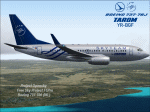
MEGA Maldives Airlines has introduced a Boeing 737-800 aircraft to its fleet as part of its fleet modernization drive.The aircraft is just over 4 years old with 12 business class seats and 156 economy class seats with the latest Boeing Sky interior and new extra fuel saving “split scimitar†winglets. It is part of an overall strategy for the airline to update and re-structure its fleet over the next year. The aircraft will support MEGA’s plans for increased connectivity between the Maldives and short to medium range markets. This includes India and Sri Lanka, with new routes starting within the 4th quarter. MEGA also plans to restart its Kuala Lumpur and Jeddah routes, although these routes will operate primarily on larger 767 aircraft in MEGA’s existing fleet. he new B737 aircraft is wet-leased from Czech operator Travel Services, but will fly in the MEGA Maldives Airlines colours and livery and MEGA Maldives cabin crew will service the flight onboard. This is the third time MEGA has wet-leased an aircraft from Travel Services. Furthermore, in support of the national drive to increase tourism, the aircraft also sports the “Maldives – sunny side of life†logo prominently. Texture only for the TDS Boeing 737-800 model. please visit us on Facebook ktrachosim for more textures and flight plans.
| Filename: | Mega_Maldives_Airlines_B737800.zip |
| License: | Freeware |
| Added: | 9th October 2016, 04:21:41 |
| Downloads: | 349 |
| Author: | Luis Flores | Tenkuu Developers Studio |
| Size: | 9.17 MB |
| Category: Flight Simulator X - Utilities | |
| Flight Simulator First Officer (FSFO) |
|
Images related to this file:
File Description:

Flight Simulator First Officer is a generic virtual copilot that can be used with any aircraft. The primary function of FSFO is to assist the Pilot In Command (PIC) to fly the aircraft safely while adhering to Standard Operating Procedures (SOPs). This is accomplished via virtual checklist and sharing of cockpit duties/responsibilities. Specifically, the First Officer reads the following configurable checklist:
Before Start,
After Start,
Before Takeoff,
In-Range,
After Landing and
Shutdown.
After reading the checklist items, the Copilot will wait to ensure you (i.e. the pilot) have configured the aircraft correctly before proceeding to the next item. Also, the Virtual copilot is capable of performing the following actions:
Call Vspeeds based on your input,
Raise the Landing Gear on Takeoff,
Retract the Flaps,
Manage the taxi/landing lights,
Land the Aircraft,
Tune the ILS frequencies,
Call Climb Power based on your input,
Reset Vertical Speed when the Aircraft is within 1000 ft of the programmed altitude,
IAS warning (e.g. Aircraft is above 250 IAS while below 10000 ft),
GS Warnings (e.g. Aircraft is above 25 knots while taxing),
Resets the altimeter to standards when passing TA,
Engage Heading Hold on Takeoff,
Engage Altitude Hold on Takeoff,
Reset Speed on Takeoff,
Engage Speed Hold on Takeoff,
Engages Rev Thrust on Landing,
Ground Proximity Warning System (GPWS) and
much more...
visit us at http://www.flightsimfirstofficer.com/
| Filename: | Flight_Simulator_First_Officer_FSFO.zip |
| License: | Freeware, limited distribution |
| Added: | 15th September 2012, 16:58:12 |
| Downloads: | 5,184 |
| Author: | Matthew King |
| Size: | 49.1 MB |
| Category: Prepar3D V1-4 - Utilities | |
| Flightplan Visualizer 1.14 |
|
Images related to this file:
File Description:
Flightplan Visualizer (FV) version 1.14.0. Copyright 2018-2019 by Pelle F. S. Liljendal ([email protected]), all rights reserved.
FV comes with 629 pre-imported Commercial AI flightplans (+380 BizJet flightplans are available as a separate download). However you are able to import additional (AI) flightplans yourself. Once imported these (AI) flightplans can be visualized on a map-view, and the user will be able to search accross all these. Hence you can use the program as inspiration as to which routes to fly. E.g. you can search across all imported flightplans to find all flights in an A321 flying into/out from LDDU, or simply to look for all flights in a Boeing 747-8F.
Simply run the included installer to install the software. The program will be installed into "C:\Program Files (x86)\Flightplan Visualizer" and all datafiles will be installed into: "C:\Users\[UserName]\AppData\Roaming\FlightplanVisualizer". The program comes with a full manual explaining everything, and a 3 page quick manual to get you started. The first 3 times you run the program the quick manual will automatically open. The forum is hosted here: https://forum.aerosoft.com/index.php?/forum/919-flightplan-visualizer/
Version 1.14 Contains the following changes:
- Flightplan file-format was changed, to accommodate changes to the airline-data. In previous versions the airline ICAO-code had to be unique, hence not allowing old defunct airlines still remaining in the data-file when a new airline would be issued the same ICAO-code (now they can both exists, and many of the defunct have been marked as defunct).
- On start-up old flightplans in enabled folders will automatically be updated to the new format. If you have sub-folders containing additional flightplans, you should make sure these are enabled, in order to have these updated as well. Once they have been updated you can go ahead and disable these sub-folders again as you please.
- Its now possible to add user defined airlines, in case you want to add you own fictitious airlines (e.g. VA's) or you want to add airlines missing in the official data-files that I supply with the program (if this is the case, please notify me, so I can add these in the next release of the program).
- "Favorite aircraft" have been renamed into "Favorite aircraft-types", as it is the "types" of aircraft you mark. You don't mark a particular aircraft/cofiguration (like the PMDG B737-800 NGXu) as your favorite, but rather the "type" (B737-800). The file containing the (active) favorite aircraft-type selection was renamed as well (you don't have to do anything, the file is automatically renamed on start-up).
- Added a new Unit-Conversion form, letting the user convert units of: Speed, Lenght/Distance, Weight/Volume, Pressure and Temperature. The Weight/Volumne conversions is a bit special as it lets the user convert between weight (kg/lbs) and volume (liter/gal), thanks to a Fuel Density that defaults to 0.785, but can be changed by the user.
- All search-forms (seaching for airport, aircraft and airline) was changed to ignore whitespeaces (e.g. "airBaltic" vs. "air Baltic"), and ignore diacritics (e.g. "AerolÃnea" vs. "Aerolinea"), making it more easy to find what you are searching for in one go.
- The airline search-form will by default exclude airlines that have been marked as defunct. However a new "Include defunct" check-box have been added to the form, allowing you to include these (who am I to say you can not still use "Air Berlin", "Monarch" or "Thomas Cook" flightplans if you want to).
- Added 3 new columns to the airline search form showing commence/cease-date, and wheter or not the airline is "in use" (as carrier/operator by any of the active fligthplans).
- State is now by default excluded when using the airport search form, which make it a lot more convenient to find airports in the city of "New York". State can still be included in the search by choosing a different search-type using the combo-box in the upper/right corner.
- When Flightplan Visualizer needs for perform potentially lengthy operations it will spread the workload over the available cores of the CPU. However if you want to limit which cores it uses you can now set the affinity-mask in the settings form.
- The splash-screen shown when the program starts, and when reloading active flightplans was prevoiusly always shown on top (top-most), but if you find this anoying it can now be disabled in settings.
- Fixed: Warnings/errors regarding loading flightplans were only displayed at start-up. Now they are shown whenever all active flightplans are loaded (e.g. after having enabled a sub-folder).
- Data: The airline-data got a major update, and a bunch of new airlines were added, and the data for MANY others were updated. It is a manual process to update these, almost as funny to do as to watch paint dry ;-)
- Data: A few countries had a wrong- or no sub-region code, so these were fixed/updated. As usual, if any of you spot any erros, or missing data, please use the forum to notify me.
- Data: Additional info added to the aircraft-data (in preparation for some future plans).
- Flightplans: All flightplans bundled with the installer have been updated to the new file-format.
- Flightplans: Thanks to Ryan Carson (RCAI) for allowing me to bundle the installer with a few of his flightplans, so the installer comes with the very first winter 2019-2020 flightplan.
- Flightplans: The good people over at AIG (Alpha India Group) have been VERY busy since the last release, hence the installer comes with +130 new pre-imported flightplans, bringing the total to 629. This update concludes Summer 2019, and AIG already have the first Winter 2019/2020 flight-plans in beta-test.
Pelle
| Filename: | Flightplan_Visualizer_114.zip |
| License: | Freeware, limited distribution |
| Added: | 10th December 2019, 06:59:46 |
| Downloads: | 370 |
| Author: | Pelle Liljendal |
| Size: | 31.01 MB |
| Category: X-Plane - Aircraft Repaints, Textures and Modifications | |
| Cessna C172II Skyhawk (C-FODX) |
|
File Description:
Here is my repaint of the Payware Carenado Cessna C172II Skyhawk for X-Plane 10. (Should work with that aircraft in X-Plane 11 although I cant test that.) You will need the original aircraft and I encourage you get that.
As I live in Canada I wanted something with a Canadian Registration. This is a ficticous aircraft with no real world counterpart. Cessna has a new paint sceme called "Radiate" and this is my best attempt at recreating that...hope you and they like it!
| Filename: | Cessna_C172II_Skyhawk_CFODX.zip |
| License: | Freeware |
| Added: | 12th April 2018, 23:35:04 |
| Downloads: | 16 |
| Author: | Owen Davies |
| Size: | 5.37 MB |
