
Where Flight Simulation Enthusiasts Gather from Around the World!
AVSIM Library - Search Results

| Category: Flight Simulator X - Scenery | |
| EVRA - Riga Intl Airport, Latvia |

|
Images related to this file:
File Description:
This airport was designed to update Riga Intl Airport and created only for FSX: runway now at its new length of 3200m, terminals and gates re-designed, airline gate allocation as per their website, frequencies corrected, all approaches, taxiways and taxi signs updated to the latest charts, lighted helipad, fuel trucks and vehicle paths included.
| Filename: | EVRA__Riga_Intl_Airport_Latvia.zip |
| License: | Freeware, limited distribution |
| Added: | 9th June 2017, 07:17:26 |
| Downloads: | 16,837 |
| Author: | Jamie Smith |
| Size: | 753.27 KB |
| Category: Microsoft Flight Simulator (2020) - Utilities | |
| Flightplan Visualizer 1.18 |
|
Images related to this file:
File Description:
Flightplan Visualizer (FV) version 1.18.0. Copyright 2018-2020 by Pelle F. S. Liljendal ([email protected]), all rights reserved.
FV comes with 787 pre-imported Commercial AI flightplans (+380 BizJet flightplans are available as a separate download). However you are able to import additional (AI) flightplans yourself. Once imported these (AI) flightplans can be visualized on a map-view, and the user will be able to search accross all these. Hence you can use the program as inspiration as to which routes to fly. E.g. you can search across all imported flightplans to find all flights in an A321 flying into/out from LDDU, or simply to look for all flights in a Boeing 747-8F.
Simply run the included installer to install the software. The program will be installed into "C:\Program Files (x86)\Flightplan Visualizer" and all datafiles will be installed into: "C:\Users\[UserName]\AppData\Roaming\FlightplanVisualizer". The program comes with a full manual explaining everything, and a 3 page quick manual to get you started. The first 3 times you run the program the quick manual will automatically open. The forum is hosted here: https://forum.aerosoft.com/index.php?/forum/919-flightplan-visualizer/
Version 1.18 Contains the following changes:
- GREATLY improved the search-legs feature (by a factor of +50).
- In the past the application was forced to 32 bit. This is no longer the case, hence if needed its able to allocate more memory than before. I have never heard of anyone getting an "out of memory" exception, buy anyway.
- In the settings form, the field for entering the path to where to look for the Make Runways -files, have been replaced with a (MRU) combo-box, remembering the last 5 paths entered. So now you don't need to remember these paths each time you want to change it (e.g. if you switch between a set of files generated for P3D and another generated for MSFS). Remark that when this path is changed, FV will automatically restart when saving the settings, as the MkRwy-data are only loaded at startup.
- Added new command-line argument /MkRwy="G:\FS\MakeRunways". If this argument is set, FV will try to locate the files generated by Pete Dowson's MakeRunway in the specified folder, no matter the value of the MkRwy-path set in the settings-form.
- Added new command-line argument /FilePrefix=XXX. If this prefix is set (in the short-cut starting FV) it will look for files in the UserData-folder using this prefix and an underscore (e.g. open "XXX_UserAirportInfo.xml" in stead of "UserAirportInfo.xml"). If FV is started with this argument it will be displayed in the caption of the main-form to notify the user "which prefix is in use".
- Added new command-line argument /ForceReprocessFlightplans which forces all flightplans to be reprocessed on startup (e.g. process all airport redirections according to loaded redirection file).
- Added new command-line argument /? or /help. Using either of these, or having specified a wrong command-line argument will show a small example of the correct way to use these arguments.
- Added a new "Auto-activation prefixes" entry field to the "Edit owned aircraft" form where you can now enter a comma separated list of prefixes for which each aircraft should set to active. If entered, the aircraft will automatically be set active when FV have been started with the /FilePrefix argument set to the entered value (e.g. P3D). If one or more prefixes have been entered into this field, and FV have been started with another prefix, those aircraft will be set to not-active.
- Added new setting to reprocess all loaded flightplans on startup if FV was started with another /FilePrefix argument than used the previous time FV was started (e.g. if you switch between two different simulators).
- Improved how pseudo-airports tries to look-up airport data from the bundled airport-database. So there is now a higher chance that: name, country/state, and time-zone will be populated with useful data for the pseudo airports.
- In previous versions when opening the airport-info form, the checkbox "Exclude small/grass/dirt" (runways) was always checked, meaning you had to uncheck this checkbox before being able to see any runway-information for small airports. In this version a new setting have been added where you can chose if this checkbox should default to being: Checked, Unchecked or (default) Automatic. if choosing "Automatic", this checkbox will default to un-checked for airports only having few/small runways.
- Redesigned the settings-form so things are less "cluttered", and it will be more easy for me to add additional items in the future.
- The Search Airport form now contains fields that lets you specify min/max criteria for rwy-length and airport elevation, and min/max distance to a specified airport (e.g. find all airports within 20-50 Nm of XXXX). Also you can specify required rwy-type (e.g. "All Hard", "Have Soft" ...).
- Added an "Edit" menu-item to the context menu in the Search Airport form, which opens the Airport Info form, and returns back to the Search Airport form (e.g. see details for a few found airports before chooing one of them).
- If Transition Altitude (TA) is not known for a particular airport, the program will now try to estimate TA based on nearby airports in the same country, where those nearby are weighted more than those further away (its not perfect, but "better" than 0). An estimated TA will be postfixed by a asterisk to mark that it is estimated.
- Minor (internal) changes to the automatic version-check.
- Fixed: Issue importing some AigFP flightplans where airports were being redirected (e.g. "AIG_AviaTrafficCompany_Winter_2019-2020v2").
- Fixed: Using the context menu in the list-view showing all owned aircraft, the changes were sometimes not saved.
- Fixed: In the conversion-form when converting weight/volume into US-Gal, the calcuation was wrong (converting from US-Gal was not an issue).
- Fixed: In the leg-info report the value of Transition Altitude was in some cases used in stead of the length of the longest runway.
- Fixed: Leg-info report only contained taxi-out time for all airports. Now it only contains the taxi-out time for the departure airport, but both departure- and destination airports contains a taxi-in time.
- Fixed: In some cases an airport that was currently being edited, could be edited in another window at the same time (opening multiple Airport Info forms).
- Data: The bundled airport-database had a MAJOR face-lift. Various data were corrected, and it have more than doubled in number of airports/helipads contained within the database.
- Data: Improved detection of aircraft-type "IAI 1126 Galaxy" (as "Gulfstream G200"). Thanks to Bruce Nicholson for notifying me of the issue when importing a particular AIG flight-plan.
- Flightplans: All new/updated flightplans have been added to the installer, and all obsolete/defunct have been marked/removed. A total of 787 active flightplans are bundled with the installer.
Pelle
| Filename: | Flightplan_Visualizer_118.zip |
| License: | Freeware, limited distribution |
| Added: | 9th November 2020, 20:09:24 |
| Downloads: | 479 |
| Author: | Pelle Liljendal |
| Size: | 34.48 MB |
| Category: Flight Simulator X - Original Aircraft | |
| C-17 Globemaster III/ER |
|
Images related to this file:
File Description:

The C-17 Globemaster III/ER is a heavy cargo aircraft used by several foreign militaries, but primarily the U.S. Air Force. She is designed to do many things that other cargo aircraft cannot, based on her unique design. This version incorporates the extended range fuel tanks. The real world aircraft can actually use reverse thrust in flight, up to 100% reverse power, during descents or on the ground. It is also the only heavy aircraft in the world with a wing efficiency factor over 1.0, which is theoretically impossible, but true. All of the dynamics in this model are correct down to the inch, so she does almost everything the real aircraft does. Some things are not possible in FSX, including reverse thrust while in flight, but full flaps/slats employed in a steep descent will adequately simulate this effect without damage to the model while in flight. The landing gear are authentic and capable of heavy loads. The weight and balance is authentic. The fuel tanks are authentic. The aircraft name, tail number, location, and callsign are authentic. The calculated range(s) listed are all authentic, understanding that most public data released is based on average range, at average altitude, and normal payload missions. The sound is authentic. The engine dynamics are authentic. The panel used is the best I could find, is fairly authentic, and requires some pre-flight study before flight. All-in-All the aircraft is very simple to fly, but requires some study to operate correctly, so I recommend all simmers watch as many "You Tube" videos, read as many authentic sites, and study as much as possible about this aircraft before operation. Model by: Bob Chicilo, Sound by: Devyn Silverstein, Panel by: Phillip Wallaert, Auto Smoke Effects by Richard Wisman/Douglas E. Trapp, Real World Aero/Engine Dynamics and modifications by: Douglas E. Trapp, FS Flight Dynamics Engineer, [email protected], July 2018, FOR EDUCATIONAL USE ONLY. This aircraft is designed for educational use protected under the Fair Use Doctrine:
(http://www.expertlaw.com/library/intellectual_property/fair_use.html). It cannot be sold or bundled for sale, and such will never be approved by me or the original authors. FREEWARE DISTRIBUTION ONLY!!! Douglas E. Trapp, [email protected], July 2018
| Filename: | C17_Globemaster_IIIER.zip |
| License: | Freeware |
| Added: | 14th July 2018, 17:41:34 |
| Downloads: | 776 |
| Author: | Dougals E. Trapp |
| Size: | 13.5 MB |
| Category: Flight Simulator 2004 - Aircraft Repaints, Textures and Modifications | |
| United (Post-CO Merge) Boeing 747-400 |
|
Images related to this file:
File Description:
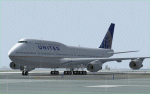
This is a repaint in one of the new "United" liverie's for the PAYWARE SMS Overland 747-400W model. This is a TEXTURES ONLY file so the SMS Overland aircraft will be required. The textures have been thoroughly tested in FS9 (FS2004) only. Will they work in FSX? "I don't know so trying them in FSX is done at your discretion. This version of the United livery is complete with customized alpha channels covering the fuselage (complete) and wings giving the plane a crisp, clean new look. All animations are as per the SMS model along with the various shadowing for the plane. This, I believe (and I could be wrong here and possible am :) ) is a very accurate rendition of one of the new United liveries for a very nice (affordable) payware model - if you don't have it, it is a worth looking at, especially if you are not interested in reading a 500 page manual before you can fly but want a MUCH better model than the default one. All Distribution, Installation and contact Details for me can be found in the SMS TC Read Me File enclosed. Enjoy her and happy, safe flying to all whether you down this file or not :)
| Filename: | United_PostCO_Merge_Boeing_747400.zip |
| License: | Freeware |
| Added: | 4th March 2012, 02:31:24 |
| Downloads: | 537 |
| Author: | Tony Cannon and SMS Overland |
| Size: | 5.08 MB |
| Category: Flight Simulator 2004 - Miscellaneous Files | |
| Airline Inventory |
|
File Description:
Not long ago I embarked on a project to streamline my flight simulator's AI setup. I knew I had too many aircraft texture sets that I was not using, too many unnecessary night texture files, installation of defunct airlines, and the like. So, I put together a spreadsheet showing my AI system with all the airlines and additional pieces such as vehicles and ships. This has been a very large and time-consuming project as my AI system has more than 7,000 texture sets, more than 2,200 airline folders, and other assorted AI components. Inside you'll find an Excel spreadsheet with all my airlines (more than 2,200) listed, Birds, Blimp, Corporate Aircraft, Defunct Airlines, Douglas DC-3, Float Planes, Government Aircraft, Helicopters, Medical Aircraft, Military Aircraft, Personal Registration Aircraft, Ships, and Vehicles - all associated with the FS AI system. In addition, I've included the spreadsheet's source text files for those that do not have Microsoft Excel. NOTE: You can download an MS Excel spreadsheet viewer (freeware) from the Microsoft site. Because of copyright restrictions and the size of my AI system, I have not provided links to specific files. However, I think you'll find the data very useful. See the readme file for a list of possible sources and contact information. Frank Bass
| Filename: | Airline_Inventory.zip |
| License: | Freeware |
| Added: | 6th December 2005, 17:45:39 |
| Downloads: | 1,274 |
| Author: | Frank Bass |
| Size: | 229.85 KB |
| Category: Flight Simulator 2004 - Utilities | |
| EvolveAI models XML BaseData files |
|
File Description:
Over the past weeks the guys from EvolveAI have released some very well done models. Their policy is to release the models and also a bunch of repaints made by their "official" top notch painter team.
The latest model, the Airbus A320-100 and -200, comes not with a bunch but rather with a whole truckload of repaints. Be ready to spent some time installing them :)
If you want to install all these files in a convenient manner, I suggest to use Claude Lacey's excellent Texture Manager. You'll get every single texture installed in a few mouse clics.
This file contains all the XML Basedata files needed to make the Manager recognize EvolveAI's models
Simply unzip the content in the Manager's BaseData folder, start the Texture Manager and have fun installing all the brand new textures.
XML files for following models:
McDonnell Douglas DC10-10
McDonnell Douglas DC10-15
McDonnell Douglas DC10-30B
McDonnell Douglas DC10-30C
McDonnell Douglas DC10-40
Airbus A321 CFM
Airbus A321 IAE
Embraer ERJ140
Embraer ERJ145 (extended_apu & short_apu)
Embraer ERJ145XR (extended_apu & short_apu)
Airbus A320-100
Airbus A320-200 CFM
Airbus A320-200 IAE (Normal, Double Boggey & Satcomm)
Credits:
EvolveAI (http://www.evolveai.com/content/aircraft.html)
Texture Manager by Claude Lacey (http://www.projectai.com/libraries/zipview.php?fileid=8174)
| Filename: | EvolveAI_models_XML_BaseData_files.zip |
| License: | Freeware |
| Added: | 17th March 2006, 04:12:36 |
| Downloads: | 1,437 |
| Author: | Francois Massin |
| Size: | 8 KB |
| Category: Flight Simulator 2004 - AFCAD Files | |
| ***AFCAD SMOOTH for Major Airports! Vienna Schwechat ( LOWW / VIE )*** |
|
File Description:
AFCAD SMOOTH is a normal AFCAD File for Major Airports such as Frankfurt, London LHR
or Paris CDG but all the taxiways have been totally reworked in order to get the most smoothest
AI Traffic on ground you will ever have. To achive this all the new created taxiways have nothing
in common with the original one for an airport. The new taxiways have been created
in a way to allow the smoothest traffic on ground, without traffic jam, conflict alerts
and also without planes staying almost 5 minutes at one point due to heavy traffic and finnaly
disappear. All this has been resolved.
In addition to this the parking positions have been created in a very very orderly way
with as much positions as possible. The gates are almost the same as in reality only with minor changes.
I also added missing ILS to airports like LIMC (RWY 17R) This File is only recommended for virtual pilots
who can call a huge amount of AI Traffic their own and who prefer smooth traffic instead an accurate taxiway system
compared to the real airports one.
In addition I recommend you AI Seperation (available at avsim), one of the best freeware AI Traffic
Management Tools for traffic on ground and in the air as well.
| Filename: | AFCAD_SMOOTH_for_Major_Airports_Vienna_Schwechat__.zip |
| License: | Freeware |
| Added: | 2nd July 2008, 15:33:25 |
| Downloads: | 2,181 |
| Author: | Dave Sheffield |
| Size: | 11.39 KB |
| Category: Flight Simulator 2004 - AFCAD Files | |
| AFCAD SMOOTH for Major Airports! Frankfurt Rhein Main ( EDDF / FRA ) |
|
File Description:
AFCAD SMOOTH is a normal AFCAD File for Major Airports such as Frankfurt, London LHR or Paris CDG but all the taxiways have been totally
reworked in order to get the most smoothest AI Traffic on ground you will ever have. To achive this all the new created taxiways
have nothing in common with the original one for an airport. The new taxiways have been created in a way to allow the smoothest traffic
on ground, without traffic jam, conflict alerts and also without planes staying almost 5 minutes at one point due to heavy traffic
and finnaly disappear.
All this has been resolved. In addition to this the parking positions have been created in a very very orderly way with as much positions as possible.
The gates are almost the same as in reality only with minor changes. I also added missing ILS to airports like LIMC (RWY 17R)
This File is only recommended for virtual pilots who can call a huge amount of AI Traffic their own and who prefer smooth traffic
instead an accurate taxiway system compared to the real airports one.
In addition I recommend you AI Seperation (available at avsim), one of the best freeware AI Traffic Management Tools for traffic on ground and in the air as well.
| Filename: | AFCAD_SMOOTH_for_Major_Airports_Frankfurt_Rhein_Ma.zip |
| License: | Freeware |
| Added: | 16th May 2008, 11:26:47 |
| Downloads: | 1,766 |
| Author: | Dave Sheffield |
| Size: | 19.05 KB |
| Category: Flight Simulator 2004 - Aircraft Repaints, Textures and Modifications | |
| Los Angeles Angeles of Anaheim Edition Beechcraft Twin Bonanza |
|
File Description:
Simmers,and Baseball fans. This is my 5th repaint of my in progress MLB collection.All repaints are of "Eric Dantes" Beachcraft Twin Bonanza. All MLB teams will be represented. These repaints are not layered so each one has to be redrawn in its offical colors.All repaints will have two liveries,one with team logos and one without logos. All MLB team names were put in two hats, American League and National League they are drawn one from each hat at random.The next repaint will be the New York Mets.Look for it soon. :)I hope you have as much fun collecting all 30 liveries as I will have painting them! This file also includes a new folder DXT3 Format. For those of you that require friendlier frame rates just replace the 32 bit 888-8 extended bitmap textures with the DXT3 textures in the DXT3 Format folder.Backup the 32 bit 888-8 extended bitmap textures, the just let the DXT3 files overwrite. This file includes the Texture.Angeles"(Los Angeles Angeles of Anaheim Edition)",Texture.Anaheim,"(The Anaheim Edition)NO..LOGOS,Panel.Angeles and Panel.Anaheim folders. The following additional file is required.-------twinstar__twin__bonanza_v2.zip---------- This file can be downloaded @ http://www.avsim.com/ Again I thank each of you for your downloads.
| Filename: | Los_Angeles_Angeles_of_Anaheim_Edition_Beechcraft_.zip |
| License: | Freeware |
| Added: | 3rd August 2008, 19:21:36 |
| Downloads: | 239 |
| Author: | Chris Tuinstra |
| Size: | 7.41 MB |
| Category: Flight Simulator 2004 - AI Aircraft | |
| Boeing C-97 Stratofreighter |
|
File Description:
Boeing C-97 Stratofreighter for classic AI Traffic. Derived from the B-29 bomber of WWII, the C-97 served for nearly thirty years as a military/civillian transport, aerial refueler, electronic warfare, and reconnaissance aircraft; with over 900 produced of all types for military use. This model set from Dee Waldron pays homage to the operational life of this important aircraft of military history, and allows you to add it into your classic AI traffic world. This package has two main aircraft, the C-97 and the KC-97. Between them, there are a total of eight models and fourteen texture sets, representing all of the versions of this aircraft I could research. Dee did the original KC-97G/L models, and I added my limited FSDS talent to make the rest. Special thanks to Dee for allowing me to utilize his models for this project, and equal thanks to Tom Gibson of California Classic for giving them to me again when I accidentally deleted them; and for a lot of advice from both of these giants of the hobby. This is a LOD6 model, for FPS economy. Base model and original textures by Dee Waldron; model tweaks, Photoshop paint kit and all included texture repaints by Michael Pearson.
| Filename: | Boeing_C97_Stratofreighter.zip |
| License: | Freeware |
| Added: | 23rd August 2008, 09:49:28 |
| Downloads: | 1,472 |
| Author: | Dee Waldron, Michael Pearson |
| Size: | 4.44 MB |


© 2001-2026 AVSIM Online
All Rights Reserved
Privacy Policy |