
Where Flight Simulation Enthusiasts Gather from Around the World!
AVSIM Library - Search Results

| Category: Flight Simulator 2004 - Original Aircraft | |
| Grumman F7F-3 RTWR Version |

|
Images related to this file:
File Description:
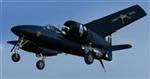
Functional VC, wingfold, tailhook; Accurate Flight Model by Tom Falley. SOH Support Forum and contact info in documentation. Tested in FSX as a portover. FSX specific FM.
If you downloaded an earlier version of this aircraft from SOH, note there are only 3 changes to this version:
1) Model updated with specular lighting
2) ST_D18 gauge added
3) Limits placed on Flap Deployment speeds
You should use this version for RTWR participation.
| Filename: | Grumman_F7F3_RTWR_Version.zip |
| License: | Freeware, limited distribution |
| Added: | 19th January 2011, 08:22:09 |
| Downloads: | 3,551 |
| Author: | Milton Shupe, Tom Falley, Paul Beaudoin, Richard Murray, Scott Thomas, Mike Wagner, Mike Zola, Franz Lowz, Gary Jones |
| Size: | 58.9 MB |
| Category: Flight Simulator 2004 - Miscellaneous Files | |
| Secondary Monitor Usage |
|
File Description:
This is hopefully a trick for one PC with dual monitors to display GPS, radio stack, throttle quads etc on a secondary monitor while flying in your favorite mode on the primary monitor. Tested on Intel 2gig, 1gig mem, Geforce4 MMX 64meg PCI and GeForce4 MMX 64meg AGP. Works on all my 69 aircraft and you can view as much as you can cram on one monitor. Hope it's helpful to someone. TRY at YOUR OWN RISK!
| Filename: | Secondary_Monitor_Usage.zip |
| License: | Freeware |
| Added: | 27th August 2006, 05:08:16 |
| Downloads: | 1,466 |
| Author: | Tim W Durham |
| Size: | 649.82 KB |
| Category: Flight Simulator X - Miscellaneous Files | |
| Wing Views for Boeing 767-300ER |
|
File Description:
REQUIRES Project Opensky Boeing 767-300ER. This file includes 5 new camera views for the Project Opensky - Boeing 767-300ER freeware imported aircraft that adds passenger window views and wheel views. The window views are in front and behind the wing. Note that since each aircraft is very different, this configuration will work as described for the exact model listed. It may not properly display in the correct aircraft location if installed on a different model.
| Filename: | Wing_Views_for_Boeing_767300ER.zip |
| License: | Freeware |
| Added: | 26th November 2006, 17:09:01 |
| Downloads: | 1,028 |
| Author: | Rob Morgan |
| Size: | 189.17 KB |
| Category: Flight Simulator X - Miscellaneous Files | |
| Plan-G data files for New Zealand South Island (NZSI) |
|
File Description:
Plan-G data files for FSX payware Orbx/New Zealand South Island (NZSI).
These PlanG datas display spots of all objects which are provided with the above mentioned software (Points of interest like unlisted airfields, dams, windfarms, lighthouses, huts, etc.) and which are not inserted automatically into PlanG during database re-built. So pick the datas you like to see on your PlanG map and import them into PlanG. For further instructions see the included "readme".
| Filename: | PlanG_data_files_for_New_Zealand_South_Island_NZSI.zip |
| License: | Freeware |
| Added: | 25th March 2012, 21:23:53 |
| Downloads: | 306 |
| Author: | Harald Klose, Dieter Linde |
| Size: | 19.68 KB |
| Category: Flight Simulator X - Aircraft Repaints, Textures and Modifications | |
| B-17G Flying Fortress "Fuddy Duddy" |
|
Images related to this file:
File Description:
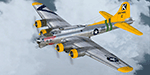
This repaint is for the A2A Wings of Power II B-17G Flying Fortress. Representing "Fuddy Duddy", which is currently on display at Lyon Air Museum, Santa Ana, CA.
To keep the definition of some graphics, I felt it necessary to raise a few textures to 4096. Feel free to lower them if you must.
| Filename: | B17G_Flying_Fortress_Fuddy_Duddy.zip |
| License: | Freeware |
| Added: | 19th September 2013, 21:40:13 |
| Downloads: | 344 |
| Author: | Steve Landau |
| Size: | 31.99 MB |
| Category: Flight Simulator 2004 - Miscellaneous Files | |
| Gmax Photo Polygon Tutorial |
|
File Description:
This tutorial explains how to take raw satellite or aerial imagery, break it up in to FS9/FSX compatible tiles, then create an accurately sized plane in Gmax to display the tiles on. The Tutorial consists of an mpeg4 file.
The final product can be exported as a ground polygon or used as reference.
| Filename: | Gmax_Photo_Polygon_Tutorial.zip |
| License: | Freeware |
| Added: | 12th May 2009, 10:16:11 |
| Downloads: | 547 |
| Author: | Kobbe Farwick |
| Size: | 28.51 MB |
| Category: Flight Simulator 2002 - Panels | |
| Minimum VFR Panel For F4U1A Corsair |
|
File Description:
The Minimum VFR Panel uses FS2002 gauges to
display F4u1a Corsair flight instrumentation
(magnetic compass, airspeed indicator, turn
coordinator, altimeter) for better visibility
during all flight modes. To be used with the
F4u1a only,the Minimum VFR Panel is activated
by the standard "W" keyboard command. The
default minipanel is available for all other
aircraft.
| Filename: | Minimum_VFR_Panel_For_F4U1A_Corsair.zip |
| License: | Freeware |
| Added: | 27th June 2003, 05:31:46 |
| Downloads: | 158 |
| Author: | Gregory F. Gilliam |
| Size: | 51.44 KB |
| Category: Flight Simulator 2002 - Panels | |
| Minimum VFR Panel for Cessna 172 |
|
File Description:
The Minimum VFR Panel uses FS2002 gauges to
display Cessna C172 flight instrumentation
(magnetic compass, airspeed indicator, turn
coordinator, altimeter) for better visibility
during all flight modes. To be used with the
C172 only, the Minimum VFR Panel is activated
by the standard "W" keyboard command. The
default minipanel is available for all other
aircraft.
| Filename: | Minimum_VFR_Panel_for_Cessna_172.zip |
| License: | Freeware |
| Added: | 24th June 2003, 16:59:26 |
| Downloads: | 209 |
| Author: | Gregory F. Gilliam |
| Size: | 3.84 KB |
| Category: Flight Simulator 2002 - Panels | |
| Minimum VFR Panel for Sopwith Camel |
|
File Description:
The Minimum VFR Panel uses FS2002 gauges to
display Sopwith Camel flight instrumentation
(magnetic compass, airspeed indicator,
altimeter) for better visibility during all
flight modes. To be used with the Sopwith
Camel only, the Minimum VFR Panel is
activated by the standard "W" keyboard
command. The default minipanel is available
for all other aircraft.
| Filename: | Minimum_VFR_Panel_for_Sopwith_Camel.zip |
| License: | Freeware |
| Added: | 24th June 2003, 17:00:33 |
| Downloads: | 143 |
| Author: | Gregory F. Gilliam |
| Size: | 2.97 KB |
| Category: Flight Simulator 2002 - Panels | |
| Minimum VFR Panel for Bell 206B |
|
File Description:
The Minimum VFR Panel uses FS2002 gauges to
display Bell 206B flight instrumentation
(compass, airspeed, turn coordinator, Power,
altimeter) for better visibility during all
flight modes. To be used with the B206 only,
the Minimum VFR Panel is activated by the
standard "W" keyboard command. The default
minipanel is available for all other
aircraft.
| Filename: | Minimum_VFR_Panel_for_Bell_206B.zip |
| License: | Freeware |
| Added: | 24th June 2003, 17:00:58 |
| Downloads: | 191 |
| Author: | Gregory F. Gilliam |
| Size: | 3.86 KB |


© 2001-2026 AVSIM Online
All Rights Reserved
Privacy Policy |