
Where Flight Simulation Enthusiasts Gather from Around the World!
AVSIM Library - Search Results

| Category: Flight Simulator 2002 - Sounds | |
| L-188 Sound Update For Cielo And Chris Buff Electras |

|
File Description:
These files are updated sound files for the Electras uploaded by Bill Schulz of the Cielo Company, and for the Chris Buff Gmax L-188's. These sounds were digitally sampled from Reeve Aleutian Airways Electras prior to their demise. I believe these FS2000 style sounds are better than the FS2002 versions, so I've left them intact so as not to have strong "echo" sounds. For real-world Electra operations visit www.flyelectra.com. Courtesy of the Cielo Company.
| Filename: | L188_Sound_Update_For_Cielo_And_Chris_Buff_Electra.zip |
| License: | Freeware, limited distribution |
| Added: | 30th June 2003, 02:11:03 |
| Downloads: | 1,857 |
| Author: | Bill Schulz |
| Size: | 2.34 MB |
| Category: Flight Simulator 2002 - Panels | |
| New GPS Frame Colors For Default Boeing 737 - 747 - 777 |
|
File Description:
For FS2002 =>
New GPS frame colors for default B737 - B747 - B777 panels. It also suits other panels better than the stock grey. Colours will change with backlight during night time. Menu buttons on the bottom of the frame. New Version.
| Filename: | New_GPS_Frame_Colors_For_Default_Boeing_737__747__.zip |
| License: | Freeware |
| Added: | 4th June 2003, 15:48:59 |
| Downloads: | 913 |
| Author: | Peter Mess |
| Size: | 509.63 KB |
| Category: Flight Simulator 2002 - Flight Plans | |
| Concorde flightplans In LAT/LONG Format For INS System Users |
|
File Description:
This file is an update to my earlier file 'ins_conc_flts.zip'. They are aimed at Concorde simmers who navigate using an INS system. I have incorporated the following improvements over my first release:
A few small route errors ironed out.
A new arrival as currently used for the EGLL-KJFK route.
Some more info about flying Concorde as per real-life procedures.
Distances between waypoints included in most plans so it will be easy to check that the coordinates have been entered correctly, and a clearer layout to the coordinates themselves.
A bit more info in the notes about each flight such as: fuel load required, geographical routing description where appropriate, expected approximate flight time, a guide to when to commence deceleration and subsequent descent, things to just make them generally more 'user friendly'.
| Filename: | Concorde_flightplans_In_LATLONG_Format_For_INS_System_Users.zip |
| License: | Freeware |
| Added: | 11th July 2003, 14:02:45 |
| Downloads: | 1,534 |
| Author: | Geoff Harrison |
| Size: | 18.31 KB |
| Category: Flight Simulator 2002 - AFCAD Files | |
| Afcad Replacement For Default KADW, KADW (Andrews AFB/NAF), USA |
|
File Description:
Afcad replacement for default KADW, KADW (Andrews AFB/NAF), USA
| Filename: | Afcad_Replacement_For_Default_KADW__KADW_Andrews_A.zip |
| License: | Freeware |
| Added: | 13th July 2003, 16:52:43 |
| Downloads: | 782 |
| Author: | John Brace |
| Size: | 50.62 KB |
| Category: Flight Simulator 2002 - AFCAD Files | |
| Afcad Replacement For Default KMCF, Macdill AFB, Tampa, Florida, USA. |
|
File Description:
Afcad replacement for default KMCF, Macdill AFB, Tampa, Florida, USA.
| Filename: | Afcad_Replacement_For_Default_KMCF_Macdill_AFB_Tam.zip |
| License: | Freeware |
| Added: | 14th July 2003, 23:15:54 |
| Downloads: | 613 |
| Author: | John Brace |
| Size: | 172.56 KB |
| Category: Flight Simulator 2002 - Scenery | |
| FSNAT update for WILCO Airport 2002 vol1 - LFPG dynamic scenery |
|
File Description:
Requires Airport 2002 vol. 1, and FSNAT1.exe available from www.wilcopub.com.
Enhances your LFPG scenery from wilco addon, with many dynamic vehicules : interactive follow me cars according to your landing runway, moving gate B20, catering truck, mobile ramp, Crew bus will come toward your parked aircraft, even fire trucks can be alerted if you land on the emergency landing runway 09L/27R !
Animated vehicules through the airport : buses, transporters, cars and trucks.
Real ATC Ground Control records are played by FSNAT system.
Comes with english PDF manual (13pages), map and quick guide (text file).
3 AFCAD files provided to activate 3 runways as in real life, +150 accurate gates according to halls and terminals. (requires Lee Swordy's AFCAD freeware).
| Filename: | FSNAT_update_for_WILCO_Airport_2002_vol1__LFPG_dyn.zip |
| License: | Freeware |
| Added: | 27th July 2003, 14:32:07 |
| Downloads: | 1,578 |
| Author: | Sebastien Belluteau |
| Size: | 2.79 MB |
| Category: Flight Simulator 2002 - AFCAD Files | |
| AFCAD Overlay Files for Lago Schiphol and Fifth Runway Polderbaan |
|
File Description:
Two AFCAD overlay files for Schiphol Amsterdam. Schengen (European) departures from 36C-18C and landing at runway 6-24. Non Schengen departures from 36L-18R and landing at 36R-18L.
| Filename: | AFCAD_Overlay_Files_for_Lago_Schiphol_and_Fifth_Ru.zip |
| License: | Freeware |
| Added: | 1st September 2003, 23:23:55 |
| Downloads: | 761 |
| Author: | Jeroen van Schoneveld |
| Size: | 2.4 MB |
| Category: Flight Simulator X - Aircraft Repaints, Textures and Modifications | |
| JASDF F-15DJ Repaint Texture Package for Milviz F-15E |
|
Images related to this file:
File Description:
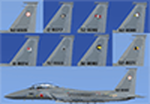
This a "package" containing EIGHT repaint textures for JASDF F-15 squadrons 23, 201, 203, 204, 303, 304, 305 and 306. Instead of posting these repaints individually, I decided to put them all together in one package to make it easier and more convenient for everyone to find and download.
| Filename: | JASDF_F15DJ_Repaint_Texture_Package_for_Milviz_F15.zip |
| License: | Freeware |
| Added: | 30th April 2023, 15:28:29 |
| Downloads: | 47 |
| Author: | Daniel Gregory |
| Size: | 111.17 MB |
| Category: Microsoft Flight Simulator (2020) - Utilities | |
| FSTramp v8.84 for MSFS, FSX(-SE), Prepart3D, X-Plane (Win) |
|
Images related to this file:
File Description:
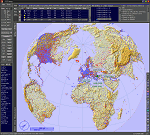
This add-on is an EXE application for Microsoft Flight Simulator and a DLL module for all other simulators. The DLL variant is activated via hotkeys or the simulator menu add-ons or plugins. Window size and layout are configurable for one or more screens. To avoid dazzling, the brightness of the entire application is customizable. Primarily it is a flight management system (FMS) with automatic control from start to landing. This also includes the observance of SID, STAR and Approaches in unmatched quality. The flight plan required for the FMS can be created manually or automatically, interactive changes and additions during the flight are possible. The basis of the flight planner is the 3D world map and the search function for airfields and navigation aids. The FMS by FSTramp relies on the autopilot of the aircraft. In case of incompatibility, the autopilot integrated in FSTramp will be used. This allows FSTramp to control almost all aircraft from airport to airport. The altitude profile of the flight plan, SID, STAR and approach is taken into account. This means that FSTramp extends the often incomplete airport procedures to and from the runway so that they can be flown completely automatically. During the fully automatic flight, the autopilot values ​​for HDG, ALT, VSPEED, SPD and MACH can be manually overridden. This is e.g. useful for being able to react to the instructions of the tower in the final approach without completely stopping the automatic flight. The rotating or north pointing 3D world map with numeric display of the terrain elevation under the mouse arrow is another special feature. It does not need an internet but is synthesized from included height profiles of the globe. The Data of continents, mountains and rivers are included in the setup. Airspaces, Airways, Waypoints and SID, STAR and Approaches are also included in the setup, but can be updated by installing additional AIRAC cycles. Airfields and navigation stations are taken from the simulator. NVIDIA: If the frame rate of the simulator drops sharply about 20 seconds after FSTramp's visibility, the power management of the GPU slows down prematurely. In the NVIDIA Control Panel, change the 'Manage 3D settings - Power management mode' option to 'Adaptive'.
| Filename: | FSTramp_v884_for_MSFS_FSXSE_Prepart3D_XPlane_Win.zip |
| License: | Shareware, time limited |
| Added: | 7th July 2023, 04:35:12 |
| Downloads: | 111 |
| Author: | Helge Schroeder |
| Size: | 358.21 MB |
| Category: Flight Simulator X - Utilities | |
| FSTramp v8.84 for MSFS, FSX(-SE), Prepart3D, X-Plane (Win) |
|
Images related to this file:
File Description:
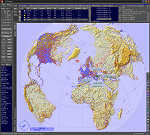
This add-on is an EXE application for Microsoft Flight Simulator and a DLL module for all other simulators. The DLL variant is activated via hotkeys or the simulator menu add-ons or plugins. Window size and layout are configurable for one or more screens. To avoid dazzling, the brightness of the entire application is customizable. Primarily it is a flight management system (FMS) with automatic control from start to landing. This also includes the observance of SID, STAR and Approaches in unmatched quality. The flight plan required for the FMS can be created manually or automatically, interactive changes and additions during the flight are possible. The basis of the flight planner is the 3D world map and the search function for airfields and navigation aids. The FMS by FSTramp relies on the autopilot of the aircraft. In case of incompatibility, the autopilot integrated in FSTramp will be used. This allows FSTramp to control almost all aircraft from airport to airport. The altitude profile of the flight plan, SID, STAR and approach is taken into account. This means that FSTramp extends the often incomplete airport procedures to and from the runway so that they can be flown completely automatically. During the fully automatic flight, the autopilot values ​​for HDG, ALT, VSPEED, SPD and MACH can be manually overridden. This is e.g. useful for being able to react to the instructions of the tower in the final approach without completely stopping the automatic flight. The rotating or north pointing 3D world map with numeric display of the terrain elevation under the mouse arrow is another special feature. It does not need an internet but is synthesized from included height profiles of the globe. The Data of continents, mountains and rivers are included in the setup. Airspaces, Airways, Waypoints and SID, STAR and Approaches are also included in the setup, but can be updated by installing additional AIRAC cycles. Airfields and navigation stations are taken from the simulator. NVIDIA: If the frame rate of the simulator drops sharply about 20 seconds after FSTramp's visibility, the power management of the GPU slows down prematurely. In the NVIDIA Control Panel, change the 'Manage 3D settings - Power management mode' option to 'Adaptive'.
| Filename: | FSTramp_v884_for_MSFS_FSXSE_Prepart3D_XPlane_Win.zip |
| License: | Shareware, time limited |
| Added: | 7th July 2023, 04:35:43 |
| Downloads: | 130 |
| Author: | Helge Schroeder |
| Size: | 358.21 MB |


© 2001-2026 AVSIM Online
All Rights Reserved
Privacy Policy |