
Where Flight Simulation Enthusiasts Gather from Around the World!
AVSIM Library - Search Results

| Category: Flight Simulator 2004 - Aircraft Repaints, Textures and Modifications | |
| BAe-146-300, SWISS HB-IYS |

|
Images related to this file:
File Description:

Repaint of the SWISS Avroliner HB-IYS (Shopping Paradise Airport Zurich) for the EW PRO BAe-146-300.
Not a perfect repaint (due to limitations and textures), but a nice paint scheme. The aircraft flies
shorthauls from ZRH. Payware EW Pro BAe is required.
| Filename: | BAe146300_SWISS_HBIYS.zip |
| License: | Freeware |
| Added: | 16th May 2010, 23:42:44 |
| Downloads: | 239 |
| Author: | Pascal K������¼ffer |
| Size: | 4.22 MB |
| Category: Flight Simulator X - Aircraft Repaints, Textures and Modifications | |
| FSX/P3Dv3 Alisarda F-27-200 1973 |
|
Images related to this file:
File Description:
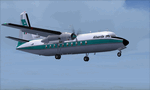
This is a repaint of the F-27-200 in Alisarda colors. The freeware FSX Native with VC F-27-200 by Bjorn Kesten is needed for this repaint. It was converted from Mike Stone's and Tom Gibson's models. The textures are 32bit DDS. It was tested on FSX-SE, but should work on FSX & P3Dv3.
Alisarda was an Italian airline based at Olbia, in Sardinia. It was established on March 28, 1963 as an air taxi company registered under the official name Linee Aerea della Sardegna SpA. Their first aircaft were two Beech 18s and Alisarda only provided a charter service. However, one year later,in 1964, they opened their fist scheduled service from Olbia to Rome. 1965 proved to be a pivotal year for the carrier. A reorganization was carried out whereby an agreement was concluded with Algenova for technical and commercial support. New investors were found, and in February 1965 two new Nord 262s were ordered from Nord Aviation. Due to this greater transport capacity, the transport figures increased strongly and in 1966 a total of 5,640 passengers were transported. The passenger loads increased dramatically in 1968 and 1969, so, Alisarda purchased three F-27 Friendships to take up the extra loads. The airline entered the 1970s with strength, and in January 1974 they received their first pure jets with the purchase of two DC-9-14s from Delta Airlines, I-SARJ and the I-SARV. 1977 saw them purchase two DC-9-32s, followed by three DC-9-50s in 1983, which replaced the aging DC-9-14s. In 1984 they received two new Maddog 82s. Their route network by 1989 consisted of domestic flights to many cities in Italy, plus international routes to Zurich, Geneva, Munich, Frankfurt, Paris, and Nice. In 1991 Alisarda merged with the Spanish carrier Universair, as the shareholders wanted to become a bigger players on the European market. The new carrier was named Meridiana. Thus, the name Alisarda ceased to exist.
| Filename: | FSXP3Dv3_Alisarda_F27200_1973.zip |
| License: | Freeware |
| Added: | 21st January 2020, 17:49:09 |
| Downloads: | 82 |
| Author: | Ted Giana |
| Size: | 4.79 MB |
| Category: Flight Simulator 2004 - Miscellaneous Files | |
| Shoot 1.6.3' Voice Contro File |
|
File Description:
"Shoot 1.6.3" voice control file for use with FS2004. You will need to download the main "freeware" program from http://clans.gameclubcentral.com/shoot/downloads.php which will allow you to make use of this control file for FS2004. The program is brilliant and allows you to control FS2004 by voice and it's totally free! All I have done is made a config file that works very well with FS2004.
It will allow you to; speak to ATC and instead of fighting with the keyboard or yoke/stick so you can fly more like a real pilot and keep your hands on the yoke more of the time. For example a commercial jet pilot calls out to the co-pilot to get the gear up and simply says "gear up". That's just what you will have to do, just like the real thing; the gear will go up when you make the call. When FS2004 ATC controller tells you to reply you can just say "roger" or "hello" or "ATC" or "air traffic" etc, etc, and the ATC window will pop up. Then all you have to do is call out the command instead of pushing buttons that real pilots don't use. Does a real pilot push a button to look out of the window or use a "mouse" to engage the autopilot?
Similarly you can call out "autopilot engage" or "autopilot master" or "autopilot disengage" and that's just what happens; the autopilot comes on/off. The best part though is when you try looking around the cockpit. If you want to move your head up you just say "move up" and presto you are higher up in your seat. You can move to the left or
Right, back or forward. You can say "zoom in" and that's what happens. You can say "reset zoom" and so on. You can say "next view" and then the view may be outside or another panel. Alternatively, you can say "panel 2" and the radio panel will come up in the 737 so you can tune the radios. If you have FS navigator installed all you have to
do is say "navigator" and the map comes up, and then say navigator again and off it goes. Just for once it is easy and possible to make full use of FS2004. Using this program has afforded me the opportunity of making better use of the views available, (and I have CH products yoke so if was never hard) but now it's even easier.
All the panels can be activated in this way, and control of the autopilot and control of FS2004. It's probably the best kept secret. I've made a file so we can all share in this freebie of a program. I've included a readme and instructions of how to make the best use of the program.
Config file for FS2004 only is provided.
| Filename: | Shoot_163_Voice_Contro_File.zip |
| License: | Freeware |
| Added: | 7th January 2004, 19:52:26 |
| Downloads: | 8,796 |
| Author: | Peter Wilding |
| Size: | 21.83 KB |


© 2001-2026 AVSIM Online
All Rights Reserved
Privacy Policy |