
Where Flight Simulation Enthusiasts Gather from Around the World!
AVSIM Library - Search Results

| Category: Prepar3D V1-4 - Aircraft Repaints, Textures and Modifications | |
| Thai Airways 777-200/200ER Fleet Pack |

|
File Description:
Thai Airways Fleet Pack for PMDG 777-200ER. PMDG 777 Base Pack and PMDG 777-200ER Expansion are required in order to use this livery. Includes HS-TJA-HS-TJH, HS-TJR-HS-TJW. SELCAL is corrected for each aircraft. Works in P3Dv4 and P3Dv5.
| Filename: | Thai_Airways_777200200ER_Fleet_Pack.zip |
| License: | Freeware |
| Added: | 5th March 2021, 17:19:15 |
| Downloads: | 414 |
| Author: | Ryuma Maeda |
| Size: | 163.7 MB |
| Category: Flight Simulator X - Gauges | |
| AP_MultiFuel_Gauges for FIP |
|
Images related to this file:
File Description:
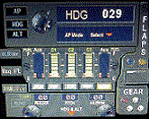
This set of 3 gauges is for use in the Saitek FIP and is an extension to my FIP gauge. That set of 3 gauges was designed to complement the Saitek AP/Multi panel and primarily showed the selected AP Altitude and Vert Spd whilst the Saitek AP/multi panel was displaying HDG. The second main part of those gauges were the Fuel Level displays, each gauge displaying a different combination of fuel tanks to suit the aircraft being flown and thus offered functionality for all types of aircraft.
This set of 3 gauges is designed for the same purpose but now encompasses a working AP that allows you to select HDG, ALT and VS values and activate the HDG and ALT mode (and AP master switch) to enable auto-pilot flight (for those who have a FIP but not an AP/multi panel).
For those who have an AP/multi panel, it gives a backup AP in your build/rig (although it all works off the same FS telemetry, I have found that when the AP/multi-panel freezes, especially the 'Alt' button, then this FIP gauge can de-activate it. The combinations displayed are those that suit my choice of aircraft, however it is easy to re-configure gauge Elements (fuel tank names) and artwork (fuel gauge titles) to suit the combination you prefer.
These gauges also retain the gear, flaps and light indicators, auto rudder on/off button plus rudder and aileron trim capability that were in the previous gauges. An additional feature is the battery switch will now turn off the AP display and fuel levels.
The artwork in these gauges has also been upgraded a bit and a template artwork is included to assist in customising.
| Filename: | AP_MultiFuel_Gauges_for_FIP.zip |
| License: | Freeware |
| Added: | 20th October 2014, 16:00:33 |
| Downloads: | 265 |
| Author: | Robert Budd |
| Size: | 764.26 KB |
| Category: Flight Simulator X - Gauges | |
| FIP - 5 Gauge Display - 2 Engine |
|
Images related to this file:
File Description:

This set of gauges is for use in the Saitek FIP and has been developed specifically for the Baron 58 and variants but should work with other twin prop aircraft. There are 3 options-
option 1. a pair of gauges for displaying on 2 FIPs (layout is similar to the fsx BB58 layout)
option 2. One gauge for displaying only on 1 FIP (left and right eng needle on each of the 5 main instruments )
option 3. a pair of gauges for displaying on 2 FIPs with larger diameter gauges and more user interaction than in 1. above.
1,2, & 3 all have the 5 main engine instrumentation ( RPM, Manifild Pressure, Fuel Flow rate, Oil Temp and Pressure, CHT/EGT Temp.) Additional features are added .e.g Marker Beacon indicators plus indicator of left / right fuel tank selected for each engine, NAV 1 & NAV 2 with DME data.
Option 1 & 3 also has fuel pump switches, alternator switches, starter buttons, cowl flaps and Amps (total load) gauge, and Battery volts gauge.
Option 3 also has additional avionics data and avionics and battery switch buttons. All this enables the aircraft to be started from cold and shut down to cold. The avionics data is useful if you only have one Saitek radio panel. i.e. dont have to keep clicking / rotating switches all the time. This option also gives user ability to alter NAV 1 standby frequency and swap to active.
With the 2 gauges in option 3 above plus my earlier FIP gauge containing a working Auto pilot and fuel levels / flaps and landing gear indicators (refer "FIP-AP Multi Fuel Gauges") there is everything required (not the primary flight display instruments) for flying a single or twin prop aircraft displayed across either 2 or 3 FIPs.
| Filename: | FIP__5_Gauge_Display__2_Engine.zip |
| License: | Freeware |
| Added: | 30th October 2014, 06:24:58 |
| Downloads: | 250 |
| Author: | Robert Budd |
| Size: | 2.4 MB |
| Category: Prepar3D V1-4 - Scenery | |
| 1M7 – Fulton Airport, Fulton Kentucky (P3D) |
|
Images related to this file:
File Description:
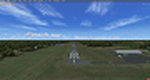
1M7 is a public use, single runway airport located 2 miles NW of Fulton, KY, a small town in Kentucky. It is also the western-most airport in Kentucky. It has a single asphalt runway measuring 4001 x 75 feet. 100LL fuel is available.
| Filename: | 1M7__Fulton_Airport_Fulton_Kentucky_P3D.zip |
| License: | Freeware |
| Added: | 12th December 2017, 23:22:59 |
| Downloads: | 260 |
| Author: | Shannan Landreth |
| Size: | 42.75 MB |
| Category: Prepar3D V1-4 - Scenery | |
| M34 – Kentucky Dam State Park Airport |
|
Images related to this file:
File Description:

M34 is a small publicly owned, single runway airport located 1 mile NW of Gilbertsville, KY, a small town in Western Kentucky. It has a single asphalt runway measuring 4000 x 100 feet. No fuel or other services are available but tiedowns are available.
| Filename: | M34__Kentucky_Dam_State_Park_Airport.zip |
| License: | Freeware |
| Added: | 4th November 2017, 19:29:32 |
| Downloads: | 263 |
| Author: | Shannan Landreth |
| Size: | 77.53 MB |
| Category: Flight Simulator 2004 - Aircraft Repaints, Textures and Modifications | |
| FS2004 Stone Air Stingray Detailed Original |
|
File Description:
This is a textures-only detailing of Mike
Stone's original Stingray paint scheme.
Features include added windows, oil smears,
access pods, fuel fill caps, seams, rivets,
and engine exhaust discoloration. By Vince
Coratello of Studio Kokopelli, with much
respect and gratitude to Mr. Stone.
| Filename: | FS2004_Stone_Air_Stingray_Detailed_Original.zip |
| License: | Freeware |
| Added: | 21st November 2007, 16:10:22 |
| Downloads: | 201 |
| Author: | Mike Stone, Vince Coratello |
| Size: | 1.14 MB |
| Category: Flight Simulator 2004 - Aircraft Repaints, Textures and Modifications | |
| FS2004 Stone Air Stingray Blue and White |
|
File Description:
This is a textures-only repaint of Mike
Stone's amazing Stingray in blue and white
livery. Features include added windows,
access pods, fuel fill caps, seams, rivets,
'Vette rear window, and 'Vette side scallop
on the vertical stabilizers. By Vince
Coratello of Studio Kokopelli.
| Filename: | FS2004_Stone_Air_Stingray_Blue_and_White.zip |
| License: | Freeware |
| Added: | 21st November 2007, 16:09:37 |
| Downloads: | 148 |
| Author: | Vince Coratello |
| Size: | 645.29 KB |
| Category: Flight Simulator 2004 - Aircraft Repaints, Textures and Modifications | |
| FS2004 Stone Air Stingray Red and White |
|
File Description:
This is a textures-only repaint of Mike
Stone's amazing Stingray in red and white
livery. Features include added windows,
access pods, fuel fill caps, seams, rivets,
'Vette rear window, and 'Vette side scallop
on the vertical stabilizers. By Vince
Coratello of Studio Kokopelli.
| Filename: | FS2004_Stone_Air_Stingray_Red_and_White.zip |
| License: | Freeware |
| Added: | 21st November 2007, 16:10:10 |
| Downloads: | 121 |
| Author: | Vince Coratello |
| Size: | 640.39 KB |
| Category: Miscellaneous Files - General Utilities | |
| Operational Flight Plan (Excel) |
|
Images related to this file:
File Description:
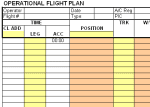
This excel file can be used to create operational flight plans for your sim flights. It includes a navigation log, mass and balance, and fuel calculation. This updated version now also includes automatic calculation of Wind Correction Angle, Ground Speed and Nautical Air Miles.
| Filename: | Operational_Flight_Plan_Excel.zip |
| License: | Freeware |
| Added: | 16th November 2009, 15:01:51 |
| Downloads: | 728 |
| Author: | Michael Arnold |
| Size: | 18.16 KB |
| Category: Orbiter - Spaceships | |
| Stealth Space Shuttle |
|
File Description:
Launch the Stealth Space Shuttle from Cape Canaveral..Once your Stealth Booster runs out of Fuel use the J key to Jetason it...Press the K key to open your Bay doors, and the J key to Jetason your Stealth Satalite..
....Use's Vinka's Spacecraft.DLL (included).
| Filename: | Stealth_Space_Shuttle.zip |
| License: | Freeware |
| Added: | 28th December 2003, 17:41:48 |
| Downloads: | 649 |
| Author: | Kev Shanow |
| Size: | 293.18 KB |


© 2001-2026 AVSIM Online
All Rights Reserved
Privacy Policy |