
Where Flight Simulation Enthusiasts Gather from Around the World!
AVSIM Library - Search Results

| Category: Flight Simulator 2004 - Aircraft Repaints, Textures and Modifications | |
| Cessna 172 (4X-CGI) |

|
File Description:
This is a repaint for Cessna172 of the Simulator.
| Filename: | Cessna_172_4XCGI.zip |
| License: | Freeware |
| Added: | 30th April 2005, 03:50:38 |
| Downloads: | 422 |
| Author: | Moshico Biller |
| Size: | 341.74 KB |
| Category: Flight Simulator 2004 - Aircraft Repaints, Textures and Modifications | |
| USAF PAFB T-41 |
|
File Description:
These textures are for Henry Tomkiewicz's excellent payware C-172 Skyhawk. I have painted
all five of Peterson AFB's T-41's, used by the Aero club for flight training.
Included registrations: N7870N, N7874N, N7879N, N7899N, N7905N.
Very basic flightplans are also included to have the aircraft show up at KCOS.
| Filename: | USAF_PAFB_T41.zip |
| License: | Freeware |
| Added: | 9th April 2006, 04:13:26 |
| Downloads: | 395 |
| Author: | David Strate, Henry Tomkiewicz |
| Size: | 695.71 KB |
| Category: Flight Simulator 2002 - AI Flight Plans | |
| Privatair B757 FP |
|
File Description:
Here is a weekly AI flightplan for Privatair's B757. Since it is a charter plane the flight info isn't 100% realistic because no timetable is available. I used the destinations from airliners.net to build up the plan. Flies around Europe and one time a week he flies to Asia (Singapore, Bombay).
| Filename: | Privatair_B757_FP.zip |
| License: | Freeware |
| Added: | 6th August 2003, 17:19:19 |
| Downloads: | 378 |
| Author: | Arthur Bleij |
| Size: | 1.48 KB |
| Category: Flight Simulator 2004 - AI Aircraft | |
| Fly Whoosh ATR 42 |
|
File Description:
Textures only for the FSP/PAI ATR42 'Fly Whoosh' Reg:SP-KCN
Operated by Polish carrier White Eagle Aviation, This UK start up flies between Dundee (EGPN) Birmingham (EGBB) and Belfast (EGAA)
Paint kit by Tony Fosler. PAI Base model required.
Flight plans by Marc Marijnissen are availble here at Avsim.
| Filename: | Fly_Whoosh_ATR_42.zip |
| License: | Freeware |
| Added: | 26th June 2007, 13:58:22 |
| Downloads: | 934 |
| Author: | Symon Long |
| Size: | 175.22 KB |
| Category: Flight Simulator 2004 - AI Aircraft | |
| Southwest Airlines 1990s fleet |
|
Images related to this file:
File Description:

This file includes all Southwest Airlines textures required for any 1990's era flight plans you use. Depending on the particular year you set up your AI, this file contains textures for Boeing 737-200, Boeing 737-300, Boeing 737-500 and Boeing 737-700 for the FAIB models. Enjoy!!!
| Filename: | Southwest_Airlines_1990s_fleet.zip |
| License: | Freeware |
| Added: | 12th January 2021, 23:10:26 |
| Downloads: | 366 |
| Author: | Eduardo Villanueva |
| Size: | 37.05 MB |
| Category: Microsoft Flight Simulator (2020) - Utilities | |
| FSTramp v8.84 for MSFS, FSX(-SE), Prepart3D, X-Plane (Win) |
|
Images related to this file:
File Description:

This add-on is an EXE application for Microsoft Flight Simulator and a DLL module for all other simulators. The DLL variant is activated via hotkeys or the simulator menu add-ons or plugins. Window size and layout are configurable for one or more screens. To avoid dazzling, the brightness of the entire application is customizable. Primarily it is a flight management system (FMS) with automatic control from start to landing. This also includes the observance of SID, STAR and Approaches in unmatched quality. The flight plan required for the FMS can be created manually or automatically, interactive changes and additions during the flight are possible. The basis of the flight planner is the 3D world map and the search function for airfields and navigation aids. The FMS by FSTramp relies on the autopilot of the aircraft. In case of incompatibility, the autopilot integrated in FSTramp will be used. This allows FSTramp to control almost all aircraft from airport to airport. The altitude profile of the flight plan, SID, STAR and approach is taken into account. This means that FSTramp extends the often incomplete airport procedures to and from the runway so that they can be flown completely automatically. During the fully automatic flight, the autopilot values ​​for HDG, ALT, VSPEED, SPD and MACH can be manually overridden. This is e.g. useful for being able to react to the instructions of the tower in the final approach without completely stopping the automatic flight. The rotating or north pointing 3D world map with numeric display of the terrain elevation under the mouse arrow is another special feature. It does not need an internet but is synthesized from included height profiles of the globe. The Data of continents, mountains and rivers are included in the setup. Airspaces, Airways, Waypoints and SID, STAR and Approaches are also included in the setup, but can be updated by installing additional AIRAC cycles. Airfields and navigation stations are taken from the simulator. NVIDIA: If the frame rate of the simulator drops sharply about 20 seconds after FSTramp's visibility, the power management of the GPU slows down prematurely. In the NVIDIA Control Panel, change the 'Manage 3D settings - Power management mode' option to 'Adaptive'.
| Filename: | FSTramp_v884_for_MSFS_FSXSE_Prepart3D_XPlane_Win.zip |
| License: | Shareware, time limited |
| Added: | 7th July 2023, 04:35:12 |
| Downloads: | 110 |
| Author: | Helge Schroeder |
| Size: | 358.21 MB |
| Category: Flight Simulator X - Utilities | |
| FSTramp v8.84 for MSFS, FSX(-SE), Prepart3D, X-Plane (Win) |
|
Images related to this file:
File Description:
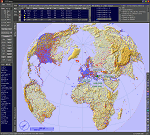
This add-on is an EXE application for Microsoft Flight Simulator and a DLL module for all other simulators. The DLL variant is activated via hotkeys or the simulator menu add-ons or plugins. Window size and layout are configurable for one or more screens. To avoid dazzling, the brightness of the entire application is customizable. Primarily it is a flight management system (FMS) with automatic control from start to landing. This also includes the observance of SID, STAR and Approaches in unmatched quality. The flight plan required for the FMS can be created manually or automatically, interactive changes and additions during the flight are possible. The basis of the flight planner is the 3D world map and the search function for airfields and navigation aids. The FMS by FSTramp relies on the autopilot of the aircraft. In case of incompatibility, the autopilot integrated in FSTramp will be used. This allows FSTramp to control almost all aircraft from airport to airport. The altitude profile of the flight plan, SID, STAR and approach is taken into account. This means that FSTramp extends the often incomplete airport procedures to and from the runway so that they can be flown completely automatically. During the fully automatic flight, the autopilot values ​​for HDG, ALT, VSPEED, SPD and MACH can be manually overridden. This is e.g. useful for being able to react to the instructions of the tower in the final approach without completely stopping the automatic flight. The rotating or north pointing 3D world map with numeric display of the terrain elevation under the mouse arrow is another special feature. It does not need an internet but is synthesized from included height profiles of the globe. The Data of continents, mountains and rivers are included in the setup. Airspaces, Airways, Waypoints and SID, STAR and Approaches are also included in the setup, but can be updated by installing additional AIRAC cycles. Airfields and navigation stations are taken from the simulator. NVIDIA: If the frame rate of the simulator drops sharply about 20 seconds after FSTramp's visibility, the power management of the GPU slows down prematurely. In the NVIDIA Control Panel, change the 'Manage 3D settings - Power management mode' option to 'Adaptive'.
| Filename: | FSTramp_v884_for_MSFS_FSXSE_Prepart3D_XPlane_Win.zip |
| License: | Shareware, time limited |
| Added: | 7th July 2023, 04:35:43 |
| Downloads: | 130 |
| Author: | Helge Schroeder |
| Size: | 358.21 MB |
| Category: Prepar3D V5 - Utilities | |
| FSTramp v8.84 for Prepart3D 2-6, MSFS, FSX(-SE), X-Plane (Win) |
|
Images related to this file:
File Description:
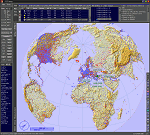
This add-on is an EXE application for Microsoft Flight Simulator and a DLL module for all other simulators. The DLL variant is activated via hotkeys or the simulator menu add-ons or plugins. Window size and layout are configurable for one or more screens. To avoid dazzling, the brightness of the entire application is customizable. Primarily it is a flight management system (FMS) with automatic control from start to landing. This also includes the observance of SID, STAR and Approaches in unmatched quality. The flight plan required for the FMS can be created manually or automatically, interactive changes and additions during the flight are possible. The basis of the flight planner is the 3D world map and the search function for airfields and navigation aids. The FMS by FSTramp relies on the autopilot of the aircraft. In case of incompatibility, the autopilot integrated in FSTramp will be used. This allows FSTramp to control almost all aircraft from airport to airport. The altitude profile of the flight plan, SID, STAR and approach is taken into account. This means that FSTramp extends the often incomplete airport procedures to and from the runway so that they can be flown completely automatically. During the fully automatic flight, the autopilot values ​​for HDG, ALT, VSPEED, SPD and MACH can be manually overridden. This is e.g. useful for being able to react to the instructions of the tower in the final approach without completely stopping the automatic flight. The rotating or north pointing 3D world map with numeric display of the terrain elevation under the mouse arrow is another special feature. It does not need an internet but is synthesized from included height profiles of the globe. The Data of continents, mountains and rivers are included in the setup. Airspaces, Airways, Waypoints and SID, STAR and Approaches are also included in the setup, but can be updated by installing additional AIRAC cycles. Airfields and navigation stations are taken from the simulator. NVIDIA: If the frame rate of the simulator drops sharply about 20 seconds after FSTramp's visibility, the power management of the GPU slows down prematurely. In the NVIDIA Control Panel, change the 'Manage 3D settings - Power management mode' option to 'Adaptive'.
| Filename: | FSTramp_v884_for_Prepart3D_26_MSFS_FSXSE_XPlane_Wi.zip |
| License: | Shareware, time limited |
| Added: | 7th July 2023, 04:35:26 |
| Downloads: | 42 |
| Author: | Helge Schroeder |
| Size: | 358.21 MB |
| Category: Flight Simulator 2004 - Aircraft Repaints, Textures and Modifications | |
| United Parcel Service Boeing 727-247/Adv(F) (N212UP) |
|
Images related to this file:
File Description:

2004/FSX TDS Boeing 727-247/Adv(F) United Parcel Service (N212UP). United Parcel Service is an American multinational package delivery and supply chain management company. The global logistics company is headquartered in the U.S. city of Sandy Springs, Georgia. Model design by Hiroshi Igami. Flight dynamics design by Nick Wilkinson and David Biggar. Master textures by Kyle Schurb.
| Filename: | United_Parcel_Service_Boeing_727247AdvF_N212UP.zip |
| License: | Freeware, limited distribution |
| Added: | 18th April 2020, 22:42:30 |
| Downloads: | 228 |
| Author: | Danny Cummings |
| Size: | 8.45 MB |
| Category: Flight Simulator 2004 - Aircraft Repaints, Textures and Modifications | |
| UPS Boeing 737-738SF (N156UP) |
|
Images related to this file:
File Description:
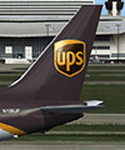
2004/FSX TDS Boeing 737-738SF. United Parcel Service, Inc. (UPS) is the world's largest package delivery company and a provider of supply chain management solutions. The global logistics company is headquartered in Sandy Springs, Georgia. Model design by Hiroshi Igami. Flight dynamics design by Nick Wilkinson and David Biggar. Master textures by Kyle Schurb. Fictional Airframe.
| Filename: | UPS_Boeing_737738SF_N156UP.zip |
| License: | Freeware, limited distribution |
| Added: | 3rd March 2018, 02:30:21 |
| Downloads: | 321 |
| Author: | Danny Cummings |
| Size: | 10.73 MB |


© 2001-2026 AVSIM Online
All Rights Reserved
Privacy Policy |