
Where Flight Simulation Enthusiasts Gather from Around the World!
AVSIM Library - Search Results

| Category: Flight Simulator 2004 - Original Aircraft | |
| Caproni-Vizzola C-22J Ventura |

|
Images related to this file:
File Description:
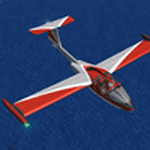
The Machine:
A fully aerobatic, very-light Jet that compares to the Bede BD-5J, but heavier and sporting two instead of one TRS-18 turbojets. Up to Mach 0.47 and 650 NM of range, with a service ceiling of 25000ft. A low stall speed (for a jet) makes the aircraft good for short field operations.
Certified for VFR operations only, yet includes a good avionics suite.
This is a "Classic" aircraft featuring "Steam" gauges and radios. Yet, controls and systems are easy to operate.
The History:
The C-22J is the last aircraft to be adorned with the legendary Caproni name. Originally known as "Caproncino", then marketed as "Ventura". A very-light jet developed in the 1980s as a military trainer, surveillance and reconnaissance aircraft. Powered by two TRS-18 turbojets fed from a dorsal NACA intake, the aircraft reached Mach 0.47 and was fully aerobatic. The airframe shows its origin in a glider design, the Caproni A-21 Calif. After the merger with SIAI Marchetti, the project was cancelled in favor of the SF-260.
The Simulation - 3D Model:
This aircraft ships with a 3-D cockpit, that incorporates realistic night lighting, in the form of a dim dome flood light, backlit gauges and luminous digital displays. The flight crew of 2 is affected by your input in the payloads menu of Flight Simulator, allowing to choose between male, female or empty seats. The Copilot Figure can be hidden with a quick click in the internal 3D view as well.
The Simulation - Realism:
This aircraft has been tuned with the invaluable help of Engineer Carlo Ferrarin, who created the real aircraft. Unique and one-off documentation has been kindly provided, and used extensively, for the creation of this product!
Just like the real aircraft, the systems are simple and of easy operation. Engines can be started with the press of a button. Systems modelling allows the following of real-world checklists as closely as Flight Simulator allows. An in-sim checklist is included, as well as a full flight manual.
The flight model is tuned with advanced aerospace techniques, resulting in a highly realistic aircraft, yet, it is very pleasant to fly, both during aerobatic displays or "A to B" cruising.
Highlights:
- High-Resolution 3D cockpit
- Full Documentation
- Aerobatic
FS-2004 Version comes with limited support and is free due to platform limitations. See Readme. FS-X & P3Dv4 (64-bit) versions are commercial products.
| Filename: | CaproniVizzola_C22J_Ventura.zip |
| License: | Freeware, limited distribution |
| Added: | 7th November 2020, 18:31:45 |
| Downloads: | 678 |
| Author: | Mario Noriega |
| Size: | 157.85 MB |
| Category: Flight Simulator 2004 - Miscellaneous Files | |
| Airline Inventory Update #5 |
|
File Description:
(Update 5 - 25 January 2006) Not long ago I embarked on a project to streamline my flight simulator's AI setup. I knew I had too many aircraft texture sets that I was not using, too many unnecessary night texture files, installation of defunct airlines, and the like. So, I put together
a spreadsheet showing my AI system with all the airlines and additional pieces such as vehicles and ships. This has been a very large and time-consuming project as my AI system has more than 7,000 texture sets, more than 2,200 airline folders, and other assorted AI components. Inside you'll find an Excel spreadsheet with all my airlines (more than 2,200) listed, Birds, Blimp, Corporate Aircraft, Defunct Airlines, Douglas DC-3, Float Planes, Government Aircraft, Helicopters, Medical Aircraft, Military Aircraft, Personal Registration Aircraft, Ships, and Vehicles - all associated with the FS AI system. In addition, I've included the spreadsheet's source text files for those that do not have Microsoft Excel. NOTE: You can download an MS Excel spreadsheet viewer (freeware) from the Microsoft site. Because of copyright restrictions and the size of my AI system, I have not provided links to specific files. However, I think you'll find the data very useful. See the readme file for a list of possible sources and contact information. NOTE: Changes since the last update are reflected in "green" text. Frank Bass
| Filename: | Airline_Inventory_Update_5.zip |
| License: | Freeware |
| Added: | 26th January 2006, 00:42:31 |
| Downloads: | 720 |
| Author: | Frank Bass |
| Size: | 237.58 KB |
| Category: Flight Simulator 2004 - Miscellaneous Files | |
| Airline Inventory Update #3 |
|
File Description:
(Update 3 - 9 January 2006) Not long ago I embarked on a project to streamline my flight simulator's AI setup. I knew I had too many aircraft texture sets that I was not using, too many unnecessary night texture files, installation of defunct airlines, and the like. So, I put together
a spreadsheet showing my AI system with all the airlines and additional pieces such as vehicles and ships. This has been a very large and time-consuming project as my AI system has more than 7,000 texture sets, more than 2,200 airline folders, and other assorted AI components. Inside you'll find an Excel spreadsheet with all my airlines (more than 2,200) listed, Birds, Blimp, Corporate Aircraft, Defunct Airlines, Douglas DC-3, Float Planes, Government Aircraft, Helicopters, Medical Aircraft, Military Aircraft, Personal Registration Aircraft, Ships, and Vehicles - all associated with the FS AI system. In addition, I've included the spreadsheet's source text files for those that do not have Microsoft Excel. NOTE: You can download an MS Excel spreadsheet viewer (freeware) from the Microsoft site. Because of copyright restrictions and the size of my AI system, I have not provided links to specific files. However, I think you'll find the data very useful. See the readme file for a list of possible sources and contact information. NOTE: Changes since the last update are reflected in "green" text. Frank Bass
| Filename: | Airline_Inventory_Update_3.zip |
| License: | Freeware |
| Added: | 9th January 2006, 21:43:00 |
| Downloads: | 459 |
| Author: | Frank Bass |
| Size: | 234.76 KB |
| Category: Flight Simulator 2004 - Miscellaneous Files | |
| Airline Inventory Update #4 |
|
File Description:
(Update 4 - 13 January 2006) Not long ago I embarked on a project to streamline my flight simulator's AI setup. I knew I had too many aircraft texture sets that I was not using, too many unnecessary night texture files, installation of defunct airlines, and the like. So, I put together a spreadsheet showing my AI system with all the airlines and additional pieces such as vehicles and ships. This has been a very large and time-consuming project as my AI system has more than 7,000 texture sets, more than 2,200 airline folders, and other assorted AI components. Inside you'll find an Excel spreadsheet with all my airlines (more than 2,200) listed, Birds, Blimp, Corporate Aircraft, Defunct Airlines, Douglas DC-3, Float Planes, Government Aircraft, Helicopters, Medical Aircraft, Military Aircraft, Personal Registration Aircraft, Ships, and Vehicles - all associated with the FS AI system. In addition, I've included the spreadsheet's source text files for those that do not have Microsoft Excel. NOTE: You can download an MS Excel spreadsheet viewer (freeware) from the Microsoft site. Because of copyright restrictions and the size of my AI system, I have not provided links to specific files. However, I think you'll find the data very useful. See the readme file for a list of possible sources and contact information. NOTE: Changes since the last update are reflected in "green" text. Frank Bass
| Filename: | Airline_Inventory_Update_4.zip |
| License: | Freeware |
| Added: | 13th January 2006, 17:20:30 |
| Downloads: | 513 |
| Author: | Frank Bass |
| Size: | 235.36 KB |
| Category: Flight Simulator 2004 - Miscellaneous Files | |
| Airline Inventory Update #1 |
|
File Description:
(Update 1 - 19 December 2005) Not long ago I embarked on a project to streamline my flight simulator's AI setup. I knew I had too many aircraft texture setsthat I was not using, too many unnecessary night texture files, installation of defunct airlines, and the like. So, I put together
a spreadsheet showing my AI system with all the airlines and additional pieces such as vehicles and ships. This has been a very large and time-consuming project as my AI system has more than 7,000 texture sets, more than 2,200 airline folders, and other assorted AI components. Inside you'll find an Excel spreadsheet with all my airlines (more than 2,200) listed, Birds, Blimp, Corporate Aircraft, Defunct Airlines, Douglas DC-3, Float Planes, Government Aircraft, Helicopters, Medical Aircraft, Military Aircraft, Personal Registration Aircraft, Ships, and Vehicles - all associated with the FS AI system. In addition, I've included the spreadsheet's source text files for those that do not have Microsoft Excel. NOTE: You can download an MS Excel spreadsheet viewer (freeware) from the Microsoft site. Because of copyright restrictions and the size of my AI system, I have not provided links to specific files. However, I think you'll find the data very useful. See the readme file for a list of possible sources and contact information. NONE: Changes since the last update are reflected in "green" text. Frank Bass
| Filename: | Airline_Inventory_Update_1.zip |
| License: | Freeware |
| Added: | 20th December 2005, 02:18:57 |
| Downloads: | 822 |
| Author: | Frank Bass |
| Size: | 231.96 KB |
| Category: Flight Simulator 2004 - Miscellaneous Files | |
| Airline Inventory Update #2 |
|
File Description:
(Update 2 - 3 January 2006) Not long ago I embarked on a project to streamline my flight simulator's AI setup. I knew I had too many aircraft texture sets that I was not using, too many unnecessary night texture files, installation of defunct airlines, and the like. So, I put together
a spreadsheet showing my AI system with all the airlines and additional pieces such as vehicles and ships. This has been a very large and time-consuming project as my AI system has more than 7,000 texture sets, more than 2,200 airline folders, and other assorted AI components. Inside you'll find an Excel spreadsheet with all my airlines (more than 2,200) listed, Birds, Blimp, Corporate Aircraft, Defunct Airlines, Douglas DC-3, Float Planes, Government Aircraft, Helicopters, Medical Aircraft, Military Aircraft, Personal Registration Aircraft, Ships, and Vehicles - all associated with the FS AI system. In addition, I've included the spreadsheet's source text files for those that do not have Microsoft Excel. NOTE: You can download an MS Excel spreadsheet viewer (freeware) from the Microsoft site. Because of copyright restrictions and the size of my AI system, I have not provided links to specific files. However, I think you'll find the data very useful. See the readme file for a list of possible sources and contact information. NONE: Changes since the last update are reflected in "green" text. Frank Bass
| Filename: | Airline_Inventory_Update_2.zip |
| License: | Freeware |
| Added: | 4th January 2006, 01:02:34 |
| Downloads: | 566 |
| Author: | Frank Bass |
| Size: | 234.3 KB |
| Category: Flight Simulator X - Panels | |
| Airbus A320-21 Widescreen |
|
Images related to this file:
File Description:
fsx A320 widescreen panel made with original default airbus panel using ms paint and fs panel studio, complete with VC and night panel.
| Filename: | Airbus_A32021_Widescreen.zip |
| License: | Freeware |
| Added: | 25th June 2010, 22:07:41 |
| Downloads: | 5,788 |
| Author: | Andre Costa |
| Size: | 3.35 MB |
| Category: Flight Simulator X - Flight Plans | |
| Rocky Mountain Airport Tour |
|
File Description:
Rocky Mountain Airport Tour:
A very hard flight plan in common GA Aircraft. I flew this with a Carenado B58. VFR Flight with wild swings in Altitudes. Maintain 16000 (One Six Thousand) feet for most of the flight to and from the airports. You will have to fly around mountains on approaches with steep short field finals. GPS flight plan is just a guide. You will have to follow the mountain passes from some airports in order to attain sufficient altitude (in some cases). Don't wimp out! Max load your plane.
Country: USA
State: Cololorado
Start: KDRO (Make sure you start from a parking spot)
End: KHDN
Most difficult: Taking off at Buckhorn Ranch (8000+ feet ALT, 4000 FT Runway)
Toughest area between airports:
KASE to KEGE
Time to compleat: about 3 hours
Good Luck.
Questions Contact me at AVSIM
Avsim ID: hawkDsl
To Install: Copy "Rocky Mountain Airport Tour.pln" and paste it into you FSX flight plan file
Win7 : userfiles/my document/Flight Simulator X Files
| Filename: | Rocky_Mountain_Airport_Tour.zip |
| License: | Freeware |
| Added: | 21st July 2012, 13:26:52 |
| Downloads: | 473 |
| Author: | Henry Oeser |
| Size: | 1.94 KB |
| Category: Flight Simulator 2004 - Aircraft Repaints, Textures and Modifications | |
| VARIG Boeing 737-36N (PP-VPT) |
|
File Description:
VARIG B.737-36N PP-VPT C/N 28566-2964.
A waited reinforcement for the Traffic 2004 VARIG standard supplied flight plans.
VARIG Boeing 737's in his differents variants(B.737-2C3Adv,B.737-241,B.737-2K9,B.737-2Q8,B.737-219,B.737-33A,B.737-36N,B.737-3K9,B.737-341,B.737-3Q8,B.737-4YO,etc)are the workhorse for the nationals and internationals flights in this inmense land.
I have included a serie of 90 Flights to the main national and international destinations,all served with 737 and the timetable and numbers flights are the rights one of this year 2004.
Many flights are corrected to be acomplished with the 737 and not the Douglas DC-10(out of service by VARIG long time ago, only a few remmants for cargo with VARIG Logistica).
Also included a new complete revised AirFile for the 737-300 type(17-04-04).
| Filename: | VARIG_Boeing_73736N_PPVPT.zip |
| License: | Freeware |
| Added: | 17th April 2004, 23:34:16 |
| Downloads: | 320 |
| Author: | Daniel Nole |
| Size: | 482.65 KB |
| Category: Flight Simulator 2004 - Aircraft Repaints, Textures and Modifications | |
| Cambrian Airways Douglas DC3's |
|
File Description:
Cambrian Airways roots extend back to 1935 when Cambrian Air Services was founded at Pengham Moor airfield, Cardiff to provide flight training and pleasure flights. Operations were suspended upon the outbreak of war in 1939 but resumed again in January 1946. Operations grew steadily and DH Rapide and Dove aircraft were added to the fleet. A move to Rhoose Airport in 1954 allowed Cambrian to consider the purchase of larger aircraft. In November 1954, the first Dakota was delivered with the second arriving in January 1955. With the introduction of Dakotas, Cambrian Air Services changed its name to Cambrian Airways in May 1955. Over the years Cambrian owned ten different DC3's having a maximum of eight of the type on fleet at any one time and six remained in service with them until the type was retired in 1969. This set of repaints shows seven of the different airfames in five different liveries that were used during Cambrian's operation of the type.
| Filename: | Cambrian_Airways_Douglas_DC3s.zip |
| License: | Freeware |
| Added: | 12th March 2007, 11:20:15 |
| Downloads: | 432 |
| Author: | John Payne |
| Size: | 27.08 MB |


© 2001-2026 AVSIM Online
All Rights Reserved
Privacy Policy |