
Where Flight Simulation Enthusiasts Gather from Around the World!
AVSIM Library - Search Results

| Category: Flight Simulator 2004 - AI Aircraft | |
| TACA Star Alliance NC Airbus A319-131 (N522TA) |

|
Images related to this file:
File Description:

TACA Star Alliance NC A319-131 N522TA - DJC/EVAI IAE Model //
Flightplans may be available on AVSIM/Flightsim.com.
This works for both FS9 and FSX. Tested in FSX. FS9 model used.
For FSX users; You may have to UNCHECK "Aircraft casts shadows on the ground" under the Aircraft - Exterior Settings in FSX to make any FS9-based model visible during the day!
Texture quality; FSX Native: DDS DXT5 with alpha. FS9 Native: BMP DXT3 with alpha.
FSX Light Fix included in the DDS night texture.
Custom Light Map. Custom Shadows, Highs, Weathering as usual...
Included repaint is for the following model; DJC_A319 from DJC.
By renaming the texture files to "EvolveAI_A319_IAE_T & EvolveAI_A319_IAE_L" it will also work for EvAI's IAE engine model.
This is a non-reflective model.
Model is available on AVSIM and FlightSim.com or on the author/developers site.
You need the basekit for this to work!!
Do make sure you copy the texture folder(s) in the respective folder.
| Filename: | TACA_Star_Alliance_NC_Airbus_A319131_N522TA.zip |
| License: | Freeware, limited distribution |
| Added: | 8th December 2012, 18:45:32 |
| Downloads: | 598 |
| Author: | Stephan Faessler / ImpulseAI |
| Size: | 1.54 MB |
| Category: Flight Simulator 2004 - AI Aircraft | |
| British Airways Cityflyer Express ATR-42-300 (G-BUEA) |
|
Images related to this file:
File Description: BA Express Cityflyer Express
ATR-42-300 G-BUEA - osp_atr_42_300 // Flightplans may be available on AVSIM/Flightsim.com.
This works for both FS9 and FSX.Tested in FSX. FS9 model used. For FSX
users make sure you have UNCHECKED "Aircraft casts shadows on the ground"
under the Aircraft - Exterior Settings in FSX to make any FS9-based model
visible during the day! Texture quality; FSX Native: DDS DXT5 with alpha. FS9
Native: BMP DXT3 with alpha. FSX Light Fix included in the DDS night texture.
Custom Light Map. Custom Shadows, Highs, Weathering as usual... Included repaint
is for the following model; osp_atr_42_300 from OSP. Model is available on AVSIM,
FlightSim.com or on the author/developers site. You need the basekit for this to
work!! Do make sure you copy the texture folder(s) in the respective folder.

| Filename: | British_Airways_Cityflyer_Express_ATR42300_GBUEA.zip |
| License: | Freeware, limited distribution |
| Added: | 14th October 2012, 06:04:26 |
| Downloads: | 372 |
| Author: | Stephan Faessler / ImpulseAI |
| Size: | 1007.68 KB |
| Category: Looking Glass Flight Unlimited 3 - Repaints | |
| "Blue & White" Icon A5 |
|
Images related to this file:
File Description:

I present you with the 'Icon Blue & White', a simple (and perhaps crude) livery for the Icon A5. This is my first livery for Microsoft Flight. More information on this livery and support can be found here: http://forum.avsim.net/topic/401563-flight-livery-hanger/?p=2923644
To install this livery, you need to install stonelance's 'Flight Toolkit'. Version 0.7.3 is available here: http://flighttoolkit.com/?page_id=7
Version 0.9.4 (latest) is available here: http://forum.avsim.net/topic/432542-flight-toolkit-094-integrated-addon-database-new-livery-packs-fixes-for-alaska-map/
Please note that you might have to install this livery using Addon Manager v0.7.3; I experienced problems installing this using Addon Manager v0.9.4, but you might be able to install it problem-free. Also, this livery requires the default Icon A5 and no other dependencies. Version 0.7.3 of the Toolkit requires the Alaska DLC (no longer available from Microsoft Marketplace); however, to my knowledge version 0.9.4 no longer requires this DLC.
| Filename: | Blue__White_Icon_A5.zip |
| License: | Freeware |
| Added: | 10th February 2014, 22:57:40 |
| Downloads: | 201 |
| Author: | Mark Carrington |
| Size: | 1.16 MB |
| Category: Flight Simulator X - Panels | |
| New! Defaultimate747 |
|
Images related to this file:
File Description:
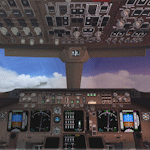
The ultimate virtual cockpit enhancement for Microsoft Flight Simulator X 747-400.
This package brings Gavin Munro's outstanding 747-400 2D panel into the default virtual cockpit, while also incorporating Jimmy Foong's callouts and Doug Dawson's XML sound gauge, all used with permission.
The cockpit lighting system is improved. Cabin lighting now includes a dome light with selectable bright and dim modes. Panel lighting and night textures have been upgraded with emissive lighting. The display units (MFDs) feature adjustable brightness controls and are switchable.
The autopilot panel has been reworked, the map display features a TCAS and the following items are now functional: Autopilot disengage bar, overhead panel, EFIS, EICAS, autobrakes and max autopilot bank bezel.
The left and right wipers are independently animated and the landing, taxi and navigation lights on the default exterior model are decoupled and work independently of each other.
| Filename: | Defaultimate747.zip |
| License: | Freeware |
| Added: | 24th September 2026, 17:53:07 |
| Downloads: | 46 |
| Author: | Trent Bennett |
| Size: | 21.14 MB |
| Category: Microsoft Flight Simulator (2020) - Utilities | |
| FSTramp v8.84 for MSFS, FSX(-SE), Prepart3D, X-Plane (Win) |
|
Images related to this file:
File Description:

This add-on is an EXE application for Microsoft Flight Simulator and a DLL module for all other simulators. The DLL variant is activated via hotkeys or the simulator menu add-ons or plugins. Window size and layout are configurable for one or more screens. To avoid dazzling, the brightness of the entire application is customizable. Primarily it is a flight management system (FMS) with automatic control from start to landing. This also includes the observance of SID, STAR and Approaches in unmatched quality. The flight plan required for the FMS can be created manually or automatically, interactive changes and additions during the flight are possible. The basis of the flight planner is the 3D world map and the search function for airfields and navigation aids. The FMS by FSTramp relies on the autopilot of the aircraft. In case of incompatibility, the autopilot integrated in FSTramp will be used. This allows FSTramp to control almost all aircraft from airport to airport. The altitude profile of the flight plan, SID, STAR and approach is taken into account. This means that FSTramp extends the often incomplete airport procedures to and from the runway so that they can be flown completely automatically. During the fully automatic flight, the autopilot values ​​for HDG, ALT, VSPEED, SPD and MACH can be manually overridden. This is e.g. useful for being able to react to the instructions of the tower in the final approach without completely stopping the automatic flight. The rotating or north pointing 3D world map with numeric display of the terrain elevation under the mouse arrow is another special feature. It does not need an internet but is synthesized from included height profiles of the globe. The Data of continents, mountains and rivers are included in the setup. Airspaces, Airways, Waypoints and SID, STAR and Approaches are also included in the setup, but can be updated by installing additional AIRAC cycles. Airfields and navigation stations are taken from the simulator. NVIDIA: If the frame rate of the simulator drops sharply about 20 seconds after FSTramp's visibility, the power management of the GPU slows down prematurely. In the NVIDIA Control Panel, change the 'Manage 3D settings - Power management mode' option to 'Adaptive'.
| Filename: | FSTramp_v884_for_MSFS_FSXSE_Prepart3D_XPlane_Win.zip |
| License: | Shareware, time limited |
| Added: | 7th July 2023, 04:35:12 |
| Downloads: | 111 |
| Author: | Helge Schroeder |
| Size: | 358.21 MB |
| Category: Prepar3D V5 - Utilities | |
| FSTramp v8.84 for Prepart3D 2-6, MSFS, FSX(-SE), X-Plane (Win) |
|
Images related to this file:
File Description:
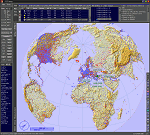
This add-on is an EXE application for Microsoft Flight Simulator and a DLL module for all other simulators. The DLL variant is activated via hotkeys or the simulator menu add-ons or plugins. Window size and layout are configurable for one or more screens. To avoid dazzling, the brightness of the entire application is customizable. Primarily it is a flight management system (FMS) with automatic control from start to landing. This also includes the observance of SID, STAR and Approaches in unmatched quality. The flight plan required for the FMS can be created manually or automatically, interactive changes and additions during the flight are possible. The basis of the flight planner is the 3D world map and the search function for airfields and navigation aids. The FMS by FSTramp relies on the autopilot of the aircraft. In case of incompatibility, the autopilot integrated in FSTramp will be used. This allows FSTramp to control almost all aircraft from airport to airport. The altitude profile of the flight plan, SID, STAR and approach is taken into account. This means that FSTramp extends the often incomplete airport procedures to and from the runway so that they can be flown completely automatically. During the fully automatic flight, the autopilot values ​​for HDG, ALT, VSPEED, SPD and MACH can be manually overridden. This is e.g. useful for being able to react to the instructions of the tower in the final approach without completely stopping the automatic flight. The rotating or north pointing 3D world map with numeric display of the terrain elevation under the mouse arrow is another special feature. It does not need an internet but is synthesized from included height profiles of the globe. The Data of continents, mountains and rivers are included in the setup. Airspaces, Airways, Waypoints and SID, STAR and Approaches are also included in the setup, but can be updated by installing additional AIRAC cycles. Airfields and navigation stations are taken from the simulator. NVIDIA: If the frame rate of the simulator drops sharply about 20 seconds after FSTramp's visibility, the power management of the GPU slows down prematurely. In the NVIDIA Control Panel, change the 'Manage 3D settings - Power management mode' option to 'Adaptive'.
| Filename: | FSTramp_v884_for_Prepart3D_26_MSFS_FSXSE_XPlane_Wi.zip |
| License: | Shareware, time limited |
| Added: | 7th July 2023, 04:35:26 |
| Downloads: | 43 |
| Author: | Helge Schroeder |
| Size: | 358.21 MB |
| Category: Flight Simulator X - Utilities | |
| FSTramp v8.84 for MSFS, FSX(-SE), Prepart3D, X-Plane (Win) |
|
Images related to this file:
File Description:
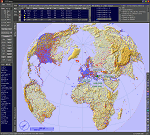
This add-on is an EXE application for Microsoft Flight Simulator and a DLL module for all other simulators. The DLL variant is activated via hotkeys or the simulator menu add-ons or plugins. Window size and layout are configurable for one or more screens. To avoid dazzling, the brightness of the entire application is customizable. Primarily it is a flight management system (FMS) with automatic control from start to landing. This also includes the observance of SID, STAR and Approaches in unmatched quality. The flight plan required for the FMS can be created manually or automatically, interactive changes and additions during the flight are possible. The basis of the flight planner is the 3D world map and the search function for airfields and navigation aids. The FMS by FSTramp relies on the autopilot of the aircraft. In case of incompatibility, the autopilot integrated in FSTramp will be used. This allows FSTramp to control almost all aircraft from airport to airport. The altitude profile of the flight plan, SID, STAR and approach is taken into account. This means that FSTramp extends the often incomplete airport procedures to and from the runway so that they can be flown completely automatically. During the fully automatic flight, the autopilot values ​​for HDG, ALT, VSPEED, SPD and MACH can be manually overridden. This is e.g. useful for being able to react to the instructions of the tower in the final approach without completely stopping the automatic flight. The rotating or north pointing 3D world map with numeric display of the terrain elevation under the mouse arrow is another special feature. It does not need an internet but is synthesized from included height profiles of the globe. The Data of continents, mountains and rivers are included in the setup. Airspaces, Airways, Waypoints and SID, STAR and Approaches are also included in the setup, but can be updated by installing additional AIRAC cycles. Airfields and navigation stations are taken from the simulator. NVIDIA: If the frame rate of the simulator drops sharply about 20 seconds after FSTramp's visibility, the power management of the GPU slows down prematurely. In the NVIDIA Control Panel, change the 'Manage 3D settings - Power management mode' option to 'Adaptive'.
| Filename: | FSTramp_v884_for_MSFS_FSXSE_Prepart3D_XPlane_Win.zip |
| License: | Shareware, time limited |
| Added: | 7th July 2023, 04:35:43 |
| Downloads: | 130 |
| Author: | Helge Schroeder |
| Size: | 358.21 MB |
| Category: Flight Simulator 2004 - Miscellaneous Files | |
| Flight dynamics Douglas DC-3 V7.0 |
|
File Description:
This Corrected Aircraft.cfg VERSION.7 dated OCTOBER 13th, 2003 Features the Following....
1. The DC-3 will now not level itself out on a coordinated turn
(This was the biggest issue and is now fixed)
2. Flaps now have a little more drag when used.
(Will realistically slow down for landings and you
wont roll down the runway so much)
3. Differential braking now has a little more power.
(Will realistically allow for tighter turns during taxi)
4. The DC-3 itself now has a little more power.
(Default version is underpowered and used up too much runway,
and.. Default version cruise speed was a little low).
5. Corrected Manifold pressure from 47" to 48" full power
(Default version had it slightly wrong)
6.Fuel is now down to 200 per tank
(Default has version was a little over)
7. All control surfaces, ailerons, rudder and elevators now have delay
(There is a certain lag time when flying a DC-3 and it now shows
with these corrections which delays your input to the controls)
8. Elevator trim is now fixed
(To much play in the default elevator trim , it is now fixed with
less play and also has a delay/lag effect)
9. Rudder trim now with delay/lag
10. Aileron trim now with delay/lag
11. Fuel Flow is now fixed, the DC-3 will burn 90 GPH instead of the original 118 GPH
12. Increased power scalar very slightly for correct cruise airspeed
13. Manifold pressure will decrease 1" MAP per 1,000 feet after 2,000 feet Altitude
13.Exactly 140 kias on full tanks at 9,000' ASL
14. Added Strobe Lights to the wings
15. Adjusted steering (just a tad) for better taxiing
16.Prop (rpm) and Power (map) throttles interact correctly
Took off some delay with ailerons and rudder
Removed some drag and pitch up from the flaps
Added more brake power to the differentials
17. Added a working NAV light to the Nose
I have also added a corrected DC-3 reference sheet". In the zip there are two aircraft.cfg's.. one is modified if you are already using the add-on for special effects.
| Filename: | Flight_dynamics_Douglas_DC3__V70.zip |
| License: | Freeware |
| Added: | 13th October 2003, 19:43:08 |
| Downloads: | 4,569 |
| Author: | Trev Morson |
| Size: | 16.58 KB |
| Category: Prepar3D V1-4 - Aircraft Repaints, Textures and Modifications | |
| SKHV/KluHV, T-6 Texan/Harvard, PH-TBR/B-182, 50 Years Edition |
|
Images related to this file:
File Description:

This packet includes a updated repaint of the harvard PH-TBR of the SKHV/KluHV
(Koninklijke Luchtmacht Historische Vlucht aka Royal Netherlands Air Force
Historical Flight). Stationed at Gilze Rijen Airbase in the Netherlands.
The PH-TBR/B-182 scheme is from the so called "BAFO Vlucht" (Photo Flight)
stationed at Deelen Airbase until 1967.
For more info on the RNLAF Historical Flight please pay a visit to there homepage:
https://kluhv.nl/home-eng/
The repaint is both on the outside and inside (Virtual cockpit & pilots).
As much detail is added as possible, accurate decals/stencils, also the
bump-map was modified, some latches removed some other added, also modified
the baggage compartment to look more like a Harvard then the Texan one.
In this 50 Years edition the stencils and decals are updated to 99% accurate
to the real one. The VC textures got a major update.
To be used with the payware A2A Simulations T-6 TEXAN/HARVARD.
Buy it here: https://a2asimulations.com/
Works both in FSX and Prepar3D.
| Filename: | SKHVKluHV_T6_TexanHarvard_PHTBRB182_50_Years_Editi.zip |
| License: | Freeware, limited distribution |
| Added: | 15th December 2019, 19:10:17 |
| Downloads: | 160 |
| Author: | Marcel Ritzema |
| Size: | 39.95 MB |
| Category: Flight Simulator 2004 - Original Aircraft | |
| Socata TB20GT Trinidad, v2.0 |
|
Images related to this file:
File Description:
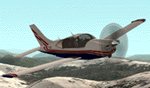
Socata TB20GT Trinidad Public Release v2.0
NOTE: FS9 (aka: Century of Flight) ONLY! This will NOT work in FS2002!
A complete new build of the "Developer's Award" winning Socata TB20GT for FS9! Three liveries are included: G-TTAC by Bill Leaming, "Betty Blue" and "Red Rider" by Kim Staneart.
The SOCATA TB20 Trinidad aircraft is a 4-5 seat training, business and travel machine. GMax design, retractable gear with full moving parts, tinted cabin windows, two gull-wing doors, and variable pitch propeller. Highly detailed, night lighted Virtual Cockpit! "Dynamic Shine" and "Reflections" enabled.
Features Garmin 530 GPS, TCAS Radar, Bendix-King slaved HSI (NAV1), Bendix-King VOR2 ILS/GS (NAV2) Bendix-King dual-needle RMI (ADF+NAV2), Bendix-King ADF, Bendix-King DME (NAV1/2 selectable) Bendix-King Transponder, 2x Bendix-King COM/NAV radios, KMA 28 Bendix-King Audio Control w/ OMI indicators, MAP/FuelFlow on P2, Tachometer on P2, EDM 700 CHT/EGT and Shadin Fuel Management Computer on P2, Astrotech LC2 Chronometer Yoke mounted. (R)
| Filename: | Socata_TB20GT_Trinidad_v20.zip |
| License: | Freeware |
| Added: | 27th May 2010, 20:48:02 |
| Downloads: | 31,902 |
| Author: | Fr. Bill Leaming, Factory Aircraft Rebuilders |
| Size: | 9.4 MB |


© 2001-2026 AVSIM Online
All Rights Reserved
Privacy Policy |