
Where Flight Simulation Enthusiasts Gather from Around the World!
AVSIM Library - Search Results

| Category: Flight Simulator X - Scenery | |
| Barbuda upgrade sound effect |

|
File Description:
Correct sound effect on Barbuda scenery
| Filename: | Barbuda_upgrade_sound_effect.zip |
| License: | Freeware |
| Added: | 11th December 2009, 21:45:58 |
| Downloads: | 1,751 |
| Author: | valladier Jean Louis |
| Size: | 1.78 KB |
| Category: Microsoft Flight Simulator (2020) - Utilities | |
| Flightplan Visualizer 1.23.1 |
|
File Description:
Flightplan Visualizer (FV) version 1.23.1. Copyright 2018-2024 by Pelle F. S. Liljendal ([email protected]), all rights reserved.
FV comes with 1780 pre-imported AI flightplans (of which 815 are BizJet flightplans, the rest are commercial, government and military). However you are able to import additional (AI) flightplans yourself. Once imported these (AI) flightplans can be visualized on a map-view, and the user will be able to search accross all these. Hence you can use the program as inspiration as to which routes to fly. E.g. you can search across all imported flightplans to find all flights in an A321 flying into/out from LDDU, or simply to look for all flights in a Boeing 747-8F. As a new feature in version 1.23 you can now be employed by the airlines, and assigned flights to fly.
Simply run the included installer to install the software. The program will be installed into "C:\Program Files (x86)\Flightplan Visualizer" and all datafiles will be installed into: "C:\Users\[UserName]\AppData\Roaming\FlightplanVisualizer". The program comes with a full manual explaining everything, and a 3 page quick manual to get you started. The first 3 times you run the program the quick manual will automatically open. The forum is hosted here: https://forum.aerosoft.com/index.php?/forum/919-flightplan-visualizer/
| Filename: | Flightplan_Visualizer_1231.zip |
| License: | Freeware, limited distribution |
| Added: | 22nd January 2024, 16:41:38 |
| Downloads: | 100 |
| Author: | Pelle Liljendal |
| Size: | 47.86 MB |
| Category: Prepar3D V1-4 - Aircraft Repaints, Textures and Modifications | |
| Modified FSX b737_800 Model Only - For P3d |
|
Images related to this file:
File Description:
This is the a modified FSX B737_800 model only with replacement landing and taxi lights that allow you to see at night using p3d v4.5 (should work with older versions). I separated the nose gear light from the landing lights and made it a taxi light. You will be able to turn on/off lights using the switches on the overhead panel:
Nose Gear taxi light - turn on/off using taxi lights switch
Landing lights - turn on/off using landing lights switch
Logo lights - turn on/off using the logo switch (no need for night texture)
| Filename: | Modified_FSX_b737_800__Model_Only__For_P3d.zip |
| License: | Freeware |
| Added: | 31st July 2019, 22:48:09 |
| Downloads: | 67 |
| Author: | James A Daniels |
| Size: | 6.8 MB |
| Category: Flight Simulator X - Aircraft Repaints, Textures and Modifications | |
| Transglobe Airways Bristol Britannia 314 1965 |
|
Images related to this file:
File Description:
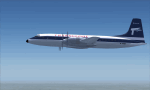
This is a repaint of the Bristol 175 Britannia 314 in Transglobe Airways colors. You need the freeware Bristol Britannia by Jens B Kristensen (FSX). On August 1, 1965, Air Links, Ltd. was officially renamed Transglobe Airways, Ltd. , and simultaneously a new Bristol Britannia 314 started flying a number of inclusive tours from London Gatwick Airport on behalf of British United Airways, Ltd. A second Britannia was delivered on December 12. All up, Transglobe operated 4 Britannias. Textures are 32bit dds. This aircraft was tested on FSX-SE. It should work on FSX & P3D v1-3
| Filename: | Transglobe_Airways_Bristol_Britannia_314_1965.zip |
| License: | Freeware |
| Added: | 24th January 2019, 05:07:46 |
| Downloads: | 50 |
| Author: | Ted Giana |
| Size: | 3.44 MB |
| Category: Microsoft Flight Simulator (2020) - Original Aircraft | |
| Aerosoft F-16C WW 91-0357 35th FW HAVEGLASS Repaint Textures |
|
Images related to this file:
File Description:
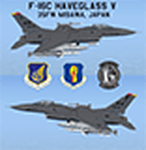
This is a repaint for the Aerosoft F-16 depicting Misawa AB F-16C 90-0357 "35FW" in the new HAVEGLASS V paint scheme. I haven't seen any pictures online of this jet having been converted to HAVEGLASS (yet), so this is technically a "fictional" repaint. The current "Grey" jet has the special "35FW" markings on the tail, so I put those markings on this HAVEGALSS jet. The latest versions of HAVEGLASS F-16s (as of 2023) now have black markings/decals on the jet instead of the grey markings on earlier versions, so that's what I used on this jet.
| Filename: | Aerosoft_F16C_WW_910357_35th_FW_HAVEGLASS_Repaint_.zip |
| License: | Freeware |
| Added: | 27th July 2023, 22:48:36 |
| Downloads: | 81 |
| Author: | Daniel Gregory |
| Size: | 4 MB |
| Category: Flight Simulator X - Aircraft Repaints, Textures and Modifications | |
| Maintenance Pack 20160809 for the Carenado C337H Skymaster |
|
Images related to this file:
File Description:
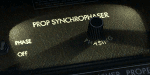
NEW in 20160809: Adjust panel light for the EGT needles, and add some light to the wet compass to make it readable. Fixed some labels in the audio panel: HF->BOTH, ADF1->ADF, ADF2->DME.
Already included since 20160611:
The label for the landing light switch is changed from "LOG" to "LDG". The labels for the Prop Synchrophaser were displayed twice with a small offset when the panel light was enabled. The modification corrects this and adds illumination for the label "Phasing". The right Collins gauge (NAV2) is now correctly labeled "Nav" instead of "Comm". Thanks to Bert Pieke for the inspiration by providing an earlier
fix. I recreated his fix from scratch and added improved night lighting.
| Filename: | Maintenance_Pack_20160809_for_the_Carenado_C337H_S.zip |
| License: | Freeware |
| Added: | 11th August 2016, 22:44:34 |
| Downloads: | 1,090 |
| Author: | Thomas Arendsen Hein |
| Size: | 4.14 MB |
| Category: Navigation and ATC - Navigation | |
| VSpeedCalculator 1.0 |
|
File Description:
Vertical Speed Calculator software usable for virtual or real flights.
It includes immediate conversions from Feet/Knots in Meters/Km-h, a LED countdown, a LED timer.
User just have to enter required parameters (waypoint name, track distance, speed, altitude 1 and altitude 2) for each new waypoint and can add it to a list that can be saved or exported (text format) or printed, modified and reopened at infinite.
The results yields are the flight time required between 2 waypoints, the QNH Mach speed equivalence (if the speed entered was in knot), or the Knot speed (if the speed entered was in Mach), and of course the vertical speed for the requested track.
| Filename: | VSpeedCalculator_10.zip |
| License: | Freeware |
| Added: | 24th March 2003, 01:30:51 |
| Downloads: | 554 |
| Author: | Franck KRIEGER |
| Size: | 1.12 MB |
| Category: Flight Simulator 2004 - AFCAD Files | |
| Manassas Regl. - KHEF |
|
File Description:
This my 3rd file for manassas regl. It fixes minor and large problems. For example aircraft taxiing through buildings due to lack of AFCAD not showing buildings making it hard to know where buildings are. It also fixes parking so that it is more realistic and just maximum parking. For where the hangars are I decided to just put parking there instead because I don't know how to use any scenery creators. If anyone wants to help E-Mail me. This one comes with install instructions. If anyone has request for an airport e-mail me and if you have photos (send through e-mail) try to add those to to help.
| Filename: | Manassas_Regl__KHEF.zip |
| License: | Freeware, limited distribution |
| Added: | 13th December 2003, 06:20:25 |
| Downloads: | 431 |
| Author: | Sean S Wolford |
| Size: | 12.05 KB |
| Category: Flight Simulator 2004 - Miscellaneous Files | |
| Active ILS - KATL v1.0 (Hartsfield Jackson Atlanta International Airport) |
|
File Description:
As most know initiating the ILS at certain airports for AI Traffic is not a function at this time when using AFCAD2. If you add a new ILS runway to an airport such as KATL (10/28) only the user aircraft can use this runway when visibility falls below 3 miles. ATC will no longer use this runway for AI Traffic because FS9 sees it as a visual runway. This will cause ATC to vector your AI Traffic back to 9R/27L which is also a South Cargo/Ramp Departure Runway. There are many additional Scenery Buildings, 274 Jetways and new Terminals (as per current Contractor plans) added to version 1.0. See the readme.txt file for additional details.
| Filename: | Active_ILS__KATL_v10_Hartsfield_Jackson_Atlanta_In.zip |
| License: | Freeware, limited distribution |
| Added: | 11th September 2005, 00:04:37 |
| Downloads: | 2,485 |
| Author: | Jim Vile |
| Size: | 553.64 KB |
| Category: Flight Simulator 2004 - Aircraft Repaints, Textures and Modifications | |
| Air New Zealand Boeing 747-400 'Lord of the Rings' |
|
File Description:
In 2003 Air New Zealand teamed up with film makers New Line Cinema in their biggest marketing campaign ever. The result was a range of fantastic "Lord of the Rings" liveries across the fleet, including two liveries for the 747-400 which I have now made available for use with PMDG's "Queen of the Skies"
Note this is not a complete aircraft download. These are texture files which are designed to be saved into your already existing Air New Zealand aircraft folder. See the Readme for more details.
Unfortunately no engine textures are available to accomodate the varients with engine artwork. I will add engine textures to this download at a later date.
| Filename: | Air_New_Zealand_Boeing_747400_Lord_of_the_Rings.zip |
| License: | Freeware |
| Added: | 24th September 2005, 22:31:35 |
| Downloads: | 1,573 |
| Author: | Phil Maunder |
| Size: | 1.49 MB |


© 2001-2026 AVSIM Online
All Rights Reserved
Privacy Policy |