
Where Flight Simulation Enthusiasts Gather from Around the World!
AVSIM Library - Search Results

| Category: Flight Simulator 2004 - AI Flight Plans | |
| Air Namibia - Winter 2009 |

|
Images related to this file:
File Description:

Winter 2009 flightplans for Air Namibia (Windhoek - Namibia).
Fleet is: 2 Airbus 340-300;1 Boeing 737-800w;2 Boeing 737-500;1 Boeing 737-200;3 Beechcraft 1900D.
Air Namibia operates scheduled flights between cities from Namibia (Luederitz, Mpacha, Ondangwa, Oranjemund, Walvis Bay, Windhoek - Eros and Windhoek - Hosea Kutako Intl), Angola (Luanda), Botswana (Maun), Germany (Frankfurt - FRA), Ghana (Accra), South Africa (Cape Town and Johannesburg), Zambia (Lusaka) and Zimbabwe (Victoria Falls).
Repaints: (Avsim.com or Flightsim.com)
A343 -> tfs_a343_nmb.zip by Mariano Bonaccorso;
B738w -> b738_air_namibia.zip by Juergen Baumbusch;
B735 -> b735_nmb.zip by Juergen Baumbusch;
B732 -> b732_air_namibia.zip by Juergen Baumbusch;
B1900D -> ask_ai_v5-okn.zip by A.Kuzmin;
B1900D -> htai_b1900d_zs-oug.zip by Francois Massin.
Afcad/Scenery: (Avsim.com or Flightsim.com) Look for sceneries by Detlev J. Rohmer.
| Filename: | Air_Namibia__Winter_2009.zip |
| License: | Freeware |
| Added: | 4th December 2009, 02:10:51 |
| Downloads: | 551 |
| Author: | Francois Massin |
| Size: | 9.86 KB |
| Category: Flight Simulator X - Aircraft Repaints, Textures and Modifications | |
| Zambia Airways 737-2Q9 1985 |
|
Images related to this file:
File Description:
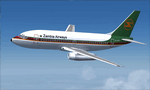
This is a repaint of the 737-2Q9 in Zambia Airways colors. The freeware 737-200 Tinmouse is needed for this repaint. Zambia Airways first operated the 737-200 in 1975. Overall they operated 5 of the type from 1975 to 1991. 9J-AEG was purchased new from Boeing in 1976 and stayed with the airline during its exisence. In 1995 it was sold toVASP of Brazil. Unluckilly for VASP, it was written off in 2003 when it hit a tree on landing in fog, and the gear collapsed. There were no casualties. Textures are 32bit dds. This repaint was tested on FSX-SE. It should also work on FSX & P3D v1-3.
| Filename: | Zambia_Airways_7372Q9_1985.zip |
| License: | Freeware |
| Added: | 22nd August 2019, 08:33:34 |
| Downloads: | 84 |
| Author: | Ted Giana |
| Size: | 4.75 MB |
| Category: Flight Simulator 2004 - Aircraft Repaints, Textures and Modifications | |
| Southwest Airlines Boeing 737-8H4 (N8642E) |
|
Images related to this file:
File Description:

Southwest Airlines Boeing 737-8H4 "N8642E". Southwest Airlines new livery painted on Tenkuu Developers Studio Boeing 737-800 aircraft. The textures are saved in 32bit format for quality graphics. Its features are Opening doors & Cargo doors, detailed textures, accurate paint, dynamic shine & effects, dynamic flexing wings that respond to turbulence, fully independent suspension, trim animation, gear steering, accurate flight dynamics, spoiler animation, crash effects, reflective cockpit windows, transparent navigation light lenses and many more. For support visit Tenkuu Developers Studio's 737 page: https://www.facebook.com/groups/TDS.SkySpirit.B737NG/.
Visit my Facebook page "Abdullah's Aerographix" for updates on my ongoing and future repaint projects: https://www.facebook.com/pages/Abdullahs-Aerographix/281295935336274?ref=hl
Thanks for downloading and happy flying.
| Filename: | Southwest_Airlines_Boeing_7378H4_N8642E.zip |
| License: | Freeware, limited distribution |
| Added: | 20th September 2014, 10:21:24 |
| Downloads: | 1,645 |
| Author: | Abdullah Rahman / Tenkuu Developers Studio |
| Size: | 8.56 MB |
| Category: X-Plane - Utilities | |
| X-Camera 2.2.1 |
|
Images related to this file:
File Description:
The X-Camera 2.1.1 plugin for X-Plane 9 and 10 is a replacement camera system that lets you define multiple view categories and multiple views within those categories that are associated with specific aircraft. X-Camera is similar to EzDok for FSX only for X-Plane. Watch this short X-Camera demo on YouTube: https://www.youtube.com/watch?v=PgOxG8ejq9A
Each view can have options:
- TrackIR:
Each view can enable or disable the TrackIR input. If the view is out the cockpit window having TrackIR enabled is desirable. However, if the view is a close-up of an instrument panel then having TrackIR disabled is probably the better choice since the view will be stable making it easy to click on cockpit controls with the mouse. We also support LinuxTrack on Linux and Mac systems.
- HeadShake:
If the HeadShake plugin from SimCoders is installed then the view can accept input from HeadShake. Similar to the TrackIR feature you will likely want this enabled for certain views but disabled for views on instrument panel close-ups where a stable camera makes it easier to use a mouse to control cockpit knobs and switches. The HeadShake plugin must be at version 1.3 or higher for the integration to work.
- Scenic Flyer:
If the Scenic Flyer plugin from Digital Avionics is installed then the view can choose to display either the Scenic Flyer Glass panel or GA panel.
- Smooth Transition:
When this option is enabled the camera with smoothly transition from one view to another over approximately half a second. When the option is off the view will transition immediately.
- Views can be controlled in a number of ways:
> Each view can be positioned by using keyboard keys or a control panel
> The camera'™s X, Y, Z, Heading, and Pitch can all be adjusted for each view
> Views can be assigned to a HotKey or JoyStick button for easy selection
> HotKey or JoyStick button can be used to navigate to next or previous views
> The views for a specific aircraft can be saved to a CSV file for easy editing
- Walk Mode:
Any view'™s camera can be placed in Walk Mode. While in this mode the camera can be walked or floated around using keyboard input. If you ever played the video game asteroid that is what walk mode is like. The mode is particularly useful for pre-flight inspections of your aircraft. You can create a external view and after selecting that view you can "Walk" the camera around checking out your landing gear, props, etc.
- Linear Transitions and Auto Advance:
Linear transitions allows you to define a transition between two adjacent cameras in category. This capability, in conjunction with the auto advance feature, allows you define fairly sophisticated animations that can be used for automated Pre-flight inspections, scenery viewing, and cool transitions affects that can be used when creating flight videos. All the transitions in our YouTube video were done with X-Camera.
- Bezier Curve Transitions:
Bezier curve transitions allows you to define a transition between three or more adjacent cameras in a category. This capability, in conjunction with the auto advance feature, allows you define fairly sophisticated animations that have an ultra smooth movement between the curve control points.
- Many Unique Camera Attributes:
Tracking Cameras - Camera Leveling - Smooth Camera Joining - Auto Advance to the Next Camera - Individual Zoom and Field of View Setting - External Cameras - Free Cameras - Target Following Cameras - Cineflex Cameras - Automatically Generate Unique Orbit and Fly-By Animations
X-Camera can create unique orbit and fly-by camera sequences by providing a few key parameters
- Airport Cameras:
You can define a set of free cameras associated with an airport. You can create up to 2,000 cameras per airport. X-Camera can also automatically populate airport cameras by reading the airport scenery files and creating cameras at runways, starting locations, taxiway signs, and airport viewpoints. You can map a joystick button to quickly switch between your aircraft camera set and the nearest camera at the nearest airport.
- Target Following Cameras:
Targets are locations defined by a latitude, longitude, and elevation in meters. Target following cameras are a special type of external camera that is attached to your plane and it has the ability to track a selected target. You can also view the target reciprocal which as a view from the target back to you plane.
X-Camera Tutorial Videos: There is also a four part series of tutorial videos that will help you get started with X-Camera. You can access them from the X-Camera Tutorial Page: https://www.stickandrudderstudios.com/x-camera-tutorial-videos/
The full manual is included in the zip file you can also view it here: https://www.stickandrudderstudios.com/downloads/User_Guide.pdf
| Filename: | XCamera_221.zip |
| License: | Shareware, limited functionality |
| Added: | 27th January 2017, 15:14:21 |
| Downloads: | 478 |
| Author: | Mark Ellis |
| Size: | 4.61 MB |
| Category: Flight Simulator X - Aircraft Repaints, Textures and Modifications | |
| Iraqi Airways B737-800 (YI-ASQ) |
|
Images related to this file:
File Description:
Overland(SMS) 737-800 in Iraqi Airways livery registered YI-ASQ. Repaint. Texture only, Payware Overland-Simmer's Sky "Fly Into The Sky! World Airline" required. Please Enjoy.
| Filename: | Iraqi_Airways_B737800_YIASQ.zip |
| License: | Freeware |
| Added: | 15th January 2017, 19:19:55 |
| Downloads: | 240 |
| Author: | Torsten Maertke |
| Size: | 5.42 MB |
| Category: Flight Simulator X - AI Aircraft | |
| Air Manas Boeing 737-800W |
|
File Description:
Textures only for FAIB 737-800W.
Model and paint Kit by FAIB.
Paint by Joel Branchu for Jeroen Eekhof's flightplans: Air_Manas_FP_SU16.zip (available at AVSIM).
Nov 2016
| Filename: | Air_Manas_Boeing_737800W.zip |
| License: | Freeware |
| Added: | 3rd November 2016, 14:46:55 |
| Downloads: | 562 |
| Author: | Joel Branchu |
| Size: | 3.44 MB |
| Category: Flight Simulator X - AI Aircraft | |
| Netherlands Government Boeing 737-700BBJ |
|
Images related to this file:
File Description:
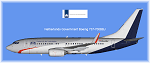
Netherlands Government Boeing 737-700BBJ PH-GOV repaint for FAIB model & paintkit by Erez Weber
Textures only.
Link for original aircraft see https://muenierweb.wordpress.com/ pages models & paintkits
| Filename: | Netherlands_Government_Boeing_737700BBJ.zip |
| License: | Freeware |
| Added: | 18th November 2018, 05:49:35 |
| Downloads: | 208 |
| Author: | Christian Muenier |
| Size: | 2.58 MB |
| Category: Prepar3D V1-4 - Aircraft Repaints, Textures and Modifications | |
| Star Perú OB2181P Boeing 737-300 |
|
Images related to this file:
File Description:
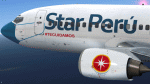
Star Perú special livery for Captain Sim Boeing 737-300. Work in P3Dv5 too. Install via ACE. See more repaints and updated versions in www.texturasbrasileiras.blogspot.com or www.texturasbrasileiras.com.
| Filename: | Star_Per_OB2181P_Boeing_737300.zip |
| License: | Freeware |
| Added: | 19th January 2022, 04:35:29 |
| Downloads: | 37 |
| Author: | Gustavo Aguiar |
| Size: | 10.83 MB |
| Category: Prepar3D V1-4 - Aircraft Repaints, Textures and Modifications | |
| Clube Náutico Ãgua Limpa PR-CID Boeing 737-300 |
|
Images related to this file:
File Description:
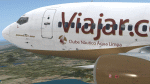
Clube Náutico Ãgua Limpa livery for Captain Sim Boeing 737-300. Work in P3Dv5 too. See more repaints and updated versions in www.texturasbrasileiras.blogspot.com or www.texturasbrasileiras.com.
| Filename: | Clube_Nutico_gua_Limpa_PRCID_Boeing_737300.zip |
| License: | Freeware |
| Added: | 29th April 2022, 03:55:12 |
| Downloads: | 17 |
| Author: | Gustavo Aguiar |
| Size: | 11.74 MB |
| Category: Prepar3D V1-4 - Aircraft Repaints, Textures and Modifications | |
| Webjet Linhas Aéreas PT-MNJ Boeing 737-300 |
|
Images related to this file:
File Description:
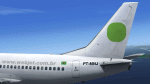
Webjet Linhas Aéreas old livery for Captain Sim Boeing 737-300. Work in P3Dv5 too. See more repaints and updated versions in www.texturasbrasileiras.blogspot.com or www.texturasbrasileiras.com.
| Filename: | Webjet_Linhas_Areas_PTMNJ_Boeing_737300.zip |
| License: | Freeware |
| Added: | 24th December 2021, 00:57:33 |
| Downloads: | 36 |
| Author: | Gustavo Aguiar |
| Size: | 10.36 MB |


© 2001-2026 AVSIM Online
All Rights Reserved
Privacy Policy |