
Where Flight Simulation Enthusiasts Gather from Around the World!
AVSIM Library - Search Results

| Category: Flight Simulator X - Utilities | |
| FSX AI Spotter 1.5.4 patch (build 61) |

|
File Description:
FSXAI Spotter (FSXAIS) is a software add-on for MS-FSX. This software can create AI Aircraft
in departure and arrival conditions simply by loading raw text “traffic filesâ€.
Moreover, FSXAIS is able to call any custom Windows Console Application in order to generate
these traffic files (for example, an application that connect on internet and arranges for the traffic
files based on live airport information), or load, at configurable interval the traffic files itself (for
example, traffic files generated by a more complex Windows Application).
| Filename: | FSX_AI_Spotter_154_patch_build_61.zip |
| License: | Shareware, limited functionality |
| Added: | 11th February 2020, 19:20:28 |
| Downloads: | 101 |
| Author: | V. Mercolino - geniX Software |
| Size: | 2 MB |
| Category: Flight Simulator X - Utilities | |
| FSX AI Spotter FlightStats® connector rel. 1.0 |
|
Images related to this file:
File Description:
geniX Software - Connector for FlightStat FlexAPI rel.1.0 to be used in conjunction with FSX AI Spotter.
The use of this connector is subject to having a FlightStats API App-Id and App-Key; the grant could be requested at https://www.flightstats.com at a very good price.
| Filename: | FSX_AI_Spotter_FlightStats_connector_rel_10.zip |
| License: | Freeware |
| Added: | 19th February 2020, 03:17:33 |
| Downloads: | 37 |
| Author: | V.Mercolino - geniX soft |
| Size: | 268.12 KB |
| Category: Flight Simulator X - Utilities | |
| Gauge-Checker ver. 1.6 |
|
Images related to this file:
File Description:
Gauge-Checker is a Windows program that verifies the availability of the Microsoft FSX Flight Simulator "gauges" (for the standard type in SimObjects folder: Airplanes, Rotorcraft, etc.) used in this environment.
It searches for panel.cfg's files and can report the full path where the gauge item is stored along with its duplicates if found.
A list of unused gauges is also reported when the user runs the program over all the SimObjects folders.
The program doesn't perform any operation on the files.
The program is freeware.
| Filename: | GaugeChecker_ver_16.zip |
| License: | Freeware |
| Added: | 31st August 2020, 18:18:09 |
| Downloads: | 229 |
| Author: | Vincenzo Mercolino - geniX Software |
| Size: | 3.56 MB |
| Category: Flight Simulator X - Utilities | |
| FSTramp v8.84 for MSFS, FSX(-SE), Prepart3D, X-Plane (Win) |
|
Images related to this file:
File Description:
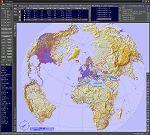
This add-on is an EXE application for Microsoft Flight Simulator and a DLL module for all other simulators. The DLL variant is activated via hotkeys or the simulator menu add-ons or plugins. Window size and layout are configurable for one or more screens. To avoid dazzling, the brightness of the entire application is customizable. Primarily it is a flight management system (FMS) with automatic control from start to landing. This also includes the observance of SID, STAR and Approaches in unmatched quality. The flight plan required for the FMS can be created manually or automatically, interactive changes and additions during the flight are possible. The basis of the flight planner is the 3D world map and the search function for airfields and navigation aids. The FMS by FSTramp relies on the autopilot of the aircraft. In case of incompatibility, the autopilot integrated in FSTramp will be used. This allows FSTramp to control almost all aircraft from airport to airport. The altitude profile of the flight plan, SID, STAR and approach is taken into account. This means that FSTramp extends the often incomplete airport procedures to and from the runway so that they can be flown completely automatically. During the fully automatic flight, the autopilot values ​​for HDG, ALT, VSPEED, SPD and MACH can be manually overridden. This is e.g. useful for being able to react to the instructions of the tower in the final approach without completely stopping the automatic flight. The rotating or north pointing 3D world map with numeric display of the terrain elevation under the mouse arrow is another special feature. It does not need an internet but is synthesized from included height profiles of the globe. The Data of continents, mountains and rivers are included in the setup. Airspaces, Airways, Waypoints and SID, STAR and Approaches are also included in the setup, but can be updated by installing additional AIRAC cycles. Airfields and navigation stations are taken from the simulator. NVIDIA: If the frame rate of the simulator drops sharply about 20 seconds after FSTramp's visibility, the power management of the GPU slows down prematurely. In the NVIDIA Control Panel, change the 'Manage 3D settings - Power management mode' option to 'Adaptive'.
| Filename: | FSTramp_v884_for_MSFS_FSXSE_Prepart3D_XPlane_Win.zip |
| License: | Shareware, time limited |
| Added: | 7th July 2023, 04:35:43 |
| Downloads: | 130 |
| Author: | Helge Schroeder |
| Size: | 358.21 MB |
| Category: Flight Simulator X - Utilities | |
| CTS/RJCC New Chitose Airport Runway Camera Views |
|
File Description:
Ever wanted to have multiple runway camera views for New Chitose Airport? Then this one is for you! Instructions, steps to do if not working, and contact is in the read_me file!
| Filename: | CTSRJCC_New_Chitose_Airport_Runway_Camera_Views.zip |
| License: | Freeware |
| Added: | 18th July 2023, 14:37:27 |
| Downloads: | 40 |
| Author: | Rye Kristian Bunao |
| Size: | 3.07 KB |
| Category: Flight Simulator X - Utilities | |
| AxisViewer 23.7.6 |
|
Images related to this file:
File Description:
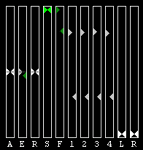
Detailed user manual included. For each aircraft control surface selected, AxisViewer will show the position of the joystick axis attached to the control surface, and the actual position of the control surface according to FSX/P3D. The benefits are: * Positive feedback on Control Surface Position. Ever ask yourself "Self, just what is that autopilot/autothrottle doing, anyway?!" * Allow you to manually adjust the Axis Positions to match the Control Surface Positions, so that you don't get a nasty surprise (for example, sudden change in thrust) when the autopilot and/or autothrottle is disengaged. * Verification of joystick functioning and range of motion. * Clear indication of when "dead zones" are entered. You will see the Control Surface Position "snap" to a particular value as the Axis Position approaches the dead zone.
| Filename: | AxisViewer_2376.zip |
| License: | Freeware, limited distribution |
| Added: | 3rd August 2023, 19:00:13 |
| Downloads: | 58 |
| Author: | William Ruppel |
| Size: | 45.45 MB |
| Category: Flight Simulator X - Utilities | |
| NSW Heli spots for HeliTraffic |
|
Images related to this file:
File Description:

NSW Heli spots for HeliTraffic 2009 by Flight 1, Covers OZx scenery, FTX scenery & Standard FSX scenery. Requires HeliTraffic 2009 by Flight 1
| Filename: | NSW_Heli_spots_for_HeliTraffic.zip |
| License: | Freeware |
| Added: | 5th December 2011, 08:44:32 |
| Downloads: | 171 |
| Author: | Matt Levi |
| Size: | 6.37 KB |
| Category: Flight Simulator X - Utilities | |
| MH's AI Traffic Check V1.0 |
|
File Description:
Missing AI aircraft will simply not show up in your scenery, but missing .air files might lead to FS crashing quite unexpectedly. This quick running tool will report missing (AI) aircraft and configuration errors (regarding model/panel/texture... paths). Data is written to a simple text file. The program is suited for FS2004 too.
| Filename: | MHs_AI_Traffic_Check_V10.zip |
| License: | Freeware, limited distribution |
| Added: | 10th July 2007, 16:42:50 |
| Downloads: | 2,448 |
| Author: | Michael Heise |
| Size: | 209.81 KB |
| Category: Flight Simulator X - Utilities | |
| SimLauncherX v5.9 |
|
Images related to this file:
File Description:
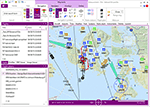
SimLauncherX (or SLX for short) can be used as a launcher application for both FSX:ME, FSX:SE and Prepar3D (v1, v2 and v3). Flights/scenarios can be loaded when launching the simulator or when the simulator is already running. New flights can be created by selecting one of the installed aircraft, selecting the start location (runway or parking position), selecting the type of weather and the time of day. You can also display and create flight plans and attach them to a flight as requested or active flight plan. Version 5.9 adds a flight computer, AI browser, interactive (spoken) checklists, PMDG 737/777 CDUs, approach charts, fleet management and many other improvements. SimLauncherX is a more modern version of my previous SimLauncher application with a lot of additional functionality:
- interactive map.
- display, create and modify flight plans.
- show .kml/.kmz files on the map.
- radio stack.
- instruments panel.
- scenery.cfg editor.
- dll/exe.xml editor.
- process monitor.
Works with FSX:ME, FSX:SE and P3D v1, v2 and v3.
| Filename: | SimLauncherX_v59.zip |
| License: | Freeware, limited distribution |
| Added: | 1st April 2017, 08:18:19 |
| Downloads: | 15,785 |
| Author: | Maarten Boelens |
| Size: | 52.64 MB |
| Category: Flight Simulator X - Utilities | |
| Random Flight Chooser |
|
File Description:
A random flight chooser from the following hubs:
KSLC,
KJFK,
KATL,
KMSP.
| Filename: | Random_Flight_Chooser.zip |
| License: | Freeware |
| Added: | 25th April 2011, 16:51:20 |
| Downloads: | 338 |
| Author: | Nikita Makarov |
| Size: | 1.5 MB |


© 2001-2026 AVSIM Online
All Rights Reserved
Privacy Policy |