
Where Flight Simulation Enthusiasts Gather from Around the World!
AVSIM Library - Search Results

| Category: Flight Simulator X - Utilities | |
| FS Earth 5.1 for Google Earth and FSX |

|
File Description:
This program acts as an interface link between Flight Simulator X and Google Earth, letting to follow a flight in real time, over the satellite images generated by Google Earth. Flights can be saved, and many options are available for fine tuning the performance, as well as the map's style (zoom, tilt, orientation). Works on a single computer running FSX and Google Earth all together or, for best experience, can be used on two networked computers running respectively FSX (master) and Google Earth (slave). AI and Multiplayer traffic is also displayed in Google Earth, with course prediction and other information. Requires Flight Simulator X and Google Earth. The program running in trial mode works only around Anchorage, Alaska, (PANC / ANC) for a maximum of five minutes per flight session. Version 5.1 has much improved smoothness. A version for FS2004 is available also.
| Filename: | FS_Earth_51_for_Google_Earth_and_FSX.zip |
| License: | Shareware, time limited |
| Added: | 12th November 2007, 23:08:31 |
| Downloads: | 1,587 |
| Author: | Luciano Napolitano |
| Size: | 2.44 MB |
| Category: Flight Simulator X - Utilities | |
| FS2Crew FS9 and FSX Start Center (May 2008) |
|
File Description:
FS2Crew FSX and FS9 Start Center. This is the most current version of the (frequently updated) FS2Crew Start Center for FSX and FS9 as of May 2008. It replaces any pre-existing versions of the Start Center on your system. While intended for FS2Crew users, non-FS2Crew users may also install and use the Start Center. Please read the PDF file enclosed in the download for further information.
| Filename: | FS2Crew_FS9_and_FSX_Start_Center_May_2008.zip |
| License: | Freeware |
| Added: | 30th May 2008, 12:12:06 |
| Downloads: | 1,425 |
| Author: | Bryan York | FS2Crew |
| Size: | 3.8 MB |
| Category: Flight Simulator X - Utilities | |
| FSX/P3D Quick ILS Utility Ver 3.1.5 **UPDATE ** |
|
Images related to this file:
File Description:
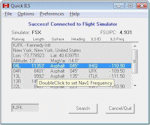
This utility was written to simplify the process of finding the ILS frequency when ATC assigns an ILS approach. Operation is simple. Enter the ICAO, click the Search button and a list of all runways, runway lengths and runway ILS frequencies for that ICAO are displayed. Here's the quick part... Just double click on a runway and the ILS frequency will instantly be set in the Nav1 radio. You can also start Flight Simulator, load a flightplan and then start Quick ILS. It will automatically read the flightplan and then display the destination airport's runway data. Again, just double click on the assigned runway to set the Nav1 radio for the ILS approach. ILS data aside, General Aviation fans may want to use Quick ILS to get information about possible destination airports. Enter an ICAO and you can quickly view the runways available, their length, the surface (ie grass, gravel, paved...) and the runway headings. Version 3.1.5 adds the ILS ID to the display. Freeware by Dave Westbury.
| Filename: | FSXP3D_Quick_ILS_Utility_Ver_315_UPDATE_.zip |
| License: | Freeware |
| Added: | 12th August 2014, 10:25:51 |
| Downloads: | 3,578 |
| Author: | Dave Westbury |
| Size: | 457.35 KB |
| Category: Flight Simulator X - Utilities | |
| Taxi Navigation (+Destination Weather Reporter) for FSX/FS9 V1.0 |
|
Images related to this file:
File Description:

Do you prepare airport charts of every airport you visit, or just follow the progressive taxi to do taxiing?
This utility will make taxiing easy and realistic by providing simple taxi navigation information in text.
While taxiing, press "Ctrl + Shift + X", then taxi navigation information will be displayed.
It includes current taxiway name, intersecting taxiways' name and distance
(e.g. "On R7 : R2 (250m), R1 (643m), A (748m), A7 (748m)").
And one more thing, it also provides destination weather report.
It can be very helpful to set up exact T/D(Top of Descent), by assuming expected runway with wind information.
Enter destination airport before flight, and press "Ctrl + Shift + W" while flying,
then destination weather information will be displayed.
It looks like METAR and includes wind direction and speed, visibility, temperature, dew point and pressure
(e.g. "RKPK 29403KT 47SM 32/23 1010mb").
| Filename: | Taxi_Navigation_Destination_Weather_Reporter_for_F.zip |
| License: | Freeware |
| Added: | 3rd August 2012, 06:47:24 |
| Downloads: | 2,940 |
| Author: | Dongjin Shin |
| Size: | 4.88 MB |
| Category: Flight Simulator X - Utilities | |
| Port Simmer's Sky / Overland airliners into FSX - Version 2 |
|
File Description:
Porting Simmer's Sky (Overland) Airliners to FSX - Version 2
By Dave Nunez ([email protected])
This DOC file explains how to port some of Simmer's Sky (Overland) airliners into FSX (with working panels, sound, pushback trucks, jetways & baggage carts, and camera definitions). You must have some of these airliners installed for this to make any sense!
This version includes instructions for porting the following:
SMS_777-200_W (Being 777-200)
SMS_777-200ER_W (Being 777-200ER)
SMS_777-300_W (Being 777-300)
SMS_A380-800 (Airbus A380-800)
SMS_MD11_V2 (McDonnal Douglas MD-11)
SMS_A300-600R_W (Airbus A300-600)
SMS_A319_W (Airbus A319)
SMS_A320_W (Airbus A320)
SMS_A321_W (Airbus A321)
SMS_767-300ER_W (Boeing 767-300ER)
| Filename: | Port_Simmers_Sky__Overland_airliners_into_FSX___Ve.zip |
| License: | Freeware |
| Added: | 25th October 2006, 20:04:40 |
| Downloads: | 3,539 |
| Author: | Dave Nunez |
| Size: | 24.41 KB |
| Category: Flight Simulator X - Utilities | |
| FSTramp v8.84 for MSFS, FSX(-SE), Prepart3D, X-Plane (Win) |
|
Images related to this file:
File Description:
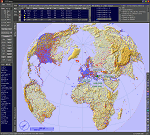
This add-on is an EXE application for Microsoft Flight Simulator and a DLL module for all other simulators. The DLL variant is activated via hotkeys or the simulator menu add-ons or plugins. Window size and layout are configurable for one or more screens. To avoid dazzling, the brightness of the entire application is customizable. Primarily it is a flight management system (FMS) with automatic control from start to landing. This also includes the observance of SID, STAR and Approaches in unmatched quality. The flight plan required for the FMS can be created manually or automatically, interactive changes and additions during the flight are possible. The basis of the flight planner is the 3D world map and the search function for airfields and navigation aids. The FMS by FSTramp relies on the autopilot of the aircraft. In case of incompatibility, the autopilot integrated in FSTramp will be used. This allows FSTramp to control almost all aircraft from airport to airport. The altitude profile of the flight plan, SID, STAR and approach is taken into account. This means that FSTramp extends the often incomplete airport procedures to and from the runway so that they can be flown completely automatically. During the fully automatic flight, the autopilot values ​​for HDG, ALT, VSPEED, SPD and MACH can be manually overridden. This is e.g. useful for being able to react to the instructions of the tower in the final approach without completely stopping the automatic flight. The rotating or north pointing 3D world map with numeric display of the terrain elevation under the mouse arrow is another special feature. It does not need an internet but is synthesized from included height profiles of the globe. The Data of continents, mountains and rivers are included in the setup. Airspaces, Airways, Waypoints and SID, STAR and Approaches are also included in the setup, but can be updated by installing additional AIRAC cycles. Airfields and navigation stations are taken from the simulator. NVIDIA: If the frame rate of the simulator drops sharply about 20 seconds after FSTramp's visibility, the power management of the GPU slows down prematurely. In the NVIDIA Control Panel, change the 'Manage 3D settings - Power management mode' option to 'Adaptive'.
| Filename: | FSTramp_v884_for_MSFS_FSXSE_Prepart3D_XPlane_Win.zip |
| License: | Shareware, time limited |
| Added: | 7th July 2023, 04:35:43 |
| Downloads: | 130 |
| Author: | Helge Schroeder |
| Size: | 358.21 MB |
| Category: Flight Simulator X - Utilities | |
| Setting FSX Radios, OBS and Autopilot Using the Keyboard Numberpad |
|
File Description:
This is an update of the original Lua script set - version 1.1 includes a 12th script for setting the auto-throttle speed (in either knots or Mach).
Numpad Control (NpC) allows you to control Com, Nav, ADF, Transponder, OBS and Autopilot settings in FSX using the keyboard number pad. Most entered values, such as radio frequencies, appear directly on the radio display as the digits are entered. No more 'fumbling with the mouse' to try to tune your radios, set you autopilot or your OBS heading. NpC requires a licensed version of FSUIPC4 and a keyboard equipped with a number pad. The zip file, NpC_v1.1.zip, contains 12 NpC LUA scripts, an installation guide, an instruction manual for configuring FSUIPC and a quick reference guide.
| Filename: | Setting_FSX_Radios_OBS_and_Autopilot_Using_the_Key.zip |
| License: | Freeware |
| Added: | 19th November 2013, 18:55:56 |
| Downloads: | 695 |
| Author: | Al Klayton, Dan Sullivan |
| Size: | 1.4 MB |
| Category: Flight Simulator X - Utilities | |
| AI Cull Traffic Density Tool for FSX/P3D (Version 1.1) |
|
Images related to this file:
File Description:

The AICull.exe utility provides intelligent traffic density for AI aircraft. The user enters the ICAO(s) of the airports the user (typically) departs from and arrives at. AICull then removes AI that is not departing from or arriving at these ICAO(s) in order to boost frame rate, but still maintain an immersive AI experience for the user. That is, the user will perceive normal traffic density at the airports the user departs or arrives at, however all other AI in the area will be deleted saving frame rates and memory. The user may also enter an unlimited number of ICAO(s) to monitor. The user may also update the list of ICAO(s) while the program is running. AICull.exe requires SimConnect and the latest, registered version of FSUIPC ver. 4.9x (or later version). For best results, use with traditional bgl-based AI traffic (e.g., default, Word of AI, My Traffic X, etc.) although the program does work to lesser effect with the simconnect-based Ultimate Traffic 2 (see the included ReadMe). Revision: fixed "Problem Opening FSUIPC Link" for P3D.
| Filename: | AI_Cull_Traffic_Density_Tool_for_FSXP3D_Version_11.zip |
| License: | Freeware |
| Added: | 22nd March 2014, 00:16:44 |
| Downloads: | 3,125 |
| Author: | Roland Foster |
| Size: | 306.83 KB |
| Category: Flight Simulator X - Utilities | |
| FsRaas V2.0 (Runway Awareness and Advisory System for FSX/FS9) |
|
Images related to this file:
File Description:
To watch FsRaas video demo, please visit "youtu.be/wDlIMjAUn0s" and "youtu.be/dUH7gAj24MY". It simulates Honeywell SmartRunway/SmartLanding system. RAAS provides crew members with information concerning the aircraft's position relative to an airport's runway during taxi, takeoff, final approach, landing and rollout to improve situational awareness and reduce the likelihood of a runway incursion. From FsRaas 1.1, 8 functions are added (Extended Hold On Runway, Short Runway Takeoff, Short Runway Landing, Distance Remaining in Meters, Landing Flaps, Too High, Too Fast, Unstable), and some other functions are upgraded. Thanks for so many feedbacks from FsRaas users! Works with both FSX and FS2004.
| Filename: | FsRaas_V20_Runway_Awareness_and_Advisory_System_fo.zip |
| License: | Freeware |
| Added: | 17th June 2012, 06:36:15 |
| Downloads: | 12,814 |
| Author: | Dongjin Shin |
| Size: | 6.26 MB |
| Category: Flight Simulator X - Utilities | |
| v2 FSX A2A Shockwave 3D Lights Redux Aircraft CFG installer |
|
File Description:
Version 2 - Improved light replacement!
This is a macro to be used with Freeware Notepad++ to streamline the installation of your previously installed Payware A2A Shockwave 3D Lights Redux into any of your compatible aircraft. You simply open the Aircraft.cfg of your chosen aircraft, and do a single mouse click to install! This will save you HOURS and HOURS of repetitive typing. I have tested this on my ENTIRE Aircraft folder and also all aircraft of Just Flight Traffic 360 and Ultimate Traffic Live! I also have included information for a DELUXE macro that will cleanup and sort all Aircraft.cfg's of your ENTIRE Aircraft hanger.
| Filename: | v2_FSX_A2A_Shockwave_3D_Lights_Redux_Aircraft_CFG_installer.zip |
| License: | Freeware |
| Added: | 18th September 2018, 04:24:28 |
| Downloads: | 1,633 |
| Author: | Jack Pickett |
| Size: | 397.89 KB |


© 2001-2026 AVSIM Online
All Rights Reserved
Privacy Policy |