
Where Flight Simulation Enthusiasts Gather from Around the World!
AVSIM Library - Search Results

| Category: Flight Simulator X - Utilities | |
| Landing Parameters for FSX and P3D |

|
Images related to this file:
File Description:
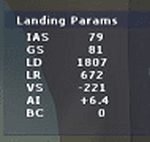
Landing_Params is a Lua script for FSX/P3D that displays landing parameters in a small text window that pops
up after the aircraft has landed and has reached taxi speed. The script should be activated with a key or button (like the gear
down key/button) during the approach to landing. Parameters displayed in the window after touchdown are
Indicated Airspeed (IAS, Kts), Ground Speed (GS, Kts), Landing Distance (LD, ft), Landing Roll (LR, ft), Vertical
Speed (VS, ft/min), Attitude Indicator pitch at touchdown (AI), and Bounce Count (BC). Data collection begins
when the a/c passes through a radar altimeter determined threshold altitude window between 45 and 55 ft
(i.e., the nominal 50ft threshold height). In addition, more detailed landing parameter information may be
logged. A registered copy of FSUIPC is required to execute the Lua script.
| Filename: | Landing_Parameters_for_FSX_and_P3D.zip |
| License: | Freeware |
| Added: | 18th February 2018, 04:09:32 |
| Downloads: | 568 |
| Author: | Al Klayton |
| Size: | 164.08 KB |
| Category: Flight Simulator X - Utilities | |
| FS2004/FSX Flight Analyzer Utility (V1.03) |
|
Images related to this file:
File Description:
This utility can do the following:
- analyzing your flight from departure to your destination, and the landing with a graphical landingchart.
- when flight analysis is finished you can print a report, the report is automaticly saved as pdf File.
- quickly change the settings of FSX, such as time, date, fuel, weight, traffic etc.
- start a failure sytem, such as gear, flaps, engine, etc.
- runway detecting system to see wich runways are in use.
- load a existing flight or flightplan.
- quickly look to your CFG (settings) files and change them even before the flight simulator is running.
- after a flight is finished FsQC saves your flight automaticly as 'FsQC last Flight', so you can continue the next day or hour.
- and lots of more.
- require FSUIPC.
| Filename: | FS2004FSX_Flight_Analyzer_Utility_V103.zip |
| License: | Check within download |
| Added: | 18th February 2018, 20:53:54 |
| Downloads: | 126 |
| Author: | Evander Tholen |
| Size: | 831.35 KB |
| Category: Flight Simulator X - Utilities | |
| NumberPad Control for FSX and P3D |
|
Images related to this file:
File Description:
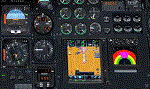
NpC4FSX&P3D (NumberPadControl for FSX and P3D) is a more efficient (and more convenient to set up)
version of a similar NpC program that I wrote a few years ago and which to
my surprise PC Pilot magazine included on their 100th Anniversary edition Freeware CD. With
NpC4FSX&P3D you assign keys to functions like Com, Nav, Heading, Course, Altitude, VS,
Autopilot functions, etc., and then can enter the associated values (like frequencies or headings) just by typing on the
keyboard’s numberpad instead of fiddling with elusive mouse click spots. NpC4FSX&P3D is
programmed primarily for aircraft with avionics that were developed within standard FSX
programming guidelines but also supports third party add-
on aircraft such as the Flysimware L35A and MU2, PMDG 737NGX / B777, Flight1 King Air
B200, A2A Cherokee 180, and also works with GPS units like the GTN750. Setup manual included.
A registered (payware) copy of FSUIPC is required.
| Filename: | NumberPad_Control_for_FSX_and_P3D.zip |
| License: | Freeware |
| Added: | 19th February 2018, 21:21:16 |
| Downloads: | 481 |
| Author: | Al Klayton |
| Size: | 683.59 KB |
| Category: Flight Simulator X - Utilities | |
| NpC - Numpad Control for FSX v2.2.1 |
|
File Description:
NpC v2.21 - some small changes from v2.2 including a script you can use to switch autopilot input from Nav to GPS and instructions on moving and re-sizing and re-positioning the NpC message window.
NumPad Control (NpC) is a program for entering Com, Nav and ADF radio frequencies, Transponder codes, VOR OBS/CRS settings, Auto-throttle airspeed, and Autopilot altitude, vertical speed, and heading values in FSX using the keyboard number-pad instead of mouse click spots. NpC is programmed primarily for aircraft with default FSX avionics (radios, transponders, and autopilots that were developed within standard FSX programming guidelines). However, this updated version of NpC also supports a number of third party add-on aircraft such as the PMDG 737NGX / B777, Flight1 King Air B200 and the A2A Cherokee 180. NpC is a set of Lua scripts and thus requires a registered copy of FSUIPC4 to work.
An installation and configuration manual is also included in the file set.
For a video that gives an overview of NpC function see: https://www.youtube.com/watch?v=P2p6CHxMOl8&list=PL_NnG_PN8zwnEI59uGxlhgp11rJQbQ_gJ&index=2
| Filename: | NpC__Numpad_Control_for_FSX_v221.zip |
| License: | Freeware |
| Added: | 4th December 2015, 20:03:34 |
| Downloads: | 698 |
| Author: | Al Klayton, Dan Sullivan |
| Size: | 801.63 KB |
| Category: Flight Simulator X - Utilities | |
| Yet Another Google Earth Tool (FSX) |
|
File Description:
This little program for FSX allows to save two types of file : a single position file and a complete path file for Google Earth program (Each leg of the path is ~1NM long). It also allows to create a direct link between a Google Earth window and an instance of FSX and to follow your position on the Google view (it uses new SDK MS SimConnect.dll)
| Filename: | Yet_Another_Google_Earth_Tool_FSX.zip |
| License: | Freeware |
| Added: | 18th October 2006, 19:59:35 |
| Downloads: | 2,527 |
| Author: | laurent claude |
| Size: | 945.02 KB |
| Category: Flight Simulator X - Utilities | |
| FSX IFR Waypoints for Plan-G |
|
File Description:
A set of files containing the default FSX IFR waypoints. These files may be imported into the user waypoint database component of Plan-G, a freeware flight planner/tracker for FS9/FSX. As Plan-G is currently designed as a VFR flight planner, ATS routes are not supported.
| Filename: | FSX_IFR_Waypoints_for_PlanG.zip |
| License: | Freeware, limited distribution |
| Added: | 17th December 2009, 23:25:19 |
| Downloads: | 745 |
| Author: | Scott Smart |
| Size: | 1.57 MB |
| Category: Flight Simulator X - Utilities | |
| FSX/FS2004 Flight Calculator Ver 1.6.5 |
|
Images related to this file:
File Description:
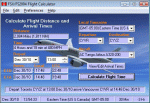
FS Flight Calculator will calculate distance and arrival times for both FSX and FS2004. The program has four input components, Local TimeZone, Departing Airport, Destination Airport and the Aircraft to be used for the flight. The program calculates the distance in nautical miles between two FlightSim Airports. It determines the flight length in hours based on the aircraft's speed and then calculates the Arrival time. If the flight time passes midnight the arrival day is incremented by a day. In addition this version takes into account the timezones of both departing and destination airports and calculates the timezone offset between them allowing display of the arrival in local time at the destination airport. The distances and times are based on point to point calculations and do not allow for taxi out, taxi in, start-up times etc. To compensate for this you can input a time period in minutes which is automatically added to the flight time to give a more accurate estimate of arrival times. This version also adds a Flight Summary Window to the main screen, the ability to create multi leg routes and a utility to create a new Aircraft.txt file. Freeware By Dave Westbury
| Filename: | FSXFS2004_Flight_Calculator_Ver_165.zip |
| License: | Freeware, limited distribution |
| Added: | 29th September 2011, 01:10:39 |
| Downloads: | 3,482 |
| Author: | Dave Westbury |
| Size: | 4.29 MB |
| Category: Flight Simulator X - Utilities | |
| FS2004/FSX Flight Analyzer Utility V2.04 |
|
Images related to this file:
File Description:

NOW ALSO WORKING WITH FS2004
What this program do:
- quickly change the settings of FSX/Fs2004, such as time, date, fuel, weight, traffic etc.
- start a failure sytem, such as gear, flaps, engine, etc.
- freeze the time, so you can fly in a for everlasting sunset.
- runway detecting system to see wich runways are in use.
- a flight analysis system, this is automaticly started when you start FsQC.
- When flight analysis is finished you can print a report, the report is automaticly saved as pdf File.
- flight analysis is finished when you parked your aicraft with the parking brakes set for more then 5 seconds.
- graphical landingchart.
- load a existing flight or flightplan.
- quickly look to your CFG (settings) files (only FSX) and change them even before the flight simulator is running.
- After a flight is finished FsQC saves your flight automaticly as 'FsQC last Flight', so you can continue the next day or hour.
- for properly working, flight analysis require a fsx/fs2004 flightplan.
Flight analysis:
Flight analysis start recording at the moment when you begin taxiing.
It gives you huge information such as:
- takeoff- and landing-weight
- takeoff roll in m. or ft.
- separate fuel consumption in taxi, climb, cruise and descent.
- maximum banking in flight
- which speed you using the flaps and gear
- when autopilot on or off
- vertical speed on touchdown
- reverser set after landing
- wich speed you cancel reverser
- bouncing at landing
- graphical landingchart.
- and lots of more
You can better look the example of the pdf document located in the 'Flight Reports' folder.
Failures:
In the settings menu you can select the kind of failures you want to occur and when they must occur.
At this moment 10 failures are possible:
-altitude
-attitude
-heading
-airspeed
-vertical speed
-pitot
-fuelleak
-flaps
-engine
-gear
Recommended:
For more easy use, run this program on a second monitor or much better on a second computer(laptop) where FSUIPC-client is running in the same network where FSX/FS2000 is running and FSUIPC WideFs is registered.
See also the pdf Manual.
Also look at www.FsQC.eu for more information.
If you have a problem look first on www.fsqc.eu/faq.html
If you have questions please contact [email protected]
| Filename: | FS2004FSX_Flight_Analyzer_Utility_V204.zip |
| License: | Check within download |
| Added: | 5th March 2018, 22:40:20 |
| Downloads: | 331 |
| Author: | Evander Tholen |
| Size: | 2.45 MB |
| Category: Flight Simulator X - Utilities | |
| AI Aircraft SID and STAR Controller - Version 1.4B <b>for FSX, FSX Steam and P3D</b> |
|
Images related to this file:
File Description:
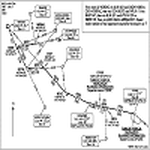
The AIController utility automatically vectors FSX, FSX-Steam or Prepar3D Artificial Intelligence (AI) aircraft through predefined Standard Instrument Departures (SIDs), jet routes, Standard Instrument Arrivals (STARs) (or alternatively generic traffic patterns), and/or final approaches. AIController automatically selects the most appropriate SID, jet route or STAR for each AI aircraft. AIController also lands arriving AI using published, custom or automatic final approach procedures, then provides taxi service to parking. The user can customize the procedures to fine tune AI arrival and departure patterns at each airport, such as specifying landing runways on-the-fly.
AIController optionally enforces spacing minimums between arriving AI aircraft by commanding speed changes and/or commanding the AI to hold at waypoints, thus reducing go-arounds. AIController can also enforce spacing minimums between the AI aircraft and the user's aircraft.
A stand-alone, windows based AI traffic monitoring program (AIMonitor.exe) is also included to provide the user with a graphical front-end. A converter (SIDSTARConverter) is included to automatically convert SID and STAR files from standard, aircraft format to the format used by AIController.
AIController requires an installed FSX or P3D SimConnect and can be run on a networked computer. The latest, registered version of FSUIPC ver. 4.9x (or later version) is also required.
| Filename: | AI_Aircraft_SID_and_STAR_Controller__Version_14B_b.zip |
| License: | Freeware |
| Added: | 18th July 2015, 00:11:26 |
| Downloads: | 14,179 |
| Author: | Roland Foster |
| Size: | 16.23 MB |
| Category: Flight Simulator X - Utilities | |
| FSX AI Spotter 1.5.4 patch (build 61) |
|
File Description:
FSXAI Spotter (FSXAIS) is a software add-on for MS-FSX. This software can create AI Aircraft
in departure and arrival conditions simply by loading raw text “traffic filesâ€.
Moreover, FSXAIS is able to call any custom Windows Console Application in order to generate
these traffic files (for example, an application that connect on internet and arranges for the traffic
files based on live airport information), or load, at configurable interval the traffic files itself (for
example, traffic files generated by a more complex Windows Application).
| Filename: | FSX_AI_Spotter_154_patch_build_61.zip |
| License: | Shareware, limited functionality |
| Added: | 11th February 2020, 19:20:28 |
| Downloads: | 101 |
| Author: | V. Mercolino - geniX Software |
| Size: | 2 MB |


© 2001-2026 AVSIM Online
All Rights Reserved
Privacy Policy |