
Where Flight Simulation Enthusiasts Gather from Around the World!
AVSIM Library - Search Results

| Category: Flight Simulator X - Utilities | |
| MH's FS Scenery Configurator V1.2 |

|
File Description:
"MH's FS Scenery Configurator" is a utility which can perform a lot of operations on the FS "scenery.cfg" file where information on scenery layers is stored. It can insert or remove scenery paths (layers), it can change priority of layers, it can search for a installed scenery etc. It allows easy installation of complete scenery containing folders by processing special batch files.
This new version V1.2 corrects few smaller errors from previous versions and introduces two new functions to report scenery layer and BGL deactivation information to text file.
Program can be used with FS 2004 as well, old version is not required.
| Filename: | MHs_FS_Scenery_Configurator_V12.zip |
| License: | Freeware, limited distribution |
| Added: | 19th December 2007, 21:34:36 |
| Downloads: | 1,542 |
| Author: | Michael Heise |
| Size: | 229.37 KB |
| Category: Flight Simulator X - Utilities | |
| Flight Simulation Add-On Tracker V1.0 |
|
Images related to this file:
File Description:
This little tool helps you keep a list of your favourite airports with the option to export this list to Google Earth. Easily choose an airport for today's flight and access additional airport data through Sam High's fsxdb.com. Requires: Microsoft .Net Framework 2.0 or higher.
EDIT 20-DEC-2015Unfortunately fsxdb.com is down. I cannot get in touch with the developer Sam High.
Therefore the Autofill option in the program does not work. You can still use the program if you enter airport data and location manually. The export to Google Earth is still functional.
| Filename: | Flight_Simulation_AddOn_Tracker_V10.zip |
| License: | Freeware |
| Added: | 27th May 2013, 23:09:19 |
| Downloads: | 445 |
| Author: | Tobias Wagner |
| Size: | 419.19 KB |
| Category: Flight Simulator X - Utilities | |
| JAB FSX, the small FSX companion |
|
File Description:
This small program has three parts. 1° It allows to regularly save the current FSX flight in order to open the next session at the same point where the last session finished (just like "Previous flight" in FS9). 2° It allows TRACK-IR owners to enable Track-IR only when in virtual cockpit and disable it in outside views (to use a joystick hat for example). 3° For scenery, mesh and landclass designers, it provides a great help to get coordinates with several formats (even for direct paste in XML files).
Works in english or french.
| Filename: | JAB_FSX_the_small_FSX_companion.zip |
| License: | Freeware, limited distribution |
| Added: | 24th February 2007, 22:55:06 |
| Downloads: | 2,924 |
| Author: | Jacky Brouze |
| Size: | 462.8 KB |
| Category: Flight Simulator X - Utilities | |
| Weather radar for ASNext |
|
File Description:
This is the weather radar that I wrote for ASNext in 2014. Included is the source code. I'm grateful to all the other source code, forum help, and tutorials I found around the place to make it work. *Requires ActiveSky Next*
| Filename: | Weather_radar_for_ASNext.zip |
| License: | Freeware |
| Added: | 24th October 2015, 22:02:00 |
| Downloads: | 393 |
| Author: | Bryn Battersby |
| Size: | 140.33 KB |
| Category: Flight Simulator X - Utilities | |
| Seasonal Textures Manager ** New Updated Version ** |
|
Images related to this file:
File Description:

FSX Seasonal Textures Manager allows you to change scenery seasonal textures. Made to help freeware scenery makers to offer some easy way for seasonal textures changing to their products. Please read the readme and the license information. This file supersedes a previous version.
| Filename: | Seasonal_Textures_Manager___New_Updated_Version_.zip |
| License: | Freeware, limited distribution |
| Added: | 27th September 2014, 13:48:47 |
| Downloads: | 442 |
| Author: | Robert Kupis |
| Size: | 511.29 KB |
| Category: Flight Simulator X - Utilities | |
| ServInfo 2.02 |
|
File Description:
Update Servinfo with the new company CFA and the logo for the FSD-Group. All others companys are there. (French) Mise � jour du logiciel ServInfo 2.02 pour int�©grer la nouvelle compagnie CFA pour FSD-Group
| Filename: | ServInfo_202.zip |
| License: | Freeware |
| Added: | 20th March 2011, 20:38:34 |
| Downloads: | 748 |
| Author: | Roddy Faye |
| Size: | 2.93 MB |
| Category: Flight Simulator X - Utilities | |
| Flight Log Client v 2 |
|
Images related to this file:
File Description:

The Series 2 of Flight log client was born, now with ability to create and submit flightplans to our network, you can also save them in "FPL IVAO compatible format" to share with your IVAO application or load them in further flight logs.
| Filename: | Flight_Log_Client_v_2.zip |
| License: | Freeware |
| Added: | 13th May 2013, 14:32:54 |
| Downloads: | 117 |
| Author: | Mario Dantas |
| Size: | 4.94 MB |
| Category: Flight Simulator X - Utilities | |
| NumberPad Control Move Aircraft Utility |
|
File Description:
NpCmoveAircraft is a Lua script in the Numberpad Control family of FSX scripts that can be used to move an aircraft to a new position. Each step includes prompts for the required input and format. User inputs include the DISTANCE to move (NMs), the DIRECTION to move (degrees magnetic), the desired aircraft ALTITUDE (ft), the desired aircraft HEADING (degrees magnetic), and the desired aircraft IAS (Kts) along with the LANDING GEAR POSITION -- up (u), down (d) or fixed (f). Or for any of the five inputs the user can simply enter a carriage return (Enter key) to signify NO CHANGE for that particular entry.
Prior to the move the aircraft can be on the ground or in the air. So, for example, NpCmoveAircraft can be used to simply turn an a/c around, to move it to the other end of a runway, to re-position it for another approach after landing, to jump ahead in cruise, to catch up to another a/c, etc. NpCmoveAircraft works with default FSX aircraft and many add-on aircraft that adhere to the standard FSUIPC offsets.
A registered copy of FSUIPC is required to execute the NpCmoveAircraft Lua script. Simply copy the script to the Modules folder of FSX and assign a ‘hot key’, button or switch to activate the script.
Al Klayton
[email protected]
| Filename: | NumberPad_Control_Move_Aircraft_Utility.zip |
| License: | Freeware |
| Added: | 21st February 2017, 21:30:01 |
| Downloads: | 147 |
| Author: | Al Klayton |
| Size: | 3.92 KB |
| Category: Flight Simulator X - Utilities | |
| FSX Settings Editor Version 1.1 |
|
Images related to this file:
File Description:

Update! New version fixes WideViewAspect setting not working in the earlier version. It also lets you see the last profile that was applied. Please uninstall the earlier version, and then install this.
FSX Settings Editor lets you create fsx.cfg profiles for different scenarios which you can quickly apply to your fsx.cfg file. Create different settings profiles and switch between them quicker than ever before. Some of the scenarios for which profiles can be created:
- Flying Rural Areas with Light GA Aircraft (Graphics can be set High)
- Flying Dense Urban Areas (Graphics can be lowered to improve FPS)
- Different profiles for flying VFR, IFR, max weather, min weather max terrain etc
- Testing out different settings to achieve max FPS with acceptable eye-candy
I created this tool to help me quickly change my FSX settings to the type of flight I intend to perform. Manually editing the fsx.cfg file, keeping separate copies of fsx.cfg file for different scenarios, or using the limited FSX save config functionality proved cumbersome and time-consuming.
Please backup your fsx.cfg before using this tool. Comments, issues, questions or suggestions are welcome.
Requires Microsoft .Net 4.0 Client Profile Installed. To Install: Run the setup and launch the program from your desktop. Email: [email protected]
| Filename: | FSX_Settings_Editor_Version_11.zip |
| License: | Freeware |
| Added: | 27th September 2015, 20:26:01 |
| Downloads: | 1,368 |
| Author: | Vishal Agarwal |
| Size: | 268.17 KB |
| Category: Flight Simulator X - Utilities | |
| HUD Parameters for FSX |
|
Images related to this file:
File Description:
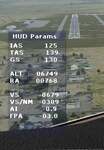
HUD_Parameters.lua is a Lua script that displays flight parameters in a small text window that pops up when the script is selected by an assigned key or button if the aircraft is in the air.
Parameters displayed are:
• Indicated Airspeed (IAS. Kts)
• True Airspeed (TAS, Kts)
• Ground Speed (GS, Kts)
• Mach# (when above a user settable altitude, currently 25000ft)
• Altitude (ALT, ft)
• Radio Altitude (RA, ft)
• Vertical Speed (VS, ft/min)
• Vertical Speed per Nautical Mile (VS/NM, ft/NM)
• Attitude Indicator pitch (AI, degrees)
• Flight Path Angle (FPA, degrees)
The top of the script contains user settable values for the size and location of the display, the altitude above which the a/c Mach# will be displayed (default is 25000ft), the data update interval in milliseconds (default is 2000),
and whether or not data is to be logged in HUD_Parameters.log (default is 0, off). These values can be set using a text editor like NotePad.
A registered copy of FSUIPC is required to execute the Lua script. Simply copy the script to the Modules folder of FSX and use FSUIPC4 to assign a key, button or switch to toggle the script on and off.
The script turns off if the aircraft is on the ground.
Al Klayton
| Filename: | HUD_Parameters_for_FSX.zip |
| License: | Freeware |
| Added: | 29th July 2017, 07:15:25 |
| Downloads: | 473 |
| Author: | Al Klayton |
| Size: | 16.82 KB |


© 2001-2026 AVSIM Online
All Rights Reserved
Privacy Policy |