
Where Flight Simulation Enthusiasts Gather from Around the World!
AVSIM Library - Search Results

| Category: Flight Simulator X - Utilities | |
| MH's AI Traffic Pack V2.1 Update |

|
File Description:
This package updates the main programs of previous V2.0 (required, from AVSIM - MH's AI Traffic Pack V2.0; DLID=135778) to correct some bugs. The first program is “AI Traffic Check“ which checks for missing sim objects and reports possible errors in sim object configuration files. “SimObject Config Repair” is a novel program designed to find and repair errors in the sim object files. “SimObject Config Modifier” can be used to modify aircraft configuration files of FS to update them to the FSX standards.
| Filename: | MHs_AI_Traffic_Pack_V21_Update.zip |
| License: | Freeware, limited distribution |
| Added: | 18th April 2009, 15:43:02 |
| Downloads: | 1,862 |
| Author: | Michael Heise |
| Size: | 835.14 KB |
| Category: Flight Simulator X - Utilities | |
| FSX AI Spotter 1.6.0 patch (build 65) |
|
File Description:
FSXAI Spotter (FSXAIS) is a software add-on for MS-FSX. This software can create AI Aircraft in departure and arrival conditions simply by loading raw text “traffic filesâ€. Moreover, FSXAIS is able to call any custom Windows Console Application in order to generate these traffic files (for example, an application that connect on internet and arranges for the traffic files based on live airport information), or load, at configurable interval the traffic files itself (for example, traffic files generated by a more complex Windows Application).
| Filename: | FSX_AI_Spotter_160_patch_build_65.zip |
| License: | Shareware, limited functionality |
| Added: | 23rd March 2020, 18:27:29 |
| Downloads: | 207 |
| Author: | V. Mercolino - geniX Software |
| Size: | 2 MB |
| Category: Flight Simulator X - Utilities | |
| XPause 1.0 |
|
File Description:
XPause is a small utility to set pause in FS on conditions like latitude,longitude,altitude,speed,distance to a waypoint or at Top Of Descent.Can calculate your Top of Descent.
You can log main data on a csv text file. You can import a Flight Simulator plan and merge it with the log file to print a flight plan report.Can be used on another computer with widefs.
You will need dotnet framework 3.5 and FSUIPC (4.x for FSX or 3.x for FS9).
| Filename: | XPause_10.zip |
| License: | Freeware |
| Added: | 15th September 2008, 15:32:40 |
| Downloads: | 1,626 |
| Author: | Patrick FABRE |
| Size: | 2.96 MB |
| Category: Flight Simulator X - Utilities | |
| FSXRC Graphical Remote Control |
|
Images related to this file:
File Description:
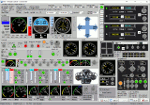
This is a FSX (only) Remote Control program with a GUI. It is intended to help you fly your various
aircraft without making changes to the aircraft files. This is a beta version with support for fixed
wing, combustion engine aircraft with 1 to 4 engines. It requires Pete Dowson's FSUIPC v4 with or
without WideFS, but it works best on a separate computer with the registered version of FSUIPC and
WideFS. The program will work for 30 days without a registration key. If you want a key, email me (see readme.txt file) with the installation code and your feedback.
With this application you can have a flight engineer working with you or an instructor can monitor and
challenge a student. You can simply use the app to help you control aspects of the aircraft that you
may not have easy access to.
| Filename: | FSXRC_Graphical_Remote_Control.zip |
| License: | Check within download |
| Added: | 16th June 2016, 08:15:08 |
| Downloads: | 182 |
| Author: | Scott Carpenter |
| Size: | 3.39 MB |
| Category: Flight Simulator X - Utilities | |
| FSX Wing Leveler/ForceFeedback Utility Version 3.1.0 |
|
File Description:
This Utility combines both a Wing Leveler and a ForceFeedback Utility for FSX/FS2004/FS2002. The Wing Leveler will remove or restore Flight Simulator's automatic Wing Leveler function. For those of you who like to fly using the Autopilot solely to maintain a constant altitude I've developed this little utility to modify Flight Simulator Aircraft.cfg file(s) to remove the Wing Leveller function. The Aircraft.cfg file is modified to add information that will disable the default Bank (wings level) and the default Pitch (Aircraft attitude, nose up, nose down or level).
If you're a Force Feedback Joystick user and the joystick shakes violently on take off it is because the Force Feedback code is missing from the Aircraft.cfg file. The Utility will add or remove the FF code for you. Requires the VB6 Runtime files.
Freeware - Dave Westbury
| Filename: | FSX_Wing_LevelerForceFeedback_Utility_Version_310.zip |
| License: | Freeware |
| Added: | 29th November 2007, 20:07:32 |
| Downloads: | 1,672 |
| Author: | Dave Westbury |
| Size: | 228.57 KB |
| Category: Flight Simulator X - Utilities | |
| AVBSpinner - A aircraft background viewer randomizer for Flight Simulator |
|
File Description:
AVBSpinner v1.0 – A Flight Simulator aircraft viewer background randomizer
AVBSpinner is a freeware aircraft viewer background randomizer that works with FSX, FS9, and others. This program should work with ANY release of Microsoft® Flight Simulator that uses the file called “aircraft_viewer_bkgrnd.bmp” located in the “uires” folder of the main Flight Simulator directory. Versions beyond FSX won’t automatically run the Flight Simulator program but if everything else is the same it should randomize the background anyway. This has been tested with Flight Simulator 2004 (FS9), the Flight Simulator X Demo, and Flight Simulator X.
You can use this program as a shortcut for whichever version of Flight Simulator you have. You should also be able to use this same program on multiple versions. After install just copy the AVBSpinner folder to a new name and delete the AVBSpinner.config file.
| Filename: | AVBSpinner___A_aircraft_background_viewer_randomiz.zip |
| License: | Freeware, limited distribution |
| Added: | 16th December 2006, 03:52:55 |
| Downloads: | 1,875 |
| Author: | Randy Alexander |
| Size: | 951.93 KB |
| Category: Flight Simulator X - Utilities | |
| Project Airbus A380 Cabin glass Opacity fix |
|
File Description:
Guys, this is an easy fix for the FSX pa_a380 cabin glass opacity...All you need to do is first delete the cabin_glass.bmp file and copy this one to your pa_a380 texture folder! Enjoy people!
| Filename: | Project_Airbus_A380_Cabin_glass_Opacity_fix.zip |
| License: | Freeware |
| Added: | 20th April 2015, 20:56:50 |
| Downloads: | 1,027 |
| Author: | Shivang Yadav / Project Airbus |
| Size: | 124.18 KB |
| Category: Flight Simulator X - Utilities | |
| p180_avanti_ii_performance_charts UPDATE |
|
Images related to this file:
File Description:

FS9 & FSX Piaggio Avanti Performance (UPDATE)
Charts. This update includes Speeds for
rotation and final approach.
Thank you to Judy Graham & service dept
at Paiggio America, Miami, FL
for providing this information.
jimmy R martin
| Filename: | p180_avanti_ii_performance_charts_UPDATE.zip |
| License: | Freeware |
| Added: | 16th July 2010, 22:34:33 |
| Downloads: | 324 |
| Author: | jimmy R martin |
| Size: | 330.51 KB |
| Category: Flight Simulator X - Utilities | |
| FLT_Date_Heure patch |
|
File Description:
This patch fix the bug preventing the software to read dates after february, 28th 2010. Patch only. For complete software, look for flt_date_heure.zip under FSX utilities. Read the readme.txt file for instructions (french and english)
| Filename: | FLT_Date_Heure_patch.zip |
| License: | Freeware |
| Added: | 7th March 2010, 21:11:21 |
| Downloads: | 234 |
| Author: | Pierre Fauteux |
| Size: | 1.34 MB |
| Category: Flight Simulator X - Utilities | |
| FS2004/FSX Flight Analyzer Utility V2.04 |
|
Images related to this file:
File Description:

NOW ALSO WORKING WITH FS2004
What this program do:
- quickly change the settings of FSX/Fs2004, such as time, date, fuel, weight, traffic etc.
- start a failure sytem, such as gear, flaps, engine, etc.
- freeze the time, so you can fly in a for everlasting sunset.
- runway detecting system to see wich runways are in use.
- a flight analysis system, this is automaticly started when you start FsQC.
- When flight analysis is finished you can print a report, the report is automaticly saved as pdf File.
- flight analysis is finished when you parked your aicraft with the parking brakes set for more then 5 seconds.
- graphical landingchart.
- load a existing flight or flightplan.
- quickly look to your CFG (settings) files (only FSX) and change them even before the flight simulator is running.
- After a flight is finished FsQC saves your flight automaticly as 'FsQC last Flight', so you can continue the next day or hour.
- for properly working, flight analysis require a fsx/fs2004 flightplan.
Flight analysis:
Flight analysis start recording at the moment when you begin taxiing.
It gives you huge information such as:
- takeoff- and landing-weight
- takeoff roll in m. or ft.
- separate fuel consumption in taxi, climb, cruise and descent.
- maximum banking in flight
- which speed you using the flaps and gear
- when autopilot on or off
- vertical speed on touchdown
- reverser set after landing
- wich speed you cancel reverser
- bouncing at landing
- graphical landingchart.
- and lots of more
You can better look the example of the pdf document located in the 'Flight Reports' folder.
Failures:
In the settings menu you can select the kind of failures you want to occur and when they must occur.
At this moment 10 failures are possible:
-altitude
-attitude
-heading
-airspeed
-vertical speed
-pitot
-fuelleak
-flaps
-engine
-gear
Recommended:
For more easy use, run this program on a second monitor or much better on a second computer(laptop) where FSUIPC-client is running in the same network where FSX/FS2000 is running and FSUIPC WideFs is registered.
See also the pdf Manual.
Also look at www.FsQC.eu for more information.
If you have a problem look first on www.fsqc.eu/faq.html
If you have questions please contact [email protected]
| Filename: | FS2004FSX_Flight_Analyzer_Utility_V204.zip |
| License: | Check within download |
| Added: | 5th March 2018, 22:40:20 |
| Downloads: | 330 |
| Author: | Evander Tholen |
| Size: | 2.45 MB |


© 2001-2026 AVSIM Online
All Rights Reserved
Privacy Policy |