
Where Flight Simulation Enthusiasts Gather from Around the World!
AVSIM Library - Search Results

| Category: Flight Simulator X - Utilities | |
| Carenado C90 Cold & Dark LUA script Version 1.0 |

|
File Description:
Proper cold and dark script for the Carenado C90.
This script results in 100% Cold & Dark.
Included is a Standard version as well as an excellerated version.
| Filename: | Carenado_C90_Cold__Dark_LUA_script_Version_10.zip |
| License: | Freeware, limited distribution |
| Added: | 2nd August 2012, 00:12:44 |
| Downloads: | 1,020 |
| Author: | JvandenBerg |
| Size: | 9.7 KB |
| Category: Flight Simulator X - Utilities | |
| ArrCab 2.6 and FSX |
|
File Description:
The FSUIPC Simconnect bottleneck in FSX is daunting at first because of how terribly it messes up ArrCab's behavior. Fortunately, ArrCab is tweak able and can overcome this problem. Simple instructions here for use with arrcab26.zip. Uploaded by the author.
| Filename: | ArrCab_26_and_FSX.zip |
| License: | Freeware |
| Added: | 16th December 2008, 02:44:53 |
| Downloads: | 942 |
| Author: | Richard Hogen |
| Size: | 147.47 KB |
| Category: Flight Simulator X - Utilities | |
| FS9 And FSX Aircraft Finder |
|
Images related to this file:
File Description:
What this program does is simply to parses the AIFP.CFG file that comes with most AI repaints to create a local HTML file with file and location details of the AI repaints.
| Filename: | FS9_And_FSX_Aircraft_Finder.zip |
| License: | Freeware, limited distribution |
| Added: | 2nd January 2016, 14:20:33 |
| Downloads: | 319 |
| Author: | Rory Fairbairn |
| Size: | 134.58 KB |
| Category: Flight Simulator X - Utilities | |
| Graphic Realism and FSX Optimization |
|
File Description:
The add-ons configuration step by step
Not configured FSX is a pain in the neck for many people. A small number of fps and frequent CTD (crash to desktop) can be extremely annoying or even depressing to some users. A lot of you probably came to a conclusion that it was going to be a losing battle and you gave up after a few fruitless days or you spent money on the FSPS-XTREME FSX PC V2 program, which can automatically do practically everything for us. But what's the point of spending money on something that we can do by ourselves with the help of this handbook?
I myself was dealing with the FSX platform three times before I gave up FS9. Microsoft gave out the engine to us, but in order to make sense, our passion involves radical tuning of the device. On the ground of one's own experience and thousands of hours devoted by people to diving into the core of the platform, I'll present a way of installation, add-ons selection and their configuration starting from the installation of the system. Having done the procedures described below, FSX will look beautiful and it'll work smoothly even with challenging sceneries. The entirety is based on quite a popular hardware configuration, which will let us use 85% of the graphic potential of Microsoft Flight Simulator X. We want t to achieve the goal of minimum 25 fps in VC B738 PMDG NGX, with challenging sceneries, flying in the window mode. For the mode the full screen efficiency should reach 33 fps.
In this handbook, I'm neither going to describe each and every change made in cfg nor explain what the alterations are to conduce. You will be given a simple and ready recipe which I use myself. I can't guarantee a 100% satisfaction for the poorer equipment computers. I can assure you, however, that FSX will definitely work so much better and playing with FSX sliders or with the size of textures in REX you will be able to obtain the desired effect.
| Filename: | Graphic_Realism_and_FSX_Optimization.zip |
| License: | Freeware, limited distribution |
| Added: | 15th November 2013, 20:33:26 |
| Downloads: | 5,743 |
| Author: | Grzegorz Trzoch |
| Size: | 3.96 MB |
| Category: Flight Simulator X - Utilities | |
| Tutorial for FIP buttons and knobs |
|
Images related to this file:
File Description:
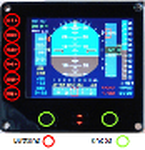
This tutorial explains how to manage buttons and knobs for the FIP. Six buttons are available on the left side of the FIP and two rotating knobs on the lower side.
| Filename: | Tutorial_for_FIP_buttons_and_knobs.zip |
| License: | Freeware |
| Added: | 2nd June 2011, 14:21:15 |
| Downloads: | 426 |
| Author: | Philippe Verhaege |
| Size: | 418.36 KB |
| Category: Flight Simulator X - Utilities | |
| BglAnalyze for FS9 and FS X |
|
File Description:
This is a new and somewhat enhanced version of the BglAnalyze disassembler. Two programs are contained: one for FS9 and one for FSX. Both are now console programs, so they can be used in a batch process if you want to disassemble more than one scenery file.
| Filename: | BglAnalyze_for_FS9_and_FS_X.zip |
| License: | Freeware |
| Added: | 7th January 2007, 19:30:48 |
| Downloads: | 9,098 |
| Author: | Winfried Orthmann |
| Size: | 132.08 KB |
| Category: Flight Simulator X - Utilities | |
| NumberPad Control for FSX and P3D |
|
Images related to this file:
File Description:
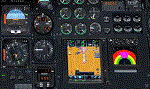
NpC4FSX&P3D (NumberPadControl for FSX and P3D) is a more efficient (and more convenient to set up)
version of a similar NpC program that I wrote a few years ago and which to
my surprise PC Pilot magazine included on their 100th Anniversary edition Freeware CD. With
NpC4FSX&P3D you assign keys to functions like Com, Nav, Heading, Course, Altitude, VS,
Autopilot functions, etc., and then can enter the associated values (like frequencies or headings) just by typing on the
keyboard’s numberpad instead of fiddling with elusive mouse click spots. NpC4FSX&P3D is
programmed primarily for aircraft with avionics that were developed within standard FSX
programming guidelines but also supports third party add-
on aircraft such as the Flysimware L35A and MU2, PMDG 737NGX / B777, Flight1 King Air
B200, A2A Cherokee 180, and also works with GPS units like the GTN750. Setup manual included.
A registered (payware) copy of FSUIPC is required.
| Filename: | NumberPad_Control_for_FSX_and_P3D.zip |
| License: | Freeware |
| Added: | 19th February 2018, 21:21:16 |
| Downloads: | 481 |
| Author: | Al Klayton |
| Size: | 683.59 KB |
| Category: Flight Simulator X - Utilities | |
| Landing Parameters for FSX and P3D |
|
Images related to this file:
File Description:
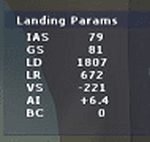
Landing_Params is a Lua script for FSX/P3D that displays landing parameters in a small text window that pops
up after the aircraft has landed and has reached taxi speed. The script should be activated with a key or button (like the gear
down key/button) during the approach to landing. Parameters displayed in the window after touchdown are
Indicated Airspeed (IAS, Kts), Ground Speed (GS, Kts), Landing Distance (LD, ft), Landing Roll (LR, ft), Vertical
Speed (VS, ft/min), Attitude Indicator pitch at touchdown (AI), and Bounce Count (BC). Data collection begins
when the a/c passes through a radar altimeter determined threshold altitude window between 45 and 55 ft
(i.e., the nominal 50ft threshold height). In addition, more detailed landing parameter information may be
logged. A registered copy of FSUIPC is required to execute the Lua script.
| Filename: | Landing_Parameters_for_FSX_and_P3D.zip |
| License: | Freeware |
| Added: | 18th February 2018, 04:09:32 |
| Downloads: | 568 |
| Author: | Al Klayton |
| Size: | 164.08 KB |
| Category: Flight Simulator X - Utilities | |
| Squawk Code Generator V1.12 |
|
File Description:
This zip includes the free version of BBC Basic for Windows and a program to randomly generate 4 digit numbers (excluding 8s and 9s) in order to simulate squawk codes in real life. V1.12 includes a code guide and a more friendly, updated method of using the program. Very useful for doing ATC!!!
| Filename: | Squawk_Code_Generator_V112.zip |
| License: | Freeware, limited distribution |
| Added: | 30th May 2010, 03:14:36 |
| Downloads: | 242 |
| Author: | Nathan and Richard Hammer |
| Size: | 1.8 MB |
| Category: Flight Simulator X - Utilities | |
| AI Aircraft SID and STAR Controller - Version 1.4B <b>for FSX, FSX Steam and P3D</b> |
|
Images related to this file:
File Description:
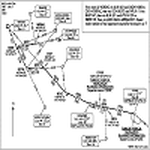
The AIController utility automatically vectors FSX, FSX-Steam or Prepar3D Artificial Intelligence (AI) aircraft through predefined Standard Instrument Departures (SIDs), jet routes, Standard Instrument Arrivals (STARs) (or alternatively generic traffic patterns), and/or final approaches. AIController automatically selects the most appropriate SID, jet route or STAR for each AI aircraft. AIController also lands arriving AI using published, custom or automatic final approach procedures, then provides taxi service to parking. The user can customize the procedures to fine tune AI arrival and departure patterns at each airport, such as specifying landing runways on-the-fly.
AIController optionally enforces spacing minimums between arriving AI aircraft by commanding speed changes and/or commanding the AI to hold at waypoints, thus reducing go-arounds. AIController can also enforce spacing minimums between the AI aircraft and the user's aircraft.
A stand-alone, windows based AI traffic monitoring program (AIMonitor.exe) is also included to provide the user with a graphical front-end. A converter (SIDSTARConverter) is included to automatically convert SID and STAR files from standard, aircraft format to the format used by AIController.
AIController requires an installed FSX or P3D SimConnect and can be run on a networked computer. The latest, registered version of FSUIPC ver. 4.9x (or later version) is also required.
| Filename: | AI_Aircraft_SID_and_STAR_Controller__Version_14B_b.zip |
| License: | Freeware |
| Added: | 18th July 2015, 00:11:26 |
| Downloads: | 14,165 |
| Author: | Roland Foster |
| Size: | 16.23 MB |


© 2001-2026 AVSIM Online
All Rights Reserved
Privacy Policy |