
Where Flight Simulation Enthusiasts Gather from Around the World!
AVSIM Library - Search Results

| Category: Flight Simulator X - Utilities | |
| GENav pro Navigation |

|
Images related to this file:
File Description:

Previous payware product at SimMarket, now 100% free.
With GENav pro you will view all AIRAC navigation data and terminal procedures inside Google Earth. GENav pro run under Windows and require only Google Earth for displaying. You can also edit your own routes or just copy routes into GENav to view in Google Earth. You can search for example an airport or a fix by short or long name, Google Earth will take you there.
You can connect to Microsoft Flight Simulator to view your aircraft. Moving map and heading is available.
GENav pro is highly optimized for best performance and clear views without clutter. There are smart filters to select relevant data to display, all AIRAC items are available. You will find all data such as nav-aid frequencies, airport runways with ILS frequencies by click the displayed icons in Google Earth.
You can edit routes visual direct inside Google Earth by click. The database can always be updated with Navigraph's latest AIRAC data.
With GENav you can easy build valid routes. Unlike other common autorouting program, GENav is the tool for you to build routes with correct airway direction and correct connected to SID/STAR's. You will easy draw your routes most straight and correct to destination. It is also excellent for visual and instrument navigation flights.
FEATURES:
*** Display airports, nav aids, waypoints
*** Display High/Low airways and airways direction
*** Display SID/STAR, Approaches and Transitions
*** Display ARTCC/FIR border
*** AIRAC data available by click
*** Search airport and fixes
*** AIRAC data compatible Navigraph data
*** Visual editable routes
*** VOR to VOR route navigation data
*** Display your aircraft
BASIC SYSTEM REQUIREMENTS:
*** Windows with Google Earth installed
( Notice, no flightsim program required )
OPTIONALLY REQUIREMENTS:
*** SID/STAR require the Navigraph purchase or an alternative free source
*** Airways direction & high/low info require the Navigraph purchase
*** To display aircraft, Microsoft Flight Simulator or Prepare3D v1/v2, with free FSUIPC is required
*** To display aircraft at a separate computer, also the payware WideFS is required
| Filename: | GENav_pro_Navigation.zip |
| License: | Freeware |
| Added: | 23rd May 2016, 19:57:35 |
| Downloads: | 1,576 |
| Author: | Lennart Vedin |
| Size: | 4.5 MB |
| Category: Flight Simulator X - Utilities | |
| TweakFS ScreenShot ToolBox |
|
Images related to this file:
File Description:
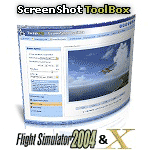
The ScreenShot ToolBox is a utility that will bring out the artist in you! Screenshots are a great way to immortalize your FS flight adventures, moments that can be shared with your FS buddies and uploaded to forums for all the world to enjoy. Some screenshot artists are very skilled, applying similar techniques used by real-world photographers in their use of angles, lighting and shot composition. With the TweakFS ScreenShot ToolBox you can easily display, create, manage, edit, uploaded, download and email FS screenshots. The major feature is the Apple "Coverflow" style 3D display system. The built-in ScreenShot Creator supports automatically adding a logo, a banner and standard text (either separately or simultaneously) at the same time the snapshot is take, or can be added later. The logo and banner adding feature supports the use of images with transparent backgrounds and objects with shadows, such as PNG (Portable Network Graphics) and PSD (Adobe Photoshop) files. The logo/banner and text feature all support alpha-blending or transparency.
| Filename: | TweakFS_ScreenShot_ToolBox.zip |
| License: | Shareware, time limited |
| Added: | 5th March 2010, 10:55:10 |
| Downloads: | 576 |
| Author: | TweakFS (Fermin Fernandez) |
| Size: | 11.36 MB |
| Category: Flight Simulator X - Utilities | |
| FSX/P3D Quick ILS Utility Ver 3.1.5 **UPDATE ** |
|
Images related to this file:
File Description:
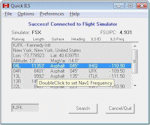
This utility was written to simplify the process of finding the ILS frequency when ATC assigns an ILS approach. Operation is simple. Enter the ICAO, click the Search button and a list of all runways, runway lengths and runway ILS frequencies for that ICAO are displayed. Here's the quick part... Just double click on a runway and the ILS frequency will instantly be set in the Nav1 radio. You can also start Flight Simulator, load a flightplan and then start Quick ILS. It will automatically read the flightplan and then display the destination airport's runway data. Again, just double click on the assigned runway to set the Nav1 radio for the ILS approach. ILS data aside, General Aviation fans may want to use Quick ILS to get information about possible destination airports. Enter an ICAO and you can quickly view the runways available, their length, the surface (ie grass, gravel, paved...) and the runway headings. Version 3.1.5 adds the ILS ID to the display. Freeware by Dave Westbury.
| Filename: | FSXP3D_Quick_ILS_Utility_Ver_315_UPDATE_.zip |
| License: | Freeware |
| Added: | 12th August 2014, 10:25:51 |
| Downloads: | 3,576 |
| Author: | Dave Westbury |
| Size: | 457.35 KB |
| Category: Flight Simulator X - Utilities | |
| JANTT - *Just a Night Texture Tool* - Ver. 1.0 |
|
Images related to this file:
File Description:
JANTT is free graphic tool whose purpose is to create night textures from satellite photo textures. I created it first for my own use, now I'm offering it to all those who are making satellite sceneries for FSX (or an other flight simulator). JANTT is probably far from perfect — sometimes the achieved result will not be ideal - but in most cases it will achieve a better result than simple darkening of original (day) image. The basic idea of JANTT is to perform several complex algorithms on the original image, in attempt to single out important parts (colors) which will be then changed to "night colored parts" (streets, yards, structures) and the other areas of the image will be darkened. To improve final result JANTT offers more settings to adjust the transformation procedure, such as determining intensity and color of the illuminated parts, the amount of darkened areas, random and intentionally created "street lights" etc. JANTT does not make any changes to your computer or registry; no special installation procedure is needed, just place the unzipped three files to the folder of your choice.
| Filename: | JANTT__Just_a_Night_Texture_Tool__Ver_10.zip |
| License: | Freeware |
| Added: | 26th June 2018, 04:10:03 |
| Downloads: | 227 |
| Author: | Darko Tralic |
| Size: | 1.07 MB |
| Category: Flight Simulator X - Utilities | |
| FSX Settings Editor Version 1.1 |
|
Images related to this file:
File Description:

Update! New version fixes WideViewAspect setting not working in the earlier version. It also lets you see the last profile that was applied. Please uninstall the earlier version, and then install this.
FSX Settings Editor lets you create fsx.cfg profiles for different scenarios which you can quickly apply to your fsx.cfg file. Create different settings profiles and switch between them quicker than ever before. Some of the scenarios for which profiles can be created:
- Flying Rural Areas with Light GA Aircraft (Graphics can be set High)
- Flying Dense Urban Areas (Graphics can be lowered to improve FPS)
- Different profiles for flying VFR, IFR, max weather, min weather max terrain etc
- Testing out different settings to achieve max FPS with acceptable eye-candy
I created this tool to help me quickly change my FSX settings to the type of flight I intend to perform. Manually editing the fsx.cfg file, keeping separate copies of fsx.cfg file for different scenarios, or using the limited FSX save config functionality proved cumbersome and time-consuming.
Please backup your fsx.cfg before using this tool. Comments, issues, questions or suggestions are welcome.
Requires Microsoft .Net 4.0 Client Profile Installed. To Install: Run the setup and launch the program from your desktop. Email: [email protected]
| Filename: | FSX_Settings_Editor_Version_11.zip |
| License: | Freeware |
| Added: | 27th September 2015, 20:26:01 |
| Downloads: | 1,369 |
| Author: | Vishal Agarwal |
| Size: | 268.17 KB |
| Category: Flight Simulator X - Utilities | |
| FSX SDK Toolbox |
|
File Description:
The FSX SDK ToolBox is a handy application for those of us who need to delve again and again into the SDK for Microsoft's new release of Flight Simulator X. It's basically an in-house tool used by TweakFS and we thought it would be nice to make it available to other FS developers as well as the general simming community. Quick links to frequently-accessed key FSX folders such as the Main FSX, ApplicationData and MyDocuments folders are also included, as are direct links to major FSX configuration files like fsx.cfg, scenery.cfg, dll.xml, exe.xml files and many more. It also includes an integrated GUID generation tool that can create single or multiple GUID lists for use with Cameras and Missions.
Mmain Features: 1) FSX SDK Browser, 2) Web Browser, 3) Browser supports HTML, DOC, RTF, TXT, XML & PDF documents, 4) The browser will also support images: JPG, GIF, PNG, SWF and BMP, 5) Direct Folder Links to Several Key FSX folders, 6) Ability to add unlimited Custom Folder Links, 7) Code Editor with File Explorer and Syntax Highlighting, 8) Direct Links to 16 Key FSX files (e.g. DLL.XML, SimConnect.Cfg, etc), 9) Ability to add unlimited Custom File Links, 10) Tool to Quickliy Enable/Disable Key FSX files (DLL.XML, EXE.XML, SimConnect.XML), 11) Tool for generating single and multiple GUIDs (for Cameras and Missions) 12) Six Themes to choose from (Win XP, Vista, Mac OS, MSN, MP 10 and Longhorn).
| Filename: | FSX_SDK_Toolbox.zip |
| License: | Freeware |
| Added: | 14th December 2007, 02:09:17 |
| Downloads: | 3,791 |
| Author: | TweakFS (Fermin Fernandez) |
| Size: | 1.04 MB |
| Category: Flight Simulator X - Utilities | |
| Graphic Realism and FSX Optimization |
|
File Description:
The add-ons configuration step by step
Not configured FSX is a pain in the neck for many people. A small number of fps and frequent CTD (crash to desktop) can be extremely annoying or even depressing to some users. A lot of you probably came to a conclusion that it was going to be a losing battle and you gave up after a few fruitless days or you spent money on the FSPS-XTREME FSX PC V2 program, which can automatically do practically everything for us. But what's the point of spending money on something that we can do by ourselves with the help of this handbook?
I myself was dealing with the FSX platform three times before I gave up FS9. Microsoft gave out the engine to us, but in order to make sense, our passion involves radical tuning of the device. On the ground of one's own experience and thousands of hours devoted by people to diving into the core of the platform, I'll present a way of installation, add-ons selection and their configuration starting from the installation of the system. Having done the procedures described below, FSX will look beautiful and it'll work smoothly even with challenging sceneries. The entirety is based on quite a popular hardware configuration, which will let us use 85% of the graphic potential of Microsoft Flight Simulator X. We want t to achieve the goal of minimum 25 fps in VC B738 PMDG NGX, with challenging sceneries, flying in the window mode. For the mode the full screen efficiency should reach 33 fps.
In this handbook, I'm neither going to describe each and every change made in cfg nor explain what the alterations are to conduce. You will be given a simple and ready recipe which I use myself. I can't guarantee a 100% satisfaction for the poorer equipment computers. I can assure you, however, that FSX will definitely work so much better and playing with FSX sliders or with the size of textures in REX you will be able to obtain the desired effect.
| Filename: | Graphic_Realism_and_FSX_Optimization.zip |
| License: | Freeware, limited distribution |
| Added: | 15th November 2013, 20:33:26 |
| Downloads: | 5,744 |
| Author: | Grzegorz Trzoch |
| Size: | 3.96 MB |


© 2001-2026 AVSIM Online
All Rights Reserved
Privacy Policy |