
Where Flight Simulation Enthusiasts Gather from Around the World!
AVSIM Library - Search Results

| Category: Flight Simulator X - Utilities | |
| QuickGOTO for FSX |

|
Images related to this file:
File Description:

Re-upload. Keeps a database of the most frequently used departure locations (gates, parkings or runways), so it will be no longer necessary to search for the airport through Flight Simulator Airport/Facilities directory and to move the aircraft to the correct departure point each time: just select the desired location from QuickGOTO and the airplane will be instantly moved there. It is recommended to disable FSX's "Show opening screen" (Options->Settings->General) in order to get the most from this add-on.
| Filename: | QuickGOTO_for_FSX.zip |
| License: | Shareware, limited functionality |
| Added: | 10th June 2010, 23:12:18 |
| Downloads: | 1,838 |
| Author: | Luciano Napolitano |
| Size: | 1.93 MB |
| Category: Flight Simulator X - Utilities | |
| AFTS Flight Tracking for FSX |
|
File Description:
AFTS (Advanced Flight Tracking System) allows you to track your aircraft movements via live maps, and also keeps logs of your hours flown. It can be used as part of the AFTS VA and Group Management System for full Pilot Management, including Flight Planning and Scheduling. Additional features such as dynamic Forum Signature to display hours are available also. AFTS is a Freeware software and has been uploaded by the authors at SimFly.EU.
Features:
-Live Flight Tracking Maps
-Full Website Integration Kit
-Automated Flight Plan Tracking
-Flight Plan Builder
-Full VA/Group Management
-Scheduling
-Custom Forum Signatures (Dynamic)
-Pilot Hours Tracking and Ranks
-VA Ranks
-Monthly Statistics (generated Daily)
Copyright 2007/08 http://www.simfly.eu
| Filename: | AFTS_Flight_Tracking_for_FSX.zip |
| License: | Freeware |
| Added: | 29th December 2007, 10:51:43 |
| Downloads: | 1,871 |
| Author: | SimFly.EU Developement Team |
| Size: | 390.68 KB |
| Category: Flight Simulator X - Utilities | |
| Multi Crew Experience MCE Script Flows for MD-11 and 737 |
|
File Description:
Scripts to make use of MCE's Voice control of the PMDG MD-11 and NGX, as well as Flow documents to help their use. Multi Crew Experience Limited Time Demo or Full Version are required.
| Filename: | Multi_Crew_Experience_MCE_Script_Flows_for_MD11_an.zip |
| License: | Freeware |
| Added: | 28th May 2012, 08:47:06 |
| Downloads: | 1,724 |
| Author: | Will Reynolds |
| Size: | 58.88 KB |
| Category: Flight Simulator X - Utilities | |
| AI Time Table 2 - release 1.5.8 for FSX |
|
Images related to this file:
File Description:
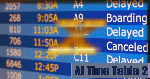
AI TimeTable is a software simulation of an airport time table for MS-FSX; starting from the rel.1.5.5, it is completed with a TTS for speaking flights announcements.
Requires MS-FSX SP1 and Simconnect.dll. - Requires AITT2FSX rel 1.5.6 full setup
| Filename: | AI_Time_Table_2__release_158_for_FSX.zip |
| License: | Shareware, limited functionality |
| Added: | 21st July 2012, 02:35:03 |
| Downloads: | 711 |
| Author: | V.Mercolino - geniX |
| Size: | 2.12 MB |
| Category: Flight Simulator X - Utilities | |
| FSXSave 1.05 |
|
Images related to this file:
File Description:
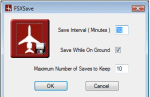
FSXSave is a fully configurable integrated autosave utility for Microsoft Flight Simulator X Service Pack 2. Users can configure from within FSX, Save Interval, Saving While on Ground and Maximum Number of Saves to Keep. Easy installation using Windows Installer and full documentation is included.
| Filename: | FSXSave_105.zip |
| License: | Freeware, limited distribution |
| Added: | 5th November 2009, 11:49:23 |
| Downloads: | 3,603 |
| Author: | Glynn Wilshaw |
| Size: | 1.34 MB |
| Category: Flight Simulator X - Utilities | |
| fs6DOFware version 1.0 |
|
Images related to this file:
File Description:
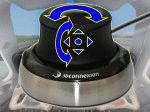
fs6DOFware is a software letting to use 3D mice in Flight Simulator to add full 6DOF (degrees of freedom) eye point movement. With this utility and a 3D mouse, you can freely rotate and translate your eye point to see towards all the directions easily, using only one control and without have to remember tricky key combinations.
| Filename: | fs6DOFware_version_10.zip |
| License: | Shareware, time limited |
| Added: | 1st March 2010, 15:12:10 |
| Downloads: | 369 |
| Author: | Luciano Napolitano |
| Size: | 7.19 MB |
| Category: Flight Simulator X - Utilities | |
| SplashSpinner v1.0 - Splashscreen Randomizer |
|
File Description:
SplashSpinner v1.0 – A Flight Simulator splash screen randomizer
This program will allow you to see a different splashscreen in Flight Simulator each time you load it. The program should work with ANY release of Microsoft® Flight Simulator that uses the splashscreen called “dlgsplash.bmp” located in the “uires” folder of the main Flight Simulator directory. Versions beyond FSX won’t automatically run the Flight Simulator program but if everything else is the same it should randomize the splash anyway. On first run, you'll pick what folder Flight Simulator is in. After that it will run, randomize and load Flight Simulator automatically. You can use this program as a shortcut for whichever version of Flight Simulator you have. You should also be able to use this same program on multiple versions. After install just copy the SplashSpinner folder to a new name and delete the SplashSpinner.config file.
The program may require Microsoft .net v1.11 or greater to be installed on your computer.
| Filename: | SplashSpinner_v10__Splashscreen_Randomizer.zip |
| License: | Freeware, limited distribution |
| Added: | 8th December 2006, 10:43:46 |
| Downloads: | 3,086 |
| Author: | Randy Alexander |
| Size: | 1.69 MB |
| Category: Flight Simulator X - Utilities | |
| FSX/FS2004 Flight Calculator Ver 1.6.5 |
|
Images related to this file:
File Description:
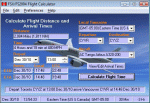
FS Flight Calculator will calculate distance and arrival times for both FSX and FS2004. The program has four input components, Local TimeZone, Departing Airport, Destination Airport and the Aircraft to be used for the flight. The program calculates the distance in nautical miles between two FlightSim Airports. It determines the flight length in hours based on the aircraft's speed and then calculates the Arrival time. If the flight time passes midnight the arrival day is incremented by a day. In addition this version takes into account the timezones of both departing and destination airports and calculates the timezone offset between them allowing display of the arrival in local time at the destination airport. The distances and times are based on point to point calculations and do not allow for taxi out, taxi in, start-up times etc. To compensate for this you can input a time period in minutes which is automatically added to the flight time to give a more accurate estimate of arrival times. This version also adds a Flight Summary Window to the main screen, the ability to create multi leg routes and a utility to create a new Aircraft.txt file. Freeware By Dave Westbury
| Filename: | FSXFS2004_Flight_Calculator_Ver_165.zip |
| License: | Freeware, limited distribution |
| Added: | 29th September 2011, 01:10:39 |
| Downloads: | 3,479 |
| Author: | Dave Westbury |
| Size: | 4.29 MB |
| Category: Flight Simulator X - Utilities | |
| SimFly.EU AFTS Client V2.4 |
|
File Description:
SimFly.EU AFTS (Advanced Flight Tracking System) is a very advanced and reliable way of live tracking your flight statistics. It also features full Virtual Airline management which includes a unique passenger system, bespoke online virtual banking, stock exchange, and many more features.
Due to the high level of innovative technologies used to create this application we are able to track flights in real time, to within milliseconds.
This application is compatible it ALL version of Windows, including 64-Bit editions.
| Filename: | SimFlyEU_AFTS_Client_V24.zip |
| License: | Freeware |
| Added: | 4th July 2008, 16:12:55 |
| Downloads: | 705 |
| Author: | SimFly.EU Development Team |
| Size: | 527.36 KB |
| Category: Flight Simulator X - Utilities | |
| Graphic Realism and FSX Optimization |
|
File Description:
The add-ons configuration step by step
Not configured FSX is a pain in the neck for many people. A small number of fps and frequent CTD (crash to desktop) can be extremely annoying or even depressing to some users. A lot of you probably came to a conclusion that it was going to be a losing battle and you gave up after a few fruitless days or you spent money on the FSPS-XTREME FSX PC V2 program, which can automatically do practically everything for us. But what's the point of spending money on something that we can do by ourselves with the help of this handbook?
I myself was dealing with the FSX platform three times before I gave up FS9. Microsoft gave out the engine to us, but in order to make sense, our passion involves radical tuning of the device. On the ground of one's own experience and thousands of hours devoted by people to diving into the core of the platform, I'll present a way of installation, add-ons selection and their configuration starting from the installation of the system. Having done the procedures described below, FSX will look beautiful and it'll work smoothly even with challenging sceneries. The entirety is based on quite a popular hardware configuration, which will let us use 85% of the graphic potential of Microsoft Flight Simulator X. We want t to achieve the goal of minimum 25 fps in VC B738 PMDG NGX, with challenging sceneries, flying in the window mode. For the mode the full screen efficiency should reach 33 fps.
In this handbook, I'm neither going to describe each and every change made in cfg nor explain what the alterations are to conduce. You will be given a simple and ready recipe which I use myself. I can't guarantee a 100% satisfaction for the poorer equipment computers. I can assure you, however, that FSX will definitely work so much better and playing with FSX sliders or with the size of textures in REX you will be able to obtain the desired effect.
| Filename: | Graphic_Realism_and_FSX_Optimization.zip |
| License: | Freeware, limited distribution |
| Added: | 15th November 2013, 20:33:26 |
| Downloads: | 5,743 |
| Author: | Grzegorz Trzoch |
| Size: | 3.96 MB |


© 2001-2026 AVSIM Online
All Rights Reserved
Privacy Policy |