
Where Flight Simulation Enthusiasts Gather from Around the World!
AVSIM Library - Search Results

| Category: Flight Simulator X - Miscellaneous Files | |
| Boeing 737NGX Checklist |

|
Images related to this file:
File Description:
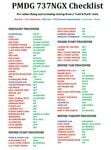
There are already some great checklists for the PMDG NGX done by others but what I've found with these checklists is that I find them to include many steps that I normally don't perform on every single flight, things like testing all fire bells and whistles etc.
So for this reason I decided to first setup the cockpit in a cold & dark state which corresponds to how the flightdeck should look like for every single switch in the cockpit according to the Boeing doc that came with the NGX after running both the shutdown and secure flows and then from this state make a checklist including all the phases of the flight from preflight at the origin to securing the a/c at the destination.
Since I'm doing all my flying online I have also included items such as filing your flightplan, asking ATC for push and engine startup clearence etc. Not fully realistic to include those kind of items in a checklist but the main purpose of this checklist will be to serve as a memory note how to perform a correct flight online in the NGX. Being used to the company of a FS2Crew FO this checklist will be there to help not forgetting about any steps during all the phases of the flight.
If you just like me have been looking for a simple checklist that will help you remember all the normal steps performed on a normal flight I hope you'll enjoy this checklist!
| Filename: | Boeing_737NGX_Checklist.zip |
| License: | Freeware |
| Added: | 18th September 2011, 17:40:11 |
| Downloads: | 8,490 |
| Author: | Richard Asberg |
| Size: | 37.91 KB |
| Category: Flight Simulator X - Flight Plans | |
| Chas mod of Stearmandriver RNP RNAV Approach into PAJN Rwy 26 for 737NGX |
|
Images related to this file:
File Description:
Modded StearmanDriver(SD) RNP RNAV Rwy 26 into PAJN, Juneau, Alaska. SD gave us a cool little route that while not LATLONG nor Fixname accurate, it couldn't be without legal and occupational liabilities...and it worked, but if you look at his FixNames and the LATLONG from the PAJN.txt file for the 737 NGX...it did work pretty nicely...at least as nicely as the charted RNAV course into Rwy 8. So I created my own procedure LATLONG rightly or wrongly in a multi-step procedure as follows:
1. I took the raw info provided by SD and flew to each of his waypoints,(if you look, almost all of his FIXs were rounded off...to avoid company or legal problems) noting safe altitude, starting out at 7000ft, creating user waypoints in my GTN750, looking around for first, vertical, then horizontal safety...keeping in mind that Ultimately...I would not be using this data for my Duke, but for the Procedure page of my PMDG 737 NGX..which you already saw me fly with SD's fixes.
2. I took my Turbine Duke up and noted the REAL LATLONG as reported by slewing and world map...transposed those numbers into the format that PMDG's procedures needed DDD.mm fractional minutes. I converted using http://www.directionsmag.com/site/latlong-converter/
3.I created my own mid-point user waypoints from the west CHRTRN,and the NNE CHRTS so we could have approaches from those directions.
4. I put my Duke into autopilot, knowing the lateral info...my flightplan was correct, but I would have to handle the Vnav manually. Turns out its rather manageable with the following info: CHRTRN 5000FT - MARMN 3500FT - TRDWL 2500FT - SALMN 1500 - LEMNN 500 - PAJN5 50
My MOD OF SDs RNP RNAV PAJNRwy 26, will be up on Avsim as ChasModRNP RNAV PAJN Rwy 26.zip
Contact:[email protected] - Support: http://forum.avsim.net/topic/466094-any-interest-in-updated-se-alaska-rnav-rnp-approach-procedures-including-juneau/
| Filename: | Chas_mod_of_Stearmandriver_RNP_RNAV_Approach_into_.zip |
| License: | Freeware |
| Added: | 8th May 2015, 11:35:16 |
| Downloads: | 339 |
| Author: | Chas Reed |
| Size: | 144.78 KB |
| Category: Flight Simulator X - Utilities | |
| Graphic Realism and FSX Optimization |
|
File Description:
The add-ons configuration step by step
Not configured FSX is a pain in the neck for many people. A small number of fps and frequent CTD (crash to desktop) can be extremely annoying or even depressing to some users. A lot of you probably came to a conclusion that it was going to be a losing battle and you gave up after a few fruitless days or you spent money on the FSPS-XTREME FSX PC V2 program, which can automatically do practically everything for us. But what's the point of spending money on something that we can do by ourselves with the help of this handbook?
I myself was dealing with the FSX platform three times before I gave up FS9. Microsoft gave out the engine to us, but in order to make sense, our passion involves radical tuning of the device. On the ground of one's own experience and thousands of hours devoted by people to diving into the core of the platform, I'll present a way of installation, add-ons selection and their configuration starting from the installation of the system. Having done the procedures described below, FSX will look beautiful and it'll work smoothly even with challenging sceneries. The entirety is based on quite a popular hardware configuration, which will let us use 85% of the graphic potential of Microsoft Flight Simulator X. We want t to achieve the goal of minimum 25 fps in VC B738 PMDG NGX, with challenging sceneries, flying in the window mode. For the mode the full screen efficiency should reach 33 fps.
In this handbook, I'm neither going to describe each and every change made in cfg nor explain what the alterations are to conduce. You will be given a simple and ready recipe which I use myself. I can't guarantee a 100% satisfaction for the poorer equipment computers. I can assure you, however, that FSX will definitely work so much better and playing with FSX sliders or with the size of textures in REX you will be able to obtain the desired effect.
| Filename: | Graphic_Realism_and_FSX_Optimization.zip |
| License: | Freeware, limited distribution |
| Added: | 15th November 2013, 20:33:26 |
| Downloads: | 5,744 |
| Author: | Grzegorz Trzoch |
| Size: | 3.96 MB |


© 2001-2026 AVSIM Online
All Rights Reserved
Privacy Policy |