
Where Flight Simulation Enthusiasts Gather from Around the World!
AVSIM Library - Search Results

| Category: Flight Simulator X - Utilities | |
| NpC - Numpad Control for FSX v2.2.1 |

|
File Description:
NpC v2.21 - some small changes from v2.2 including a script you can use to switch autopilot input from Nav to GPS and instructions on moving and re-sizing and re-positioning the NpC message window.
NumPad Control (NpC) is a program for entering Com, Nav and ADF radio frequencies, Transponder codes, VOR OBS/CRS settings, Auto-throttle airspeed, and Autopilot altitude, vertical speed, and heading values in FSX using the keyboard number-pad instead of mouse click spots. NpC is programmed primarily for aircraft with default FSX avionics (radios, transponders, and autopilots that were developed within standard FSX programming guidelines). However, this updated version of NpC also supports a number of third party add-on aircraft such as the PMDG 737NGX / B777, Flight1 King Air B200 and the A2A Cherokee 180. NpC is a set of Lua scripts and thus requires a registered copy of FSUIPC4 to work.
An installation and configuration manual is also included in the file set.
For a video that gives an overview of NpC function see: https://www.youtube.com/watch?v=P2p6CHxMOl8&list=PL_NnG_PN8zwnEI59uGxlhgp11rJQbQ_gJ&index=2
| Filename: | NpC__Numpad_Control_for_FSX_v221.zip |
| License: | Freeware |
| Added: | 4th December 2015, 20:03:34 |
| Downloads: | 698 |
| Author: | Al Klayton, Dan Sullivan |
| Size: | 801.63 KB |
| Category: Flight Simulator X - Aircraft Repaints, Textures and Modifications | |
| Air Canada Boeing 777-233/LR (C-FNND) |
|
Images related to this file:
File Description:

Air Canada is the flag carrier and largest airline of Canada. The airline, founded in 1936, provides scheduled and charter air transport for passengers and cargo to 178 destinations worldwide. It is the world's seventh-largest passenger airline by fleet size, and the airline is a founding member of Star Alliance. Air Canada's corporate headquarters are located in Montreal, Quebec, while its largest hub is Toronto Pearson International Airport, located in Mississauga, Ontario. The airline's regional service is Air Canada Express.
Air Canada livery painted on PMDG Boeing 777 LRX model. The textures are saved in DDS format for quality graphics. Textures are also characterized by HD (High Definition). Its features are idle-reverser animation, animated pack vents and pressurisation outflow valve, detailed textures, accurate paint, dynamic shine & effects, dynamic flexing wings that respond to turbulence, fully independent suspension, trim animation, gear steering, accurate flight dynamics, spoiler animation, reflective cockpit windows, improved wingflex code with input from several new parameters including ground spoilers, fuel load, and angle of attack, transparent navigation light lenses and many more. "HD EXPERIENCE" INSIDE.
Visit our Facebook page "Sky Level Textures" for news, updates and previews on my future repaint projects. Thanks for downloading & Happy flying.
| Filename: | Air_Canada_Boeing_777233LR_CFNND.zip |
| License: | Freeware |
| Added: | 14th April 2014, 23:21:08 |
| Downloads: | 2,380 |
| Author: | Giacomo Tomasini | Sky Level Textures |
| Size: | 25.28 MB |
| Category: Flight Simulator X - Flight Plans | |
| SIDSTAR for KJFK John F Kennedy Intl, New York |
|
File Description:
SIDSTAR Procedure File for KJFK for Cycle 1204/1205 (05APR12-31MAY12) based on FAA National Data from National Flight Data Center, issued every 56d (Two Navigraph Cycles). These procedures include the following enhancements: All procedures are included as-published by the FAA and they are expanded to replace VECTORS with realistic route segments for use in a non-ATC environment (ie not using VATSIM or other service). All STARs include routing from the arrival to the final approach fix of the approach and all SIDs are expanded to include routing from the runway to the departure gate, except where noted in the file header. Each procedure file includes a text header that provides information on all the procedures for that location.
The KJFK procedure file includes all published SIDs plus routes to often filed departure gates such as BAYYS, BERGH, COATE, CUTOX DIXIE GAYEL LINND NEION and RBV. All published STARs are included and routes are provided to all ILS as well as GPS13L and Visual 22L. All published approaches are provided including two Charted Visual Approaches BELMONT VIS22L and PARKWAY VIS13L/R.
For PMDG 737NG/737NGX/747-400/747-400X/MD-11FS9/MD-11FSX/BAeJS41
| Filename: | SIDSTAR_for_KJFK_John_F_Kennedy_Intl_New_York.zip |
| License: | Freeware |
| Added: | 21st April 2012, 22:21:49 |
| Downloads: | 351 |
| Author: | Dan Downs |
| Size: | 14.09 KB |
| Category: Flight Simulator X - Aircraft Repaints, Textures and Modifications | |
| Korean Airlines Boeing 747-8i/8B5i (HL7630) |
|
Images related to this file:
File Description:

Korean Airlines Boeing 747-8B5/i (HL7630). REPAINT ONLY FOR FSX PMDG 747-400 expansion pack -8i/-8f
This livery is still fictional but I tried to collect as much data as I could from the -400 model as well as the concept/
previews of the -8i model. The real Korean 748i is still unpainted but is sitting in storage at Paine Field.
Features:
1. Korean Airlines Logo (New Livery with correct positions in referenced to the aircraft concepts).
2. Accurate placement of the SkyTeam Logo.
3. Korean text below the first class windows.
4. Studied and averaged precise sky blue color for fuselage.
5. Grey Stripe also averaged for closest match.
6. Grey Engine colors.
7. Korean Airlines Logo on the engines (accurate placement and removed engine warnings).
8. Studied design to create the "Closest" experience to the real thing.
9. White window door frames.
9. Boeing 747-8i decal above the last set of 8 windows (in Boeing font and accurate dark blue color).
10.Registration on the tail in accurate position, spacing, font, and color.
11.Korean Air logo flipped correctly (right side) and Flag included on top.
12.Added dirt textures to tail and aft belly.
13.Registration in accurate place on wing (color and font also studied and accurate).
14.Registration included on bottom of the wing as well.
| Filename: | Korean_Airlines_Boeing_7478i8B5i_HL7630.zip |
| License: | Freeware, limited distribution |
| Added: | 25th December 2014, 22:32:47 |
| Downloads: | 895 |
| Author: | Rohan Patel |
| Size: | 11.21 MB |
| Category: Flight Simulator X - Miscellaneous Files | |
| Boeing 737NGX Checklist |
|
Images related to this file:
File Description:
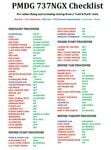
There are already some great checklists for the PMDG NGX done by others but what I've found with these checklists is that I find them to include many steps that I normally don't perform on every single flight, things like testing all fire bells and whistles etc.
So for this reason I decided to first setup the cockpit in a cold & dark state which corresponds to how the flightdeck should look like for every single switch in the cockpit according to the Boeing doc that came with the NGX after running both the shutdown and secure flows and then from this state make a checklist including all the phases of the flight from preflight at the origin to securing the a/c at the destination.
Since I'm doing all my flying online I have also included items such as filing your flightplan, asking ATC for push and engine startup clearence etc. Not fully realistic to include those kind of items in a checklist but the main purpose of this checklist will be to serve as a memory note how to perform a correct flight online in the NGX. Being used to the company of a FS2Crew FO this checklist will be there to help not forgetting about any steps during all the phases of the flight.
If you just like me have been looking for a simple checklist that will help you remember all the normal steps performed on a normal flight I hope you'll enjoy this checklist!
| Filename: | Boeing_737NGX_Checklist.zip |
| License: | Freeware |
| Added: | 18th September 2011, 17:40:11 |
| Downloads: | 8,490 |
| Author: | Richard Asberg |
| Size: | 37.91 KB |
| Category: Flight Simulator X - Flight Plans | |
| Chas mod of Stearmandriver RNP RNAV Approach into PAJN Rwy 26 for 737NGX |
|
Images related to this file:
File Description:
Modded StearmanDriver(SD) RNP RNAV Rwy 26 into PAJN, Juneau, Alaska. SD gave us a cool little route that while not LATLONG nor Fixname accurate, it couldn't be without legal and occupational liabilities...and it worked, but if you look at his FixNames and the LATLONG from the PAJN.txt file for the 737 NGX...it did work pretty nicely...at least as nicely as the charted RNAV course into Rwy 8. So I created my own procedure LATLONG rightly or wrongly in a multi-step procedure as follows:
1. I took the raw info provided by SD and flew to each of his waypoints,(if you look, almost all of his FIXs were rounded off...to avoid company or legal problems) noting safe altitude, starting out at 7000ft, creating user waypoints in my GTN750, looking around for first, vertical, then horizontal safety...keeping in mind that Ultimately...I would not be using this data for my Duke, but for the Procedure page of my PMDG 737 NGX..which you already saw me fly with SD's fixes.
2. I took my Turbine Duke up and noted the REAL LATLONG as reported by slewing and world map...transposed those numbers into the format that PMDG's procedures needed DDD.mm fractional minutes. I converted using http://www.directionsmag.com/site/latlong-converter/
3.I created my own mid-point user waypoints from the west CHRTRN,and the NNE CHRTS so we could have approaches from those directions.
4. I put my Duke into autopilot, knowing the lateral info...my flightplan was correct, but I would have to handle the Vnav manually. Turns out its rather manageable with the following info: CHRTRN 5000FT - MARMN 3500FT - TRDWL 2500FT - SALMN 1500 - LEMNN 500 - PAJN5 50
My MOD OF SDs RNP RNAV PAJNRwy 26, will be up on Avsim as ChasModRNP RNAV PAJN Rwy 26.zip
Contact:[email protected] - Support: http://forum.avsim.net/topic/466094-any-interest-in-updated-se-alaska-rnav-rnp-approach-procedures-including-juneau/
| Filename: | Chas_mod_of_Stearmandriver_RNP_RNAV_Approach_into_.zip |
| License: | Freeware |
| Added: | 8th May 2015, 11:35:16 |
| Downloads: | 339 |
| Author: | Chas Reed |
| Size: | 144.78 KB |
| Category: Flight Simulator X - Utilities | |
| Graphic Realism and FSX Optimization |
|
File Description:
The add-ons configuration step by step
Not configured FSX is a pain in the neck for many people. A small number of fps and frequent CTD (crash to desktop) can be extremely annoying or even depressing to some users. A lot of you probably came to a conclusion that it was going to be a losing battle and you gave up after a few fruitless days or you spent money on the FSPS-XTREME FSX PC V2 program, which can automatically do practically everything for us. But what's the point of spending money on something that we can do by ourselves with the help of this handbook?
I myself was dealing with the FSX platform three times before I gave up FS9. Microsoft gave out the engine to us, but in order to make sense, our passion involves radical tuning of the device. On the ground of one's own experience and thousands of hours devoted by people to diving into the core of the platform, I'll present a way of installation, add-ons selection and their configuration starting from the installation of the system. Having done the procedures described below, FSX will look beautiful and it'll work smoothly even with challenging sceneries. The entirety is based on quite a popular hardware configuration, which will let us use 85% of the graphic potential of Microsoft Flight Simulator X. We want t to achieve the goal of minimum 25 fps in VC B738 PMDG NGX, with challenging sceneries, flying in the window mode. For the mode the full screen efficiency should reach 33 fps.
In this handbook, I'm neither going to describe each and every change made in cfg nor explain what the alterations are to conduce. You will be given a simple and ready recipe which I use myself. I can't guarantee a 100% satisfaction for the poorer equipment computers. I can assure you, however, that FSX will definitely work so much better and playing with FSX sliders or with the size of textures in REX you will be able to obtain the desired effect.
| Filename: | Graphic_Realism_and_FSX_Optimization.zip |
| License: | Freeware, limited distribution |
| Added: | 15th November 2013, 20:33:26 |
| Downloads: | 5,744 |
| Author: | Grzegorz Trzoch |
| Size: | 3.96 MB |


© 2001-2026 AVSIM Online
All Rights Reserved
Privacy Policy |