
Where Flight Simulation Enthusiasts Gather from Around the World!
AVSIM Library - Search Results

| Category: Flight Simulator X - Miscellaneous Files | |
| FeelThere Map screens megapack |

|
File Description:
This package looks to be my final release of its' kind. Here are over 250 different screens for use with FeelThere Map; an amalgamation of my prior work into one package. You must have the payware add-on, FeelThere Map installed. These screens will work in FS9 and FSX, but were not tested in other sims. They should work in any sim that works with FeelThere Map (i.e. compatible versions of P3D). Many more complete airline sets are found here, along with a few sensible national groupings, a new bizjet operator grouping, and the addition of luxury brand advertisements for our high-end GA cockpit interiors, or to perhaps complete a set for an airline that might only have 2 or 3 screens of its' own. Lots of retro carriers, and some of the complete sets draw from historic timetable art, and/or bring type specificity. There are other packages from different authors available on the internet that would enable the construction of several more complete airline sets, for the dedicated VA pilot. Speaking of VAs, there's a few VA-specific groupings herein, as well. There's literally something here for every Map-enabled aircraft and flight context in your hangar. Enjoy your flights.
| Filename: | FeelThere_Map_screens_megapack.zip |
| License: | Freeware |
| Added: | 25th April 2026, 17:13:15 |
| Downloads: | 26 |
| Author: | Henry Douglas |
| Size: | 18.38 MB |
| Category: Flight Simulator X - Scenery | |
| Freeware Project Kobe X (RJBE) Japan |
|
Images related to this file:
File Description:
Freeware project KOBE X (RJBE) Japan. Contains fully detailed airport with custom ground polygons. Accurate 3d model and texture of all the building of the airport including the terminal, control tower, hangars, bridge and many more. Please note that this project was my initial experience in many fields of scenery design so take it as it is and enjoy flying in Japan. The design is never done but I think it was ready to be released. Still have some work to do with the animated jetways and night lighting for my next "payware" project (KSAN, San Diego Intl). It's going to be far better than this freeware.
You can download the world of ai installer and install the All Nippon Airways package and maybe the JAL too. The jetways are not animated but you can park a 747 in gate 1, a 767 in gate 5 and a 737 in gate 6 and be perfectly aligned with the jetway door.
Also I've not try this scenery in a less powerful computer than mine. I run a Windows 7, I7-950 @ 3.8 GHz and a GTX 570. So don't get mad if you're having bad performances :). With all sliders in the "display settings" set to max I've around 20 fps in the virtual cockpit of the level-d 767. You'll get a nicer airport with also the global texture resolution set to max, water effects set to High 2.x and traffic to ultra-high. Do not turn on Ground scenery shadows as it will make a shadow for the entire airport (ground poly).
I've some tutorial on my YouTube channel (n170toga) on how to make fsx sceneries if you are interested. Don't forget to subscribe there and have updates for the upcoming scenery. Please review this airport if you like as I will learn a lot for my next
project and it's only going to be better.
This scenery is a freeware and should be considered as a freeware. Arigato, Sagga Toure (Devinci), Devinci Design and Development (3De)
| Filename: | Freeware_Project_Kobe_X_RJBE_Japan.zip |
| License: | Freeware |
| Added: | 12th June 2011, 08:28:51 |
| Downloads: | 6,653 |
| Author: | Sagga Toure |
| Size: | 66.48 MB |
| Category: Flight Simulator X - Aircraft Repaints, Textures and Modifications | |
| Boeing 747-8i Delta Northwest |
|
File Description:
FSX Boeing 747-8i Delta Northwest with advanced VC by Alejandro Rojas Lucena and VC Texture Upgrade by Enrique Cornejo. This gives the b747 a payware Virtual Cockpit look! It even has a pilot jacket hanged in the rear of the cockpit (besides the right jumpseat).
The panel.cfg and the aircraft.cfg have been assembled and edited by the Flightsim Workshop Team. Now you can pop up "My icons" window in the Virtual Cockpit to easily reach the following windows: GPS, avionics, map, ATC, Climb/Radio Altimeter/Spoiler switch, auto-break switch, throttle quadrant, clock, descentometer, kneeboard and overhead panel.
The aircraft has new engine views (from both wings) and new Virtual Cockpit interior views from the left, right and central jump seats.
The Delta Northwest texture is wonderful and it has a unique paintscheme by Mcphat Studios with a repaint by Enrique Cornejo which also includes details such as some stains caused by humidity and other details just like a real aircraft.
This aircraft uses the Project Opensky FSX Boeing B747-800 Model OSX748V4_GENX(MDL), and includes the gauge window Posky Utility to view the main stairs, ground cargo servicing, etc. The engine sounds are edited like the real ones with cockpit ambient, so you can enjoy a pleasant flight. The Flight Management Computer (FMC) is fixed and looks like a payware instrument. The VC includes FMC, Primary Flight Display (PFD) and Multi-Function Display (MDF) displayed in the correct size.
The virtual cockpit also has an Engine-Indicating and Crew-Alerting System also known as EICAS, Ground Proximity Warning System (GPWS), working wipers, cabin lights, fire suppression, avionics switch, fuel crossfeed, and you can identify those intruments in the overhead panel because they are bordered with color lines. You can also find landing lights switches, taxi light switch, engine generators, APU generator, battery switch, starter switches, de-ice switch, general lights switches which are a great work of Alejandro. So now the whole cockpit and texture upgrade with all these improvements looks better than a payware version. The clock numbers are now in orange which makes them look better and easily recognizable.
Assembled and edited for FSX by Enrique Cornejo.
| Filename: | Boeing_7478i_Delta_Northwest.zip |
| License: | Freeware |
| Added: | 13th January 2013, 01:02:31 |
| Downloads: | 990 |
| Author: | Enrique Cornejo |
| Size: | 78.26 MB |
| Category: Flight Simulator X - Aircraft Repaints, Textures and Modifications | |
| Boeing 747-8i Delta Northwest |
|
File Description:
FSX Boeing 747-8i Delta Northwest with advanced VC by Alejandro Rojas Lucena and VC Texture Upgrade by Enrique Cornejo. This gives the b747 a payware Virtual Cockpit look! It even has a pilot jacket hanged in the rear of the cockpit (besides the right jumpseat).
The panel.cfg and the aircraft.cfg have been assembled and edited by the Flightsim Workshop Team. Now you can pop up "My icons" window in the Virtual Cockpit to easily reach the following windows: GPS, avionics, map, ATC, Climb/Radio Altimeter/Spoiler switch, auto-break switch, throttle quadrant, clock, descentometer, kneeboard and overhead panel.
The aircraft has new engine views (from both wings) and new Virtual Cockpit interior views from the left, right and central jump seats.
The Delta Northwest texture is wonderful and it has a unique paintscheme by Mcphat Studios with a repaint by Enrique Cornejo which also includes details such as some stains caused by humidity and other details just like a real aircraft.
This aircraft uses the Project Opensky FSX Boeing B747-800 Model OSX748V4_GENX(MDL), and includes the gauge window Posky Utility to view the main stairs, ground cargo servicing, etc. The engine sounds are edited like the real ones with cockpit ambient, so you can enjoy a pleasant flight. The Flight Management Computer (FMC) is fixed and looks like a payware instrument. The VC includes FMC, Primary Flight Display (PFD) and Multi-Function Display (MDF) displayed in the correct size.
The virtual cockpit also has an Engine-Indicating and Crew-Alerting System also known as EICAS, Ground Proximity Warning System (GPWS), working wipers, cabin lights, fire suppression, avionics switch, fuel crossfeed, and you can identify those intruments in the overhead panel because they are bordered with color lines. You can also find landing lights switches, taxi light switch, engine generators, APU generator, battery switch, starter switches, de-ice switch, general lights switches which are a great work of Alejandro. So now the whole cockpit and texture upgrade with all these improvements looks better than a payware version. The clock numbers are now in orange which makes them look better and easily recognizable.
Assembled and edited for FSX by Enrique Cornejo.
| Filename: | Boeing_7478i_Delta_Northwest.zip |
| License: | Freeware |
| Added: | 13th January 2013, 01:24:18 |
| Downloads: | 1,961 |
| Author: | Enrique Cornejo |
| Size: | 78.71 MB |
| Category: Flight Simulator X - Panels | |
| Eurofighter Typhoon Panel |
|
Images related to this file:
File Description:
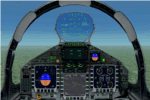
The panel has been developed for FSX Flight Simulator SP1 or SP2. It has also been tested with Microsoft Acceleration, but compatibility is not guaranteed by the author.
This panel has been designed according to a large number of technical documents, descriptions, and pictures out of the Internet. The design goal was to develop a panel and gauges as close as possible to the original aircraft. It was, however by far not possible to programming all the functions and displays, because of the complexity of the real Eurofighter panel, and also because of limitations in FSX.
However, I believe, that the panel with the MFD screen displays gives a good impression on how the real Eurofighter cockpit looks inside.The aircraft model, development by ALPHA/VIRTAVIA, has been used as the base for this panel development. The aim was to go with one model version only , the two seater air to air model. A number of parameter of the aircraft.cfg have been modified to achieve a best possible result of the flight dynamics for the model. It is up to the user to use any other model as this one, and use this panel for it.
For this package, panel and model, I decided to call it the X -Version which shall be seen as an experimental military test version, or if you like, a " Proof of Concept " version. So, you will see a neutral paint with just the Typhoon letters on the aircraft tail. This approach allows to go with deviations and differences to the current technical implementations for the cockpit displays and functions for the Eurofighter.
The panel includes gauges for the afterburner effects, sonic sound effect, callout sounds, weapon explosions effects, and a full functioning TCAS gauge (A future requirement for the Eurofighter), A2A fuel functions, target radar tracking functions and more. The panel has been developed for widescreen monitors only. No VC panel is part of this package.
This is not a load and fly package. Please take your time to read the included panel documentation carefully. Do not skip chapters because you may think, they are not important for you.
For copyrights and credits please look at the documentation for this panel.
| Filename: | Eurofighter_Typhoon_Panel.zip |
| License: | Freeware, limited distribution |
| Added: | 13th April 2016, 20:37:48 |
| Downloads: | 394 |
| Author: | Dietmar Loleit |
| Size: | 24.77 MB |
| Category: Flight Simulator X - Scenery | |
| Merrill Field PAMR |
|
Images related to this file:
File Description:
This is a version for FSX of the Merrill Field made by Roger Wensley (me) for FS9, converted by John B Loney jnr. "PAMR read this first" explains this but I have modified John's original procedure, and instead of first installing the Merrill Field original plus two updates I have included here the current FS9 version as installed on my computer. Note that to see the apron lighting working in FS9 it was necessary to have Sidney Schwartz's light library installed, along with his updated textures (to avoid severe blurries caused by a faulty texture). The original installation instructions are included giving file library priorities etc. Just ignore the bits that do not apply, such as installing AI that is not included. I have of course omitted the original AI as this is replaced by John's version. I have no comment to make on installing in FSX as I have not done so, and I have not tested it in FSX. If you have comments or questions I will respond as much as I am able. Merrill Field is in Anchorage Alaska, between Anchorage International to the southwest and and Elmendorf Air Force Base to the north. It caters for general aviation and is the land equivalent of the Lake Hood float plane base, with fuel and numerous maintenance facilities, and several hundred parking spots for small planes. There are three runways, and the longest is 4,000 feet of 100 feet wide asphalt, the second 2,635 feet of asphalt 75 feet wide, and the third 2,000 feet of 60 feet wide gravel. The first two have runway lights. It is a controlled airfield with a relatively new control tower to cater for the numerous flights and to coordinate with Elmensdorf and Anchorage International, the latter also controlling flights from Lake Hood and the adjacent gravel strip Z41. (See my Lake Hood scenery). The gravel runway at Merrill Field is not connected with active taxiways to the rest of the airfield; this avoids you being ordered to land on it when flying a plane too large to do so.
| Filename: | Merrill_Field_PAMR.zip |
| License: | Freeware, limited distribution |
| Added: | 3rd July 2017, 18:00:19 |
| Downloads: | 452 |
| Author: | Roger Wensley and John B loney jnr |
| Size: | 21.73 MB |
| Category: Flight Simulator X - AFCAD Files | |
| Ekdahl Airport (NJ59), NJ |
|
File Description:
Located 04 miles S of Freehold, New Jersey, Ekdahl Airport is a private turf strip 1300' in length bordered closely by trees. This makes for an interesting landing as the 90' width of the runway is all the room you have to play with. However because it can be difficult to gauge your distance to trees and also because even the slightest brush with a tree can cause a crash, all trees immediately adjacent to the runway have crash disabled - mainly so you can turn your plane around if you land on Runway 02. The hard surface runway was removed so make sure your terrain mesh complexity is set as high as possible to get that bumpy ground realism. A windsock is listed as being available on this field but I could not locate it in any imagery and so placed it by default near the hangar building. You can start on the runways or parked in front of the hangar. Make sure your plane is capable of these take off and landing distances! Tree height around the field was not listed so I again used my best judgement from studying aerial photos. There is no fuel or parking for transient aircraft available. The field is not lit - daytime VFR operations only are recommended.
Scenery constructed with use of satellite images/streetview/aerial photos - the author has not been there in person.
This scenery is meant to be used in conjunction with MegaScenery Earth New Jersey/Delaware 002. It is not required, but apron use is minimized to allow satellite scenery to show through as much as possible, and objects are placed based on the MSE textures - lack of it may make scenery look out of place.
| Filename: | Ekdahl_Airport_NJ59_NJ.zip |
| License: | Freeware |
| Added: | 13th August 2011, 16:53:55 |
| Downloads: | 172 |
| Author: | Drew Sikora |
| Size: | 550.03 KB |
| Category: Flight Simulator X - Scenery | |
| Ireland VFR Small Airports Part 3 |
|
Images related to this file:
File Description:
Ireland VFR Small Airports Part 3. This scenery consists of 1. EIKY Kerry International Airport, 2. EIBN Bantry Airfield, 3. EIBR Birr Airfield, and 4. Clonbullogue Airfield.
Kerry is situated in the South West of Ireland and serves as a gateway to the world famous Lakes of Killarney, The Ring of Kerry and the Dingle Peninsula. Bantry is ideal for visiting the rugged beauty of West Cork. Clonbullogue is home to the Irish Parachute Club and is situated approximately 30 miles southwest of EIDW Dublin. Birr is almost in the centre of Ireland and is home to a very active group of GA aviators.
The scenery has been created almost entirely from real photographs and all objects have been placed accurately using ordinance survey data and satellite imagery. It also includes animated marshallers, aircrew and passengers together with animated animals and vehicles. Appropriate sound effects have been added to each file together with smoke and strobe lighting. Full night lighting is included, with flood and wash lighting of the aprons and carparks. Each airport has been sub-divided into seperate elements, which can be switched on or off according to the users preference and hardware setup. It caters for GA enthuasiasts and for those who prefer to fly the heavies.
This scenery has not been designed as a standalone, it calls on many objects from my Ireland VFR Small Airports parts 1 and 2. It has also been designed to complement photographic scenery but will also work with the default terrain and I have inlcuded a set of landclass and photoreal textures. It also includes an extended set of photoscenery treescapes. Full installation instructions, settings, credits and tips can be found in the README file.
Please enjoy and I hope you like my airports as much as I enjoyed making them.
| Filename: | Ireland_VFR_Small_Airports_Part_3.zip |
| License: | Freeware, limited distribution |
| Added: | 8th April 2012, 22:40:52 |
| Downloads: | 3,747 |
| Author: | George Keogh |
| Size: | 81.33 MB |
| Category: Flight Simulator X - Aircraft Repaints, Textures and Modifications | |
| Grumman Mallard (VH-TGA) |
|
Images related to this file:
File Description:

This folder contains a repaint for the freeware Grumman Mallard by Milton Shupe and LDR development. It shows VH-TGA, which was Mallard c/n J13 as used by Trans Australia Airlines in mid 1963 on the "Coralair Service".
This airframe was constructed in late 1946 and delivered to Canada on 25-01-1947 as CF-FFG. By mid 1951 it was in Indonesia as PK-AKG with an offshoot of Shell Oil. It then moved to the Netherlands New Guinea register as JZ-POB in 1955. It eventually became VH-TGA in 1962 with East Coast Airlines followed by a transfer to Trans Australia Airlines in mid 1963 and used on the "Coralair Service". It was ferried into Auckland on 13-10-1963 and became ZK-CDV on the 15th for Utah-Williamson-Burnett at Invercargill. It still had some hydraulic problems as its nosewheel collapsed on 07-10-1964 at Invercargill. It was purchased in about 1969 by the Department of Internal Affairs and went to NAC in Christchurch for some refurbishment and a paint job before being cancelled on 21-02-1969 and marked up as VQ-FBC. This was for Air Pacific with whom it carried the name "Na Secala". It was withdrawn from use in Fiji on 04-10-1970 and cancelled from their register on 31-03-1971 for transfer to the US as N2442H the following day. It has soldiered on ever since; moving to Canada as C-GRZI for about a year in 1978 before returning to the US again. In June of 1993 it was sold to Steve Hamilton of Reno Nevada, who re-registered it as N2950 in March of 1998. It is still current.
Repaint by Jan Kees Blom, based on the white textures that came with the model
| Filename: | Grumman_Mallard_VHTGA.zip |
| License: | Freeware |
| Added: | 19th July 2018, 13:24:02 |
| Downloads: | 117 |
| Author: | Jan Kees Blom |
| Size: | 11.48 MB |
| Category: Flight Simulator X - Original Aircraft | |
| Gulfstream G-550SP |
|
Images related to this file:
File Description:
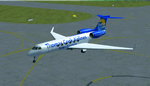
This aircraft is the advanced upgrade from previous versions, and there are no more upgrades scheduled for the future. The paint is fictional, but illustrates what would be used for Charter flights by some airlines. Even in that case, I tried to make it as real as possible, as you will see. All authors credited other than myself are not involved with any of the engine or aerodynamic or detailed corrections. I even enhanced the parking data, callsign used, lighting effects, gear, MOI, weight & ballance, flaps and smoke for realism. There are no known issues with this model as it stands, and it is now possible to easily achieve FL510 and cruise over 8,000 nm, even with 16X simulation speed activated using auto-pilot. This perfection is based on real world aero/engine dynamic data and formulas employed within the aircraft.cfg and .air files. Flight Tuning is no longer used in this model. There is no other FSX Gulfstream G-550 available anywhere (Free or Payware) that includes all of this realism, and if there is in the future, it was copied from this data. Don't be fooled. I don't expect any world-wide awards or the "Nobel FS Prize" for any of this, but your comments related to the results will be appreciated, and acknowledged. Please understand that this work required many hours of study and testing, and is offered free for Educational Purposes primarily. The results illustrate the realism of the G-550 in almost every aspect imaginable, which is possible with all FSX aircraft when you know how and what is needed. Model, Sounds & Textures by Peter Brun ([email protected]). Flight Dynamics, Data and all Modifications by Douglas E. Trapp ([email protected]), 31 December 2017.
| Filename: | Gulfstream_G550SP.zip |
| License: | Freeware |
| Added: | 1st January 2018, 03:20:19 |
| Downloads: | 9,275 |
| Author: | Peter Brun, Douglas E. Trapp |
| Size: | 19.94 MB |


© 2001-2026 AVSIM Online
All Rights Reserved
Privacy Policy |