
Where Flight Simulation Enthusiasts Gather from Around the World!
AVSIM Library - Search Results

| Category: Flight Simulator X - Scenery | |
| LJLJ Ljubljana Joze Pucnik Airport |

|
File Description:
Ljubljana Joze Pucnik Airport (IATA: LJU, ICAO: LJLJ) also known by its previous name Brnik Airport, is the international airport of Ljubljana, Slovenia. The airport is located near the village of Brnik, 19 km (12 mi) north of Ljubljana
and 11 km (6.8 mi) south of Kranj on the road between Kranj and Menges. It has a 3,300 m �� 45 m (10,827 ft �� 148 ft) paved runway. Letalisce Brnik was opened on December 24, 1963.
In 2007, the central-right government controversially renamed the airport to Ljubljana Joze Pucnik airport. Joze Pucnik was a Slovene public intellectual, dissident, and politician, leader of the Democratic Opposition of Slovenia (Demos)
between 1989 and 1992.
The airport is home to Adria Airways, the Slovenian flag carrier. There are currently two low-cost carriers serving the airport, EasyJet and Wizz Air. A few other airlines also serve the airport.
On December 8, 2004, the airport received its first annual millionth passenger. Overall, the airport handled 1,369,485 passengers in 2011, down from 1,673,050 passengers in 2008. It is the only airport in Slovenia with scheduled air
traffic.
The airport is served by a motorway exit off the A2 motorway and by bus service connecting it with Ljubljana and Kranj. A rail line to both cities is planned as well.
Airport is equipped with ILS Cat IIIb on runway 30. NDB and VOR approach are also available.
The runway of the Ljubljana Joze Pucnik Airport was closed to air traffic in April 2010. During that time, the entire width of the asphalt surface of the runway was renovated, as well as the asphalt surface on some parts of taxiways.
This file has the right coordenates, apron and characteristics of the airport, airport vehicules and buildings, Airport charts included.
| Filename: | LJLJ_Ljubljana_Joze_Pucnik_Airport.zip |
| License: | Freeware |
| Added: | 22nd November 2012, 16:29:14 |
| Downloads: | 1,510 |
| Author: | Anwar Gonzalez |
| Size: | 1.84 MB |
| Category: Flight Simulator X - Scenery | |
| VOHS-VOBL package for FSX and FSX-SE |
|
Images related to this file:
File Description: Rajiv Gandhi International Airport (IATA: HYD, ICAO: VOHS) is an international airport that serves Hyderabad,
the largest city in the Indian state of Telangana. It is located in Shamshabad, about 24 kilometres (15 mi) south of Hyderabad.
The airport is operated by GMR Hyderabad International Airport Ltd, a public–private venture.
It was opened in March 2008 to replace Begumpet Airport as the primary commercial airport for Hyderabad.
It is named after Rajiv Gandhi, former Prime Minister of India. _______________________________________________________________________________________ Kempegowda International Airport (IATA: BLR, ICAO: VOBL) is an international airport serving Bangalore, the capital of the Indian state of Karnataka.
Spread over 4,000 acres (1,600 ha), it is located about 40 kilometres (25 mi) north of the city near the village of Devanahalli.
It is owned and operated by Bangalore International Airport Limited (BIAL), a public–private consortium.
The airport opened in May 2008 as an alternative to increased congestion at HAL Airport,
the original primary commercial airport serving the city. It is named after Kempe Gowda I, the founder of Bangalore.
Kempegowda International Airport became Karnataka's first fully solar powered airport developed by CleanMax Solar.[2][3] As of 2016, Kempegowda Airport is the third-busiest airport by passenger traffic in the country,
behind the airports in Delhi, Mumbai and is the 35th-busiest airport in Asia. It handled over 22.2 million passengers in 2016 with little less than 500 aircraft movements a day.
The airport also handled about 314,060 tonnes (346,190 short tons) of cargo. By 2020, it is expected to handle at least 40 million passengers per year,
with 45 international airlines and more than 1000 aircraft movements per day.
| Filename: | VOHSVOBL_package_for_FSX_and_FSXSE.zip |
| License: | Freeware |
| Added: | 28th January 2018, 17:03:17 |
| Downloads: | 4,462 |
| Author: | morten thomas van der linden |
| Size: | 171.62 MB |
| Category: Flight Simulator X - Original Aircraft | |
| Gulfstream G-550SP |
|
Images related to this file:
File Description:
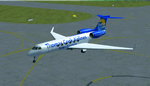
This aircraft is the advanced upgrade from previous versions, and there are no more upgrades scheduled for the future. The paint is fictional, but illustrates what would be used for Charter flights by some airlines. Even in that case, I tried to make it as real as possible, as you will see. All authors credited other than myself are not involved with any of the engine or aerodynamic or detailed corrections. I even enhanced the parking data, callsign used, lighting effects, gear, MOI, weight & ballance, flaps and smoke for realism. There are no known issues with this model as it stands, and it is now possible to easily achieve FL510 and cruise over 8,000 nm, even with 16X simulation speed activated using auto-pilot. This perfection is based on real world aero/engine dynamic data and formulas employed within the aircraft.cfg and .air files. Flight Tuning is no longer used in this model. There is no other FSX Gulfstream G-550 available anywhere (Free or Payware) that includes all of this realism, and if there is in the future, it was copied from this data. Don't be fooled. I don't expect any world-wide awards or the "Nobel FS Prize" for any of this, but your comments related to the results will be appreciated, and acknowledged. Please understand that this work required many hours of study and testing, and is offered free for Educational Purposes primarily. The results illustrate the realism of the G-550 in almost every aspect imaginable, which is possible with all FSX aircraft when you know how and what is needed. Model, Sounds & Textures by Peter Brun ([email protected]). Flight Dynamics, Data and all Modifications by Douglas E. Trapp ([email protected]), 31 December 2017.
| Filename: | Gulfstream_G550SP.zip |
| License: | Freeware |
| Added: | 1st January 2018, 03:20:19 |
| Downloads: | 9,276 |
| Author: | Peter Brun, Douglas E. Trapp |
| Size: | 19.94 MB |
| Category: Flight Simulator X - Scenery | |
| Freeware Project Kobe X (RJBE) Japan |
|
Images related to this file:
File Description:
Freeware project KOBE X (RJBE) Japan. Contains fully detailed airport with custom ground polygons. Accurate 3d model and texture of all the building of the airport including the terminal, control tower, hangars, bridge and many more. Please note that this project was my initial experience in many fields of scenery design so take it as it is and enjoy flying in Japan. The design is never done but I think it was ready to be released. Still have some work to do with the animated jetways and night lighting for my next "payware" project (KSAN, San Diego Intl). It's going to be far better than this freeware.
You can download the world of ai installer and install the All Nippon Airways package and maybe the JAL too. The jetways are not animated but you can park a 747 in gate 1, a 767 in gate 5 and a 737 in gate 6 and be perfectly aligned with the jetway door.
Also I've not try this scenery in a less powerful computer than mine. I run a Windows 7, I7-950 @ 3.8 GHz and a GTX 570. So don't get mad if you're having bad performances :). With all sliders in the "display settings" set to max I've around 20 fps in the virtual cockpit of the level-d 767. You'll get a nicer airport with also the global texture resolution set to max, water effects set to High 2.x and traffic to ultra-high. Do not turn on Ground scenery shadows as it will make a shadow for the entire airport (ground poly).
I've some tutorial on my YouTube channel (n170toga) on how to make fsx sceneries if you are interested. Don't forget to subscribe there and have updates for the upcoming scenery. Please review this airport if you like as I will learn a lot for my next
project and it's only going to be better.
This scenery is a freeware and should be considered as a freeware. Arigato, Sagga Toure (Devinci), Devinci Design and Development (3De)
| Filename: | Freeware_Project_Kobe_X_RJBE_Japan.zip |
| License: | Freeware |
| Added: | 12th June 2011, 08:28:51 |
| Downloads: | 6,653 |
| Author: | Sagga Toure |
| Size: | 66.48 MB |
| Category: Flight Simulator X - Aircraft Repaints, Textures and Modifications | |
| FSX/P3D ANA - All Nippon Airways 747SR-81 1980 |
|
Images related to this file:
File Description:
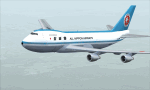
This is a repaint of the 747SR-81 (Short Range) in ANA - All Nippon Airways classic 1980 "Mohican" colors. The freeware 747-200 by Project Open Sky - POSKY is needed for this repaint. All Nippon Airways Company, Ltd.
(ANA) was formed on March 1, 1958 through the merger of two small companies. The Japanese government granted the carrier full certification to operate over domestic trunk routes on April 1, 1959, and by the mid 60s it was Japan's biggest domestic airline with a comprehensive network. During this time through to the 1970s, ANA expanded its fleet size greatly. ANA ordered its first jetliner, the 727-181, in 1964 and by 1978 they had a vast fleet of jetliners at their disposal, including the queen of the skies, the 747. ANA operated its first international flight, a charter flight, on July 15 and 31 1970, with YS-11s to Pusan, South Korea. However, a fully scheduled international flight was still in the distant future. In 1978 ANA held the position as the world’s sixth largest airline. Not bad for a domestic carrier. The carrier’s longest domestic route, the 2,051-km Sendai–Okinawa segment was opened in 1980. Interestingly, First-Class service was introduced on Japanese domestic flights as late as July 1985. In December 1985, the Japanese government opened international operations to all of the country’s airlines by revising its air transport policy and deregulating the industry. This included domestic carriers. ANA's desire for international routes became a reality and joined the fray It flew its first fully international scheduled route with a four times a week service to Guam, on March 3 1986. Today it has a vast network of international flights, and they are easily Japan's biggest carrier with 233 aircraft. They were also the launch customer of the 787. ANA has been going from strength to strength ever since its inception. For them, the sky's the limit. It might work on FS2004 as well. Textures are 32bit bmp.
| Filename: | FSXP3D_ANA__All_Nippon_Airways_747SR81_1980.zip |
| License: | Freeware |
| Added: | 12th May 2019, 18:39:42 |
| Downloads: | 162 |
| Author: | Ted Giana |
| Size: | 9.14 MB |
| Category: Flight Simulator X - Aircraft Repaints, Textures and Modifications | |
| FSX/P3Dv3 Alisarda F-27-200 1973 |
|
Images related to this file:
File Description:
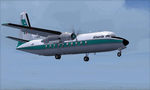
This is a repaint of the F-27-200 in Alisarda colors. The freeware FSX Native with VC F-27-200 by Bjorn Kesten is needed for this repaint. It was converted from Mike Stone's and Tom Gibson's models. The textures are 32bit DDS. It was tested on FSX-SE, but should work on FSX & P3Dv3.
Alisarda was an Italian airline based at Olbia, in Sardinia. It was established on March 28, 1963 as an air taxi company registered under the official name Linee Aerea della Sardegna SpA. Their first aircaft were two Beech 18s and Alisarda only provided a charter service. However, one year later,in 1964, they opened their fist scheduled service from Olbia to Rome. 1965 proved to be a pivotal year for the carrier. A reorganization was carried out whereby an agreement was concluded with Algenova for technical and commercial support. New investors were found, and in February 1965 two new Nord 262s were ordered from Nord Aviation. Due to this greater transport capacity, the transport figures increased strongly and in 1966 a total of 5,640 passengers were transported. The passenger loads increased dramatically in 1968 and 1969, so, Alisarda purchased three F-27 Friendships to take up the extra loads. The airline entered the 1970s with strength, and in January 1974 they received their first pure jets with the purchase of two DC-9-14s from Delta Airlines, I-SARJ and the I-SARV. 1977 saw them purchase two DC-9-32s, followed by three DC-9-50s in 1983, which replaced the aging DC-9-14s. In 1984 they received two new Maddog 82s. Their route network by 1989 consisted of domestic flights to many cities in Italy, plus international routes to Zurich, Geneva, Munich, Frankfurt, Paris, and Nice. In 1991 Alisarda merged with the Spanish carrier Universair, as the shareholders wanted to become a bigger players on the European market. The new carrier was named Meridiana. Thus, the name Alisarda ceased to exist.
| Filename: | FSXP3Dv3_Alisarda_F27200_1973.zip |
| License: | Freeware |
| Added: | 21st January 2020, 17:49:09 |
| Downloads: | 81 |
| Author: | Ted Giana |
| Size: | 4.79 MB |
| Category: Flight Simulator X - Scenery | |
| YMDN Merredin, Western Australia, Town and Airfield |
|
File Description:
YMDN Merredin Town and Airfield - includes townsite landclass. Merredin, a town better known for its wheat and sheep exports. But for almost a decade, it's where one of Asia's busiest carriers, China Southern Airlines, has been sending its trainee pilots to learn how to fly. "They come from a country with a population of more than a billion people. Right now they live in Merredin - population, depending on who's visiting, around 2,000. For nine years now, they and hundreds like them have travelled to WA's empty, sprawling Wheatbelt to learn how to fly. The middle of the Wheatbelt is not the first place you'd look for the future of Chinese commercial aviation. But before these fledgling flyers can spread their wings with China's largest airline, they must pass six months of boot camp in Merredin. Most of them are from China's southern provinces. Their backgrounds are varied. For many of them, it's the first time that they've operated some form of machinery, which includes those students that haven't even had an exposure to driving a motor car. It's early days in their careers. The students are putting in the groundwork. First, mastering the art of piloting single-engine two-seater planes. It's all preparation for the Boeings and airbuses they'll eventually be flying on major international routes. The pressure is intense. Every aspect of the student's progress is measured. Failure can have serious implications for their hopes of becoming commercial pilots. It's part theory and part practical. But flying isn't the only thing that these young men have to get used to in Merredin. For one, there's the incredibly slow pace of country life. Merredin Shire sold the defunct airport for $1 - that's cheaper than a bag of lollies. The locals say the monetary sweetener has paid off." (From ABC transcript) REQUIRES Blencowe_LibraryKit.zip
REQUIRES blencowe_librarykit_309494.zip (Available HERE)
| Filename: | YMDN_Merredin_Western_Australia_Town_and_Airfield.zip |
| License: | Freeware |
| Added: | 28th February 2013, 13:56:12 |
| Downloads: | 281 |
| Author: | Alan Blencowe |
| Size: | 4.56 MB |
| Category: Flight Simulator X - AFCAD Files | |
| Murtala Muhammed International Airport, Lagos (DNMM) Version 2 |
|
File Description:
Hi again fellow simmers....
This is an major update to my previous AFCAD on this famous West African airport.
Here are all its features:
- ILS offset fixed as well as some smaller details, like the fact that rwys 1L/1R are
permanently closed to take-off and landings.
- Corrected runway lightings/markings.
- DME on Rwy 19R now working.
- Right Hand Pattern Approach/Take-off only.
- Added correct amount of gates at the International Terminal with parking codes for airlines
that actually fly to DNMM (British Airways, Air France, KLM, Alitalia, Virgin Atlantic,
Virgin Nigeria, Sabena, Swiss, Afriqiya, Emirates, Qatar Airways, South African Airways and
more).
- Domestic Terminal fully laid out and functional with domestic airline parkinting codes
(Albarka, Chanchangi, ADC, Belleview, Kabo Air, etc).
- Cargo parking fully functional.
- Military parking (C130, MiG-21, MiG-29, Alpha Jet, Jaguar, Tornado).
To Install:
1. DELETE THE PREVIOUS 'AF2_DNMM.BGL' file from the 'Flight Simulator X/Addon
Scenery/scenery' folder.
2. Extract all files from the downloaded '.zip' file.
3. Now COPY the NEW 'AF2_DNMM.BGL' file and place it into 'Flight Simulator X/Addon
Scenery/scenery' folder.
4. Start up the Flight sim and the changes will be present.
READ THIS !!!
I've tried to the best of my ability to produce and much detail as possible but i'm sure
something has been left out (there always is).
I've used the latest Jeppesen charts and other materials at my disposal and even my own
eyesight at great risk to myself (yep, even pilots are restricted from certain places at
airports)
Also, lots of airports have changed drasticly on the past couple years like Abuja airport
(DNAA) and I would love to do justice to it as its fast becoming a major hub in the region. I
would be willing to join forces to with anyone that is good with AFCAD on this project.
Enjoy!
[email protected]
13:44 30/07/2007
| Filename: | Murtala_Muhammed_International_Airport_Lagos_DNMM_.zip |
| License: | Freeware |
| Added: | 30th July 2007, 19:44:57 |
| Downloads: | 3,283 |
| Author: | usman saleh |
| Size: | 7.38 MB |
| Category: Flight Simulator X - Aircraft Repaints, Textures and Modifications | |
| Virgin Galactic Boeing 747-8i |
|
Images related to this file:
File Description:
FSX Boeing 747-8i Virgin Galactic with advanced VC by Alejandro Rojas Lucena and VC Textures Upgrade by Enrique Cornejo, founder of the Flightsim Workshop Project. This gives the b747 a payware Virtual Cockpit look and now with green leather tapestry on the sides of the seats. It even has a pilot jacket hanged in the rear of the cockpit (besides the right jumpseat). The panel.cfg and the aircraft.cfg have been assembled and edited by the Flightsim Workshop Team. Now you can pop up "My icons" window in the Virtual Cockpit to easily reach the following windows: GPS, avionics, map, ATC, Climb/Radio Altimeter/Spoiler switch, auto-break switch, throttle quadrant, clock, descent meter, kneeboard and overhead panel. A new feature in My Icons Window I added is a new Pitot Heat switch with ON and Off features, (XML gauge by Enrique Cornejo). cold weather, the Pitot Heat switch works just like in real life, so if its turned off the air speed indicator will stop working, so make sure you turn the Pitot Heat switch on before taking off!
The autopilot ON switches have green lights which make them look more realistic. Center ATC identification in this aircraft is "Boeing 747". We have also fixed the position of the strobe lights so when the aircraft is flying they are in the right place, so turn on the strobe lights switch after take off. The cockpit view from the pilots seat is now more comfortable because the distance between the cockpit and the seat is longer.
The aircraft has new engine views (from both wings) and new Virtual Cockpit interior views from the left, right and central jump seats. The brakes has a differential brake system to make smoother turns in ground. The Virgin Galactic Spaceship texture is wonderful and it has a unique paint scheme by Enrique Cornejo which also includes details such as some stains caused by humidity in the fuselage and the wing flaps and other details just like a real aircraft. Real smoke in the four engines, just select key, more cabin views, realistic cockpit and engines sound & more realistic night VC lights and fuselage night textures, in the VC just select key and reset the overhead Instrument panel light dim switch in the overhead panel. The aileron parameters have also improved, so now the right and left turns are smoother. This aircraft uses the Project Opensky FSX Boeing B747-800 Model OSX748V4_GENX(MDL), and includes the gauge window Posky Utility to view the main stairs, ground cargo servicing, etc. The engine sounds are edited like the real ones with cockpit ambient, so you can enjoy a pleasant flight. The Flight Management Computer (FMC) is fixed and looks like a payware instrument. The VC includes FMC, Primary Flight Display (PFD) and Multi-Function Display (MDF) displayed in the correct size. The virtual cockpit also has an Engine-Indicating and Crew-Alerting System also known as EICAS, Ground Proximity Warning System (GPWS), working wipers, cabin lights, fire suppression, avionics switch, fuel cross feed, and you can identify those instruments in the overhead panel because they are bordered with color lines. You can also find landing lights switches, taxi light switch, engine generators, APU generator, battery switch, starter switches, de-ice switch, general lights switches which are a great work of Alejandro. So now the whole cockpit and texture upgrade with all these improvements looks better than a payware version. The clock numbers are now in orange which makes them look better and easily recognizable. Assembled and edited for FSX by Flightsim Workshop Founder Enrique Cornejo. 78 MB
| Filename: | Virgin_Galactic_Boeing_7478i.zip |
| License: | Freeware |
| Added: | 21st February 2013, 18:56:28 |
| Downloads: | 1,940 |
| Author: | Enrique Cornejo |
| Size: | 77.73 MB |
| Category: Flight Simulator X - Miscellaneous Files | |
| 737NG Normal Procedures Non-APU version |
|
Images related to this file:
File Description:
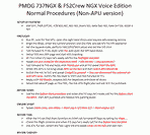
After some input and ideas from a fellow FS2Crew pilot here is a non-APU version of my flow and checklist to even closer mimic real world OPs the way many big airlines operate in real life every day at big airports around the world where the use of APU is limited to only a short period of time a couple of minutes before engine start. I also (don't I always ;-)) did some other changes and what I think improvements since my last version so give it a try and see what you think! About fitting the list on 2 A4 pages when printing it from WordPad please set all your margins to 25 mm in WordPad and uncheck the option to print the page numbers. This time I will not ask the AVSIM Library Managers to replace my old version with this one since some of you might still want the version where the APU is used depending on what kind of flights you do and to what kind of airports. Instead this will be uploaded as a new and separate version.
A flow/checklist for flying PMDG's 737NGX with FS2Crew Voice Edition. Did this mainly for my own use meaning the flow/checklist is adjusted for how I do my flying and with the addons I use like Aerosoft AES for example. Please also be aware this is not the kind of flow/checklist that includes all things you need to perform during a normal flight but instead you are expected to already have a general knowledge of both the NGX and FS2Crew. However I thought others might be helped by this too both newbies to get you going with the "flow" using FS2Crew but also for the more experienced users as a simple to print out and use memory note. It's also easy for you to change whatever you like to suit your own needs better since I created it in common rtf format using the standard Wordpad Windows application. I deliberately made it as compressed as possible leaving out stuff like all the answers to the checklists etc so it would fit on a single A4 sheet being easy to print and maybe also laminate if you like. Hope you'll enjoy it!
| Filename: | 737NG_Normal_Procedures_NonAPU_version.zip |
| License: | Freeware |
| Added: | 22nd June 2012, 03:34:37 |
| Downloads: | 1,085 |
| Author: | Richard Asberg (with input from Peter Wolf) |
| Size: | 6.36 KB |


© 2001-2026 AVSIM Online
All Rights Reserved
Privacy Policy |