
Where Flight Simulation Enthusiasts Gather from Around the World!
AVSIM Library - Search Results

| Category: Flight Simulator X - Aircraft Repaints, Textures and Modifications | |
| United Airlines Boeing 737 MEGA Pack (700-800-900) |

|
Images related to this file:
File Description:

United Airlines, is an American major airline headquartered in Chicago, Illinois. United is a wholly owned subsidiary of United Continental Holdings following a $3 billion merger in 2010. The airline was previously owned, at one point in its history, by The Boeing Company, one of the world's largest aircraft manufacturers. Since its merger with Continental Airlines, the company boasts more revenue passenger miles than any airline in the world.
United Airlines's livery painted on PMDG Boeing 737 NGX WL model. The textures are saved in DDS format for quality graphics. Textures are also characterized by HD (High Definition). Its features are idle-reverser animation, animated pack vents and pressurisation outflow valve, detailed textures, accurate paint, dynamic shine & effects, dynamic flexing wings that respond to turbulence, fully independent suspension, trim animation, gear steering, accurate flight dynamics, spoiler animation, reflective cockpit windows, improved wingflex code with input from several new parameters including ground spoilers, fuel load, and angle of attack, transparent navigation light lenses and many more. "HD EXPERIENCE" INSIDE.
Visit our Facebook page "Sky Level Textures" for news, updates and previews on my future repaint projects. Thanks for downloading & Happy flying.
| Filename: | United_Airlines_Boeing_737_MEGA_Pack_700800900.zip |
| License: | Freeware |
| Added: | 30th March 2014, 14:12:29 |
| Downloads: | 6,372 |
| Author: | Giacomo Tomasini | Sky Level Textures |
| Size: | 127.45 MB |
| Category: Flight Simulator X - Aircraft Repaints, Textures and Modifications | |
| American Airlines Boeing 737-800 (N809NN / N838NN) Mega Pack |
|
Images related to this file:
File Description:

American Airlines is a major U.S. airline headquartered in Fort Worth, Texas. It operates an extensive international and domestic network, with scheduled flights throughout North America, the Caribbean, South America, Europe, and Asia. Its route network centers around five "cornerstone" hubs in Dallas/Fort Worth, New York, Los Angeles, Miami, and Chicago. Its primary maintenance base is located at Tulsa International Airport (TUL). American Airlines is part of the Oneworld airline alliance
American Airlines livery painted on PMDG Boeing 737 NGX WL model. The textures are saved in DDS format for quality graphics. Textures are also characterized by HD (High Definition). Its features are idle-reverser animation, animated pack vents and pressurisation outflow valve, detailed textures, accurate paint, dynamic shine & effects, dynamic flexing wings that respond to turbulence, fully independent suspension, trim animation, gear steering, accurate flight dynamics, spoiler animation, reflective cockpit windows, improved wingflex code with input from several new parameters including ground spoilers, fuel load, and angle of attack, transparent navigation light lenses and many more. "HD EXPERIENCE" INSIDE. Credits to PMDG Simulations.
Visit our Facebook page "Sky Level Textures" for news, updates and previews on my future repaint projects. Thanks for downloading & Happy flying.
| Filename: | American_Airlines_Boeing_737800_N809NN__N838NN_Meg.zip |
| License: | Freeware |
| Added: | 22nd May 2014, 14:07:02 |
| Downloads: | 7,626 |
| Author: | Giacomo Tomasini | Sky Level Textures | PMDG Simulations |
| Size: | 79.64 MB |
| Category: Flight Simulator X - Original Aircraft | |
| Piaggio P-180 V3.0 |
|
Images related to this file:
File Description:
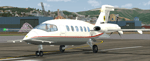
This is a true FS-X (SP2) SDK aircraft! Version 3.0 brings an entirely new cockpit (2D/3D, 2D panel available in Widescreen and 4/3) and cabin down to almost every single switch, entirely new flight dynamics, advanced systems and avionics, new sound and panel sound effects, and much more!
The Piaggio P-180 is a high-speed high-efficiency turboprop aircraft. Capable of speeds up to 395 KTAS (or M0.68) up to its service ceiling of 41000ft. This performance is achieved by extreme aerodynamic optimization instead of sheer power. The end result is an aircraft that burns 40% less fuel than the average jet of comparable size, while flying at the same speed range, or 30% less than an equivalent size turboprop, as it flies much faster. The pusher propellers on the wings mounted much backwards thanks to the forward wing set make it a comfortable and quiet ride for the passengers, that also enjoy a very spacious cabin for an aircraft of this size.
Features Clickable Dynamic Photortreal VC with Night Lighting, night lighted internals, Photoreal 2D Cockpit, Engine start Effect, advanced FDE, Customizable Payloads.
| Filename: | Piaggio_P180_V30.zip |
| License: | Freeware |
| Added: | 30th July 2012, 23:25:47 |
| Downloads: | 7,273 |
| Author: | Mario Noriega |
| Size: | 68.37 MB |
| Category: Flight Simulator X - Scenery | |
| HALA - Hawassa Intl. - Hawassa, Ethiopia |
|
Images related to this file:
File Description:
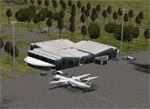
This project adds the booming city of Hawassa, Ethiopia, creates the new international airport (HALA), moves (and rebuilds) the downtown airport (recoded to HALX), and includes AI flight plans for the Ethiopian Airlines service that began April 2016. Tested in both the default FSX: Acceleration and with FTX Global/Vector, accurate coastlines, lakes, road data, and SRTMGL1 (30m) mesh, as well as corrected landclass are provided based on the latest available satellite imagery. The Hawassa International Airport was created using information from the current satellite footprint and the promotional video from Ethiopian Airports Enterprise (EAE). Although there is still very little published data on the airport, it is fully functional.
Updates were created or rebuilt in a manner which carefully aligns airport data with current satellite imagery. Scenery was created using Airport Design Editor X v1.70.6042, SBuilderX 3.13, and the FSX Object Placement Tool. Scenery objects were added and modified from stock FSX scenery to resemble as closely as possible the actual airports. The FSX apron lights included are from the set created by Jim Dhaenens. Thanks to Ron Blehm for bringing this part of the world to my attention.
| Filename: | HALA__Hawassa_Intl___Hawassa_Ethiopia.zip |
| License: | Freeware |
| Added: | 20th July 2016, 09:06:40 |
| Downloads: | 1,021 |
| Author: | Carlyle Sharpe |
| Size: | 10.41 MB |
| Category: Flight Simulator X - AFCAD Files | |
| LQSA - Sarajevo Intl. Airport, Bosnia Herzegovina |
|
File Description:
Sarajevo International Airport (IATA: SJJ, ICAO: LQSA), also known as Butmir Airport, is the main international airport in Bosnia and Herzegovina, located 3.3 NM (6.1 km; 3.8 mi) southwest of the railway station in the capital city of Sarajevo in the suburb of Butmir. Since the Dayton Accord in 1996, the airport has welcomed a thriving commercial flight business which includes B&H Airlines, Austrian Airlines, Lufthansa, Jat Airways, Croatia Airlines, Turkish Airlines, Germanwings and others. In 2006, 466,186 passengers traveled through Sarajevo airport, compared to only 25,000 in 1996. In 2011 Sarajevo International Airport had 599,996 passengers which is more than all of the airports in Bosnia-Herzegovina had together and 6,5% more than in 2010. In 2012 the company has a slight decline in traffic. In 2005 the European branch of the Airports Council International awarded Sarajevo the award of Best Airport Under 1 Million Passengers. I just land in this airport, thank you to Sarajevo approach for a nice job. This file has the right coordinates, with runway 46 meters wide, apron and characteristics of the airport, airport vehicles and buildings.
| Filename: | LQSA__Sarajevo_Intl_Airport_Bosnia_Herzegovina.zip |
| License: | Freeware |
| Added: | 10th November 2012, 22:52:51 |
| Downloads: | 2,141 |
| Author: | Anwar Gonzalez |
| Size: | 4.44 MB |
| Category: Flight Simulator X - Aircraft Repaints, Textures and Modifications | |
| Airbus A380-800 Mega Pack |
|
Images related to this file:
File Description: (Air France , Korean Air , Emirates , China Southern Airlines , Lufthansa
, Singapore Airlines) Sky Level Textures is proud to present the Airbus A380-800 MEGA PACK! This
package contains six liveries of the major A380 operators (AFR KAL UAE CSN DLH
SIA) equipped with their original engines configuration Rolls Royce and Engine
Alliance (PA models are also included).

Liveries painted on Project Airbus's Airbus A380-800 model. The textures are
saved in 32bit format for quality graphics. Textures are also characterized by
HD (High Definition). Its features are idle-reverser animation, animated pack
vents and pressurisation outflow valve, detailed textures, accurate paint,
dynamic shine & effects, dynamic flexing wings that respond to turbulence, fully
independent suspension, trim animation, gear steering, accurate flight dynamics,
spoiler animation, reflective cockpit windows, improved wingflex code with input
from several new parameters including ground spoilers, fuel load, and angle of
attack, transparent navigation light lenses and many more.
Visit our Facebook page "Sky Level Textures" for news, updates and previews on
my future repaint projects. Thanks for downloading & Happy flying. HD GAMING
EXPERIENCE inside. https://www.facebook.com/SkyLevelTextures
| Filename: | Airbus_A380800_Mega_Pack.zip |
| License: | Freeware |
| Added: | 8th July 2014, 15:06:09 |
| Downloads: | 10,251 |
| Author: | Giacomo Tomasini / Sky Level Textures / Project Airbus |
| Size: | 150.31 MB |
| Category: Flight Simulator X - Aircraft Repaints, Textures and Modifications | |
| Royal Netherlands Airforce "50 Years" Aerospatiale Alouette III |
|
Images related to this file:
File Description:
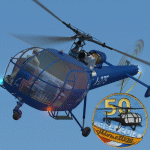
This packet includes a repaint of Alouette III by Camille Bachmann (Squirrel) in the current livery of the Royal Netherlands Airforce (Koninklijke Luchtmacht).
The livery includes the special 50 years stickers, the RNLAF (Klu) has been operating the Alouette III since 1964. Currently only 4 remain in the VIP flight based at Gilze Rije airbase. They are due to retire in 2016, after 52 years of service!
Outside is painted in high resolution 40964x4096 pixels. Almost all decals are present and readable. Inside is also completely repainted to bring it in-line as close as possible with the real aircraft. This includes the VC textures:
- Airspeed and Vertical speed are now Knots and feet/min, and photo-real look
- Altitude could not be changed texture wise, however is still changed
in a more photo-real look
- Most instruments have now English text
- Added lots of (semi) photo-real details across the VC
The freeware Alouette III can be found at the following sites:
http://frenchvfr.free.fr/download.php?lng=en&pg=584&prt=-1
http://royalefrenchnavy.perso.sfr.fr/RFN-Avions.htm#HelicoEmb
| Filename: | Royal_Netherlands_Airforce_50_Years_Aerospatiale_A.zip |
| License: | Freeware, limited distribution |
| Added: | 24th October 2015, 21:57:17 |
| Downloads: | 375 |
| Author: | Marcel Ritzema |
| Size: | 9.12 MB |
| Category: Flight Simulator X - Scenery | |
| Bhutan Airports and Paro Valley |
|
Images related to this file:
File Description:
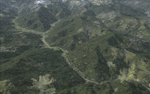
This project adds and updates all of the airports of Bhutan. Bathpalathang (VQBT) and Gelephu (VQGP) are added, Yongphulla (VQ10) is updated and recoded as VQTY, and Paro (VQPR) is fully updated to reflect current satellite imagery. These are all fully functioning AI airports as well. Special attention was given to the entire Paro Valley, and numerous road/river vectors were updated around Gelephu. Accurate coastlines, lakes, road and river data, as well as corrected landclass are provided based on the latest available satellite imagery. They are optimized to fit seamlessly with FTX Vector's roads/water, but they should be fully functional in all FSX configurations.
GA-encoded flight plans for the Buddha Air/Kathmandu charter are provided to enhance service to Paro. NASA SRTM Global 3 arc second terrain mesh is also included for all of Bhutan. Updates were created or rebuilt in a manner which carefully aligned airport data with current satellite imagery, when available. Scenery was created using Airport Design Editor X v1.61.5298, SBuilderX 3.13, and the FSX Object Placement Tool. Scenery objects were added and modified from stock FSX scenery to resemble as closely as possible the actual airports.
| Filename: | Bhutan_Airports_and_Paro_Valley.zip |
| License: | Freeware |
| Added: | 19th January 2015, 06:09:17 |
| Downloads: | 11,430 |
| Author: | Carlyle Sharpe |
| Size: | 21.4 MB |
| Category: Flight Simulator X - Aircraft Repaints, Textures and Modifications | |
| Qatar Airways B777-200LR (GE) (A7-BBB) **UPDATE ** |
|
Images related to this file:
File Description:

REPAINT UPDATED FOR - new Captain Sim v1.0 folders, improved wear pattern on wings, correction to engine paint issues.
This is a repaint of a Boeing 777-200LR, registration code A7-BBB, operated by Qatar Airways, the flag carrier of Qatar. Headquartered in Doha, Qatar Airways operates services across Africa, Central Asia, Europe, Far East, South Asia, Middle East, North America, South America and Oceania. Qatar Airways uses the Arabian Oryx as its logo and currently operates 9 Boeing 777-200LRs.
This repaint has plenty of clear markings so if you enjoy exterior detail, then you will love this repaint. You can see (and read): Door opening instructions; Static port directions; Air vent warnings; Engine hazard area; No Step warnings; RAT caution; APU intake warning; Stabilizer compartment access; Ground power supply; Forward and aft access door instructions; Pitot, ADA probe, Ice detector and TAT probe markings; Visible rivets; Enhanced window frames; Authentic Qatar logo; Bold, colorful Qatar livery and authentic flags; Lovely Qatar flight attendant; No frame rate hit.
To use this repaint, the Captain Sim B777-200 v1.0 is required. Repainted by Garrett Rowley, [email protected]
| Filename: | Qatar_Airways__B777200LR_GE_A7BBB__UPDATE_.zip |
| License: | Freeware |
| Added: | 27th February 2013, 14:49:22 |
| Downloads: | 4,209 |
| Author: | Garrett Rowley, Captain Sim |
| Size: | 28.89 MB |
| Category: Flight Simulator X - Aircraft Repaints, Textures and Modifications | |
| Virgin Galactic Boeing 747-8i |
|
Images related to this file:
File Description:
FSX Boeing 747-8i Virgin Galactic with advanced VC by Alejandro Rojas Lucena and VC Textures Upgrade by Enrique Cornejo, founder of the Flightsim Workshop Project. This gives the b747 a payware Virtual Cockpit look and now with green leather tapestry on the sides of the seats. It even has a pilot jacket hanged in the rear of the cockpit (besides the right jumpseat). The panel.cfg and the aircraft.cfg have been assembled and edited by the Flightsim Workshop Team. Now you can pop up "My icons" window in the Virtual Cockpit to easily reach the following windows: GPS, avionics, map, ATC, Climb/Radio Altimeter/Spoiler switch, auto-break switch, throttle quadrant, clock, descent meter, kneeboard and overhead panel. A new feature in My Icons Window I added is a new Pitot Heat switch with ON and Off features, (XML gauge by Enrique Cornejo). cold weather, the Pitot Heat switch works just like in real life, so if its turned off the air speed indicator will stop working, so make sure you turn the Pitot Heat switch on before taking off!
The autopilot ON switches have green lights which make them look more realistic. Center ATC identification in this aircraft is "Boeing 747". We have also fixed the position of the strobe lights so when the aircraft is flying they are in the right place, so turn on the strobe lights switch after take off. The cockpit view from the pilots seat is now more comfortable because the distance between the cockpit and the seat is longer.
The aircraft has new engine views (from both wings) and new Virtual Cockpit interior views from the left, right and central jump seats. The brakes has a differential brake system to make smoother turns in ground. The Virgin Galactic Spaceship texture is wonderful and it has a unique paint scheme by Enrique Cornejo which also includes details such as some stains caused by humidity in the fuselage and the wing flaps and other details just like a real aircraft. Real smoke in the four engines, just select key, more cabin views, realistic cockpit and engines sound & more realistic night VC lights and fuselage night textures, in the VC just select key and reset the overhead Instrument panel light dim switch in the overhead panel. The aileron parameters have also improved, so now the right and left turns are smoother. This aircraft uses the Project Opensky FSX Boeing B747-800 Model OSX748V4_GENX(MDL), and includes the gauge window Posky Utility to view the main stairs, ground cargo servicing, etc. The engine sounds are edited like the real ones with cockpit ambient, so you can enjoy a pleasant flight. The Flight Management Computer (FMC) is fixed and looks like a payware instrument. The VC includes FMC, Primary Flight Display (PFD) and Multi-Function Display (MDF) displayed in the correct size. The virtual cockpit also has an Engine-Indicating and Crew-Alerting System also known as EICAS, Ground Proximity Warning System (GPWS), working wipers, cabin lights, fire suppression, avionics switch, fuel cross feed, and you can identify those instruments in the overhead panel because they are bordered with color lines. You can also find landing lights switches, taxi light switch, engine generators, APU generator, battery switch, starter switches, de-ice switch, general lights switches which are a great work of Alejandro. So now the whole cockpit and texture upgrade with all these improvements looks better than a payware version. The clock numbers are now in orange which makes them look better and easily recognizable. Assembled and edited for FSX by Flightsim Workshop Founder Enrique Cornejo. 78 MB
| Filename: | Virgin_Galactic_Boeing_7478i.zip |
| License: | Freeware |
| Added: | 21st February 2013, 18:56:28 |
| Downloads: | 1,940 |
| Author: | Enrique Cornejo |
| Size: | 77.73 MB |


© 2001-2026 AVSIM Online
All Rights Reserved
Privacy Policy |