
Where Flight Simulation Enthusiasts Gather from Around the World!
AVSIM Library - Search Results

| Category: Flight Simulator X - Scenery | |
| TNCB - Flamingo Airport (Bonaire) |

|
File Description:
Welcome to one of the 3 ABC's beautifull dutch island, Bonaire.
Flamingo Intl. is an international airport located at Kralendijk, Bonaire, Netherlands Antilles. Flamingo Airport serves as a connecting
point for flights of KLM to some destinations in South America. It once served as a hub for BonaireExel, BonaireExpress,CuraçaoExel,
CuraçaoExpress and now serves Dutch Antilles Express as it's secondary hub & also "EZAir" serves Bonaire as its main airline, although
the airline itself is based at Curaçao.
It is the 3rd largest airport in the Netherlands Antilles behind St.Maarten's Princess Juliana International Airport & Curaçao's Hato
International Airport and is the 4th largest between the islands of the Dutch Kingdom behind the already mention St. Maarten,
Curaçao & Aruba's Queen Beatrix International Airport. Arkefly, Continental, Delta & KLM are currently the largest airline operators
that operate flights to Bonaire.
The airport is large enough to accommodate most international widebody airliners such as the Boeing 747, the Boeing 777 and the
Airbus A340, although the largest widebody type to operate to Bonaire today is the MD11. It can also accommodate medium sized
aircraft such as the Boeing 737 and Airbus A310 as well as small aircraft such as the de Havilland Dash 8, ATR 42 and other such
turboprop aircraft.
| Filename: | TNCB__Flamingo_Airport__Bonaire.zip |
| License: | Freeware |
| Added: | 13th April 2009, 08:00:18 |
| Downloads: | 2,343 |
| Author: | Daniel Louvet |
| Size: | 1.01 MB |
| Category: Flight Simulator X - Aircraft Repaints, Textures and Modifications | |
| FSX/P3D Ethiopian Airlines 707-379C 1968 |
|
Images related to this file:
File Description:
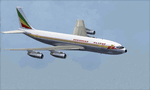
This is a repaint of the 707-379C in Ethiopian Airlines colors. The payware 707-300C by Captain Sim is needed for this repaint. Ethiopian Airlines was established in 1946 by the Emperor Haile Sellassie, and TWA which provided technical and managerial support. Regular operations commenced on April 8 1946 with a fleet of 6 ex USAAF DC-3s. Later in 1950, 2 Convair CV-240s entered the fleet. Then in 1958, the first DC-6B arrived on the scene. On January 1 1959 Ethiopian officially became a member of IATA. The first jet services started in 1963 after the delivery of the carrier's first Boeing 720s. The 720s replaced the DC-6Bs on the European routes. In 1964, Ethiopian started a new pilot training school, installed a large IBM computer system, and also established the largest jet overhaul facility in Africa. 707s, 727s, and 737s, joined the fleet in the ensuing years. Today Ethiopian ranks as Africa's supreme air carrier with a safe and reliable service, notwithstanding the 737 Max 8 tragedy, and has a vast route network. The cherry on top was when in 2014, Ethiopian dethroned South African Airways as the "Best African Airline". Textures are 32 bit dds and DXT5 textures are included as well. This repaint was tested FSX-SE. It should work on FSX & P3Dv1-3.
| Filename: | FSXP3D_Ethiopian_Airlines_707379C_1968.zip |
| License: | Freeware |
| Added: | 20th September 2019, 16:33:20 |
| Downloads: | 131 |
| Author: | Ted Giana |
| Size: | 20.14 MB |
| Category: Flight Simulator X - Aircraft Repaints, Textures and Modifications | |
| Boeing B-17G 91st BG (LL-E) "Shoo shoo shoo baby" |
|
Images related to this file:
File Description:
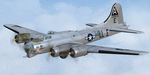
This folder contains a repaint for the A2A WoP2 B-17G in the colors B-17G-35-BO 42-32076, which rolled off Boeing's production line in Seattle in march 1944. This was around the transition from camouflaged to bare metal aircraft, which led to the odd situation that the datablock was stencilled onto a OD panel, while the rest of the aircraft was left bare metal. This was because the datablock was sprayed on right at the beginning of production. The aircraft was assigned to the 401st BS of the 91st BG, and was collected at the depot in Burtonwood by Paul McDuffee, who was so impressed with its smooth handling that he asked to be assigned to it. The aircraft was named by its crew chief, Hank Cordes, and was named after a popular song by the Andrews Sisters. Originally, the name was 'Shoo shoo baby', applied in gothic letters, which was later replaced by a Vargas girl and an additional 'shoo', painted by Cpl. Tony Starcer. McDuffee flew 13 missions with 076, before completing his tour of duty. On completion of his last flight, he buzzed the airfield and flew so low that fencing wire became entangled in the tail wheel. On the plane's 23rd mission, on 29 may 1944, Lt. Robert Guenther was flying 076 on a raid to Poznan when he suffered engine failure on one engine, and a while later, flak knocked out a second engine. 'Shoo shoo shoo baby' started to fall behind, and when a third engine started to falter, Lt Guenther decided to turn to neutral Sweden, with the crew jettisoning all loose equipment. A group of FW190's closed in, but did not open fire, peeling away. By the time 076 reached Bulltofta airfield near Malmö, it had only one engine left, but it did manage to perform a safe landing. The crew were interned, and the aircraft was impounded. The crew returned to the UK in October 1944, and 'Shoo shoo shoo baby' would later tour the world...
Repaint by Jan Kees Blom, based on the paintkit by A2A.
| Filename: | Boeing_B17G_91st_BG_LLE_Shoo_shoo_shoo_baby.zip |
| License: | Freeware |
| Added: | 7th October 2019, 18:22:46 |
| Downloads: | 106 |
| Author: | Jan Kees Blom |
| Size: | 18.03 MB |
| Category: Flight Simulator X - Utilities | |
| FSTramp v8.84 for MSFS, FSX(-SE), Prepart3D, X-Plane (Win) |
|
Images related to this file:
File Description:
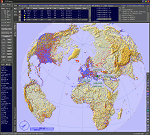
This add-on is an EXE application for Microsoft Flight Simulator and a DLL module for all other simulators. The DLL variant is activated via hotkeys or the simulator menu add-ons or plugins. Window size and layout are configurable for one or more screens. To avoid dazzling, the brightness of the entire application is customizable. Primarily it is a flight management system (FMS) with automatic control from start to landing. This also includes the observance of SID, STAR and Approaches in unmatched quality. The flight plan required for the FMS can be created manually or automatically, interactive changes and additions during the flight are possible. The basis of the flight planner is the 3D world map and the search function for airfields and navigation aids. The FMS by FSTramp relies on the autopilot of the aircraft. In case of incompatibility, the autopilot integrated in FSTramp will be used. This allows FSTramp to control almost all aircraft from airport to airport. The altitude profile of the flight plan, SID, STAR and approach is taken into account. This means that FSTramp extends the often incomplete airport procedures to and from the runway so that they can be flown completely automatically. During the fully automatic flight, the autopilot values ​​for HDG, ALT, VSPEED, SPD and MACH can be manually overridden. This is e.g. useful for being able to react to the instructions of the tower in the final approach without completely stopping the automatic flight. The rotating or north pointing 3D world map with numeric display of the terrain elevation under the mouse arrow is another special feature. It does not need an internet but is synthesized from included height profiles of the globe. The Data of continents, mountains and rivers are included in the setup. Airspaces, Airways, Waypoints and SID, STAR and Approaches are also included in the setup, but can be updated by installing additional AIRAC cycles. Airfields and navigation stations are taken from the simulator. NVIDIA: If the frame rate of the simulator drops sharply about 20 seconds after FSTramp's visibility, the power management of the GPU slows down prematurely. In the NVIDIA Control Panel, change the 'Manage 3D settings - Power management mode' option to 'Adaptive'.
| Filename: | FSTramp_v884_for_MSFS_FSXSE_Prepart3D_XPlane_Win.zip |
| License: | Shareware, time limited |
| Added: | 7th July 2023, 04:35:43 |
| Downloads: | 130 |
| Author: | Helge Schroeder |
| Size: | 358.21 MB |
| Category: Flight Simulator X - Original Aircraft | |
| B-52J |
|
Images related to this file:
File Description:
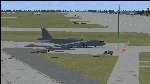
Since it became operational in 1955, the B-52 has been the main long-range heavy bomber of the U.S. Air Force. It first flew on Apr. 15, 1952. Nearly 750 B-52s were built when production ended in Oct. 1963. This "J" model is the future re-engined "h" model 60-0042 of the 917th Wing AFRC based at Barksdale AFB (KBAD). She flies higher, further, and faster than any previous version. The aircraft can cruise at 380 KIAS at 500 ft agl over about 5,000 nm which makes her capable of reaching targets within enemy airspace anywhere on the globe without being detected by radar until it's too late. Her normal high altitude cruise speed has been increased to Mach .88 above FL550E over 9,000 nm without refueling, and her service ceiling has increased to FL570E. The 50,000 lb payload is still nominal, but due to the lighter engines she now has more accomidations for the crew, and does not require refueling very often. She can range much further with less speed (i.e., Mach .85), but there is normally no need for that. This aircraft is designed to fly like the real thing. It is likely one of the best B-52 models available at this time. I have test-flown this aircraft around the globe several times to reassure myself that all is well. You will not have a bouncing effect occur when cruising with 16x speed acceleration and autopilot engaged because all aerodynamics and balance are perfected to a very low margin of error, or no error margin at all. Please be sure to read the INSTRUCT.TXT file for extended details. Original aircraft designer: Mike Stone; Textures by Bill Baldwin; Panel and gauges by Philippe Wallaert; Auto Smoke Effects by Richard Wisman; BR-725 Sound by Ronald Buffalo; Real World aero/engine dynamics, data, lights and effects by: Douglas E. Trapp, FS Flight Dynamics Engineer, Irving, Texas, [email protected], October 2018. The use of this model, and the configuaration of such, is designed for free educational purposes, and protected by the Free Use Act: (https://www.law.cornell.edu/uscode/text/17/107). This model and/or aspects of such cannot be used for monetary purposes!
| Filename: | B52J.zip |
| License: | Freeware |
| Added: | 27th October 2018, 18:57:21 |
| Downloads: | 628 |
| Author: | Douglas E. Trapp |
| Size: | 24.51 MB |
| Category: Flight Simulator X - Original Aircraft | |
| AN-22 Antheus Mastered |
|
Images related to this file:
File Description:

THIS IS MY FINAL AN-22 VERSION: Unveiled to the West in 1965, the Antonov An-22 was the world's largest aircraft, until the advent of the Lockheed C-5A Galaxy. Powered by 4 contra-rotating turboprops, the design remains the world's largest turboprop-powered airplane. The An-22 was originally built for the Soviet Air Force and Aeroflot, the state airline. A total of 68 aircraft were built during 1965-1975, from which 2 never flew, 19 have been preserved, and 33 removed from service. Currently only 7 are in service. Six of them are used by the Russian Air Force and one (UR-09307) belongs to Antonov Design Bureau, used for civil needs, and operates out of UKKM. The AN-22 is designed to carry heavy loads of 80 tonnes over a 3,000 nm range at high speed and moderate altitude. The civilian model is used for long and medium range flights with updated avionics and flight controls. The wing has a forward and rear sweep effect with a low taper ratio and moderate wing area for it's size. The tail includes twin vertical fins that help maintain stability. The engines are constant speed turboprops that include 2 four bladed contra-rotating props with auto-pitch, and this gives her a thrust rating of 15,211 shp and a fuel efficiency of .353 lb/hp/hr. The cargo area is 14 ft high and wide, and 108 ft long. All fuel is contained within the wings and in the upper fuselage (7 tanks). She has 12 wheels that carry most of the weight, and two steering wheels located behind the crew cabin. Cargo is loaded through the rear loading ramp. The cockpit is located high, as well as the crew quarters. Additional passengers (when present) are seated below the cockpit forward. Original Design and Textures by: Enrique Del Rosario; Sound by: Aaron R. Swindle; Panel by: Marco Spada; Auto Smoke Effects by Richard Wisman; Engine/Aero Dynamics, effects and data by: Douglas E. Trapp. Please Read the Readme AN22.txt file before operations.
| Filename: | AN22_Antheus_Mastered.zip |
| License: | Freeware |
| Added: | 19th August 2018, 01:44:48 |
| Downloads: | 1,292 |
| Author: | Douglas E. Trapp |
| Size: | 4.62 MB |
| Category: Flight Simulator X - Scenery | |
| VTSM - Koh Samui |
|
File Description:
Today, after almost half a year of construction, I am presenting my new airport to
youVTSM- Samui Airport in front of .......
since I was already there myself and again no decent freeware scenerywas to be
found for the FSX,
so building it yourself was once again the trend
I tested the airport on another computer - everything works fine
Traffic works, Ai traffic as well as road traffic and ILS approach works. So
have fun in Koh Samui at the airport and the surrounding area .......
The best way to go on a voyage of discovery is with a small plane or helicopter so
that you can do the same
see many details .........
lands at the airport VTSM with an A319 or a Boing 737 larger planes are not there
then allowed to take a helicopter or a small plane and fly over the island
explores the many details ...............
Installation:
Put the folder VTSM - Samui in the folder FSX Addon Scenery and activate
Him......... !
The steps listed below only if you don't have these add-ons yet! !
to be able to see people unzip the supplied folder 3dpeoble_Lib and put
the unzipped folder in your FSX Addon Scenery and activate it
Support:
If you have any problems or questions, please send an email to
[email protected]
now have fun and good luck on your flight LG Jamaica
Demo video at https://youtu.be/dcIkSi03sfg?t=7
| Filename: | VTSM__Koh_Samui.zip |
| License: | Freeware |
| Added: | 5th February 2021, 19:28:51 |
| Downloads: | 778 |
| Author: | Ewald Wagner |
| Size: | 52.16 MB |
| Category: Flight Simulator X - Scenery | |
| FSX-DTTJ-Djerba |
|
File Description:
Well it starts like always, I can't find a usable freeware airport in this
case for the DTTJ Djerba-Zarzis so I'll build it myself again.........
well what can I say here it is built as real as possible with many details
with the standard scenery after a lot of work ..........
So fly to Tunisia to the island of Djerba, of course with an Airbus A321 or
a Boeing 737. There you change to a helicopter or a smaller plane and
look around the area...Tip: Zarzis is near the port a helipad......
Installation:
copy the folder DTTJ Djerba Scenery into the addon folder of the FSX,
start the FSX go to settings, scenery library, add area, press OK, then
you can already start.............
Extras: to be able to see people, I deliver the file 3DPeoble_Lib, copy it
into the Addon Scenery folder and activate it in FSX as described during
the installation and you can already see people......
the same applies to all files that are supplied to see more details in the
FSX folder Addon Scenery copy individually and activate in FSX you
should have already activated one of these files! You don't need to install
it again! EZ-Scenery-Object Files ( for extra buildings and accessories )
...... RCJ-Neoplan............( Buses ). airport_restaurants_ss_fsx..........
( extra building ) Parking lots_large_ss_Fsx.Bgl........( vehicles and
parking lots) Lightobj.bgl......lights and light poles......... more about it on
my youtube channel https://www.youtube.com
/channel/UC7vHXQMa3hhU2iGtODXlkHw/videos
Support:Questions and help on my YouTube channel or by email to
[email protected] And now have fun In Djerba Jamaica
| Filename: | FSXDTTJDjerba.zip |
| License: | Freeware |
| Added: | 18th September 2023, 14:53:38 |
| Downloads: | 395 |
| Author: | Wagner Ewald alias Jamaika |
| Size: | 84.97 MB |
| Category: Flight Simulator X - Scenery | |
| FSX-LPMA-Funchal-Madeira |
|
File Description:
FSX-LPMA-Funchal-Madeira
well it starts as always, i can't find any usable freeware airport in this case for
the LPMA Madeira Funchal so I'll build it myself again...............well what can i
say here it is after a lot of work as real as possible with a lot of details with the
Default scenery built ..........So fly to Madeira with an Airbus A321 or a Boeing
737, of course There youchange to a heli or a smaller plane and see each other on
the premises at......
Installation:copy the folder LPMA-Madeira Scenery into the addon folder of the
FSX, start the FSX go to settings, scenery library , add area, press ok , after that
you can already start............
Extras:
to be able to see people I deliver the file 3DPeoble_Lib with you can also put it in
the Copy the addon folder and activate it in FSX as described during installation
and you'll see you people..............
the same applies to extra vehicles and extra buildings with the supplied files
ObjLib-Large-Car-Parking-FSX and you'll see more vehicles...........
Airport_Restaurants_ss_fsx.BGL + RCS_Cobus3000.BGL
! You don't need these extras if you already have them!
Extra bonus:
especially for the LPMA-Madeira, I'm adding the Airport AI Enhancer program so
that you can create your own AI traffic.........
more about it on my Youtube channel
https://www.youtube.com/channel/UC7vHXQMa3hhU2iGtODXlkHw/videos
Support:
Questions and help on my Youtube channel or by email to [email protected]
now have fun in Madeira Funschal
Jamaika
| Filename: | FSXLPMAFunchalMadeira.zip |
| License: | Freeware |
| Added: | 18th September 2022, 21:19:38 |
| Downloads: | 1,851 |
| Author: | Ewald Wagner |
| Size: | 71.29 MB |
| Category: Flight Simulator X - Scenery | |
| FSX-LIEO-Olbia-Sardinien |
|
File Description:
Now, after a long construction period and many hours of free time,
the new FSX airport LIEO-Olbia-Sardinia is finally finished, of
course as always with lots of details and a few extras.........
So off we go, off to Sardinia to the Costa Smeralda, preferably
with an A 321 or a Boeing 737, where you switch to a helicopter or
a smaller aircraft and explore the landscape in detail, including
the port, which has a heli pad for them VIP guests or you can take
a fire-fighting plane and help put out the fire. Of course, in the
direction of the hot air balloons, please first fill up with water
in the sea.............
Installation:
Unpack the zip folder: then copy the FSX-LIEO-Olbia folder into
the FSX addon folder, start the FSX, go to settings, scenery
library, add area, press OK, then you can start.
Extras:
! If you already have one of these files activated in your scenery
library, you do not need to install it again.
For all extras, the respective file must be copied individually
into the Addon Scenery folder and activated individually in FSX as
described during installation.
File: 3DPeople_Lib............ (to see people)
File: ObjLib-Large-Car-Parking-FSX.............(parking spaces and
vehicles)
File: PKP...........(to see trains and wagons)
File: Cobus.........(to see buses)
File: FSX_LTS......(lights and light poles)
File: EZ object Library.......(! Most important file for numerous
accessories + buildings)
! Note whoever installed the old EZ Object Library from me before
October 25th, 2023 should install this new one here and delete the
old one in FSX because I have completely revised it!
Candy:
As a treat, I'll give you the Canadair CL215 firefighting plane
that is stationed in Olbia 1x as AI traffic + 1x for flying
yourself..............
You can find more information on my YouTube channel
https://www.youtube.com/channel/UC7vHXQMa3hhU2iGtODXlkHw/videos
| Filename: | FSXLIEOOlbiaSardinien.zip |
| License: | Freeware |
| Added: | 29th October 2023, 12:01:15 |
| Downloads: | 596 |
| Author: | Ewald Wagner alias Jamaika |
| Size: | 251 MB |


© 2001-2026 AVSIM Online
All Rights Reserved
Privacy Policy |