
Where Flight Simulation Enthusiasts Gather from Around the World!
AVSIM Library - Search Results

| Category: Flight Simulator 2004 - Miscellaneous Files | |
| Landing Lights Enhancement |

|
File Description:
In the most of the cases, FS2004 aircrafts landing and taxi lights make a "too" white halo on the ground but the aircraft light intensity is insuficient.
This archive contains two more realistic replacement textures.
| Filename: | Landing_Lights_Enhancement.zip |
| License: | Freeware |
| Added: | 19th October 2003, 12:03:57 |
| Downloads: | 32,393 |
| Author: | Frederic Nadot |
| Size: | 168.2 KB |
| Category: Flight Simulator 2004 - Miscellaneous Files | |
| Airbus A310 |
|
File Description:
This is a configuration file of the CLS A310 (payware) for the Payware Addon "Airport Enhancement Services (AES)" by Aerosoft.
| Filename: | Airbus_A310.zip |
| License: | Freeware |
| Added: | 26th May 2007, 17:17:11 |
| Downloads: | 1,512 |
| Author: | LEVRIER JF |
| Size: | 45.47 KB |
| Category: Flight Simulator 2004 - Miscellaneous Files | |
| documentation in English for Caravelle 12 v3.0 panel by B. Gaurant |
|
File Description:
Documentation in english for the
FS2004 Caravelle Super12 panel v3.0
by Benoit Gaurant
(cs12v_30.zip)
| Filename: | documentation_in_English_for_Caravelle_12_v30_pane.zip |
| License: | Freeware |
| Added: | 23rd December 2005, 12:40:31 |
| Downloads: | 2,381 |
| Author: | Benoît Gaurant |
| Size: | 2.81 MB |
| Category: Flight Simulator 2004 - Miscellaneous Files | |
| Instant Sky Environment |
|
Images related to this file:
File Description:
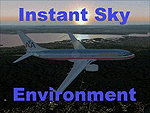
FS2004 Instant Sky Environment. Brings new variety into your FS2004 environment with many photoreal crafted textures, a state of the art interface and with no loss of system frame rates. By Real Flight Environment.
| Filename: | Instant_Sky_Environment.zip |
| License: | Freeware |
| Added: | 25th December 2010, 11:43:43 |
| Downloads: | 1,244 |
| Author: | Salvador Godoy |
| Size: | 10.96 MB |
| Category: Flight Simulator 2004 - Miscellaneous Files | |
| Airbus A319 AES intelliscene.cfg |
|
File Description:
AES Configuration file for Project Airbus A319.
intelliscene.cfg
www.pairbus.com
| Filename: | Airbus_A319_AES_intelliscenecfg.zip |
| License: | Freeware |
| Added: | 12th January 2009, 02:34:12 |
| Downloads: | 1,006 |
| Author: | Tom Goepel | net-sky.de |
| Size: | 828 B |
| Category: Flight Simulator 2004 - Miscellaneous Files | |
| Manual/Checklist Boeing 737-400 |
|
File Description:
This is the HTML version of the Manual/Checklist for "on-screen" use in the browser window of the ELECTRONIC KNEEBOARD. It replaces the original html file.
The Manual/Checklist describes all neccessary settings and operations for the default Boeing 737-400 starting with a "dark and cold" panel/engine. From Pre Start - Startup - Before Taxi - Taxi - Before Takeoff - Takeoff - Climb Out - Cruise - Descent - Approach - Landing - Taxi To Ramp - Shutdown - Securing Aircraft - to "cold".
| Filename: | ManualChecklist_Boeing_737400.zip |
| License: | Freeware |
| Added: | 13th October 2003, 16:22:41 |
| Downloads: | 2,247 |
| Author: | Werner Schott |
| Size: | 282.76 KB |
| Category: Flight Simulator 2004 - Miscellaneous Files | |
| Manual/Checklist Boeing 737-400 |
|
File Description:
The Manual/Checklist describes all neccessary settings and operations for the Default Boeing 737-400, starting with a "dark and cold" panel/engine. From Pre Start - Startup - Before Taxi - Taxi - Before Takeoff - Takeoff - Climb Out - Cruise - Descent - Approach - Landing - Taxi To Ramp - Shutdown - Securing Aircraft - to "cold".
| Filename: | ManualChecklist__Boeing_737400.zip |
| License: | Freeware |
| Added: | 27th August 2003, 14:54:46 |
| Downloads: | 4,928 |
| Author: | Werner Schott |
| Size: | 1.35 MB |
| Category: Flight Simulator 2004 - Miscellaneous Files | |
| Nick's Massive Crash Final Edition |
|
File Description:
FS9 & FS2002 FX: All users of Massive Crash are urged to install this update. The files included address and fix video screen 'wash-out' issues on impact when using a high quality video adapter and/or when the effects quality slider in the simulator is set to maximum. It also fixes "wake visually renders above the water level when operating seaplanes or other water type aircraft." New water crash effects added. Improved frame rates with this release will allow those with slower video adapters to use higher effects detail settings. If you are installing Massive Crash for the first time, this package is what you want to download. Enjoy!
| Filename: | Nicks_Massive_Crash_Final_Edition.zip |
| License: | Freeware |
| Added: | 19th November 2003, 01:38:45 |
| Downloads: | 11,316 |
| Author: | Nick Needham |
| Size: | 1.19 MB |
| Category: Flight Simulator 2004 - Miscellaneous Files | |
| SimFlyer GNS 430/530 Product Tutorial |
|
File Description:
SimFlyer GNS 430/530 Product Tutorial. This video tutorial created by Tim Mandeville for SimFlyer guides you step-by-step through all the basic functions of the GNS (version 4) package (including the GMA340, GNS530, GNS430 and GTX330) and includes approximately 40 minutes of narrated footage to help teach you just how to use the GNSv4 package. By SimFlyer/Tim Mandeville.
| Filename: | SimFlyer_GNS_430530_Product_Tutorial.zip |
| License: | Freeware, limited distribution |
| Added: | 15th November 2009, 18:45:40 |
| Downloads: | 269 |
| Author: | SimFlyer/Tim Mandeville |
| Size: | 23.21 MB |
| Category: Flight Simulator 2004 - Miscellaneous Files | |
| Shoot 1.6.3' Voice Contro File |
|
File Description:
"Shoot 1.6.3" voice control file for use with FS2004. You will need to download the main "freeware" program from http://clans.gameclubcentral.com/shoot/downloads.php which will allow you to make use of this control file for FS2004. The program is brilliant and allows you to control FS2004 by voice and it's totally free! All I have done is made a config file that works very well with FS2004.
It will allow you to; speak to ATC and instead of fighting with the keyboard or yoke/stick so you can fly more like a real pilot and keep your hands on the yoke more of the time. For example a commercial jet pilot calls out to the co-pilot to get the gear up and simply says "gear up". That's just what you will have to do, just like the real thing; the gear will go up when you make the call. When FS2004 ATC controller tells you to reply you can just say "roger" or "hello" or "ATC" or "air traffic" etc, etc, and the ATC window will pop up. Then all you have to do is call out the command instead of pushing buttons that real pilots don't use. Does a real pilot push a button to look out of the window or use a "mouse" to engage the autopilot?
Similarly you can call out "autopilot engage" or "autopilot master" or "autopilot disengage" and that's just what happens; the autopilot comes on/off. The best part though is when you try looking around the cockpit. If you want to move your head up you just say "move up" and presto you are higher up in your seat. You can move to the left or
Right, back or forward. You can say "zoom in" and that's what happens. You can say "reset zoom" and so on. You can say "next view" and then the view may be outside or another panel. Alternatively, you can say "panel 2" and the radio panel will come up in the 737 so you can tune the radios. If you have FS navigator installed all you have to
do is say "navigator" and the map comes up, and then say navigator again and off it goes. Just for once it is easy and possible to make full use of FS2004. Using this program has afforded me the opportunity of making better use of the views available, (and I have CH products yoke so if was never hard) but now it's even easier.
All the panels can be activated in this way, and control of the autopilot and control of FS2004. It's probably the best kept secret. I've made a file so we can all share in this freebie of a program. I've included a readme and instructions of how to make the best use of the program.
Config file for FS2004 only is provided.
| Filename: | Shoot_163_Voice_Contro_File.zip |
| License: | Freeware |
| Added: | 7th January 2004, 19:52:26 |
| Downloads: | 8,796 |
| Author: | Peter Wilding |
| Size: | 21.83 KB |


© 2001-2026 AVSIM Online
All Rights Reserved
Privacy Policy |