
Where Flight Simulation Enthusiasts Gather from Around the World!
AVSIM Library - Search Results

| Category: Flight Simulator X - Utilities | |
| FsMobileMap V1.0 |

|
Images related to this file:
File Description:
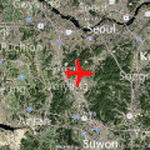
FsMobileMap displays map around your aircraft position on your mobile devices. In addition, it displays taxiway information and gate position on the map if the aircraft is on ground. FsMobileMap is extremely lightweight so it has nearly no effect on FS performance. It works with any mobile devices(Smartphone or tablet, Android or iOS). You don't need to install any mobile apps, but can just use the web browser(Chrome or Safari). It uses Microsoft Bing map service. It works with both FSX and FS2004.
| Filename: | FsMobileMap_V10.zip |
| License: | Freeware |
| Added: | 31st December 2012, 01:05:51 |
| Downloads: | 1,092 |
| Author: | Dongjin Shin |
| Size: | 6.96 MB |
| Category: Flight Simulator X - Utilities | |
| FsTakeoffTrainer V1.0 |
|
Images related to this file:
File Description: With FsTakeoffTrainer, you can easily try real-world airline simulator
training in FSX! Adverse weather(Wind: Calm/Light/Max Crosswind/Turbulence,
Visibility: 1/8SM~20SM, Condition: Rain/Snow/Thunderstorm) and Engine
failure(before or after V1, left or right) can be generated by this simple
utility with only a few clicks. Sim training scenario examples are : Max
crosswind takeoff and landing; Low visibility, Engine failure before V1 to
Rejected Takeoff; Low visibility, Engine failure after V1 to takeoff and landing
with 1 engine; Manual landing with low visibility and turbulence. It is also
highly recommended to use with LoLa(Lord of Landing) to practice landing in
adverse weather. Requires FSX SP2.

| Filename: | FsTakeoffTrainer_V10.zip |
| License: | Freeware |
| Added: | 7th April 2013, 17:22:54 |
| Downloads: | 1,511 |
| Author: | Dongjin Shin |
| Size: | 1.81 MB |
| Category: Flight Simulator X - Utilities | |
| WAT VA voicepack modification for EditVoicePack XL |
|
File Description:
EditVoicePack XL (6.x) or later required. Modification to the FSX/P3D voicepack that says "WALKER AIR TRANSPORT." Cobbled together by heavily modifying the default VP.
Users should pick "WALKER AIR TRANSPORT" as their airline when selecting their aircraft, for this to properly function.
| Filename: | WAT_VA_voicepack_modification_for_EditVoicePack_XL.zip |
| License: | Freeware |
| Added: | 22nd June 2025, 13:54:39 |
| Downloads: | 22 |
| Author: | Stuart Guberman |
| Size: | 2.44 KB |
| Category: Flight Simulator X - Utilities | |
| FSTramp v8.84 for MSFS, FSX(-SE), Prepart3D, X-Plane (Win) |
|
Images related to this file:
File Description:
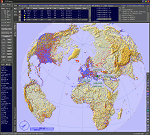
This add-on is an EXE application for Microsoft Flight Simulator and a DLL module for all other simulators. The DLL variant is activated via hotkeys or the simulator menu add-ons or plugins. Window size and layout are configurable for one or more screens. To avoid dazzling, the brightness of the entire application is customizable. Primarily it is a flight management system (FMS) with automatic control from start to landing. This also includes the observance of SID, STAR and Approaches in unmatched quality. The flight plan required for the FMS can be created manually or automatically, interactive changes and additions during the flight are possible. The basis of the flight planner is the 3D world map and the search function for airfields and navigation aids. The FMS by FSTramp relies on the autopilot of the aircraft. In case of incompatibility, the autopilot integrated in FSTramp will be used. This allows FSTramp to control almost all aircraft from airport to airport. The altitude profile of the flight plan, SID, STAR and approach is taken into account. This means that FSTramp extends the often incomplete airport procedures to and from the runway so that they can be flown completely automatically. During the fully automatic flight, the autopilot values ​​for HDG, ALT, VSPEED, SPD and MACH can be manually overridden. This is e.g. useful for being able to react to the instructions of the tower in the final approach without completely stopping the automatic flight. The rotating or north pointing 3D world map with numeric display of the terrain elevation under the mouse arrow is another special feature. It does not need an internet but is synthesized from included height profiles of the globe. The Data of continents, mountains and rivers are included in the setup. Airspaces, Airways, Waypoints and SID, STAR and Approaches are also included in the setup, but can be updated by installing additional AIRAC cycles. Airfields and navigation stations are taken from the simulator. NVIDIA: If the frame rate of the simulator drops sharply about 20 seconds after FSTramp's visibility, the power management of the GPU slows down prematurely. In the NVIDIA Control Panel, change the 'Manage 3D settings - Power management mode' option to 'Adaptive'.
| Filename: | FSTramp_v884_for_MSFS_FSXSE_Prepart3D_XPlane_Win.zip |
| License: | Shareware, time limited |
| Added: | 7th July 2023, 04:35:43 |
| Downloads: | 130 |
| Author: | Helge Schroeder |
| Size: | 358.21 MB |
| Category: Flight Simulator X - Utilities | |
| CTS/RJCC New Chitose Airport Runway Camera Views |
|
File Description:
Ever wanted to have multiple runway camera views for New Chitose Airport? Then this one is for you! Instructions, steps to do if not working, and contact is in the read_me file!
| Filename: | CTSRJCC_New_Chitose_Airport_Runway_Camera_Views.zip |
| License: | Freeware |
| Added: | 18th July 2023, 14:37:27 |
| Downloads: | 40 |
| Author: | Rye Kristian Bunao |
| Size: | 3.07 KB |
| Category: Flight Simulator X - Utilities | |
| AxisViewer 23.7.6 |
|
Images related to this file:
File Description:
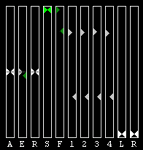
Detailed user manual included. For each aircraft control surface selected, AxisViewer will show the position of the joystick axis attached to the control surface, and the actual position of the control surface according to FSX/P3D. The benefits are: * Positive feedback on Control Surface Position. Ever ask yourself "Self, just what is that autopilot/autothrottle doing, anyway?!" * Allow you to manually adjust the Axis Positions to match the Control Surface Positions, so that you don't get a nasty surprise (for example, sudden change in thrust) when the autopilot and/or autothrottle is disengaged. * Verification of joystick functioning and range of motion. * Clear indication of when "dead zones" are entered. You will see the Control Surface Position "snap" to a particular value as the Axis Position approaches the dead zone.
| Filename: | AxisViewer_2376.zip |
| License: | Freeware, limited distribution |
| Added: | 3rd August 2023, 19:00:13 |
| Downloads: | 58 |
| Author: | William Ruppel |
| Size: | 45.45 MB |
| Category: Flight Simulator X - Utilities | |
| Slewable Control Tower |
|
Images related to this file:
File Description:

WHAT IS IT?
In a nutshell, the stock FSX control tower turned into an airplane with the aerodynamics of a cement brick with highly adjustable landing gear for tower height. No longer does one have to create a multiplayer session to use the stock control tower to do some AI "plane watching". The control tower is fitted with floats so one can slew to a good vantage point at certain airports like Boston Logan, La Guardia or KSFO for instance, floating on water. (Yes, it still "bobs" with waves) This was also done for better stability on uneven ground and the inability to roll around. There are some new features added such as tower flood lighting, a reference switch, and an external program to adjust the tower height (30-1000 ft.) for convenience. ( Not tested at all in P3D )
| Filename: | Slewable_Control_Tower.zip |
| License: | Freeware, limited distribution |
| Added: | 6th September 2013, 15:30:05 |
| Downloads: | 665 |
| Author: | Roman Stoviak |
| Size: | 770.98 KB |
| Category: Flight Simulator X - Utilities | |
| Flight Log Client (v1.9) |
|
Images related to this file:
File Description:

A Windows client software which acts as your black-box, tracking in real time your flight data like latitude, longitude, altitude, ground speed, true heading, radio frequencies like COM's, NAV's, Transponder and send them to our servers so you can save an history of your flghts and see it in our Log System Web Service. This software is the main key of our Log System, you'll be able to connect to our Log System to query the database and see your flight progress on every date. Flight Log Client is a FREEWARE software. A FREE account will be created at software first launch. Start logging your flights from now and keep an history of you Pilot life. Updated version, v1.9. Requires Peter Dawson's FSUIPC.
| Filename: | Flight_Log_Client_v19.zip |
| License: | Freeware |
| Added: | 24th April 2013, 23:05:52 |
| Downloads: | 326 |
| Author: | Mario Dantas |
| Size: | 4.93 MB |
| Category: Flight Simulator X - Utilities | |
| Dash 8 Q400 Fuel Planning Sheet |
|
File Description:
This is a spreadsheet that I have specifically created for the Majestic Dash 8 Q400 for fuel planning purposes. This version includes separate tabs for LBs output and KGs output. The raw data for the calculations is provided by Bob Scott.
| Filename: | Dash_8_Q400_Fuel_Planning_Sheet.zip |
| License: | Freeware |
| Added: | 1st May 2013, 20:51:05 |
| Downloads: | 3,094 |
| Author: | Adam Hill |
| Size: | 25.31 KB |
| Category: Flight Simulator X - Utilities | |
| Flight Log Client v 2 |
|
Images related to this file:
File Description:

The Series 2 of Flight log client was born, now with ability to create and submit flightplans to our network, you can also save them in "FPL IVAO compatible format" to share with your IVAO application or load them in further flight logs.
| Filename: | Flight_Log_Client_v_2.zip |
| License: | Freeware |
| Added: | 13th May 2013, 14:32:54 |
| Downloads: | 117 |
| Author: | Mario Dantas |
| Size: | 4.94 MB |


© 2001-2026 AVSIM Online
All Rights Reserved
Privacy Policy |