
Where Flight Simulation Enthusiasts Gather from Around the World!
AVSIM Library - Search Results

| Category: Flight Simulator X - Utilities | |
| FSX Autothumbnail |

|
File Description:
Autothumbnail adds a simple menu entry to FSX to automatically generate a thumbnail for the current aircraft. The thumbnail is created from a screenshot and is immediately visible in the aircraft selection menu. No need to find image, resize and copy it. Requires .NET framework 2.0
| Filename: | FSX_Autothumbnail.zip |
| License: | Freeware |
| Added: | 31st January 2007, 15:44:55 |
| Downloads: | 6,948 |
| Author: | Lamont Clark (lc0277) |
| Size: | 135.41 KB |
| Category: Flight Simulator X - Utilities | |
| GA-Traffic Release Candidate 2 |
|
File Description:
Second Release Candidate of FSX GA-Traffic.
The version contain BUG fixes and should also work better with Windows Vista.
The version is not compatible with GA-Traffic for FS9 or the previous BETA version!
It only works withs FSX.
| Filename: | GATraffic_Release_Candidate_2.zip |
| License: | Freeware |
| Added: | 4th February 2007, 17:07:52 |
| Downloads: | 10,964 |
| Author: | Markus Brunner |
| Size: | 6.59 MB |
| Category: Flight Simulator X - Utilities | |
| TTools AI flightplans to MS format flightplans |
|
File Description:
At the moment, there are some difficulties to transfer AI flightplans files, written in TTools format to FSX, and to compile them to some
| Filename: | TTools_AI_flightplans_to_MS_format_flightplans.zip |
| License: | Freeware |
| Added: | 7th March 2007, 16:56:20 |
| Downloads: | 2,587 |
| Author: | Gerhard Berendt |
| Size: | 60.21 KB |
| Category: Flight Simulator X - Utilities | |
| PlanConverter |
|
File Description:
PlanConverter is a program for converting FSX and FS9 flightplans for use with the SimuFly Carousel IV-A INS system (available HERE).
It works with the built in flight planners of FSX and FS9, as well as several external flight planners when plans are exported in FS9 or FSX format (details in the README.txt file). The program is released under the BEER-WARE LICENSE, essentially freeware with unlimited redistribution, see the COPYING.txt file for more details.
| Filename: | PlanConverter.zip |
| License: | Check within download |
| Added: | 5th September 2012, 20:00:02 |
| Downloads: | 493 |
| Author: | Klas Bjorkqvist |
| Size: | 53.23 KB |
| Category: Flight Simulator X - Utilities | |
| Static Aircraft .mdl Maker ("SAMM") FS9 Compatible |
|
File Description:
Tired of having to program AI (and suffer the overhead) just to have some "eye candy" sitting around your airport. No more! Static Aircraft .mdl Maker ("SAMM") will convert just about any FS8 or FS9 flyable or AI aircraft into a FS9 scenery model. (FSX will display most of these models satisfactorily.) Just "point" SAMM to the aircraft you wish to convert, decide where to save the scenery file and, presto, "eye candy". Most aircraft will convert using SAMM's default settings. Where, the static model is not quite right using default settings or if you want to make your static models as efficient as possible, SAMM includes a set of tools to help you. This re-release is to facilitate future updates from http://stuff4fs.com. Current users will be automatically updated.
| Filename: | Static_Aircraft_mdl_Maker_SAMM_FS9_Compatible.zip |
| License: | Freeware, limited distribution |
| Added: | 19th August 2011, 00:34:53 |
| Downloads: | 1,713 |
| Author: | Don Grovestine |
| Size: | 555.51 KB |
| Category: Flight Simulator X - Utilities | |
| FSXRC Graphical Remote Control |
|
Images related to this file:
File Description:
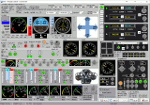
This is a FSX (only) Remote Control program with a GUI. It is intended to help you fly your various
aircraft without making changes to the aircraft files. This is a beta version with support for fixed
wing, combustion engine aircraft with 1 to 4 engines. It requires Pete Dowson's FSUIPC v4 with or
without WideFS, but it works best on a separate computer with the registered version of FSUIPC and
WideFS. The program will work for 30 days without a registration key. If you want a key, email me (see readme.txt file) with the installation code and your feedback.
With this application you can have a flight engineer working with you or an instructor can monitor and
challenge a student. You can simply use the app to help you control aspects of the aircraft that you
may not have easy access to.
| Filename: | FSXRC_Graphical_Remote_Control.zip |
| License: | Check within download |
| Added: | 16th June 2016, 08:15:08 |
| Downloads: | 183 |
| Author: | Scott Carpenter |
| Size: | 3.39 MB |
| Category: Flight Simulator X - Utilities | |
| FS2004/FSX Flight Analyzer Utility V2.04 |
|
Images related to this file:
File Description:

NOW ALSO WORKING WITH FS2004
What this program do:
- quickly change the settings of FSX/Fs2004, such as time, date, fuel, weight, traffic etc.
- start a failure sytem, such as gear, flaps, engine, etc.
- freeze the time, so you can fly in a for everlasting sunset.
- runway detecting system to see wich runways are in use.
- a flight analysis system, this is automaticly started when you start FsQC.
- When flight analysis is finished you can print a report, the report is automaticly saved as pdf File.
- flight analysis is finished when you parked your aicraft with the parking brakes set for more then 5 seconds.
- graphical landingchart.
- load a existing flight or flightplan.
- quickly look to your CFG (settings) files (only FSX) and change them even before the flight simulator is running.
- After a flight is finished FsQC saves your flight automaticly as 'FsQC last Flight', so you can continue the next day or hour.
- for properly working, flight analysis require a fsx/fs2004 flightplan.
Flight analysis:
Flight analysis start recording at the moment when you begin taxiing.
It gives you huge information such as:
- takeoff- and landing-weight
- takeoff roll in m. or ft.
- separate fuel consumption in taxi, climb, cruise and descent.
- maximum banking in flight
- which speed you using the flaps and gear
- when autopilot on or off
- vertical speed on touchdown
- reverser set after landing
- wich speed you cancel reverser
- bouncing at landing
- graphical landingchart.
- and lots of more
You can better look the example of the pdf document located in the 'Flight Reports' folder.
Failures:
In the settings menu you can select the kind of failures you want to occur and when they must occur.
At this moment 10 failures are possible:
-altitude
-attitude
-heading
-airspeed
-vertical speed
-pitot
-fuelleak
-flaps
-engine
-gear
Recommended:
For more easy use, run this program on a second monitor or much better on a second computer(laptop) where FSUIPC-client is running in the same network where FSX/FS2000 is running and FSUIPC WideFs is registered.
See also the pdf Manual.
Also look at www.FsQC.eu for more information.
If you have a problem look first on www.fsqc.eu/faq.html
If you have questions please contact [email protected]
| Filename: | FS2004FSX_Flight_Analyzer_Utility_V204.zip |
| License: | Check within download |
| Added: | 5th March 2018, 22:40:20 |
| Downloads: | 331 |
| Author: | Evander Tholen |
| Size: | 2.45 MB |
| Category: Flight Simulator X - Utilities | |
| GENav pro Navigation |
|
Images related to this file:
File Description:

Previous payware product at SimMarket, now 100% free.
With GENav pro you will view all AIRAC navigation data and terminal procedures inside Google Earth. GENav pro run under Windows and require only Google Earth for displaying. You can also edit your own routes or just copy routes into GENav to view in Google Earth. You can search for example an airport or a fix by short or long name, Google Earth will take you there.
You can connect to Microsoft Flight Simulator to view your aircraft. Moving map and heading is available.
GENav pro is highly optimized for best performance and clear views without clutter. There are smart filters to select relevant data to display, all AIRAC items are available. You will find all data such as nav-aid frequencies, airport runways with ILS frequencies by click the displayed icons in Google Earth.
You can edit routes visual direct inside Google Earth by click. The database can always be updated with Navigraph's latest AIRAC data.
With GENav you can easy build valid routes. Unlike other common autorouting program, GENav is the tool for you to build routes with correct airway direction and correct connected to SID/STAR's. You will easy draw your routes most straight and correct to destination. It is also excellent for visual and instrument navigation flights.
FEATURES:
*** Display airports, nav aids, waypoints
*** Display High/Low airways and airways direction
*** Display SID/STAR, Approaches and Transitions
*** Display ARTCC/FIR border
*** AIRAC data available by click
*** Search airport and fixes
*** AIRAC data compatible Navigraph data
*** Visual editable routes
*** VOR to VOR route navigation data
*** Display your aircraft
BASIC SYSTEM REQUIREMENTS:
*** Windows with Google Earth installed
( Notice, no flightsim program required )
OPTIONALLY REQUIREMENTS:
*** SID/STAR require the Navigraph purchase or an alternative free source
*** Airways direction & high/low info require the Navigraph purchase
*** To display aircraft, Microsoft Flight Simulator or Prepare3D v1/v2, with free FSUIPC is required
*** To display aircraft at a separate computer, also the payware WideFS is required
| Filename: | GENav_pro_Navigation.zip |
| License: | Freeware |
| Added: | 23rd May 2016, 19:57:35 |
| Downloads: | 1,577 |
| Author: | Lennart Vedin |
| Size: | 4.5 MB |
| Category: Flight Simulator X - Utilities | |
| Flight Simulator First Officer V2.2 |
|
Images related to this file:
File Description:

Flight Simulator First Officer is a generic virtual copilot for FSX and FS9. The primary function of FSFO is to assist the Pilot In Command (PIC) to fly the aircraft safely while adhering to Standard Operating Procedures (SOPs). This is accomplished via virtual checklist and sharing of cockpit duties/responsibilities. Specifically, the First Officer reads the following configurable checklist: Before Start, After Start, Before Takeoff, In-Range, After Landing and Shutdown. After reading the checklist items, the Copilot will wait to ensure you (i.e. the pilot) have configured the aircraft correctly before proceeding to the next item. Also, the Virtual copilot is capable of performing the following actions: Call Vspeeds based on your input, Raise the Landing Gear on Takeoff, Retract the Flaps, Manage the taxi/landing lights, Land the Aircraft, Tune the ILS frequencies, Call Climb Power based on your input, Reset Vertical Speed when the Aircraft is within 1000 ft of the programmed altitude, IAS warning (e.g. Aircraft is above 250 IAS while below 10000 ft), GS Warnings (e.g. Aircraft is above 25 knots while taxing), Resets the altimeter to standards when passing TA, Engage Heading Hold on Takeoff, Engage Altitude Hold on Takeoff, Reset Speed on Takeoff, Engage Speed Hold on Takeoff, Engages Rev Thrust on Landing, Ground Proximity Warning System (GPWS) and much more...
View the change log to view what's new with V2.2: http://flightsimaddons.proboards.com/thread/32/change-log-updated-july-2014
This is a complete installer; you DO NOT need FSFO V2.*. If upgrading from 2.*, please read the attached readme.txt file for instructions
| Filename: | Flight_Simulator_First_Officer_V22.zip |
| License: | Freeware, limited distribution |
| Added: | 12th July 2014, 08:19:29 |
| Downloads: | 2,359 |
| Author: | Matthew King |
| Size: | 67.17 MB |
| Category: Flight Simulator X - Utilities | |
| SimLauncherX v5.9 |
|
Images related to this file:
File Description:
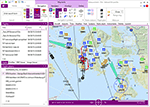
SimLauncherX (or SLX for short) can be used as a launcher application for both FSX:ME, FSX:SE and Prepar3D (v1, v2 and v3). Flights/scenarios can be loaded when launching the simulator or when the simulator is already running. New flights can be created by selecting one of the installed aircraft, selecting the start location (runway or parking position), selecting the type of weather and the time of day. You can also display and create flight plans and attach them to a flight as requested or active flight plan. Version 5.9 adds a flight computer, AI browser, interactive (spoken) checklists, PMDG 737/777 CDUs, approach charts, fleet management and many other improvements. SimLauncherX is a more modern version of my previous SimLauncher application with a lot of additional functionality:
- interactive map.
- display, create and modify flight plans.
- show .kml/.kmz files on the map.
- radio stack.
- instruments panel.
- scenery.cfg editor.
- dll/exe.xml editor.
- process monitor.
Works with FSX:ME, FSX:SE and P3D v1, v2 and v3.
| Filename: | SimLauncherX_v59.zip |
| License: | Freeware, limited distribution |
| Added: | 1st April 2017, 08:18:19 |
| Downloads: | 15,783 |
| Author: | Maarten Boelens |
| Size: | 52.64 MB |


© 2001-2026 AVSIM Online
All Rights Reserved
Privacy Policy |