
Where Flight Simulation Enthusiasts Gather from Around the World!
AVSIM Library - Search Results

| Category: Flight Simulator X - Utilities | |
| FSX Engine and Flight Instrument Failure Generator |

|
Images related to this file:
File Description:
The FSX Engine and Flight Instrument Failure Generator program allows the user to simulate the loss of one randomly selected engine (out of 4 max) and up to five flight instruments: Airspeed Indicator (ASI), Attitude Indicator (AI), Altimeter (ALT), Vertical Velocity Indicator (VVI) and Directional Gyro (DG).
The program works with most FSX default aircraft and to varying degrees with payware aircraft depending on how much the payware aircraft adheres to the FSX of doing things. Failures are based on failure probabilities, ranging from 0 to 100%, assigned by the user to the engine(s) and each of the flight instruments. Failures occur at random times within a specified time period called the Failure Window which the user can specify to be from 1 to 240 minutes. The FSX Engine and Flight Instrument Failure Generator is a Lua program and requires a registered version of FSUIPC4. Operation and Installation manual included.
Al Klayton, Dan Sullivan
| Filename: | FSX_Engine_and_Flight_Instrument_Failure_Generator.zip |
| License: | Freeware |
| Added: | 2nd February 2016, 15:41:45 |
| Downloads: | 185 |
| Author: | Al Klayton and Dan Sullivan |
| Size: | 550.54 KB |
| Category: Flight Simulator X - Utilities | |
| FS9 And FSX Aircraft Finder |
|
Images related to this file:
File Description:
What this program does is simply to parses the AIFP.CFG file that comes with most AI repaints to create a local HTML file with file and location details of the AI repaints.
| Filename: | FS9_And_FSX_Aircraft_Finder.zip |
| License: | Freeware, limited distribution |
| Added: | 2nd January 2016, 14:20:33 |
| Downloads: | 319 |
| Author: | Rory Fairbairn |
| Size: | 134.58 KB |
| Category: Flight Simulator X - Utilities | |
| Little Logbook 1.5.0 |
|
Images related to this file:
File Description:
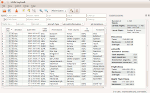
FSX, FSX SE, P3D Logbook Viewer and Extraction program.
Little Logbook allows fast and intuitive search and grouping of logbook entries based on several parameters as well as export to HTML, CSV and Google Earh KML documents.
Additional information about airports can be shown together with the MakeRunways utility of Peter Dowson.
New in 1.5.0:
* Now supports FSX, FSX SE, P3D V2 and P3D V3
* Detects paths to all simulators automatically
* Added Google Earth KML export
* Added import filter to ignore incomplete logbook entries
* HTML export now uses paging and creates multiple linked documents
* Added zoom functionality to change font size in table
* Other bug fixes and improvements - see included change log
The Software is released under the GPL. Source code is available. See http://albar965.github.io/littlelogbook.html for more Information.
| Filename: | Little_Logbook_150.zip |
| License: | Freeware |
| Added: | 20th January 2016, 22:40:37 |
| Downloads: | 1,389 |
| Author: | Alexander Barthel |
| Size: | 18.74 MB |
| Category: Flight Simulator X - Utilities | |
| FSLaunchPad 2.34 |
|
File Description:
The version 2.34 allows to exit automatically FSL after to have launch your simulator and your addons. Also reload FLS to free your simulator and your addons from FSL process, sometime this can cause problem for some addons (see new item in Preferences section).
| Filename: | FSLaunchPad_234.zip |
| License: | Freeware, limited distribution |
| Added: | 26th August 2016, 00:50:41 |
| Downloads: | 275 |
| Author: | Pierre Legault |
| Size: | 3.65 MB |
| Category: Flight Simulator X - Utilities | |
| Curtis F-11 Hawk II PaintKit |
|
Images related to this file:
File Description:

PaintKit for Curtis F-11 Hawk II of Eduardo Padul. Include my own VCpanel. More at https://simrepaints.envaldemoro.com
| Filename: | Curtis_F11_Hawk_II_PaintKit.zip |
| License: | Freeware |
| Added: | 28th March 2017, 17:31:14 |
| Downloads: | 30 |
| Author: | Juan Villamor |
| Size: | 2.48 MB |
| Category: Flight Simulator X - Utilities | |
| FSLaunchPad One Thousand One |
|
File Description:
FSLaunchPad 1001 provide a lot of new possibilities for FSX,FSX:SE and P3D users. Now it's possible to manage more than Thousand sceneries, add and delete more than one scenery in same time, move several sceneries consecutively to another directory and update the scenery.CFG file automatically. Also it's possible to resize then User Interface with the mouse like a Web page and a new Interface for Google Earth Search was update to see the results clearly. FSL 1001 is available in English, French and now in Spanish!
| Filename: | FSLaunchPad_One_Thousand_One.zip |
| License: | Freeware, limited distribution |
| Added: | 1st April 2017, 18:46:58 |
| Downloads: | 373 |
| Author: | Pierre Legault |
| Size: | 4.04 MB |
| Category: Flight Simulator X - Utilities | |
| V7.5.6 Addit! Pro Add-on Manager |
|
Images related to this file:
File Description:
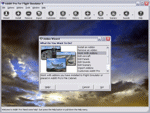
Addit! Pro is a comprehensive addon manager for Flight Simulator X. Easily install, manage and remove aircraft, adventures, flights, flight plans, gauges, missions, panels, A.I. airport and facilities data, scenery, sounds, textures, videos, weather and more! Archive add-ons to Addit! Pro's File Cabinet or recreate them in zip files. Modify your aircraft, panels and sounds. Automatically update FS's Scenery Library. Includes FS Configuration Manager, complete scenery library editor, ZIP/RAR support and much more! See Readme.htm for details. Requires Flight Simulator X: Standard, Deluxe, Gold or Steam Edition. Shareware $24.95--please register to install an unlimited number of add-ons. See Register.htm. By Joseph Stearns.
| Filename: | V756_Addit_Pro_Addon_Manager.zip |
| License: | Shareware, limited functionality |
| Added: | 10th February 2017, 00:29:04 |
| Downloads: | 198 |
| Author: | Joseph Stearns |
| Size: | 19.94 MB |
| Category: Flight Simulator X - Utilities | |
| NumberPad Control Move Aircraft Utility |
|
File Description:
NpCmoveAircraft is a Lua script in the Numberpad Control family of FSX scripts that can be used to move an aircraft to a new position. Each step includes prompts for the required input and format. User inputs include the DISTANCE to move (NMs), the DIRECTION to move (degrees magnetic), the desired aircraft ALTITUDE (ft), the desired aircraft HEADING (degrees magnetic), and the desired aircraft IAS (Kts) along with the LANDING GEAR POSITION -- up (u), down (d) or fixed (f). Or for any of the five inputs the user can simply enter a carriage return (Enter key) to signify NO CHANGE for that particular entry.
Prior to the move the aircraft can be on the ground or in the air. So, for example, NpCmoveAircraft can be used to simply turn an a/c around, to move it to the other end of a runway, to re-position it for another approach after landing, to jump ahead in cruise, to catch up to another a/c, etc. NpCmoveAircraft works with default FSX aircraft and many add-on aircraft that adhere to the standard FSUIPC offsets.
A registered copy of FSUIPC is required to execute the NpCmoveAircraft Lua script. Simply copy the script to the Modules folder of FSX and assign a ‘hot key’, button or switch to activate the script.
Al Klayton
[email protected]
| Filename: | NumberPad_Control_Move_Aircraft_Utility.zip |
| License: | Freeware |
| Added: | 21st February 2017, 21:30:01 |
| Downloads: | 147 |
| Author: | Al Klayton |
| Size: | 3.92 KB |
| Category: Flight Simulator X - Utilities | |
| FlyLive |
|
Images related to this file:
File Description:

FlyLive is a fully free and fully featured* flight simulation streaming suite.
Looking to beef up your FSX/P3D livestream for zero charge? You're at the right place! FlyLive is dedicated to satisfying even the most serious flight simulator streamers. The features are packed together in a sophisticated yet simple and user friendly interface - making it surprisingly easy to set up, with the help of the documentation.
The purpose of FlyLive is to inject flight data from your simulator into your livestream, so your audience don’t have to look at the tiny numbers on the flight instruments to know what’s going on. It is designed specifically for streamers who want to “up their game†in Flight Simulation streaming, but don’t have the knowledge to code something.
Perquisites
FlyLive relies on FSUIPC to extract data from the Simulator. You MUST have FSUIPC installed (free or registered) on your computer to use this software. FSUIPC can be downloaded from http://www.schiratti.com/dowson.html
You must have a broadcaster/recorder that can read from text files constantly. OBS Studio is an excellent, open source free broadcasting suite which FlyLive supports. OBS can be downloaded from https://www.obsproject.com
A *legal* working copy of any FSX version or P3D (except v1) with FSUPC must be installed on your computer.
*compared to similar programs
| Filename: | FlyLive.zip |
| License: | Freeware |
| Added: | 19th May 2017, 16:40:58 |
| Downloads: | 370 |
| Author: | Mark Ng |
| Size: | 100.24 KB |
| Category: Flight Simulator X - Utilities | |
| SibWings Antonov An-2 Loadmanager |
|
File Description:
This is the SibWings Antonov An-2 Loadmanager, which was done by myself for the SibWings An-2. It is a simple programmed application which lets you change the passenger on board, the amount of cargo and the amount of fuel. This application has been uploaded here, as the SibWings Forums are down.
Included is a ReadMe.pdf, which you should read completely as it explains the application, every function of it and how it is to handle.
| Filename: | SibWings_Antonov_An2_Loadmanager.zip |
| License: | Freeware |
| Added: | 3rd December 2017, 16:30:33 |
| Downloads: | 142 |
| Author: | Kevin Schutz |
| Size: | 1.66 MB |


© 2001-2026 AVSIM Online
All Rights Reserved
Privacy Policy |