
Where Flight Simulation Enthusiasts Gather from Around the World!
AVSIM Library - Search Results

| Category: Flight Simulator X - Gauges | |
| B737 Head-Up Guidance System (HGS) Model 2350 |

|
File Description:
This gauge has been developed for FSX Flight Simulator Acceleration. It should also work with FSX SP1/SP2 . The functionality of this gauge is based on the Rockwell Collins HGS which is designed for the B737NG . It works correct for FSX B737-800 models only !!
The gauge has been developed as close as possible according to the HGS Pilot Guide from Rockwell Collins for normal operations. The HGS can be used during all phases of flight from takeoff to landing. This can include Ground Roll Guidance, all enroute operations and either non-precision or precision approaches.
This gauge is very realistic. It supports the pilot particular during approach operations to meet always
precise the runway touch down zone by keeping a 3° glide slope angle. Even for a visual approach maneuver
the HGS supports the pilot to establish and maintain the aircraft on the proper glide path to the runway without reference to a ground based landing system like ILS.
Technical descriptions and installations guide are included in the zip file for further information. You may also look at a video under this link: https://youtu.be/mw4Q_eOWYtk
| Filename: | B737_HeadUp_Guidance_System_HGS__Model_2350.zip |
| License: | Freeware |
| Added: | 8th November 2019, 18:09:22 |
| Downloads: | 267 |
| Author: | Dietmar Loleit |
| Size: | 7.59 MB |
| Category: Flight Simulator X - Gauges | |
| GPS2020 – V12.4 |
|
Images related to this file:
File Description:
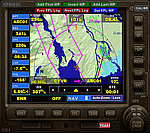
For those that still want to use FSX/P3D, it is recommended to replace GPS2020 V12.0 with this V12.4!
V12.4: Major fault corrected:
- When flying a normal flight plan, then setting a Direct-To destination, quite regularly after a few seconds the DTO was aborted prematurely
and the normal flight plan was restored. Obviously, this is intolerable. A solid cure has been found.
Some additions and smaller corrections:
- WPT infobox upper left: if GPS NAV Lock set, background gets color of active leg (purple).
- When the aircraft reaches the Direct-To destination, normally it starts circling around it (only with the autopilot).
From now on, if a flight plan was active before the Direct-To was started, it will automatically be resumed when the destination is reached.
- Direct-To flight plan: occasionally, the destination waypoint shown in the 2-point DTO flight plan changed to 'Aircraft', although the autopilot navigation
functioned correctly. Now the Direct-To flight plan should always be correct.
- Adding an approach procedure (PROC) to the flight plan, then removing it, then Direct-To to a WP, then cancel DTO:
the flight plan should be restored WITHOUT the PROC, but it was restored WITH the previously deleted PROC. Corrected now.
| Filename: | GPS2020__V124.zip |
| License: | Freeware |
| Added: | 29th August 2020, 20:48:56 |
| Downloads: | 808 |
| Author: | Hugo Jansen |
| Size: | 4.61 MB |
| Category: Flight Simulator X - Gauges | |
| FreeFlight TRI-40 RadAlt V2 |
|
Images related to this file:
File Description:
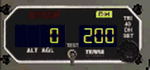
FreeFlight TRI-40 RadAlt version 2. The difference with v1 is just the fact that the buzzer sounds only once and only while descending. For FSX and FS 2004 stand alone XML gauge in two models (RG or fixed gear). Shows AGL and preselected DH with light and sound warnings. Sound gauge by Doug Dawson.
| Filename: | FreeFlight_TRI40_RadAlt_V2.zip |
| License: | Freeware |
| Added: | 6th January 2013, 12:25:36 |
| Downloads: | 547 |
| Author: | Pierre Fasseaux |
| Size: | 46.04 KB |
| Category: Flight Simulator X - Gauges | |
| Pitch Trim Reset |
|
File Description:
Just push "SHIFT+F4" to set the pitch trim in neutral position. FSX and FS 2004 stand alone XML gauge.
| Filename: | Pitch_Trim_Reset.zip |
| License: | Freeware |
| Added: | 6th January 2013, 12:27:08 |
| Downloads: | 487 |
| Author: | Pierre Fasseaux |
| Size: | 1.87 KB |
| Category: Flight Simulator X - Gauges | |
| V-speed gauge (extended) |
|
File Description:
V-speed function as explained. New feature: Panel switch for better handling after take-off! Gauge values according to A321 panel.
| Filename: | Vspeed_gauge_extended.zip |
| License: | Freeware |
| Added: | 3rd October 2012, 01:04:54 |
| Downloads: | 671 |
| Author: | Karsten Mende ( original by Anthony Eades, Jacob Larsen) |
| Size: | 201.48 KB |
| Category: Flight Simulator X - Gauges | |
| Airport Chart Gauge V2 |
|
File Description:
The first version was a disaster, due to a heavy error I made during packing the zip archive. This one will work.
The Airport Chart Gauge shows you the layout of an arbitrary airport, no matter, whether the airport is shipped with Flight Simulator or included in an Add-On. It doesn’t use any scanned charts, instead it takes its data directly from the Flight Simulator. The chart contains all taxiways, runways, heliports and parking places, including their identifiers, of course. With the Airport Chart Gauge you can easily find your way from your current parking place to the runway (or vice versa).
| Filename: | Airport_Chart_Gauge_V2.zip |
| License: | Freeware, limited distribution |
| Added: | 31st March 2008, 19:10:41 |
| Downloads: | 23,233 |
| Author: | Holger Maass |
| Size: | 5.59 MB |
| Category: Flight Simulator X - Gauges | |
| VTOL/Hover addon (V4.0) for V22-Osprey |
|
Images related to this file:
File Description:
VTOL/Hover (V4.0) for Alphasim / Virtavia V22-Osprey
This freeware package adds new V(S)TOL & Hover features to the V22-Osprey.
Besides true vertical takeoff & landing, it allows you to fly forward, backward,
sideways and turn, while in a hover. This solution is based on overriding the normal FS flightdynamics when the nacelles are rotated out of the normal flight position; in short, it's a V(S)TOL&Hover FDE coded in a gauge.
For users of previous versions of this addon: this is a major update.
The README includes extensive installation and flying instructions.
Requires prior installation of Peter Dowson's FSUIPC (registered or un-registered). For FSX-SP2 or FSX-Acceleration ONLY !!!! By Rob Barendregt.
| Filename: | VTOLHover_addon_V40_for_V22Osprey.zip |
| License: | Freeware, limited distribution |
| Added: | 23rd September 2012, 16:23:46 |
| Downloads: | 902 |
| Author: | Rob Barendregt |
| Size: | 61.27 KB |
| Category: Flight Simulator X - Gauges | |
| Advanced Radar System 2 (ARS2) |
|
Images related to this file:
File Description:
This Advanced Radar System (ARS2) is a enhanced version of the ARS system Version 1.0.
I includes all the displays function from the ARS version 1.0.
New features for ARS2:
ARS2 includes an enhanced tracking function which allows to track an
AI aircraft now regarding heading, speed and altitude. It includes two
simple XML elements which allows the user to change the tracking parameter
for the auto speed control and to set parameter for the re-fuel function as required.
The airfuel panel includes now two pointers in order to watch the distance and the altitude
relative to the AI.
For more information and installation see the documentation in the zip file.
COPYRIGHTS:
This gauge is freeware. All rights are reserved and no part of the package may
be duplicated or distributed without the expressed, written permission of the
author.
| Filename: | Advanced_Radar_System_2_ARS2.zip |
| License: | Freeware |
| Added: | 24th March 2011, 19:47:51 |
| Downloads: | 1,885 |
| Author: | Dietmar Loleit |
| Size: | 1.61 MB |
| Category: Flight Simulator X - Gauges | |
| Flypad Gauge V2.0 |
|
Images related to this file:
File Description:
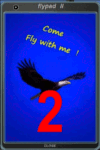
FSX, Flypad Gauge Version 2.0
This gauge has been developed on Win7 for FSX Flight Simulator SP2 or SP1.It should also work with Acceleration, but this is not guaranteed by the author. The gauge is a little extra addon based on the design of a smart phone and provides 9 different displays which are different from all of the standard gauge displays on a regular aircraft panel. It is mainly helpful for the user flying small propeller aircraft, and old timer aircraft.
However, the displays are as well attractive for sim pilots flying modern jet aircraft. Use it as if you just grabbed to your smart phone during a flight and check on the status of your aircraft, or how the terrain awareness situation looks like, how the AI traffic on the radar is, while you proceed with your flight plan. Enjoy the new design of a simple aircraft attitude display during an ILS approach. A new screen for LAT/LON coordination control and distance/bearing calculation has been added to this version in addition with a number of improvements.For credits look at the pdf documentation inside the zip file. By Dietmar Loleit
| Filename: | Flypad_Gauge_V20.zip |
| License: | Freeware |
| Added: | 2nd August 2014, 17:50:45 |
| Downloads: | 778 |
| Author: | Dietmar Loleit |
| Size: | 4 MB |
| Category: Flight Simulator X - Gauges | |
| Canadair Regional Jet 700 Gauge Corrections |
|
File Description:
This package corrects a gauge issue with the FSX default CRJ 700. "TAS" now indicates TAS instead of IAS. Simple installation procedures are outlined in the included documentation.
| Filename: | Canadair_Regional_Jet_700_Gauge_Corrections.zip |
| License: | Freeware, limited distribution |
| Added: | 23rd March 2007, 22:26:51 |
| Downloads: | 1,936 |
| Author: | Mark Chapman |
| Size: | 2.08 MB |


© 2001-2026 AVSIM Online
All Rights Reserved
Privacy Policy |