
Where Flight Simulation Enthusiasts Gather from Around the World!
AVSIM Library - Search Results

| Category: Flight Simulator X - Gauges | |
| FIX For A330/40 Gauge Upgrade |

|
File Description:
Fix for the Overland/SMS A330 and A340 Gauge upgrade uploaded previously.
| Filename: | FIX_For_A33040_Gauge_Upgrade.zip |
| License: | Freeware |
| Added: | 19th April 2012, 21:23:22 |
| Downloads: | 329 |
| Author: | Dimitrios Moschos |
| Size: | 7.32 KB |
| Category: Flight Simulator X - Gauges | |
| Garmin G1000 and CRJ-700 FSX SP-1 Gauge Fix |
|
File Description:
FSX SP-1 fixed some of the Instrument Panel issues in the original release, but they
missed a couple of items that should have been picked up. After a full reinstall of FSX and the SP-1 Patch, you can use these files to correct the gauge errors. As a pilot and former navigator, I couldn't let these go.
The TAS display on all installed G1000 MFDs is displayed as CS, and the TAS in the
CRJ-700 is shown as IAS. The two enclosed zip files will correct both issues. The
specific and simple instructions are included in each file in Readme.txt files.
Happy Flying - Per Ardua Ad Astra!
| Filename: | Garmin_G1000_and_CRJ700_FSX_SP1_Gauge_Fix.zip |
| License: | Freeware, limited distribution |
| Added: | 19th May 2007, 19:47:44 |
| Downloads: | 2,504 |
| Author: | Mark Chapman |
| Size: | 2.94 MB |
| Category: Flight Simulator X - Gauges | |
| Moving Map Display |
|
File Description:
This is an adaptation of the FSX gps map in which I removed all the functions I didn't want. It simply displays the map with range rings and allows you to add or delete some of the standard items such as airspace boundaries, a compass ring, the ILS "feathers", etc.
| Filename: | Moving_Map_Display.zip |
| License: | Freeware |
| Added: | 7th February 2011, 00:41:51 |
| Downloads: | 983 |
| Author: | Bob Picht |
| Size: | 8.14 KB |
| Category: Flight Simulator X - Gauges | |
| Advanced Radar System (ARS) |
|
Images related to this file:
File Description:
This Advanced Radar System (ARS) Version 1.0 displays AI traffic of FSX in a range of
5, 10, 20, and 40 miles.The ARS contains an AI tracking function, which allows you
to follow a selected AI automatically in terms of course and speed. In this mode
the ARS is coupled with the autopilot of your aircraft. The ARS feeds the
autopilot with the AI heading and speed data. The tracking mode can be
switched on or off.
An air fuel gauge is included in the ARS package also, which allows you to
perform an air re-fuel procedure for your aircraft. A air refueling can be done
from each AI aircraft if you have decided to use it as your tanker. The decision
will be done via a select function from the ARS panel and in addition via a
dedicated activation on the air fuel panel.For installation, look at the ARS_DOC folder.
(the folder is now included in the zip !!!!!!!!!! It was not in the previous upload. Sorry!)
COPYRIGHTS
This gauge is freeware. All rights are reserved and no part of the package may
be duplicated or distributed without the expressed, written permission of the
author.
CREDIT goes to: Bob Familton for his review of the documentation and testing
for SP1 FSX.
| Filename: | Advanced_Radar_System_ARS.zip |
| License: | Freeware |
| Added: | 2nd February 2011, 20:33:29 |
| Downloads: | 2,886 |
| Author: | Dietmar Loleit |
| Size: | 1.05 MB |
| Category: Flight Simulator X - Gauges | |
| Ice Gauge for FSX as Pop Up Window |
|
Images related to this file:
File Description:
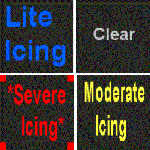
This is the Pop Up Window version for the "Ice Gauge for FSX and FS9" by Charles Owen, and with updated graphic. This allows the gauge to be used with any aircraft. Typical use would be to place the pop up on a second monitor, or it can be resized to fit out of the way on your main monitor.
This gauge is provided as a way of making winter flying in the sim a little more realistic. This Pop Up version is intended for FSX, but may also work with FS9 (untested).
Modified with permission from Charles Owen. Original File is at http://library.avsim.net/download.php?DLID=135386
| Filename: | Ice_Gauge_for_FSX_as_Pop_Up_Window.zip |
| License: | Freeware |
| Added: | 19th January 2015, 06:10:53 |
| Downloads: | 1,057 |
| Author: | Henry Oeser & Charles (Dutch) Owen |
| Size: | 38.27 KB |
| Category: Flight Simulator X - Gauges | |
| Labelled Cockpit Switches |
|
Images related to this file:
File Description:
Wow! This ***MEGA*** cockpit gauge pack from Touch-Up Designs brings you a
fantasmodical download, now being made exclusively available to AVSIM users
totally free of charge. You will be unable to resist slobbering
over the virtual unreality that this download brings to your
aircraft. Did you fall for all that hype? Oh good. There really
isn't a lot interesting to say about a
boring set of cockpit switch gauges which
are just a simple modification of one of the splendid CPT Toggles/Switches gauges by Jorge Salas with added
individual labelling for each switch (on a transparent background) - absolutely ideal for the lazy panel
designer. Should work with FS2002, FS2004 and FSX, although I have no plans to test it with the latter. Incidentally, every
download automatically grants you free membership of the LPDS - you can
see how many there are in that society by looking at the total number of
downloads below. Broadband users are requested not to blink during the download. Guaranteed 0.00001% realistic.
| Filename: | Labelled_Cockpit_Switches.zip |
| License: | Freeware |
| Added: | 8th February 2007, 01:26:17 |
| Downloads: | 2,725 |
| Author: | John Hinson |
| Size: | 257.33 KB |
| Category: Flight Simulator X - Gauges | |
| Head Up Display (HUD) |
|
Images related to this file:
File Description:
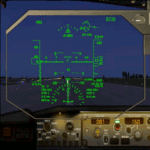
This gauge has been developed for FSX Flight Simulator SP1 or SP2. It
has also been tested with Microsoft Acceleration but compatibility is not guaranteed by the
author. The functionality of this gauge is based on the Rockwell Collins HGS which is
designed for the Bombardier CRJ 700. However, this gauge is not following the Rockwell
Collins design completely. It is created to be used as a generic HUD for all commercial
aircraft. It can be programmed to work on any FSX aircraft as a stand alone pop up
window. The gauge is available in the frame color of gray and beige.
For installation and configuration look at the documentation inside the zip file.
Credit goes out to: Kaj O. Hallstrom for his outstanding support on
documentation, pre beta and beta testing and improvement recommendations
for the gauge and control panel.
Credit also goes to Doug Dawson for his config.gau generating dsd-XML
interface.
| Filename: | Head_Up_Display_HUD.zip |
| License: | Freeware |
| Added: | 14th October 2011, 16:57:19 |
| Downloads: | 5,225 |
| Author: | Dietmar Loleit |
| Size: | 2.68 MB |
| Category: Flight Simulator X - Gauges | |
| Generic Head Up Display (HUD) |
|
File Description:
This is a generic Head Up Display which can be used for any aircraft in the FSX-Environment. With the HUD on the proper position on the panel window it will provide the PC-Pilot mainly during the approach phase with all the information required to land without moving his view across various instruments.
Installation:
Follow the installation instructions of the document inside the zip-file .
| Filename: | Generic_Head_Up_Display_HUD.zip |
| License: | Freeware |
| Added: | 12th February 2009, 18:37:36 |
| Downloads: | 3,516 |
| Author: | Dietmar Loleit |
| Size: | 474.29 KB |
| Category: Flight Simulator X - Gauges | |
| V-One Gauge for Boeing 707-300 Complete |
|
Images related to this file:
File Description:
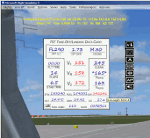
This gauge is specifically written for Captain Sim B707-300 and variants.
List of features: [New Items/Features]
Twenty-Two call-outs sounds integrated into gauge [15 new call-outs].
Take-off V-Speeds calculated for Flaps 14 with temperature and altitude adjustments.
[Take-off speed bugs automatically set for: V1, VR, V2].
[Flaps-up maneuvering speed (clean speed) bug set after flaps-up].
Optimum altitude and optimum EPR (EPR calc for M.80) are continually calculated.
Gross Weight overage will display in 'red' text. Tooltip indicates overweight value (LB/KG).
Take-off trim calculated for current gross weight.
Display units can be toggled between LB and KG (default LB).
Outside Air Temperature can be toggle between Fahrenheit and Celsius.
Resettable fuel use.
Resettable flight timer.
[Selectable Vref landing configurations, Vref40 (default) or Vref50].
[Approach / landing speed bugs automatically set for: Vref, Vref + 5, Vref + 10].
ZFW, Fuel, CG, Gross Weight and Barometric Pressure MSL (QNH) displayed.
['Barometer Set' call-out occurs when pressing keyboard letter 'B' (V-One gauge must be open)].
[Decision Height adjustment now on Data Card in hidden click-spot located on upper right corner].
[Now installation to a single location will work for all variants].
| Filename: | VOne_Gauge_for_Boeing_707300_Complete.zip |
| License: | Freeware, limited distribution |
| Added: | 3rd February 2013, 00:11:24 |
| Downloads: | 2,453 |
| Author: | Paul Tally |
| Size: | 3.14 MB |
| Category: Flight Simulator X - Gauges | |
| Advanced Radar System 2 (ARS2) |
|
Images related to this file:
File Description:
This Advanced Radar System (ARS2) is a enhanced version of the ARS system Version 1.0.
I includes all the displays function from the ARS version 1.0.
New features for ARS2:
ARS2 includes an enhanced tracking function which allows to track an
AI aircraft now regarding heading, speed and altitude. It includes two
simple XML elements which allows the user to change the tracking parameter
for the auto speed control and to set parameter for the re-fuel function as required.
The airfuel panel includes now two pointers in order to watch the distance and the altitude
relative to the AI.
For more information and installation see the documentation in the zip file.
COPYRIGHTS:
This gauge is freeware. All rights are reserved and no part of the package may
be duplicated or distributed without the expressed, written permission of the
author.
| Filename: | Advanced_Radar_System_2_ARS2.zip |
| License: | Freeware |
| Added: | 24th March 2011, 19:47:51 |
| Downloads: | 1,889 |
| Author: | Dietmar Loleit |
| Size: | 1.61 MB |


© 2001-2026 AVSIM Online
All Rights Reserved
Privacy Policy |