
Where Flight Simulation Enthusiasts Gather from Around the World!
AVSIM Library - Search Results

| Category: Flight Simulator 2004 - Gauges | |
| TerraVue: Moving Map, Ground Proximity, Information pages |

|
File Description:
FS2004 Gauge: TerraVue. This gauge contains a moving map display with a terrain elevation legend color-keyed to the FS9 map. The legend allows the elevation of terrain lying ahead of the aircraft to be taken into account. TerraVue can display the FS map in seven ranges from 4 NM to 160 NM. The Map mode also employs animation to show the proximity between the aircraft and ground in a graphical and digital display with indicators showing whether the distance is increasing or decreasing. The gauge can be switched to the Information mode which will display up to four individual pages of data that is created by you. These scrollable pages may contain checklists, airport diagrams, approach plates, strip charts, etc. Fully functional, free software to help quickly construct these pages is included along with an illustrated tutorial that demonstrates the simple copy/paste process that tailors these pages to include whatever data you wish. For panel or separate window installation with TerraVue Icon gauge. By Glenn Copeland
| Filename: | TerraVue_Moving_Map_Ground_Proximity_Information_p.zip |
| License: | Freeware |
| Added: | 24th June 2006, 15:13:12 |
| Downloads: | 5,081 |
| Author: | Glenn Copeland |
| Size: | 1.92 MB |
| Category: Flight Simulator 2004 - Gauges | |
| Install of Aircraft Info Window |
|
Images related to this file:
File Description:
Aircraft information display in 2D panel, primarily for communication with ATC. The small window containing the airline, aircraft registration and flight ID can be opened by the small ATC button in any 2D panel. The window can then be resized and moved to any free panel space.
Many actual cockpits have the aircraft registration on a small tag in view of the tech crew (In FS, this info is typed in aircraft.cfg behind 'atc_id=' (example N557UA). The flight number is typed in aircraft.cfg behind 'atc_flight_number='(example 376). The operating airline is typed in aircraft.cfg behind 'atc_airline='(example United).
By installing this gauge, all this info is compiled in a small window and is readily viewed by FS pilot.
| Filename: | Install_of_Aircraft_Info_Window.zip |
| License: | Freeware |
| Added: | 19th January 2023, 00:09:47 |
| Downloads: | 64 |
| Author: | Peter Bendl |
| Size: | 63.48 KB |
| Category: Flight Simulator 2004 - Gauges | |
| Fuel Quantity Gauges All Aircraft |
|
File Description:
Installation of any fuel gauge or set of fuel gauges either straight into the aircraft panel, or as a resizable and movable pop-up window (group of 2,3,4,5,6,7 or 8 fuel gauges are grouped in the pop-up options see the pictures in download). The fuel quantity pop-up window can be opened by installing a button in the panel. The gauges correspond with the aircraft.cfg [fuel] section tank designations. To accommodate different tank quantities the gauges are showing the tank loads in percentages, or "Empty, 1/4, 1/2, 3/4 and Full".
| Filename: | Fuel_Quantity_Gauges_All_Aircraft.zip |
| License: | Freeware |
| Added: | 17th December 2021, 17:18:11 |
| Downloads: | 110 |
| Author: | Peter Bendl |
| Size: | 887.55 KB |
| Category: Flight Simulator 2004 - Gauges | |
| Airline Hud 2022 |
|
Images related to this file:
File Description:
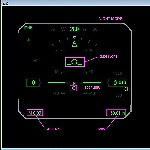
This is a HUD designed specifically for Air Line operations. Hours of work have been dedicated to this project. FS9 has always lacked a HUD suitable for airliners. Well now its here. Not only does this HUD display accurate symbology, it also warns both visually & audibly of detected icing conditions. Happy New Year and I hope our FS9'ers enjoy.
| Filename: | Airline_Hud_2022.zip |
| License: | Freeware, limited distribution |
| Added: | 1st January 2022, 16:01:20 |
| Downloads: | 306 |
| Author: | Michael Lehkamp, Edward Cox |
| Size: | 330.83 KB |
| Category: Flight Simulator 2004 - Gauges | |
| Davtron 301 and 307 OAT |
|
Images related to this file:
File Description:
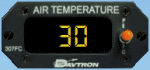
FS2004 and FSX stand alone XML digital OAT indicators. Type 301 in °F or in °C and Type 307 in °F and °C. See readme.txt about installing and difference between FS9 and FSX models.
| Filename: | Davtron_301_and_307_OAT.zip |
| License: | Freeware |
| Added: | 10th November 2009, 20:19:57 |
| Downloads: | 641 |
| Author: | Pierre Fasseaux |
| Size: | 150.41 KB |
| Category: Flight Simulator 2004 - Gauges | |
| Runway Roll Gauge v2.0 |
|
File Description:
Collects and displays a number of takeoff and landing roll parameters, including ground roll, obstacle length, nominal runway length and touchdown vertical speed, all in metric or US measure. Easy to use one button ARM operation, just like in v1.0. The gauge disarms automatically on take off, and when you slow to taxi speed on landing. This is a bitmap gauge which can be installed in FS2004 (FS9) or FS2002 aircraft. (1000+ downloads of v1.0)
| Filename: | Runway_Roll_Gauge_v20.zip |
| License: | Freeware, limited distribution |
| Added: | 17th June 2005, 23:23:51 |
| Downloads: | 3,607 |
| Author: | Orest Skrypuch |
| Size: | 99.63 KB |
| Category: Flight Simulator 2004 - Gauges | |
| SuperOTTO (dual autopilot system) |
|
File Description:
2 fully independant autopilots in 1 box (for small and mid-size commercial jets like B737, B757, A320, A330), with features like auto-takeoff, anti-hijacking lock, emergency decompression descent, a variety of auto-systems (like wing-leveler programs, rudder-control and active yaw-damper programs, fast throttle-control with selectable max-percent N1, auto-flaps, auto-gear, auto-brakes, flight-plan navigation (both lateral and vertical)), and much more :)
| Filename: | SuperOTTO_dual_autopilot_system.zip |
| License: | Freeware |
| Added: | 2nd November 2005, 13:55:17 |
| Downloads: | 3,209 |
| Author: | Jacob Larsen |
| Size: | 1.41 MB |
| Category: Flight Simulator 2004 - Gauges | |
| Light Aircraft Autopilot |
|
File Description:
This gauge has been designed to fit into those tight spaces and provide basic functions for flying light aircraft. The autopilot can keep the wings level and hold a chosen vertical speed in feet.
I have included an example panel.cfg for Rick Piper's Aeroprakt A-22 Foxbat with the fantastic Apollo SL40 Comm radio, GX50 GPS and SL70 Transponder radio stack gauges by Gerd R. Nehr. The panel.cfg also uses a gauge called 'dsd_view_skip' by Douglas S. Dawson to remove the 2D view. This gauge is not included.
| Filename: | Light_Aircraft_Autopilot.zip |
| License: | Freeware |
| Added: | 9th September 2007, 15:17:41 |
| Downloads: | 1,792 |
| Author: | Matt Hinchliffe |
| Size: | 431.49 KB |
| Category: Flight Simulator 2004 - Gauges | |
| JELAIR - real-size HUD for jets |
|
File Description:
Full-screen heads-up-display for jets (suitable for all types of jets). Designed especially to assist with low-visibility approaches.
| Filename: | JELAIR__realsize_HUD_for_jets.zip |
| License: | Freeware |
| Added: | 4th January 2006, 01:10:13 |
| Downloads: | 1,261 |
| Author: | Jacob Larsen |
| Size: | 334.59 KB |
| Category: Flight Simulator 2004 - Gauges | |
| Airspeed Reduction Monitor (ARM) |
|
File Description:
FS2004 Gauge: Airspeed Reduction Monitor(ARM).
This small, fully animated gauge arms the spoilers and reverse thrusters so both deploy upon landing. The gauge does not extend spoilers or activate reverse thrusters until the nose wheel is safely on the runway. This overcomes the pitch-up tendency in some jets caused when the spoilers deploy as soon as the main gear touches down. As IAS decreases to preset limits, r/thrusters auto-deactivate followed later by spoiler retraction. By Glenn Copeland
| Filename: | Airspeed_Reduction_Monitor_ARM.zip |
| License: | Freeware |
| Added: | 14th March 2006, 16:35:46 |
| Downloads: | 4,613 |
| Author: | Glenn Copeland |
| Size: | 109.7 KB |


© 2001-2026 AVSIM Online
All Rights Reserved
Privacy Policy |