
Where Flight Simulation Enthusiasts Gather from Around the World!
AVSIM Library - Search Results

| Category: Flight Simulator 2004 - Panels | |
| Flight1 ATR72 panel for Wide monitor |

|
File Description:
Flight1 ATR72 2D Panel adapted for 16:10 wide monitor
| Filename: | Flight1_ATR72_panel_for_Wide_monitor.zip |
| License: | Freeware |
| Added: | 8th April 2008, 21:46:43 |
| Downloads: | 1,228 |
| Author: | Vladimir Svoboda - Cesmina |
| Size: | 7.07 MB |
| Category: Flight Simulator 2004 - Panels | |
| ATR72 panel for Wide monitor - Correction |
|
File Description:
Little correction for 2D panel for Flight1 ATR72 , adapted for wide monitor , ID 119896
corrected wrong area in switch FMS panel
| Filename: | ATR72_panel_for_Wide_monitor___Correction.zip |
| License: | Freeware |
| Added: | 10th April 2008, 10:34:40 |
| Downloads: | 679 |
| Author: | Vladimir Svoboda - Cesmina |
| Size: | 9.7 KB |
| Category: Flight Simulator X - Panels | |
| ATR72-500 16:10 Widescreen Modification & Night VC Texture Fix |
|
Images related to this file:
File Description:
Wide-screen adaptation of the Flight1 ATR for 16:10 monitors. Three versions inside: CPT, FO and fs2crew CPT. Brown edition only. Additionally a VC texture fix to help with readability of ADU and EFIS panels at night. Requires the Flight1 ATR72-500.
| Filename: | ATR72500_1610_Widescreen_Modification__Night_VC_Te.zip |
| License: | Freeware |
| Added: | 27th February 2012, 23:03:09 |
| Downloads: | 2,180 |
| Author: | Marek Wlaz |
| Size: | 3.38 MB |
| Category: Flight Simulator 2004 - Panels | |
| ATR72-500 2D Panel adapted for wide screen 16:9 |
|
Images related to this file:
File Description:
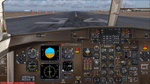
ATR72-500 (Flight1) 2D Panel adapted for wide screen 16:9. Panel is modified for use 16:9 monitors. The size of cockpit and all instruments is now correct for use widescreen monitors 16:9.
| Filename: | ATR72500_2D_Panel_adapted_for_wide_screen_169.zip |
| License: | Freeware |
| Added: | 16th December 2010, 06:20:41 |
| Downloads: | 2,670 |
| Author: | Aldo Bulgheroni |
| Size: | 1.4 MB |
| Category: Flight Simulator 2002 - Original Aircraft | |
| Airbus Wide Bodies |
|
File Description:
FS2002 Airbus widebodies for AI.Including A300-600R (Japan Air System,Lufthansa).A310(Aeroflot,China Northwest).
A330-200 (BMI,Volare Airlines,TAM Brazil).A330-300(Garuda Indonesia,Philippin Airlines,US Air).A340-200(Air Tahiti Nui).
A340-300(Scandinavian).A340-500(Airbus Industry).A340-600 (Virgin Atlantic).Models and textures by FSPainter.
| Filename: | Airbus_Wide_Bodies.zip |
| License: | Freeware |
| Added: | 5th January 2003, 15:30:17 |
| Downloads: | 38,220 |
| Author: | FSPaniter, Hiro |
| Size: | 6.99 MB |
| Category: Flight Simulator 2004 - Scenery Design | |
| Bridge/Causeway Segments for EZ-Scenery |
|
File Description:
Straight, curved, flat & sloped bridge/causeway segments - 28 segments.
13 - 3.5m wide & 15 - 10m wide.
Plus 4 simple road sections - 2 lengths - 3.5m wide & 10m wide each.
Library bgl, txt files and DXT1 textures included.
| Filename: | BridgeCauseway_Segments__for_EZScenery.zip |
| License: | Freeware |
| Added: | 20th January 2006, 05:39:03 |
| Downloads: | 4,157 |
| Author: | Lou Frost |
| Size: | 106.39 KB |
| Category: Flight Simulator 2004 - Utilities | |
| F1 View Module |
|
File Description:
The F1_View module is a very basic tool that implements mouse-based zooming, panning, and eyepoint adjustments, including the ability to move your eyepoint beyond the limits imposed by Flight Simulator (this feature is good to stroll about virtual cabins of larger aircraft).
This module requires a wheel-mouse (a center wheel that also acts as a center mouse button).
/QUOTE
This application is provided for free by Flight1 and can even be placed on your own website for download providing you follow the guide lines set down in the agreement.
For those who are interested, you can find it HERE http://atr.flight1.net/ , look under:
Quick Links to our ATR Project Areas...
• Accessory Downloads
which can be found about half way down the page you are initially viewing.
and a bit more info from the readme:
Modes of Operation:
Rolling the mouse wheel forward means rolling the wheel away from the user.
Rolling the mouse wheel backward means rolling the wheel towards the user.
Virtual-cockpit:
Wheel forward moves you forward and wheel backward moves you back.
CTRL+forward moves right and CTRL+backward moves left.
SHIFT+forward moves up and SHIFT+backward moves down.
CTRL+SHIFT+forward zooms out and CTRL+SHIFT+backward zooms in.
While in Pan Mode (when mouse wheel is pressed and held down) inside the Virtual Cockpit:
Moving the mouse to the left rotates the view to the left.
Moving the mouse to the right rotates the view to the right.
Moving the mouse forward, away from the user, rotates the view up.
Moving the mouse backward, towards the user, rotates the view down.
Cockpit view:
CTRL+SHIFT+forward zooms the exterior view out and CTRL+SHIFT+backward zooms it in.
Tower view:
CTRL+SHIFT+forward zooms the view out and CTRL+SHIFT+backward zooms it in.
Spot view:
Wheel forward moves the view distance forward, and wheel backward moves the distance back.
CTRL+forward rotates the eyepoint right, and CTRL+backward rotates the eyepoint left.
SHIFT+forward moves the eyepoint down, and SHIFT+backward moves the eyepoint up.
CTRL+SHIFT+forward zooms out and CTRL+SHIFT+backward zooms in.
Note: View distance is different from view zoom.
While in Pan Mode (when mouse wheel is pressed and held down) in spot view:
Mouse left/right rotates the eyepoint right/left.
Mouse up/down moves the eyepoint up/down.
Top-down view:
CTRL+SHIFT+forward moves the view distance out and CTRL+SHIFT+backward moves it in.
Note: In this mode you can move your view all the way to outer space and back in.
| Filename: | F1_View_Module.zip |
| License: | Freeware |
| Added: | 8th May 2005, 04:27:45 |
| Downloads: | 15,464 |
| Author: | Flight1 |
| Size: | 725.3 KB |
| Category: Flight Simulator 2004 - Panels | |
| Cessna 182 Wide Screen 2D |
|
Images related to this file:
File Description:
A wide screen 2D panel for the default FS2004 C182. These are updated bitmaps and panel.cfg files for 1920x1280 wide screen monitors. No more stretched gauges!
| Filename: | Cessna_182_Wide_Screen_2D.zip |
| License: | Freeware |
| Added: | 25th August 2011, 05:34:29 |
| Downloads: | 603 |
| Author: | Jeff Cork |
| Size: | 439.45 KB |
| Category: Flight Simulator X - Panels | |
| Lear 45 Wide Screen 2D |
|
File Description:
A wide screen 2D panel for the default FSX Lear 45. These are updated bitmaps and panel.cfg files for 1920x1280 wide screen monitors. No more stretched gauges!
| Filename: | Lear_45_Wide_Screen_2D.zip |
| License: | Freeware |
| Added: | 21st March 2012, 03:33:58 |
| Downloads: | 1,019 |
| Author: | Jeff Cork |
| Size: | 801.74 KB |
| Category: Flight Simulator 2004 - Panels | |
| Wide View Boeing 737-800 Panel |
|
Images related to this file:
File Description:
Wide view Boeing 737-800 panel
| Filename: | Wide_View_Boeing_737800_Panel.zip |
| License: | Freeware |
| Added: | 8th December 2011, 09:09:38 |
| Downloads: | 1,342 |
| Author: | Tushar Deshpande |
| Size: | 12.33 MB |


© 2001-2026 AVSIM Online
All Rights Reserved
Privacy Policy |